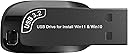
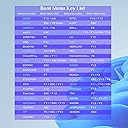
🚀 Your all-in-one Windows rescue & install toolkit — never get stuck again!
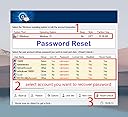
This 32GB USB 3.2 bootable drive is engineered for professional-grade Windows 10 & 11 fresh installations, supporting both UEFI and Legacy BIOS. Beyond OS deployment, it offers powerful utilities like password reset, network drive access, data recovery, disk management, and hardware diagnostics, all backed by easy-to-follow video tutorials to ensure a hassle-free setup and repair experience.


| ASIN | B0BZRL3PLL |
| Best Sellers Rank | 20,460 in Computers & Accessories ( See Top 100 in Computers & Accessories ) 249 in USB Flash Drives |
| Brand | Tipsench |
| Brand Name | Tipsench |
| Colour | black |
| Compatible Devices | PC/Laptop/Phone |
| Connectivity technology | USB |
| Customer Reviews | 4.3 out of 5 stars 763 Reviews |
| Flash Memory Type | NAND |
| Hardware Connectivity Technology | USB Type A, USB Type C |
| Hardware Interface | USB 3.2 Gen 1 |
| Hardware interface | USB 3.2 Gen 1 |
| Item Weight | 45 g |
| Manufacturer Part Number | SMPACK |
| Memory Storage Capacity | 128 GB |
| Memory storage capacity | 128 GB |
| Model Number | FLASH_DRIVE |
| Network Connectivity Technology | USB |
| Product Features | Data Recovery Tools, Antivirus Tool, Hardware Testing |
| Read Speed | 200 Megabytes Per Second |
| Read speed | 200 Megabytes Per Second |
| Special feature | Data Recovery Tools, Antivirus Tool, Hardware Testing |
| UPC | 760627225926 |
M**F
You saved me £900 and even helped restore my prehistoric laptop that had been dormant for 2 years!
The product that keeps on giving! Not only did you save my desktop but you also revived an old laptop that had remained dormant for 2 years. Initially, I thought £17.99 was a bit expensive but that £17.99 saved me £550 for the desktop and £350 for the laptop. Why did I buy this? Because Artificial intelligence fu!£ed up my PC by deleting the page size to help free up space on my PC . After that, the PC wouldn't load not even doing some code work in the boot manager worked. So thank you very much for saving my bacon! Instructions Somewhat easy to follow but I have a tech background which makes it easier, however, I cant deal with too much information so I relayed the instructions to ChatGPT and got him to guide me one step at a time so if I did encounter issues Chatgpt had the tech knowledge to help but ( use with caution because he did make mistakes ) if in doubt " always" follow the guy's instructions. I really appreciate the screenshots. Screenshots really helped me understand the instructions. Thank you
B**N
IT WORKED FOR ME
My pc was not booting into windows, microsoft built in repair was not working. Received this and it booted ok, not a simple thing to use, but being a bit pc tech savy, knew I had to delete all the partitions on my disk drive to reinstall windows, did that,with the partion manager available on the usb stick and by the way, thats worth money on its own, and reinstalled windows . once you load this up, you will see all the options. It worked great. I am now typing this on my once dead pc. ps, you may not need to delete a partition on your device, but I had no option,as It said I could not just do a straight install , keeping my files intact.This usb is a handy utility to have if needed.
P**D
Excellent job. Does what it says on the tin!
. Needed a copy of W10 to load on a PC that had W10 previously and I still had the original licence key. USB stick Booted fine and identified the hard drive and partitions. Read the .txt files and watched the video twice as suggested. Program identified the Harddrive and partitions. Was able to delete the partitions and create a new one for Windows and install W10 with no problem.Once finished reboot without USB stick worked fine so, updated and loaded the video driver from PC manufacturer and some serial,port drivers. All working well.didnt have to contact seller, but email address included and list of potential problems and suggested solutions included on USB stick.
S**N
Read directions thoroughly and several times.
It is a little confusing (or maybe that’s just me!) but it worked and I got my computer up and running again. The directions were the slightly confusing bit but after trying various things it did work. If the directions were more of a “hold your hand” kind of fixing the computer I would give it the fifth star. Worth the money when faced with a dead computer!
O**S
Amazing
Magic USB stick, I been tried 3 days to reinstall my PC, after my computer rebooted when I tried to copy my system on other SSD, did self USB bott disks, tried different ways but always got some errors, this one made my computer alive in 1 hour. I'm not sure about restoring data or restoring passwords, but I'm sure that with this USB you can make alive that PC what is like a stone because your Windows died. Cost each penny.
M**O
After using this item my PC is no longer usable!
There were no clear instructions or warnings with this item. Nor, despite several messages, has the seller resolved my issue in that after carefully watching the "video" on the usb stick I followed the instructions to the letter and promptly lost all of the apps on my PC. Yes it did reinstall Windows 10 but my drivers were lost and the PC runs incredibly slowly, so slowly that my PC is no longer usable. As with most customers that turn to a usb reboot I know very little about my PC operating systems and thought that this "magic" item would somehow save the day (especially after the glowing reviews from other users) - it didn't and it definitely made things much worse. Having relied on Google to save my passwords I was shocked to discover that my passwords, favourites, Banking access, GOV. UK log ins!, etc. were all lost. Not for PC users that aren't already IT savvy. I wouldn't buy this item again and most assuredly wouldn't trust the vendor.
R**C
Clean bios install no problem
I purchased this to carry out a clean new install on a laptop with a new ssd hard drive with nothing installed on it. Inserted usb in blank laptop, started laptop, entered bios and selected usb as boot device. Laptop restarted and booted up from usb to a full working windows platform. Once up and running from the usb, the instructions were pretty clear, the desktop background picture shows instructions, with step by step instructions thereafter in relevant sections. When it came to installing windows 10 (win10 selected as I prefer to stick with what I know) it was pretty straight forward. follow the on screen windows instructions, up pops a screen which asks if you wish to upgrade (recommended) or custom (professional), it automatically defaults to the user friendly “recommended” choice which if you select you will get the generic “unable to carry out function” (or something along them lines. change this selection to custom if you wish to carry out a clean install, then select the hard drive you wish to install windows on. There are reviews on here saying they had problems booting from bios, or that it wouldn’t carry out a clean install (from scratch) but I genuinely had no problems, and had a perfect working windows system on my completely new out of the box ssd hard drive in about 15 minutes from first plugging this usb in. It was So easy that even after removing the usb I constantly restarted laptop numerous times convinced it’s still booting from the usb (thats not even plugged in 🤣) 100% recommend, some knowledge/understanding of what is happening when using this device is required, ie USB is a temporary boot device, which you have to ensure your laptop/pc knows to look for as a boot device, and then once booted, you need to tell the laptop/pc to transfer the info to the fixed hard drive.
P**L
LIfe saver
Me being a tinkerer, I trashed my laptop, unable to boot it. I had somehow returned boot to legacy accidentally from UEFI. Being an HP laptop with its own anoying software, just could not change boot to UEFi. Inserted this magic stick and it booted into its own software package immediately. But it still would not fix boot from legacy to UEFI and I could not install Windows 10 saying it cannot install to a GPT partition. Hum. Being in GPT, it had 5 or 6 partitions. So using the partition software from this magic stick, carried out deletion and merger of partitions down to 3 partitions. Then used the conversion software converted GPT to MBR. I was then able to install Windows 10. dih dah. Worked like a dream restarted, it booted into a fesh copy of Windows 10. Success. A life saver. Caution upon taking notice of those who knock this Bootable USB stick, one needs to be patient persist and you you will succeed. Although his email address was available for support, me being a novice, I still managed on my own to successfully restore my laptop to full use again. A big thank you to the developer of this bootable USB stick.
Trustpilot
1 week ago
1 week ago