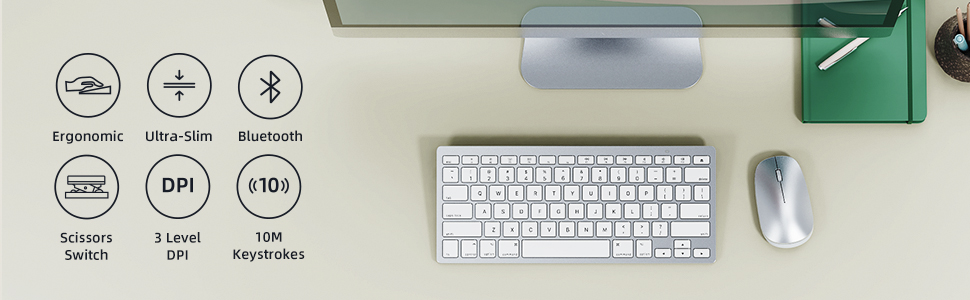
⌨️🖱️ Elevate your Mac setup with sleek, silent, and smart wireless control!
The OMOTON Ultra-Slim Bluetooth Keyboard and Mouse Combo offers Mac users a premium wireless experience with broad MacOS compatibility, silent scissor-switch keys, and a precision mouse featuring 3 adjustable DPI settings. Designed for ergonomic comfort and energy efficiency, this combo ensures seamless connectivity, long battery life, and a minimalist silver aesthetic that complements any professional workspace.


| ASIN | B0BM8PLLY8 |
| Antenna Location | Office |
| Are Batteries Required | Yes |
| Best Sellers Rank | #340 in Computer Keyboard & Mouse Combos |
| Brand | OMOTON |
| Color | Silver |
| Compatible Devices | Laptop, Personal Computer |
| Connectivity Technology | Bluetooth |
| Customer Reviews | 4.3 out of 5 stars 1,753 Reviews |
| Hand Orientation | Ambidextrous |
| Item Height | 2 centimeters |
| Keyboard Description | Indoor |
| Keyboard Layout | QWERTY |
| Manufacturer | OMOTON |
| Movement Detection | Optical |
| Number of Keys | 78 |
| Operating System | Mac OS |
| Other Special Features of the Product | Wireless |
| Power Source | Battery Powered |
| Special Feature | Wireless |
| Unit Count | 1.0 Count |
| Warranty Description | 12 Months |
J**U
Excellent replacement keyboard for my Mac!
I recently had the pleasure of replacing my Mac setup with a new wireless keyboard and mouse, and I must say, the Omoton combination has certainly met my expectations. First and foremost, the price point of this wireless keyboard and mouse set is a major standout. It provides exceptional value for the features it offers, making it an affordable yet high-quality choice for Mac users on a budget. The package includes both the ergonomic keyboard and a responsive mouse, ensuring that you get a complete and cost-effective solution for your computing needs. The pairing process was a breeze, and I was up and running in no time. The Bluetooth connectivity seamlessly integrated with my Mac, eliminating the need for any complicated setups or additional software installations. The straightforward pairing process is a significant advantage for users who value simplicity and efficiency in their devices. The keyboard boasts a comfortable key layout with a satisfying tactile feedback, promoting a comfortable typing experience for extended periods. The low-profile keys contribute to reduced typing fatigue, and the layout is intuitive for Mac users, enhancing overall usability. The ergonomic design also extends to the mouse, which fits perfectly in the hand, reducing strain during prolonged use. The responsiveness and precision of the mouse make it a reliable companion for various tasks, from creative work to everyday browsing. Overall, the Omoton wireless keyboard and mouse combination is a fantastic addition to any Mac setup, delivering a perfect blend of affordability, ease of use, and ergonomic design. If you're in search of a reliable and budget-friendly replacement for your Mac peripherals, this set comes highly recommended. Upgrade your workspace without breaking the bank and enjoy the seamless convenience of Omoton's wireless keyboard and mouse.
P**E
Perfect Solution for iMac Users!
As the owner of an iMac, I've struggled with connectivity issues with my original mouse, which has been incredibly frustrating. After considering purchasing a pricey Apple mouse, I decided to give the Bluetooth Keyboard and Mouse for Mac by OMOTON a try – and I'm thrilled with the results! Seamless Setup: Setting up this keyboard and mouse combo was a breeze. I simply unboxed it, inserted the batteries, and quickly paired it with my iMac. The process was smooth and hassle-free, and I was up and running in no time. Reliable Performance: Both the keyboard and mouse operate just like the original Apple peripherals, which was a pleasant surprise. In fact, I even prefer the toggle wheel on the mouse! Most importantly, I haven't experienced any connectivity issues since switching to this Bluetooth combo. It's been a game-changer for me. Long-lasting Battery Life: I'm pleased with the battery life of both the keyboard and mouse. They seem to last a reasonable amount of time before needing replacement, which is a huge plus for me. It's reassuring to know that I won't have to constantly worry about running out of power during important tasks. Sleek Design: The keyboard has the same sleek and minimalist design as the original Apple keyboard, which I love. It looks great on my desk and feels comfortable to type on. Plus, the mouse is ergonomically designed for ease of use and comfort during long periods of work. The keys look and operate the same. Final Recommendation: If you're in need of a reliable keyboard and mouse replacement for your iMac, look no further than the Bluetooth Keyboard and Mouse for Mac by OMOTON. It offers seamless connectivity, reliable performance, and long-lasting battery life – all at a fraction of the cost of Apple's peripherals. I couldn't be happier with my purchase and highly recommend it to fellow iMac users!
T**U
Good Keyboard, Mediocre Mouse
Bought this for my work laptop to alleviate some neck pain I've been developing but didn't want the clutter of wires everywhere. Pros: convenient; sleek; keyboard reliable and ergonomic. Cons: mouse connects only half the time and not very ergonomic; bluetooth keyboard is slightly larger than MacBook keyboard so I bump the wrong keys sometimes. Overall happy with the keyboard but the mouse needs improvement. Not bad for the price point.
J**O
So cute and AMAZING CUSTOMER SERVICE
I purchased this rose gold keyboard & mouse set to use with my iPad when I travel. I was so impressed as it is super cute and worked great. The keyboard is similar to my iMac, so that was a huge plus. Since I mainly only use it when I travel, I do not use it regularly. Unfortunately, after only a few months of using it periodically, the mouse stopped working. I had no trouble with the keyboard, but when I turned the mouse on, it would not connect and it got really hot. I turned the mouse back off for about 20 minutes to let it cool down, then put a brand new battery in and it did the same thing (would not connect and got hot). Super sad because the set matched all my other iPad stuff so good and I really liked it. I reached out to the seller and hope I can get a replacement for the mouse or I will probably cry :( :( :( UPDATE 08-19-2020: I reached out to the seller and they quickly responded to my concerns and sent me a new mouse! They were so responsive, friendly, and nice. The rose gold was out of stock when I initially messaged them, and they even asked me if I preferred the silver option right away, or to wait for the rose gold version. I appreciate their exceptional customer service and commitment to their customers. Thank you!!!!!!
T**N
Awesome Product! This will probably be the go-to wireless keyboard...
While I was hesitant to purchase this because it meant that I would have to put batteries into it instead of plugging it in and having it recharge - I decided to purchase it anyway. In thinking about it I realized that by using batteries if the charge started to go down then I could pop in more batteries and not have much productivity loss (course plugging it in to recharge would mean the ability to keep working while charging...but, then there are those instances where an outlet is not available, so...there was that consideration also). So, far, it doesn't seem to use up a great deal of battery (meaning it doesn't drain the batteries quickly) and I have been able to actually utilize about 40 hrs of in-use time with 2 AAA batteries. However, I've tried this with 2 different brand of batteries; and, the brand / type does seem to make a difference. If you use generic batteries that are known to not have great use-time then don't expect for extended use-time. I've found that Energizer's AAA batteries have been the best for the extended use-time. I've used the Energizer AAA batteries for at least 40 hrs of use-time and it seems I have plenty of use-time left. When NOT in use, save yourself battery juice and flip the switch on the bottom to "OFF". With that said.... Onto another topic on this product... The keyboard is made of a nice and hiqh quality plastic. The back / bottom side that houses the batteries and the on/off switch and the little black rubber connect button (which is almost flush with the keyboard) provides a raise to the keyboard so it doesn't sit flat. It is a nice height. It has rubber pads on the bottom of it so that it doesn't slide all over the place when in use. The keys are pretty standard and have a nice feel and spring back to them. This keyboard is bigger than my tablet - so it doesn't go into a tablet portfolio type case (unless you get a bigger portfolio type case and put it into it - which is what I would do); but, I have a small carry case that actually houses my tablets, cords, and portable charging JuiceBox. I also got the matching mouse with this - the mouse takes 2 AA batteries. I have no problems whatsoever in getting this keyboard to sync-up with my tablets (Android, iPad, and Amazon Fire Tablet) as it is blue-tooth. If my TV had blue-tooth capabilities I'd so trust that it would synch-up and be useful. It is light weight. I love the Rose and Ivory colors... It is cute. It was definitely worth it and I'd be willing to get another one just like it if something happened to it. I do not have small children around anymore so it likely will not be broken by adorable tiny fingers. I am betting this will probably last me several years - probably longer than the tablets will.
Z**X
trash
trash. has delay and its as cheap as the price
B**N
Decent for the price
UPDATE: I dropped a star because of three things: 1) having to pick up both mouse and keypad to turn them on after walking away for 5 minutes, 2) the mouse automatically connects bluetooth when I turn it on, but the keyboard always requires me to connect with the bluetooth icon on the computer. It's already kind of annoying that when I have to wake up the computer after 5 minutes, I have to turn on both again, but one bluetooth connecting and the other not is annoying. 3) the mouse has developed an annoying squeak on the roller when it's rolled backward. This is very similar to my Apple Air laptop keypad in terms of configuration. The keys are in almost the same placement, and the bluetooth connections are solid - except that the mouse connects almost automatically, however the keyboard I usually have to click the bluetooth icon to get it to connect. Keyboard is a little loud and clicky. The placement of the connection/on-off buttons on the back of both the keypad and the mouse is a little cumbersome - it would have been better to place them on top so you don't have to pick both items up to turn them on - but for the price it's a small quibble. The only thing that's really annoying is that the arrow controls on the far right side of the keyboard are a *little* just a little off in placement to the Mac, and so when working on a spreadsheet and hitting shift, many times my finger just brushes one of the arrows and bam! the cursor puts me somewhere else on the document - extremely frustrating.
K**U
Nice portable mac keyboard and mouse
I travel a lot but also carry an additional portable monitor and this keyboard and mouse. I both develop code and I trade options and futures daily. Great, light weight, and makes working with a mac laptop a pleasure as I can lean back away from all the heat the laptop generates and work. This is very important in South Florida when you work from a boat with no A/C. Great little combo and battery operated which I love as you don't have to wait to recharge, I use AA rechargeable batteries and they last for a long time. Actually I have never had to change them in the 6-7 weeks I have had this and I use it daily 10-12 hours a day. Cheers!
Trustpilot
1 day ago
2 weeks ago