Desertcart purchases this item on your behalf and handles shipping, customs, and support to France.
🚀 Elevate Your Home Network to Pro-Level Speeds & Security
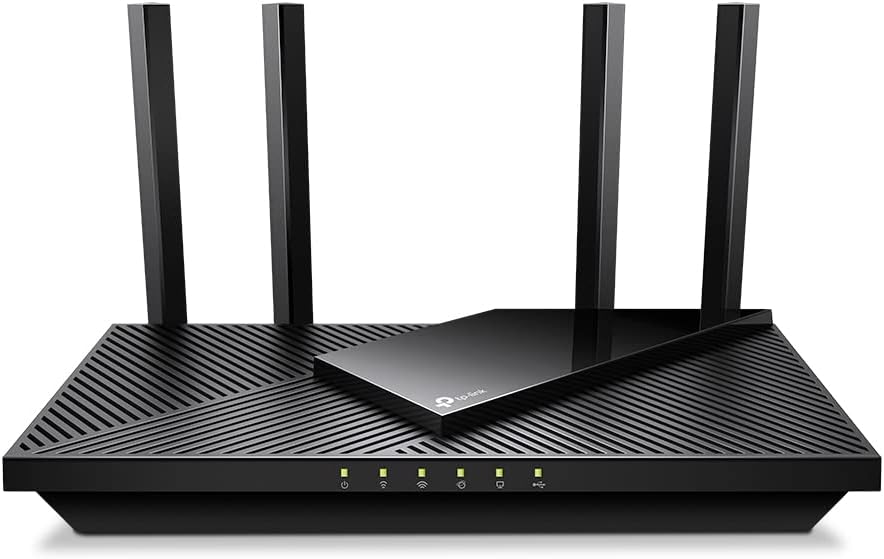
The TP-Link Archer AX55 Pro is a cutting-edge WiFi 6 router featuring dual-band AX3000 speeds, a 2.5 Gbps multi-gigabit port, and four high-performance antennas with Beamforming for expansive, reliable coverage. It supports advanced technologies like MU-MIMO and OFDMA for efficient multi-device connectivity and includes TP-Link HomeShield for robust network security and parental controls. Compatible with Alexa and designed for seamless 8K streaming, gaming, and VPN support, this router is built to future-proof your home or office network.


| Antenna Location | Gaming, Home |
| Antenna Type | Fixed |
| Asin | B0BTD7V93F |
| Best Sellers Rank | #185 in Computers (See Top 100 in Computers) #2 in Routers |
| Brand | TP-Link |
| Built In Media | Power Adapter, Quick Installation Guide, RJ45 Ethernet Cable, Wi-Fi Router Archer AX55 Pro |
| Color | black |
| Compatible Devices | Amazon Echo devices |
| Connectivity Protocol | Wi-Fi, IPv4, IPv6 |
| Connectivity Technology | Wi-Fi (802.11ax, 802.11ac, 802.11b, 802.11g, 802.11n), Ethernet, USB |
| Control Method | App |
| Controller Type | App Control |
| Coverage | Boosted coverage throughout a house |
| Customer Reviews | 4.3 4.3 out of 5 stars (1,133) 4.3 out of 5 stars |
| Data Transfer Rate | 2976 Megabits Per Second |
| Frequency | 5 |
| Frequency Band Class | Dual-Band |
| Global Trade Identification Number | 00840030706806 |
| Has Internet Connectivity | Yes |
| Has Security Updates | Yes |
| Is Modem Compatible | No |
| Item Dimensions L X W X H | 26.1L x 13.5W x 4.1H centimeters |
| Item Type Name | WiFi 6 Router |
| Item Weight | 544 g |
| Lan Port Bandwidth | 2500 Mbps |
| Manufacturer | TP-Link |
| Maximum Upstream Data Transfer Rate | 2500 Megabits Per Second |
| Mfr Part Number | Archer AX55 Pro |
| Model Name | Archer AX55 Pro |
| Model Number | Archer AX55 Pro |
| Number Of Antennas | 4 |
| Number Of Ports | 5 |
| Operating System | Networking Operating System |
| Other Special Features Of The Product | WPS |
| Router Firewall Security Level | basic |
| Router Network Type | hybrid |
| Security Protocol | WPA3 |
| Unit Count | 1 Count |
| Upc | 840030706806 |
| Voltage | 12 Volts |
| Wi Fi Generation | Wi-Fi 6 |
| Wireless Compability | 802.11ac, 802.11ax, 802.11b, 802.11g, 802.11n |
User
Good
One
User
Good
Really Good RouterGood Price as well
User
Just works and delivers the full 500 Mbit/s I'm paying for
I bought a Deco X55 back in July 2022 after my 11-year-old Apple AirPort Extreme / Time Capsule just couldn't keep up with all my connected devices (now numbering 27 including IoT lights, etc).Although I liked the Deco, it was a bit harder to set up than it should have been. I will separately comment on that product instead of including it here.Suffice to say that I could never achieve the full 500 Mbit/s speeds I was paying for and instead would get in the mid 400's if I was lucky and often it fell to the high 300's. I put devices that didn't need the bandwidth, such as IoT light switches, thermostats, etc. on the 2.4 Ghz band. But still, even with my computer 4 feet from the Deco, I could never hit 500. The forcing function for me was the Deco did not have a USB port and I wanted to hook my 6TB external hard drive to the router so it would be accessible by my iPad and two computers "over the air".The first thing I noticed was how easy it was to set up. I used the tether app and it did not skip a beat. Very intuitive and it just worked, first time, out of the box when I followed the guidance of the app on my phone.The second thing I noticed was the speed. Routinely getting 520-540 Mbit/s speeds from the devices where I need it, like Apple TV, iPad, and my laptops.The third thing I noticed was the signal strength. I guess that is to be expected since it has 4 antennas instead of the hidden one in the Deco's little white cylinder that is aesthetically pleasing but just simply not as powerful.The Archer AX3000 also has two processors so whether it is signal strength, processing power, or a combination of the two, every device in my house that needs to have a high-speed connection has it - no matter where I am at within the 1800 sq. ft. structure.I place the router on top of a tall bookshelf and I like that I can see the LEDs without standing on a step stool. The Deco didn't permit that because of where the LED was located; I had to stand on the couch to see if the light was red or green.Both the Deco and the Archer AX3000 were good at keeping devices connected without dropping them and with staying connected to my cable modem. My old Apple AirPort would drop its connection to the modem about 3-4 times per week, and that is what prompted me to start looking for something more reliable. Also, the Time Capsure (2TB hard drive) was starting to faintly squeal on occasion, and I think that was the fan. It tended to get very hot and it was clear to me that it was being taxed too heavily with so many devices. It started it's life in 2012 with only 5 connections (iMac, 2 phones, 1 iPad, 1 printer) and this gradually increased to 5X as many devices. I am today at 27 and counting and the Archer AX3000 has no trouble keeping up.I like the Tether app and the ability to give names to my connected devices, to see what band they are on, and to assign icons.Connecting my external hard drive was also pretty straightforward and most of my issues were in understanding how to enable Win 11 and my ipad to use SMB and FTP to access the HDD - not any failing of the router.The price was reasonable ($135) and I could not be happier with the upgrade. Now, to put my Deco X55 on eBay and find it a new home. It was a good little device for the 6 months I had it, but my home is small enough that it doesn't need a mesh device and satellites, and now that I have compared it to the Archer AX3000 it is clear that the Deco cannot match the performance. I pay for 500 Mbit/s through my ISP (Spectrum) and I am finally getting not only the full 100%, but actually about 110% in most cases.
User
راىع انصح بع
ممتاز جدا
User
Steady , no observed connection timeouts 3m now
Steady , good performance , supports multiple VPN providers , including ProtonVPN
User
تغطية مساحات كبيرة
افضل راوتر جرّبته
User
This updated our LAN to WiFi6 support and more. Updated from Asus N300
I recently purchased this TP-Link AX3000 WiFi 6 Router (Archer AX55 Pro) to upgrade our LAN even though our Asus N300 has been working just fine with no drama for many years and still does. I can recommend both sold here on Amazon.The TP-Link Archer AX55 Pro takes things to the next level for WiFi 6 and the router' s many features and settings. I venture to say the Asus N300 will still do fine for most homes streaming and networking needs. It is easier to set up than the AX55 Pro.On to the AX55 Pro - - -So this is just my initial comments and set up so far. Will update if needed.Setup to the TP-Link Archer AX55 Pro is simple using the recommended app, but I chose to use the cable connected method to a spare laptop which provides easier access to detailed settings. It went ok, but advise to go slow and careful to assure what you want to enable and disable. Disable OFDMA if you want the best speeds.I was then able to get speeds off the wired ports usually higher than what Spectrum provides. Good on them.Going wireless . . It upped the speed to even our Roku devices 95 to 110 Mbps.Laptops fared generally better as well but a bit lower. All the dozen or more client devices benefited to one degree or another depending on their capabilities.So for now, the AX55 Pro is a go. It does take more time to power up or re-start.Also, unsure of whether it will pick up ok after an outage of main power or ISP loss?Seemed a like I may need to reset and then restart both modem and AX55 Pro if mains power goes out based on my initial setup, but it could just be me fussing with things.Previously, I was using the Asus N300 WiFi Router (RT-N12_D1) for several years and it served well and still would serve my purposes for 2 heavily used home laptops, a couple of tablets, 3 Roku, 2 internet radios total of about a dozen or so devices plus cell phone use while home.The Asus :https://www.amazon.com/Wireless-N300-Technology-streaming-performing-RT-N12/dp/B00DWFPDNOworks very well, never dropped signal in our 1700 sq ft single story home (plus lower level), always recovered after any outages with no drama of having to reset it or Spectrum supplied modem. It is great if your needs are as mentioned above, simple to use, access setup on line for any changes, no muss and no fuss.
Trustpilot
1 month ago
1 week ago