


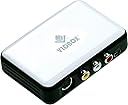
VIDBOX Video Conversion For PC
Product ID: 50934464
💾Converts to DVD & digital formats
📼Supports VHS, Beta, 8mm & camcorder tapes
🔌USB video capture device
Desertcart purchases this item on your behalf and handles shipping, customs, and support to France.
🎞️ Turn nostalgia into now — digitize your memories with ease!
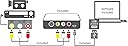
VIDBOX Video Conversion for PC is an all-in-one USB capture solution that converts VHS, Beta, 8mm, and camcorder tapes into digital formats compatible with PCs and portable devices. It includes all necessary cables, software, and guides to preserve and share your precious analog videos on social media or cloud storage, while also offering audio digitization from cassettes and LPs.


| ASIN | B01IP6N5MA |
| Best Sellers Rank | 488 in Software ( See Top 100 in Software ) 50 in Video |
| Customer reviews | 4.2 4.2 out of 5 stars (1,865) |
| Is discontinued by manufacturer | No |
| Item model number | VCP1M |
| Manufacturer | VIDBOX Inc |
| Product Dimensions | 13.67 x 5.41 x 19.05 cm; 250 g |
K**E
Actually works
I don't really write reviews but I had to come back for this one, at first I had a few hiccups with it and thought I'm gonna have to send it back like the other one I tried but after having a Tech Whiz of a friend come round and sort out some settings for me it worked perfectly fine I'm now almost finished converting all of my home movies so they're immortalised forever and I even now have them on my phone! Just wanna add that I didn't use the vidbox software as I couldn't get along with it and it was reducing quality so I used OBS capture instead and now they're at the best quality they can be for their time
H**D
I liked
This is so good
M**R
Check befor buying
Disliked the software, It was not as good as Honetech's. Although it worked.
I**1
... this ticks all the boxes price If it as easy as described would be
I need something to covert my vhs tape s but I am not sure this ticks all the boxes price If it as easy as described would be good
K**N
How to understand the instructions
I had difficulty understanding the instructios
A**N
Waste of money
Don’t waste your money, it doesn’t work 👎🏼
H**S
Kwaliteit van de video
De kwaliteit van de video, ook bij hoogste instellingen, valt via de S-videokabel behoorlijk tegen.
C**N
bon produit
Reçu en bon état dans un délai convenable. Bon produit, très facile d'utilisation.
A**Y
Excellent converter for tape based cameras and VCR to digital formats such as MP4
Excellent device to digitalize my old videos of my family. Simple to use. They supplied an MP4 converter but I used a better one to obtain better refresh rates.
J**S
Juan Antonio
Todo perfecto . Ningún problema con el hardware ni con el software . Muy fácil de usar . Lo recomiendo .
F**S
Muy fácil de usar y gran servicio técnico.
En un inicio tuve problemas porque me equivoque de modelo, pero contacte al servicio técnico de la marca y me resolvieron mis problemas en 24 horas. He convertido muchos videos utilizando este convertidor y el resulrtado ha sido muy bueno y el video de muy buena resolución.
Trustpilot
2 weeks ago
2 weeks ago