We remain fully operational. Our teams are working around the clock to ensure your deliveries continue safely.
DOWNLOAD THE APP


Customer Services
Copyright © 2025 Desertcart Holdings Limited
DOWNLOAD THE APP
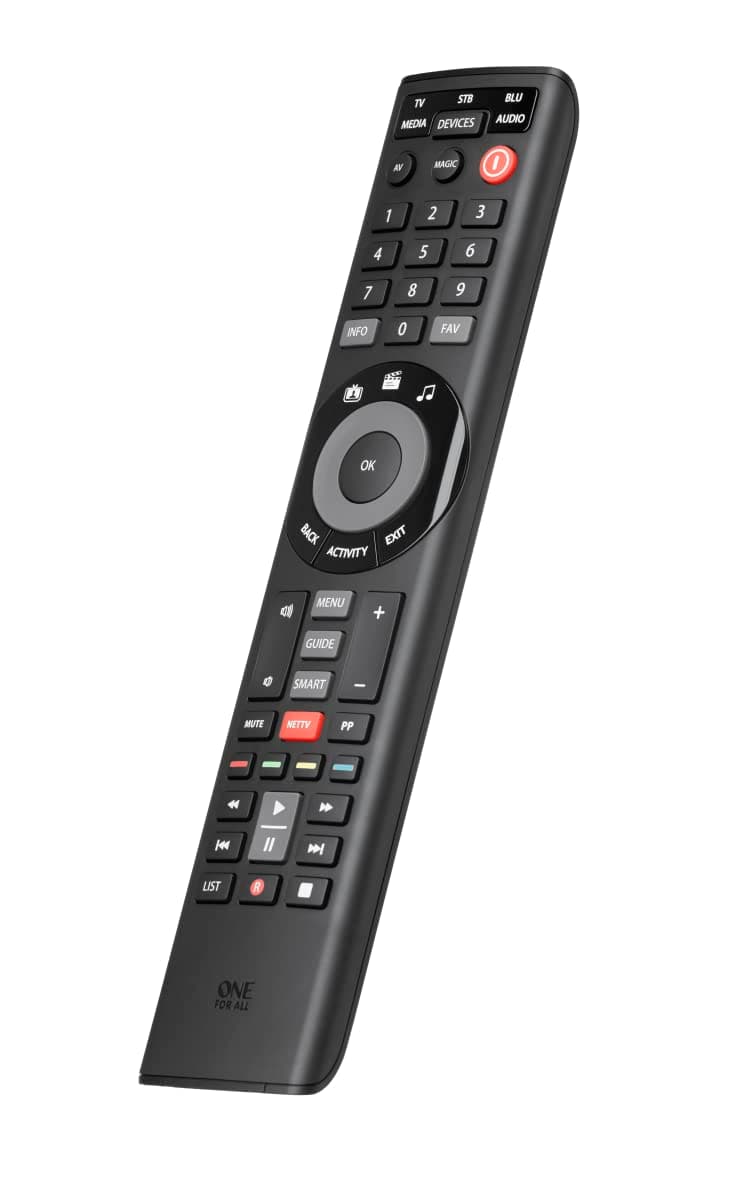
🎯 Simplify your entertainment universe with one remote to rule them all!
The One For All Smart Control 5 (URC7955) is a cutting-edge universal remote that consolidates control of up to five devices—including TV, set-top box, Blu-ray, game console, and audio systems—into one sleek, easy-to-use device. Featuring a free smartphone app for effortless Bluetooth setup, a unique NETTV button for instant streaming access, and three smart activity modes for seamless device switching, it guarantees 100% compatibility with over 7,000 brands and future devices. Its learning feature allows full customization, making it the ultimate future-proof solution for managing your home entertainment with style and simplicity.


| ASIN | B01N2KAO2W |
| Battery Types | Alkaline |
| Best Sellers Rank | 928 in Remote Controls (Electronics & Photo) |
| Box Contents | Contents: 1 item |
| Brand Name | One For All |
| Button Quantity | 47 |
| Colour | black |
| Compatible Devices | TV, Set Top Box, Blu-ray, Game Console, Media Player, Audio Devices |
| Controller Type | Remote Control |
| Customer Reviews | 4.1 4.1 out of 5 stars (1,497) |
| Global Trade Identification Number | 08716184065590 |
| Item Dimensions L x W x H | 25L x 11W x 3H centimetres |
| Item Type Name | One For All URC 7955 Universal Remote Control Black |
| Item Weight | 0.05 Kilograms |
| Manufacturer | One For All |
| Manufacturer Part Number | URC7955 |
| Maximum Number of Supported Devices | 5 |
| Maximum Range | 10 Metres |
| Model Name | URC7955 |
| Model Number | URC7955 |
| Network Connectivity Technology | USB |
| Number of Batteries | 2 AA batteries required. |
| Product Features | Universal |
| Product Warranty | 2 year manufacturer |
| Unit Count | 1.0 count |
M**.
Best universal remote I have used.
I have used universal remotes for a number of years and have generally liked them. However, some whilst have been good have not been able to use them with the latest tech. But this one is different, TV, Blu-ray players, satellite boxes, soundbars, hifi are generally pretty easy. However I was an early adopter of Sky Q and I have the Sky Soundbar. So my current universal remote could not be used with these two new pieces of tech. Until now, the URC 7955 does them all, now it controls all of my devices with ease and does a great job. Initially I was sceptical as to how much functionality it would actually have, but with the help of One for All support service I've managed to get all functionality for each device which is Samsung TV & Blu-ray player and now with great joy my Sky Q 2TB box and Sky Soundbar which is made by a fairly unknown brand Devialet. So I would highly recommend this remote to anyone with a number of devices similar to those I've listed. Yes it does take a bit of playing with to set it up right but once it's done you will be happy.
N**S
Great for the price ...
As background to this review I need to explain that some years ago I discovered the world of Harmony Remotes, a universal remote that allowed you to program activities such as "watch movie" and it would turn on your TV, Sound System, BluRay Player and set everything to the right channel. Sadly Logitech discontinued them and the buttons on my Harmony 555 are now failing, so time to find an alternate. So after much searching I was faced with the choice of this remote or one more like the Harmony Remotes but at approximately ten times the price. As this one advertises macros and an Activity key I decided to gamble on this one before forking out ten times as much for the other. For setup I decided to use their iPhone app (Android version available) and that was a breeze for getting my devices added. I simply selected the brand for each of my devices, entered the model number, and it selected the right set of codes. This worked brilliantly and it was easy to do. A quick test and I found I could turn all my devices on and off. The only frustration with the app is that is all it does, you can't program macros with it or anything else, all you can do is setup the devices. In terms of device control everything was reasonably intuitive except for my Pioneer AV Receiver; the remote controlled hardly anything. However I was able to learn from my old remote and that introduced the missing buttons; I can't see why the default doesn't include them but not a great hassle to program the remote to learn them. For the life of me I cannot figure out the Activity button. The instructions imply that you press the Activity key until the activity you want is highlighted and everything will turn on (with a programmable choice of what combination, for example TV+STB or TV+STB+AV), however it doesn't; pressing the Activity key until the one you want is highlighted does nothing. [Update: Customer Service finally replied and explained that with all devices on the Activity button configures the remote to control relevant parts of each device so, for example, if you are watching TV then the programme buttons would control your STB, the volume buttons your AV receiver and so on. It isn't meant to switch the devices on/off but if you long press the power button having selected the activity that will turn the devices on/off] You are also supposed to be able to add a macro to the activity, for example to switch the AV receiver input to a different device (so for TV I need it to switch the input to the Humax box and for BluRay to the Sony player) with the commands being sent 3 seconds after you select the activity. I successfully programmed the macro and I can see the remote sending the commands 3 seconds after I select the activity, but as nothing is on it is a bit pointless. [Update: After talking to Customer Service the sequence would be 1. Select Activity 2. Long press power button 3. Select Activity again to send the macro] After some trial and error I found that if you select an activity and long press the power button it turns on the correct devices for the activity, but the macro is sent during the long press of the power button (as the 3 seconds have elapsed) so it achieves nothing. Also you have to remember to select the activity again before long pressing to turn everything off otherwise it will only turn off the device you last controlled. I've tried asking OneForAll support what I'm doing wrong but to date they have only sent me excerpts from the user manual which say exactly what the copy included with the remote says, so I'm no further forward. It might be I have a defective remote, but who knows. [Update: See above for answers from support] In frustration I have assigned macros to the red, green, yellow and blue buttons as we never ever use them for anything, and if we needed to in the future we could dig out the relevant remote. I programmed the red button to switch on the TV and AV Receiver and put the AV Receiver on the right input for my Fire TV stick. Similarly the blue button does BluRay, green button sets it up for my Switch, and yellow for my Humax box. These work brilliantly, one press and everything switches on, one press and it all switches off again. If you decide to do something similar just make sure the last device you turn on is the one you want the remote to control, so for TV I make the last device my Humax box as I receive TV through that. If you don't it's no issue as you can always use the Device button to select the device you want to control, but it's neater if you end the macro on the right device. [Update: Now understanding the Activity button I think I'll stick with the solution I devised as it is a one button press to achieve what would take multiple presses if you used the remote as intended] Finally the remote has a function to lock the volume control buttons to a particular device, so in my case they will always control the AV receiver no matter what device the remote is controlling. That works really well. So, in summary, I have managed to get the remote to do what I want. It isn't elegant but it works. The setup app is helpful but could be so much better if it allowed you to do all the setup. The Activity button's function eludes me but I've found a way round it. My heart says "spend ten times as much and get the more elegant remote" but my head says "save the money and stick with this one". I think I'll give it a few months and see how frustrated I get with it (or not). Given the intricacy of setting it up this is one product I'm keeping the instructions for ... [Update: I've asked customer support to update the instructions and advertising material to clarify the purpose of the Activity button as it is currently misleading]
M**N
Good equipment
Very well designed and intuitive remote control. I can easily control both television and set top box with it
C**L
Simple setup!
As the household techy I pride myself on being able to configure the whole entertainment suite setup, but universal remotes are always so annoyingly hit and miss. If you lost the original remote(s) it made the whole process a billion times harder. This remote? Was finished within 10 minutes using their app. The app hate (at least from Android) is hard to understand as I simply searched the make and model of my TV, tried 2-3 recommended settings and saved them. I'm now using this remote to control the bedroom TV, Xbox One and Stereo flawlessly. The currently active setting light will flash when a button is pressed so you know what you're controlling. One thing to note is that it gave me two layouts to try with my Xbox One, and I've tried every button on both settings but it will not open the guide (Xbox button on controller). It's archaic, but currently get around it by turning the One off and on (which opens up the guide).
I**G
If you don’t have / want a Google account forget it !!
This device is supposed to be programmable for 5 devices … thats IF your kit is in the short list of available codes ! If not then you should be warned that the memory in this device for learning is only enough for ONE device. My free view box is new but is not on the list ! So that takes all the available learning memory. 2 more TV’s that I have are also not provided for in the app. Now the app ! I don’t use Google ! The app DEMANDS that you must be signed in by using a Google account (no other option is offered) to gain access to the code lists. I don’t agree with Google’s ‘terms and conditions’ concerning personal privacy, ( one MUST agree to allow Google to track, use and have access to everything you do). So I am completely unable to get access to the supposed existence of the thousands of device codes that may (or may not) work. Memory chips are cheap so this devices lack of learning memory might be seen as a trick to force customers to use a Google account. I do NOT recommend this product, it’s just a very expensive failure. Also the keys are not well placed e.g. the playback control keys including the recording functions are all squashed down at the bottom of the device making them not-very-user-friendly to use. I seldom give bad reviews and often prefer to not give a review at all if I don’t have a kind word to say …. BUT this device really is deserving of some rebuke. Also note this device is NOT sold by Amazon, yet still claims Prime status ! So returns are not post free ! And it’s not cheep … better to put up with the one device function or just throw it away …. ☹️
A**E
Nice bit of kit
Excellent bit of kit, now I can adjust my amp volume and TV functions with one remote, a customer service phone number would make life much easier but I got it set up with the aid of the email service
K**R
It does the job very well
Very good
B**D
I have an obscure make of HiFi amplifier, the rc for which quit. Roksan was not listed, and as the original was dead, it could not be copied to the new one. An email to OneforAll, and no-time later, I had a working code, which needed to be transferred from my smartphone via Bluetooth to the handset. What incredible tech for the money! The balance is good, and the action of the buttons feel very mechanical, meaning you know it's been pressed. Service: 10/10!
T**E
Remplace ma Logitech Harmony, cette télécommande est vraiment super, facilité de détection des appareils via l'application Android One for all setup et possibilité de définir des macros, très utile pour pouvoir allumer plusieurs appareils en appuyant sur la touche power on/off.
L**K
Aggiornamento 19 Marzo 2019: Torno a dare 5 stelle perché il telecomando che avevo nell’ultimo aggiornamento aveva qualche problema su alcuni tasti. Mi è stato sostituito con un nuovo modello che funziona perfettamente. Un plauso anche all’assistenza ufficiale, che in questi giorni mi ha seguito telefonicamente e via email. Aggiornamento 17 Marzo 2019: Devo abbassare il giudizio su questo telecomando perché sembra che alcuni tasti, contrariamente a quanto affermato dall’azienda, non possano essere programmati. Magari funzionano su un dispositivo ma non sull’altro (stesso tasto), il che riduce di molto l’utilità del telecomando stesso. :( Vengo da una lunga sfilza di telecomandi Harmony, dal mitico 555 (il migliore), passando per due o tre dei più recenti (l'ultimo è stato l'Ultimate One). Questo se li mangia tutti a colazione, pranzo e cena ad un costo che è una frazione dei Logitech. Innanzitutto si programma senza dover ricorrere al computer, cercare i cavetti, lanciare il programma ecc... Tramite l'apposita app è possibile aggiungere i propri dispositivi in pochi secondi. In mancanza dell'app è possibile inserire i codici che si trovano su un apposito libretto incluso. A questo punto la configurazione base, a portata di tutti, è terminata. Se siete smanettoni come me allora vi si apre un mondo: insegnare comandi specifici ai vari tasti usando i telecomandi originali, creare macro (quasi tutti i tasti supportano sequenze fino a 15 comandi) e attività. Addirittura si possono combinare vari telecomandi in modo da controllare TV, home Theatre e lettore multimediale senza dover saltare da una configurazione all'altra. Oppure si può forzare i controlli audio principale su tutti gli altri telecomandi. Insomma, cose che Logitech non ha mai fatto. C'è da dire che le varie procedure, pur essendo semplici, richiedono una buona dose di pazienza. Si va di codici e di pressione di tasti perché non c'è il display (solo un piccolo led lampeggiante). Inoltre qualche volta occorre ripetere varie volte l'insegnamento di un telecomando perché non sempre lo prende al primo colpo. Però, una volta configurato, va come un treno. Se avete pazienza ed esigenze avanzate questo è il telecomando per voi (lol, parlo come Mastrota... Vi assicuro che non lavoro per questa azienda) :D
J**N
Works like a charm
C**G
Me compré este mando, después de haber probado otro y considerar otro mas. Creo que hice una muy buena compra. Mi idea era emular el mando de un med8er 1000x3d. El mando anterior que probé resulto frustrante, así que opté por uno programable. Aunque en la web no aparece, en principio como soportado, posteriormente si aparece una código que lo emula casi totalmente. Resalto lo de casi, porque con la ayuda del equipo de soporte, logré una emulación totalmente satisfactoria. Ya en contacto con el soporte me ayudaron a mejorar notablemente, y configurar otros mandos que también uso. Lo dicho, ademas de se un buen y potente mando, cuenta con una unidad de soporte competente, eficaz, rápida en contestar las dudas, paciente, y muy amable. Lo recomiendo rotundamente.
Trustpilot
2 months ago
1 month ago