Desertcart purchases this item on your behalf and handles shipping, customs, and support to France.
⌨️ Elevate your typing game — comfort, control, and style in one sleek split keyboard!
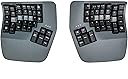
The Kinesis Advantage360 Professional is a Bluetooth-enabled, fully programmable mechanical keyboard designed for ergonomic excellence. Featuring concave keywells, adjustable tenting, and integrated palm supports, it reduces wrist strain and promotes a natural hand posture. Its open-source firmware allows deep customization, while tactile switches ensure precise, comfortable typing. With a compact footprint and backlit keys, it’s built for professionals who demand both performance and health-conscious design.


| ASIN | B0BCHMGZMD |
| Additional Features | Backlit, Ergonomic, Hotkeys and Media Keys, Split Keyset Design, Wrist Rest |
| Antenna Location | Office |
| Best Sellers Rank | #315 in Computer Keyboards |
| Brand | KINESIS |
| Built-In Media | Bridge Connector, Extra Keycaps, Keycap Puller, USB Charging Cables (Two) |
| Button Quantity | 87 |
| Color | Dark Gray |
| Compatible Devices | PC |
| Compatible Operating System Family | Linux, MacOS, Windows |
| Connectivity Technology | Bluetooth |
| Customer Reviews | 4.0 out of 5 stars 197 Reviews |
| EU Spare Part Availability Duration | 3 years |
| Enclosure Material | Plastic |
| Global Trade Identification Number | 00607998360026 |
| Hand Orientation | Ambidextrous |
| Item Dimensions L x W x H | 15"L x 8"W x 3"H |
| Item Type Name | Keyboards |
| Item Weight | 3.2 pounds |
| Keyboard Backlighting Color Support | Single Color |
| Keyboard Description | Mechanical |
| Keyboard Layout | QWERTY |
| Manufacturer | Kinesis |
| Mfr Part Number | KB360-PRO-GBR |
| Model Name | Kinesis Advantage360 Professional |
| Model Number | KB360-PRO-GBR |
| Number of Keys | 76 |
| Number of Sections | 1 |
| Power Source | Rechargeable Lithium-Ion Batteries |
| Recommended Uses For Product | Office |
| Series Number | 360 |
| Special Feature | Backlit, Ergonomic, Hotkeys and Media Keys , Split Keyset Design, Wrist Rest |
| Style Name | Professional (Bluetooth) | Tactile Switch |
| Switch Type | Tactile |
| UPC | 607998360026 |
| Unit Count | 1 Count |
| Warranty Description | 3 Year Manufacturer |
| Water Resistance Level | Not Water Resistant |
G**D
Adv360Pro. Very very good with minor caveat.
I purchased the Kinesis Advantage 360 keyboard a few weeks ago, and I am confident that it will be my go-to keyboard for a long time. The keyboard is incredibly comfortable to use, and I was able to easily customize the keys with the Kinesis graphical keymapping tool. Although the build quality is decent, I felt that the default ABS plastic keycaps that came with the purchase were of low quality. Fortunately, replacing them with Kinesis PBT keys made a significant difference. Initially, I had a Bluetooth connection issue, but after troubleshooting, I haven't experienced any problems since. Although the keyboard comes with a higher price tag, I believe that it's worth the investment. If you work on a computer a lot, just like with investing in a high-quality chair, it's essential to prioritize ergonomics and comfort. I recently started feeling a tingling sensation, soreness, and sometimes minor pain in my wrists while typing on a regular keyboard, which led me to research ergonomic keyboards. I'm thrilled that I found the Kinesis Advantage 360 because it has significantly reduced my discomfort and improved my typing experience. But even if you don't have any problems with your wrists/hands, I still think this is a great keyboard to consider. It took me about a week to get used to the keyboard layout, but with daily practice, typing at least thirty minutes to an hour each day, I was able to return to my average typing speed of 90wpm. Three weeks in, I feel like I am in total control of this keyboard, including all the special symbols, without even looking at the keys. I have never felt this level of control with a regular keyboard. While I changed the mapping for the hotkeys, I left the key mapping alone for the majority of the keys. Some of the special symbols, such as equal/plus, back tick/tilde, and curly brackets, were challenging to get used to, but with plenty of practice, I have significantly improved. It's worth noting that it's normal to experience some frustration when using a keyboard like this, but I believe that anyone can come to appreciate it with practice. There is a good chance that you might run into Bluetooth connection issues with this keyboard at some point, but be aware that this is a normal thing for any type of bluetooth electronics. For me, after troubleshooting, the Bluetooth issue has not returned yet, but it is very infrequent and minor enough that the benefits of this keyboard outweigh the potential downsides.
Z**R
Good, bad, and the awesome
It's been about twenty years since I first used a Kinesis and haven't used one since. For the past 14 months I've been using a Moonlander split keyboard. It's a decent keyboard, but the options for tenting are very poor unless you invest in more hardware purchased from their site. They do offer excellent support, though. I'd had the keyboard for about six months when the right side thumb cluster hinge broke. They sent me a replacement for free. Back to the Kinesis. I write A LOT. I'm a full-time author so I bang out hundreds of thousands of words per year. I'm in my mid-fifties, and fingers and wrist hurt all the time because of poor ergonomics and cheap keyboards. The Kinesis Advantage 360 is kind of amazing. It has true tenting, and the concave nature of the pieces means you can comfortably rest your palms on the outside and only move your fingers. Since I have used a split ortho board for over a year, this was not a huge learning curve. The keys are laid out well, but I had to change a few. I like the CTRL and ALT on the left side on the bottom row. I moved those keys using the ZMK software which is not really friendly. You have to have a Github account, fork builds, and then use the key mapper to generate new firmware. Each piece of the keyboard them must be connected via USB. Copy the corresponding builds to each piece and then swap key caps. I'm happy with the four or five keys I moved and have this looking almost exactly like my Moonlander layout. Bluetooth has worked perfectly on my PC. I've had zero issues so far. I hit a key in the morning and my PC wakes up. I leave the backlighting off. After two weeks of heavy use, the batteries are still going strong without a recharge. I purchased the palm pad separately. Why aren't these included with this very expensive keyboard? Come to find out, they might not be needed depending on your hands. I find them okay, but I will probably switch back to using the palm rests without the pads. They are comfortable and all, but I'm making more typos with them installed. This is a very expensive keyboard, and it will not be for everyone. There is a learning curve. When I initially switched to a Moonlander, my WPM dropped to about five words per minute. I'm a slow and not very accurate typist, but after this short amount of time I'm up to about 70 WPM with a 98% accuracy rate. This is fantastic for my old hands. Overall, this is a technical board that requires an understanding that the interface software is far from user friendly. Remapping keys will be challenging. I find that the key caps get oily from my fingers rather quickly, which is a weird thing to write, but it's true. So far this has not affected my typing, but I feel like I need to wipe them with a cloth a few times a week. Lightly textured key caps would have been perfect on this thing. Even with these negatives, I feel this keyboard beats the Moonlander by a mile. This is a true ergo keyboard and so far I love typing on it. The Gateron brown switches feel really nice. Negatives aside, this is the best keyboard I've ever owned. I look forward to many years with this thing.
B**B
Almost perfect keyboard
This keyboard is miles above the standard qwerty staggered layout keyboards. Typing on this for the last ~10 months has been extremely comfortable and has reduced my shoulder and wrist pain caused by regular non-split staggered keyboards. If you are on the fence just buy it and give it a solid try for at least 1-2 weeks. The process will be painful trying to learn the new layout. Do some typing tests and learn the proper home-row finger placement to take full advantage of this board. While I do highly recommend this keyboard if you are typing on a keyboard a lot, there are some issues to be aware of. The main annoyances of this keyboard are the Bluetooth connection, connection issues between the two halves of the boards, and double key-pressing issues. I ended up having to RMA my board because the double-pressing issue became so bad. I still have the same issue after RMA occasionally though Kinesis has recently put out a new firmware that claims to fix this. If this keyboard used a 2.4ghz USB dongle in addition to the Bluetooth, and the double pressing issues were fixed this would be the perfect keyboard. Update: Kinesis latest firmware has fixed the Bluetooth issues making this keyboard even better
A**R
Poor Bluetooth IME
Loving the keyboard itself so far but the Bluetooth is absolutely awful for my setup. I have a work pc that sits 2 feet away with no latency or connection issues with Bluetooth but my home PC on the other side of the desk on the floor randomly disconnects frequently and gets occasional high latency. I'm pretty much at the point where Bluetooth for woek is fine but I am forced to run a wireless keyboard wired for my personal computer which kind of defeats the entire purpose of me buying the pro model. Tried several things, drivers, external Bluetooth dongles, nothing seems to help me get a consistent reliable connection. Updating my product review. Upon trying to use it wired for several days as the wireless version, I am getting constant issues where keys or sticking or where keys aren't registered while gaming wired with the left set, even with right turned off I do love they keyboard after extended use but I think wired is the way to go after using other brands of wireless.
A**S
Best keyboard in the market
This is the best keyboard I have ever used. I got the pro version. The Bluetooth connectivity works flawlessly. The quality of the product is really good. It’s heavy, it looks good and is very confortable. The contoured design is amazing. After a few days I got used to it (I already had a keyboard with a columnar layout) and I don’t feel pain in my wrists anymore. The backlight is just white and its brightness is adjustable. I almost never turn it on. The battery life is incredible. I bought the keyboard 2-3 months ago and haven’t charged yet, and it still has about 20-40 % left. I only wish the pro version could come with the red switches. The brown ones are very heavy and I felt some numbness in my pinkies at the beginning (not anymore) If you are not interested in RGBs, this is the one you have to get.
J**A
TOO MANY PROBLEMS FOR THE PRICE.
Jeez where do I start? Honestly I love how this keyboard feels, its definitely helped with my RSI symptoms at my desk job, WHEN ITS WORKING. I cannot tell you how often I have to deal with bluetooth issues. I usually have to turn the right side of the keyboard on and off AT LEAST 10 times. Next the software for reprogramming this keyboard is just god awful. Trying to find the right layout takes multiple tries, but this software just gets in the way of it, its so annoying especially for a $500 keyboard from a company that has been around since 1991, seems like theyve just gotten complacent. All in all, the ONLY reason I would recommend this keyboard over a Glove80, is Amazon's return process. Try it out, if you don't like it return it and get a Glove80. Also I have updated my keyboard and done all the troubleshooting steps to solve all my issues, doesn't help.
D**N
Quietest, most versatile and useful Ergonomic Keyboard on the planet!
This is not my first Kinesis keyboard and I switched to ergonomic keyboards about 2000 and have tried them all to reduce wrist pain. I loved my Advantage2 (when I received one from a friend who upgraded there's) over my previous favorite (classic MS Ergonomic) and unfortunately spilled coffee on the 360 I bought a year ago (grabbing my kitty having a seizure on my desk). It had the "quiet" keys but still made too much noise. This version with the pink keys is *chef's kiss* for me. I get the format and versatility I need for comfort and reduce the noise so it's not distracting when I'm on conference calls - and it doesn't scare my kitty and trigger a seizure (it's a thing unfortunately). While they are expensive, I've learned that there are a few places you really need to not skimp for your quality of life. 2 spots I don't skimp is a good keyboard and office chair (since I'm using them constantly for a minimum of 8 hours a day, 5 days a week). Same for bed\pillows. Your body will thank you as you reach "a certain age". What I love about the 360 is that it's not fixed. I can separate (or not) the keys more, offset them if I'm gaming, change the "tent" angle AND you have a 10 key in the same format. When you need to 10 key you need to 10 key. It does take some getting used to and won't help hunt and peck typers much, but if you're typing all day (with decent typing form) - switching to this keyboard could be a game changer in your comfort on a daily basis. 10/10 can (and will) recommend the Kinesis 360 - even if you don't use all of the options - especially now that you CAN get the pink keys if you need or want the short throw, quiet keys.
J**R
DOES NOT PLAY WELL WITH OTHERS
Ive been buying KINESIS keyboards since they were KEYBOARD AT plugs that cam with PS2 adapters which i believe was around 1999-2000 this is my 5th KINESIS keyboard and the best way to describe what a KINESIS keyboard is would be like a WW2 tiger tank. if you ever watch WW2 cartoon youtube videos or play world of tanks you will perfectly understand this metaphor the tiger tank was an amazing tank.....as long as it didn't suffer mechanical break downs, no other tank could match it......as long as it didn't suffer mechanical break downs, it was unstoppable on the battlefield....as long as it didn't suffer mechanical break downs!!! and that's my experience with kinesis keyboards, they are amazing for anyone that types as fast as a mini-gun spiting bullets, and for anyone like me that spends 10-14 hours a day typing something up its a life saver on the hands, you can type all day and not feel pain on your wrist and this new 360 is even better with optional angle elevation and a solid metal frame pad underneath the key board. if you are plugged in by bluetooth; your bluetooth win menu will display your batter life. you can connect both sides at the same time to recharge them while you work. so whats the problem well there's always something that goes wrong with every kinesis Ive owned, 1. original PS2 Kinesis had problems with being identifying by windows, and not every key worked 2. The Kinesis i bought for windows vista worked great but surprise upgrading to win 7 and the keyboard stopped working. When i contacted Kinesis multiple times, finally one tech told me off hand that win 7 would not recognize last gen models and i would have to pay another $385 for a new keyboard!!!! really a 1999 Dell computer i took out of an office trash bin still works today on win 11 but a $400 keyboard has issues??? somehow when i upgraded to win 10 and 11 the older keyboards started to work again -_- finally in 2023 this keyboard once again was amazing but then all of a sudden after 1 week the bluetooth would not connect. I fell back on using the USBC cable and 2 months later it didn't work at all!! finally after 3 days i found out the keyboard won't work if i have my gaming keypad plugged in?? i tried contacting kineses but forget it. Lat year their customer service tried to weasel there way out and blame me for the problems. Today all you get is an auto message that they are no longer taking tech calls at the moment cause you know still using covid as an excuse in 2023! so be warned for $500 you will get a god tier tank!! but when it breaks down or gets stuck in the mud you're on your own to get yourself out of trouble!
V**M
Great keyboard
It took me ~ a month to get used to the keyboard, but now I love it. Something that it pushed me to do is to use right fingers to type certain keys. Also I feel a bit more efficient after I started to use VIM motions with the keyboard almost everywhere - magic.
I**N
Comfortable ergonomic keyboard
This keyboard is awesome! I've gone through a bunch of other keyboards over the years from cheap Dell ones, Keychron mechanical keyboards (great keyboards for normal layouts), Unicomp IBM Model M and was skeptical at first about this, primarily as I've never touch-typed.. can type fast with numerous fingers but mostly looked at the keyboard. This Kinesis has taught me to touch type too now, within a few weeks. I remapped a few of the keys due to programming needs, but it's so comfy and allows me to sit in a better position. It's not cheap, bit if you're looking for a split ergo keyboard, I'd highly recommend it!
D**Y
Junk
This keyboard is awful. Nearly 1000 dollars and you have to use a janky fork of a GitHub repository to change anything.
D**K
Very well designed keyboard
I bought used keyboard, but I arrived in totally new condition. I just missed one tool part to remove keys, but that is ok, I got it 180 EUR cheeper than new one. Small price to pay :D When starting with this keyboard you really need to use all 10 fingers, and I need to relearn typing. Its not the same as ordinary keyboards.
C**.
Gran producto, dejaron de dolerme las muñecas.
Llego en tiempo y forma.
Trustpilot
2 weeks ago
2 weeks ago