Desertcart purchases this item on your behalf and handles shipping, customs, and support to France.
⚡ Upgrade your network game with gigabit speed and sleek versatility!
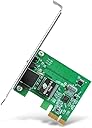
The TP-Link TG-3468 is a high-performance Gigabit PCI Express Ethernet Network Adapter delivering up to 1 Gbps full-duplex speeds. Designed with a 32-bit PCIe interface, it supports Windows OS and includes both standard and low-profile brackets for flexible installation. Certified globally and trusted by millions, it features Wake-on-LAN for remote management, making it the go-to choice for professionals seeking reliable, fast, and easy-to-install network connectivity.


| Asin | B003CFATNI |
| Best Sellers Rank | 953 in Computers & Accessories (See Top 100 in Computers & Accessories) 1 in Network Cards |
| Box Contents | Gigabit PCI Express Network Adapter TG-3468, Low-profile Bracket, Quick Installation Guide, Resource CD |
| Brand Name | TP-Link |
| Color | Verde Smeraldo |
| Compatible Devices | PC, notebook |
| Compatible Operating System Family | Windows |
| Country Of Origin | Netherlands |
| Customer Reviews | 4.6 4.6 out of 5 stars (18,677) 4.6 out of 5 stars |
| Data Link Protocol | 1000BASE-T |
| Data Transfer Rate | 1000 Megabits Per Second |
| Eu Spare Part Availability Duration | 1 Years |
| External Testing Certification | FCC, CE, RoHS, BSMI, VCCI |
| Global Trade Identification Number | 06935364001049 |
| Hardware Interface | Ethernet |
| Item Dimensions L X W X H | 16L x 2.8W x 13.5H centimetres |
| Item Part Number | TG-3468 |
| Item Type Name | TP-Link NE000644 TP-Link TG-3468 Gigabit PCI Express Network Card |
| Item Weight | 0.22 Pounds |
| Manufacturer | TP-Link |
| Manufacturer Part Number | PCI-E |
| Minimum Required Operating System Version | Windows XP |
| Model Number | TG-3468 |
| Number Of Items | 1 |
| Number Of Packs | 1 |
| Product Warranty | Default Manufacturer Warranty. Please contact us if you require further details |
| Unit Count | 1.0 count |
| Upc | 840460604796 |
User
Drivers on a mini CD
You will need an external cd drive if you don’t have a case mounted one.This wasn’t as quite straight forward as it should have been, A freshly installed and updated version of windows 11 pro, could not detect the card when inserted into the motherboard. After downloading an installing the TP link drivers from the support site for the correct version of this card V4.0 the card was still not detected, even older drivers from the sight didn’t work. Device manager only found a generic BT device, no wifi. One set of the online instructions said to install the cd, there was no CD when i first opened the box or so I thought, pulling the plastic try out revealed a mini cd , installation instructions and a product card… yes I know not something you’d normally do when opening a box like this. I grabbed a usb cd drive and it took no more than 5 minutes to install both drivers and get the card working after a frustrating day of fiddling.If you want to use the on board Bluetooth you will also need a spare usb header on your motherboard. The supplied bracket didn't fit my case snuggly and required a little bending on the tongue otherwise it doesn’t fit all the way down in the socket.These few problems aside the card works faultlessly and has a strong connection to the wifi hub. This card is better than the copy version of it which I installed on a friends machine. Hence the reason I still have it 5stars , at time of purchase it was on offer and made excellent value for money.It’s Bluetooth 4.0 and above, so far I’ve not come across an incompatible BT device
User
Super easy to install and works great
This Wi-Fi card works brilliantly and has given me a fast, stable connection. I had not installed anything like this before, but the setup was straightforward with the help of a quick YouTube video.Once installed, it connected without any issues and has performed reliably ever since. Very pleased with it and would recommend it to anyone looking to improve their PC’s Wi-Fi.
User
Easy to use and great results
Works great. Installation is extremely easy, and the instructions in the box are very clear. You need both a free PCIe port and a free USB header on your motherboard -- without a free USB header, you will only get WiFi and not Bluetooth.WiFi range and speeds are great -- even on the other side of the house, my PC gets over 50% signal strength and I get my full 500Mbps connection speed. Bluetooth works great as well, connects to my headphones with no problems and holds the connection over a decent range. Overall, great upgrade at a decent price if your PC doesn't have WiFi/Bluetooth built-in.
User
Good Value - But Weak Signal
I purchased this mini-pci card to set up Wi-Fi signal in my flat. The card is so tiny that even when it's plugged in right next to my graphics card, it doesn't block the fan. The included antenna is really tiny though. The card itself doesn't produce much of a signal so you get 1 bar of signal where another Wi-Fi card I have will get full bars. However, this card does work well and is a good value for money. Installation into windows 7 x64 was flawless. This card is Rev. 2 so perhaps some of the other bad reviews were for Rev. 1? The drivers on the mini cd are exactly the same as the ones you can download so everything is up to date. I recommend that when you install the drivers that you select "use windows to manage connections" because if you don't then the TP-Link seems to reset everything to it's own settings.This card doesn't drop signals like some other cards I've owned so it will be useful for those who are playing games. I ordered an additional antenna. The "TP-Link TL-ANT2405C 2.4GHz 5dbi Indoor Omni-Directional Antenna," which has a 2 meter cable and boosts the signal up to 4 bars. [link below]. I highly recommend this antenna as it's under a fiver shipped. It really high quality, does exactly what it claims to do and has a coated magnet in the base so it sticks tightly to the top of my computer case.You could spend the £15 on a more expensive card but it's not going to work any better than this card plus the antenna would still be tethered to the back of the card which gets in the way of the DVI cable and being hidden away in the back always diminishes the signal strength.Otherwise except for a few minor drawbacks, I'm very happy with my purchase all around and I recommend this if you're on a tight budget.TP-Link TL-ANT2405C 2.4GHz 5dbi Indoor Omni-Directional Antenna
User
Well built card with noticeably better performance than last generation
It took a bit of research to make sure this was the right card for my partners PC and a bit of research into how to fit it will also be worthwhile unless you are experienced in replacing and fitting such cards. It will help with understanding the type of fitment used for the Bluetooth connection to the motherboard for example. The card itself feels like a quality item - well finished, no skimping and worth the bit of extra money over the basic ones. It was easy to fit the separate antennae, but do ensure you have enough room/height for them before you start. Performance is really good, a noticeable improvement over the 10 year old card this one replaced. Do watch out for the difference between WiFi 6 and 6E. It transpires our recently procured Sky router only supports the former, so we can’t get the very best out of the new card. One last tip - if you’re on Windows 11, remove any Bluetooth mouse and keyboard from the system before you fit the new card, then re-pair them once it’s in. This does mean that you will need a spare wired set to see you through the install process.
User
Tp-link AX3000
I had never fitted a card of any type to a tower gaming PC. The original USB WiFi dongle was playing up so I decided to take the plunge at bought it at £29.99. It's gone up to over £40 overnight, shame on you Amazon.I had only one space available for the card which was directly below the bulky graphics card. It took three attempts to get the card to connect with the motherboard socket as I was virtually working blind. Presumably the Utube videos showing how easy a process this is were working in a larger/roomier tower box. However the card is working great and the bonus is I now have Bluetooth. Brilliant!
User
Easy to fit card
Easy to install and I’ve never installed one before. Just look up on YouTube for guidance. For windows I downloaded the drivers from the website and installed. Still needed to select each one in device manager to recognise the tplink driver but was up and running in 5 mins. For Ubuntu , the WiFi was recognised instantly but not Bluetooth, I’ll figure that one out later as it works fine on Windows. Speeds have doubled for me rather than using the Ethernet over power adaptors
User
brilliant, buy one
Un-flippin-believable... absolutely transformed my PC's internet speed.Plugging it in, inside the PC 'box' was a tad nerve wracking but the instructions were clear and tbh it was quite straightforward. Old dongle thingy now in the recycling ✔️
User
Parfait !
Elle fait son travail comme demandé. Petite et bien pratique dans son emplacement.
User
Zuverlässiger Netzwerkadapter für stabile Verbindungen
Nachdem ich ständig Probleme mit meiner integrierten Netzwerkkarte auf meinem Gaming-Mainboard hatte, entschied ich mich für den TP-Link Gigabit PCIe Network Adapter (TG-3468) - und ich wurde nicht enttäuscht.Die Installation des Netzwerkadapters war ein Kinderspiel. Dank des 32-Bit PCIe-Interfaces konnte ich ihn problemlos in meinen Computer einbauen. Die mitgelieferte Low-Profile-Halterung ermöglichte es mir sogar, den Adapter in meinem platzbeschränkten Gehäuse zu verwenden.Seitdem ich den TP-Link Gigabit PCIe Network Adapter verwende, sind alle meine Verbindungsprobleme verschwunden. Die Verbindung ist stabil und zuverlässig, und ich genieße jetzt unterbrechungsfreies Gaming und schnelle Downloads. Der Adapter unterstützt verschiedene Betriebssysteme, einschließlich Windows 11/10/8.1/8/7/Vista/XP, was für eine breite Kompatibilität sorgt.Die Gigabit-Geschwindigkeit dieses Adapters ermöglicht eine ultraschnelle Datenübertragung. Ich habe eine deutliche Verbesserung meiner Internetgeschwindigkeit und eine reibungslose Nutzung meiner Netzwerkdienste festgestellt.Die TP-Link-Marke steht für Qualität und Zuverlässigkeit, und der Gigabit PCIe Network Adapter ist da keine Ausnahme. Ich kann diesen Netzwerkadapter jedem empfehlen, der nach einer stabilen und leistungsfähigen Verbindung sucht. Er hat meine Erwartungen übertroffen und ist eine Investition, die sich definitiv gelohnt hat.
User
Easy to install
Package arrived without any damage and on time. Installed the WI-FI card and then the driver. no issue so far.Thank you for this quality product.
User
işini yeterince görüyor.
linux mint 22.3 ile sorunsuz biçimde tak çalıştır kullanma imkanım oldu. tabii 150mbps bugün için yeterli bir hız mı tartışılır ama pek çok evde internetin hala bu hıza ulaşamadığını düşünürsek fiyatının hakkını verdiğini düşünüyorum.
User
Plug and play, worked first time
Needed an additional network card for a PC used for security (Dell Optiplex desktop). This one comes with a full size and a half size bracket (I needed the half size to fit the case and PCI express). Changed the bracket, installed and worked first time without issue.
Trustpilot
2 weeks ago
1 month ago