
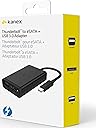

KANEX Thunderbolt to eSATA with USB 3.0 Adapter
Product ID: 48339067
Details
- BrandKanex
- ColourBlack
- Connector typeUSB 3.0
- Item dimensions L x W x H5.1 x 7.6 x
⚡Thunderbolt speed
💾eSATA support
🔌USB 3.0 connectivity
⚡ Connect with Confidence: Elevate Your Data Game!
The KANEX Thunderbolt to eSATA with USB 3.0 Adapter offers a powerful solution for professionals seeking high-speed data transfer and versatile connectivity options. With its sleek design and plug-and-play functionality, this adapter is perfect for enhancing your tech setup.
| ASIN | B00LOLBBQQ |
| Brand | Kanex |
| Brand Name | Kanex |
| Colour | Black |
| Compatible Devices | 27-inch, Apple Thunderbolt Display (No USB 3.0), Mac mini (Mid 2011), Mac mini with Thunderbolt (No USB 3.0), MacBook Air (11-inch, Mid 2011), MacBook Air (13-inch, Mid 2011), MacBook Pro (13-inch, Early 2011), MacBook Pro (13-inch, Late 2011), MacBook Pro (15-inch, Early 2011), MacBook Pro (15-inch, Late 2011), MacBook Pro (17-inch, Early 2011), MacBook Pro (17-inch, Late 2011), MacBook with Thun… |
| Compatible devices | 27-inch, Apple Thunderbolt Display (No USB 3.0), Mac mini (Mid 2011), Mac mini with Thunderbolt (No USB 3.0), MacBook Air (11-inch, Mid 2011), MacBook Air (13-inch, Mid 2011), MacBook Pro (13-inch, Early 2011), MacBook Pro (13-inch, Late 2011), MacBook Pro (15-inch, Early 2011), MacBook Pro (15-inch, Late 2011), MacBook Pro (17-inch, Early 2011), MacBook Pro (17-inch, Late 2011), MacBook with Thunderbolt (No USB 3.0), iMac (21.5-inch, Mid 2011), iMac (27-inch, Mid 2011), iMac with Thunderbolt (No USB 3.0) Compatible devices 27-inch, Apple Thunderbolt Display (No USB 3.0), Mac mini (Mid 2011), Mac mini with Thunderbolt (No USB 3.0), MacBook Air (11-inch, Mid 2011), MacBook Air (13-inch, Mid 2011), MacBook Pro (13-inch, Early 2011), MacBook Pro (13-inch, Late 2011), MacBook Pro (15-inch, Early 2011), MacBook Pro (15-inch, Late 2011), MacBook Pro (17-inch, Early 2011), MacBook Pro (17-inch, Late 2011), MacBook with Thunderbolt (No USB 3.0), iMac (21.5-inch, Mid 2011), iMac (27-inch, Mid 2011), iMac with Thunderbolt (No USB 3.0) See more |
| Connector Type | USB 3.0 |
| Connector type | USB 3.0 |
| Current Rating | 13 Amps |
| Customer Reviews | 4.1 out of 5 stars 690 Reviews |
| Finish type | Matte |
| Global Trade Identification Number | 07426800691652 |
| Item Dimensions | 5.1 x 7.6 x 2.5 centimetres |
| Item Weight | 45 Grams |
| Item dimensions L x W x H | 5.1 x 7.6 x 2.5 centimetres |
| Manufacturer | KANEX |
| Manufacturer Part Number | KTU10 |
| Model Number | KTU10 |
| Number of Items | 1 |
| Number of Ports | 3 |
| Package Quantity | 1 |
| Power Plug Type | No Plug |
| Product Finish Type | Matte |
| UPC | 814556010013 814556017173 |
| Unit Count | 1.0 count |
| Warranty Type | Limited |
I**E
Use good quality kit if you want the best from this product
Mac Mini Server mid 2011 SSD main boot disk. Works extremely well on eSATA with a very fast transfer rate. Applied an EasyAcc USB 3.0 hub to the USB port and attached an SSD. Transfer from SSD disk, of a 720mb file to an attached USB 3 external SSD disk, did not even register the time delay/time taken. It just appeared as a copied file in what looked like under one second. Attaching a USB 2.0 external drive, via the USB 3.0 hub... well something went wrong. The external disk did not appear on on the attached disks list. Tried another two similar external USB 2.0 attached disks and got the same result. Power light looked OK on the external disk housing but nothing showing in Finder etc. Direct connection to main board USB 2.0 ports would normally show these disks. It might be a problem of the USB 3.0 hub, or a standards problem with the USB 2.0 external disk adaptors. I cut out the hub and went direct USB 2.0 external disk to USB 3.0 port and this still gave the same result, nothing appearing. I do not think that this problem is a result of this KANEX adaptor. The USB 2.0 external hard disk adaptors were of poorer quality/brand. I next used a USB 3.0 external box from ICY BOX and they are good at what they do. It worked instantly. Another USB 2.0 external disk drive worked. So I have three poor quality external disk drive housing that are faulted when connected to USB 3.0 but one ICY BOX external 3.0 adaptor that is just fantastic. Go with reputable equipment and this adaptor is extremely good. I do not think that you could go any faster in your disk transfers if you did eSATA SSD attached disk and SSD from your main machine. Lower quality, or slow, attached disk products give problems in El Capitan so my best advice is to purchase the best quality and this is one of them.
B**Y
The Drive Matters, it boots
I have just bought this to use with a 2011 Macbook Pro, I've took the disk from a seagate slimline external drive 2 TB with a SATA3 6GB interface and used that for the internal drive and the 500GB drive is now in the external usb3 case. I've also tested with a 4 TB seagate expansion drive all are formatted as hsf+ I've bench marked with black magics disk speed test using the 5 GB file. These are spinning hard drives and not capable of reaching full speed of the interface a SSD drive probably would be many times faster. ok so my results the internal 2.5" gave 100 MB/s read & write my 500GB in the slimline case gave around 25 MB/s write and about 40 MB/s read on the USB 2 ports on the usb3 interface this became 100MB/s read and write pretty much the same as the internal Sata drive The 4 TB seagate Expansion drive on the usb3 interface gave around 70 MB/s read and write. So it appears that drive speed limits the interface matching the internal Sata III is about as good a result as I could hope for. The interface wasn't limiting the drive. The Seagate expansion drive is a slower drive its designed for doing backups , not editing video... I'm pretty happy with a 4x speed up over USB 2 and I would rate firewire800 as about 2x faster than USB 2 Faster drives would give better results... IPad transfers are faster too. The downside you can't boot from the usb port, some people claim to have booted from the esata port the manufacturer says this isn't possible. Its possible to use an iPad as a second display on a mac this should work better over usb3. part 2 booting. My late 2011 Macbook pro does not see a USB3 attached Hard drive at boot time so booting is limited to the USB 2 ports and speeds or firewire which is twice as fast as usb2. However there is the esata port, esata is not the same as esatap. Esata-P provides power as well as a Sata connection in one port. We don't have this we have esata only and a usb3 port so for a 2.5" Sata drive you need an adapter cable which has a standard laptop drive connector at the drive end and 2 tails (one usb the other esata) the USB port is just used for power. Good news is that the drive connected by esata is recognised at boot time (unlike the usb3 which isn't). Using the blackmagic Speedtest I'm getting about 44MB/s this is just an old 200GB Drive I have knocking around. This drive may be slow and there may be a driver needed still better than usb2.0 but not that much better. Ok that was disappointing wasn't it. So I went back to the 500GB drive i used earlier for the USB3 test and popped that back out of the seagate slimline case. Connected that with my ESata cable and ran the black magic Speed test. The result 101.5 MB/s read and write or pretty much the same as the USB3 test result i got last week. So the drive matters, if you use esata you can boot from the drive (but currently i'm now using a bare drive) If I want to use a 3.5" Sata drive i'm going to need 12 volts to power it. On the other hand an SSD is another option which will be faster and not need separate power. External displays well i can connect to my apple tv wirelessly but using my one and only thunderbolt port i cant use my mini displayport adater to dvi/ hdmi /vga. On the other hand i've had 2 1080p displays connected at work via the usb3 port and a dell docking station giving 3 displays. I have also picked up an elgato thunderbolt dock with 2 thunderbolt ports also has 3 usb3 gigabit ethernet and a hdmi port and audio ports. I can't boot from that though. OK I just tried daisy chaining through this. The good news it still boots but the speed test result was around 84Mbit a second read/write down from around 100 Mbit a second however booting internally gave me the 100 Mbit via usb3 So this device is good for fast booting an external drive and it gets you into the USB3 eco system. If it had a second thunderbolt port it would be perfect. it's a good size for my laptop bag and thats not happening with the elgado dock which has a power brick bigger than this adapter. This product is a bit of a niche product get a later mac and you have USB 3 but locked down hardware. If you have an iMac then this is a good option if you don't want to take the screen out to upgrade the boot drive. Cable is a bit short i'd probably velcro it to the back of the iMac. If you have a macbook with thunderbolt as well as the iMac you can take this drive with you. If you have an iPad duet display works well on USB3 in Sierra you can also have the touchbar on the iPad even if your mac doesn't have that with an iPad Pro you can use the apple pencil. You can also use the iPad as a midi controller handy for lightroom or audio use. There are some adapters to convert usb3 to usb C another possibility to break out ... I now have a Samsung Ssd 850 Evo 250 Gb and the speed up from a hdd is quite impressive attached to E-Sata 348 write and 374 read. Over all this Dongle was worth it. Hopefully you now have a good view of what this dongle can and can't do.
C**M
Works well, saves money
This really does work. I timed it as 9 times faster than my USB2 and about the same as thunderbolt. I daisy-chained it from my 6TB La Cie external working drive with no problem and backed up 3TB of movie files to an external storage HD. It took a bit over 4 hours, would have taken a day and a half with USB2! It would be fast enough to use it as a working video drive for NL editing. Using it on an iMac with Thunderbolt but no USB 3, so perfect solution. Instead of having to buy expensive Thunderbolt drives, I can now use much cheaper USB 3 external drives for storage. Only 4 stars so far as I have only had it a few days and don't know about build quality. No reason to suspect it won't last, who knows, but it has already saved me money.
H**T
Poor performance at a high price
Very disappointed by the performance of this adapter, especially considering the blazing speeds offered by Thunderbolt. Using an external SSD, the eSATA port measured at 400MB/sec (540MB/sec on a motherboard SATA port) and USB3 write speed measured at 200MB/sec (250MB/sec via motherboard USB3 port). Most Thunderbolt peripherals are grossly over-priced, so having to accept poor performance as well is a wretched state of affairs.
S**T
Pricey but essential for 2011 iMac
I got this so I could modernise my mid-2011 iMac which only has USB 2 ports and a Thunderbolt 2 port. I must have spent hours researching Amazon and the internet for a simple adapter for the now redundant Thunderbolt 2 so I could take advantage of the much higher speeds. I settled on this one which gives a USB 3 (A) port and a SATA 3 port. It's quite an eye-watering amount of money for what is basically a cable adaptor, but I put this down to supply and demand as Thunderbolt 2 is a now redundant standard. The high price if offset when you consider how much it costs to get a new iMac! On performance, this is exactly what I was looking for. I use this with an SSD external hard drive, and I get approximately 10 times faster speeds than my previous setup which was a HDD via USB 2. So if you work with audio or video production, this will instantly upgrade your old Mac to a modern standard. (In fact I also replaced my internal HDD boot drive with an SSD, so now the machine is super fast. It's like having a brand new iMac for a couple of hundred quid!). The cable for this unit is fixed and is quite short. It's so short in fact I have to sit it up on an old box to level it with the port so I don't put strain on it, but this isn't a problem and it's behind the Mac so you can't really see it. I'm keeping my eye out for a SATA 3 to USB C adaptor or hub, so that I could also take advantage of the extra port and add USB C peripherals. In conclusion, really happy. A hundred quid has saved me hundreds on getting a new Mac which would essentially be the same spec.
F**D
It took over 7 hours to copy 720GB from the mac to an external hard drive that had been freshly formatted and connected directly using a good quality USB3 cable
This has been a very disappointing purchase. Things started off badly when I opened the package and found that the box containing the Kanex adaptor was damaged - it appeared to have been opened. The outer package was not damaged so whoever packed my order knew the Kanex box had probably been opened before they packed it. Another problem with the device is that on my mac - a MacBook Pro early 2011 - it was much slower then I expected. It took over 7 hours to copy 720GB from the mac to an external hard drive that had been freshly formatted and connected directly using a good quality USB3 cable. Given the very high price for this item, I can't say it represents good value for money. I would have liked to email Kanex to ask them about the damaged packaging, the possibility that the device may have been used and second hand and about the slow transfer speed, but I was unable to find any way of contacting them. Hopefully they will read this and get in touch with me.
A**R
Beware sleep mode!
This product works fine in general use but does not work properly if the computer goes into sleep mode.
L**O
Great adapter without breaking the bank.
A must have for owner of 2011 Macbook Pro owners who doesn't have USB 3.0, speed up project transfer a lot. You can plug in both eSata and USB 3.0 and the transfer speed on both hard drive does not affect each other! I had tested it with AJA system test. One of the problem I encountered with the unit was that every time the computer comes back from sleep, the hard drives are disconnected, which can be quite scary especially if you have footages transfer over. And the Solution is to go to Energy Saver in your System Preference/Energy Saver and make sure "PUT HARD DRIVE TO SLEEP WHEN POSSIBLE" is Unticked.
E**T
Mehr als erwartet
War erst skeptisch, weil wir als Filmproduktion einen etwas älteren maximal hochgerüsteten großen iMac in Betrieb halten wollten, der noch kein USB 3 hat. Aber der Kanex hält, was er verspricht, und das zuverlässig, wir betreiben damit fast ein dutzend externe Festplatten (neben Thunderbolt-HDs und Firewire-HDs), und alles funktionert so gut wie tadellos (durch den Mischbetrieb von USB 3, Thunderbolt und FW kann es schon mal vorkommen, dass eine von 14 Festplatten nicht gemountet wird (allerdings alle USB 3 schon), dann richtet das ein kurzer Neustart. Der Hauptvorteil - die Geschwindigkeit, ist sehr zufriedenstellend. Wir können den Kanex empfehlen.
M**R
Worked Exactly How I Needed
I have a 27" 2011 iMac with first generation thunderbolt and USB 2.0. This little device gave me an alternative to buying an expensive doc with an unneeded Ethernet port. I have replaced hard drives in my computer and have an SSD running Windows 7 and a 4tb drive with 1tb used for MacOS X and 3tb used for a NTFS data drive for Windows. It was a pain in the neck to get this configuration working nice as each OS rather enjoyed fataly injuring the other during OS installation and partition configuration. This little device allowed me to create an external boot, prepare partitions from the external disk and do much needed OS mirroring prior to windows ow mac throwing a tantrum at the other! As for usability once it is all done, make sure you install the proper Windows 7 drivers, and in my case enjoy improved flexibility with USB 3 and eSATA 6gbps without having to buy a ridiculously expensive dock.
J**L
Great Product. Perfect for 2011 Thunderbolt-equipped Macs
Kudos to Kanex for making a product such as this and kudos to Amazon for the speedy delivery. This product gives me a USB 3.0 slot to use for my 2011 Macbook Pro at home or even on the go. So far it works perfectly. It definitely extends the usability of my laptop since I suddenly gained USB 3.0 transfer speeds. Transferring massive videos and RAW photos for storage is now less of a pain. To me, the eSATA port is just an added bonus. The Thunderbolt cable is permanently attached. I only wish the cable was thicker. All in all I am very much happy with this purchase. For those with Thunderbolt and USB 3.0 slots already built-in, it may only benefit you if you want to add another USB 3.0 slot or if you need the eSATA port.
A**N
One Star
This product is not working, i want to return it
A**O
Semplicemente perfetto
tolto dalla scatola, collegato al MacBook ed all'HUB USB 3.0, e funziona perfettamente (come d'altronde dovrebbe). C'è da considerare che per n problema di sovra alimentazione avevo bruciato una delle due porte del Mac, e l'altra USB dopo l'aggiornamento a Sierra non veniva più riconosciuta. Ne ho approfittato per un upgrade. Imballo minimo e prodotto ben realizzato.
Trustpilot
3 weeks ago
2 weeks ago