🎥 Elevate your presentations with crystal-clear clarity and effortless versatility!
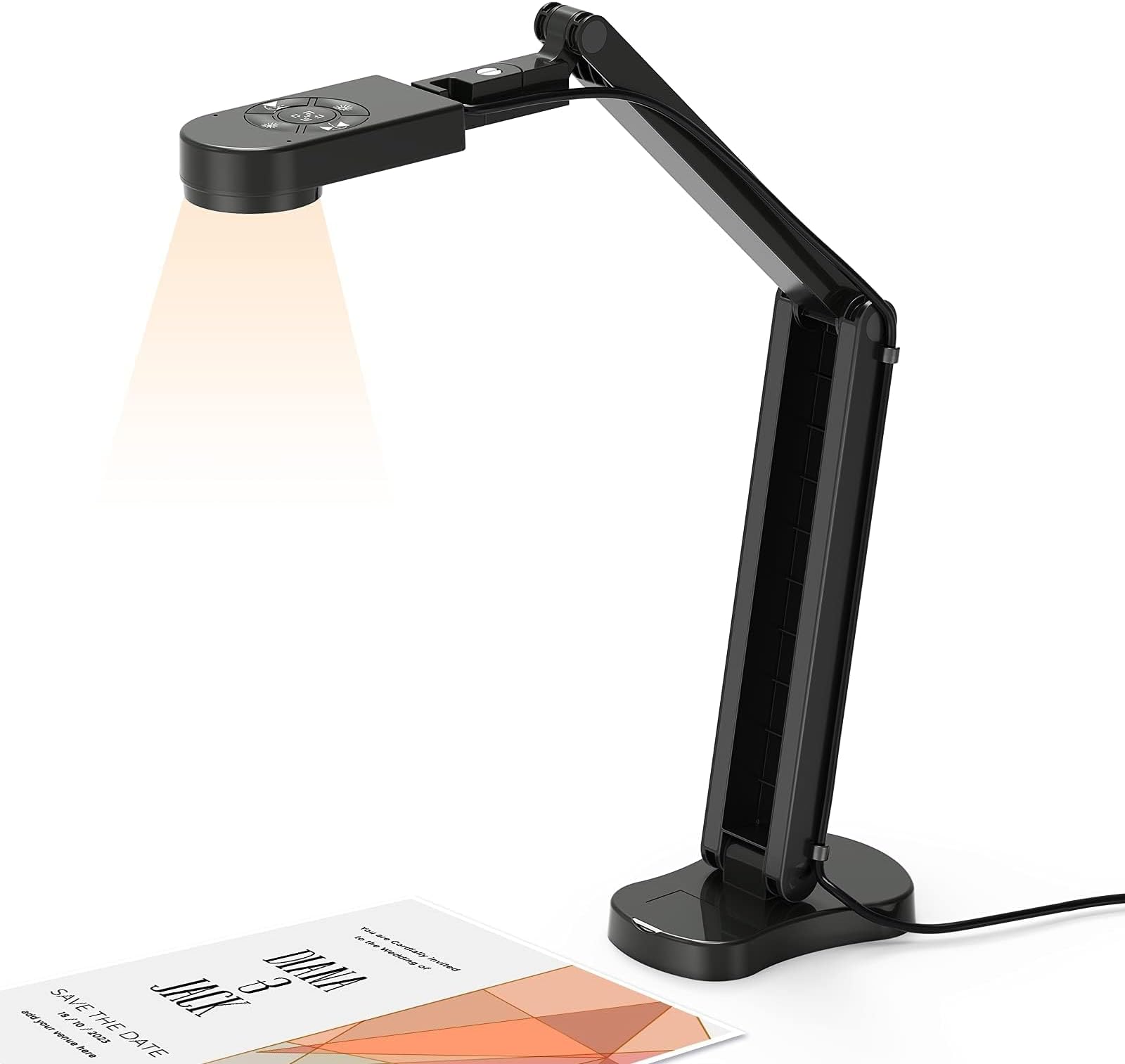
The Kitchbai 4K USB Document Camera combines an 8MP sensor with 30fps video, 3-level LED lighting, and image inversion to deliver professional-grade live demos and presentations. Its foldable, multi-angle design fits A3 documents and works seamlessly across Windows, macOS, and Chrome OS platforms with plug-and-play USB-C connectivity. Dual built-in microphones enhance audio quality, making it the ultimate tool for educators and professionals seeking flawless remote and in-person visual communication.


| ASIN | B0BB2Q8RK6 |
| Best Sellers Rank | #65 in Webcams |
| Customer Reviews | 4.5 4.5 out of 5 stars (624) |
| Date First Available | January 1, 2024 |
| Item Weight | 1.94 pounds |
| Item model number | KB-700 |
| Manufacturer | Kitchbai |
| Product Dimensions | 4.72 x 2.36 x 22.44 inches |
I**K
Quality
⭐⭐⭐⭐⭐ Excellent quality and very easy to use This document camera exceeded my expectations. The 4K image quality is crystal clear, and the 8MP camera captures text and small details perfectly — even on A3 size documents. Setup was truly plug-and-play on Windows and macOS, no drivers needed. The dual microphones work surprisingly well for live demos and online classes, and the 3-level LED light is very helpful in low-light situations. I also really like the image invert and rotation features, which make it easy to show books or handwritten notes correctly. The foldable design is compact and sturdy, perfect for a desk or classroom use. Works flawlessly with Zoom, Google Meet, and other apps. Great choice for teachers, online presentations, and live demonstrations. Highly recommended!
H**J
Great tool for teachers!
Bought this as a gift for my science teacher friend and she loves it! The image quality is super clear, setup was easy, and it works perfectly for live demos and showing papers or experiments to the class. The built-in lights and microphones are a nice bonus too. Highly recommend!
C**R
Good quality, easy to use
Got this so I can record myself working on my art, and so far it's been extremely easy to use. The details it picks up are great, and its microphone is also good at picking up sound (extremely funny to play the recordings back and hear myself singing along to the music I have on in the background). All in all, quite happy with my purchase!
T**L
Only negative was requiring to hit the focus button any time it was moved in the slightest
Video quality is great, built in light is helpful, you do have to hold the base with one hand any time you want to manipulate the camera. And at least I do, have to press the focus button any time the camera is moved. Even if just an inch higher or lower, it just doesn’t seem to have any auto focus at all, it will focus but requires me to press the focus button on the camera after I’ve moved it. It won’t automatically try to refocus on its own. Just seems odd. Luckily I keep the camera at about the same height from the material I’m presenting so I don’t have to press the focus button often.
S**L
Let me show you
As a teacher in a small private school I needed something to help me demonstrate things for the students. Most of the time my kids couldn’t see what I was doing so this little tool here made a BIG difference. It’s super easy to use, just plug it in and open the camera app on your computer. You can adjust the brightness by the push of a button. It folds down to a compact size and doesn’t take up much room when not in use. And the price isn’t too bad compared to some others. My only thing is image contrast. And honestly, this is just me being nitpicky. I can turn the brightness down but the contrast of the image can still make somethings hard to see. Overall I’m really glad I bought!
R**Y
Works as Intended
I am using this to teach Zoom classes and it works fine. I wish it had a zoom function, but otherwise there is really no issues.
M**7
Easy to set up, no driver to install!
This is a great tool for my older kids to use for art and school. My son said it was easy to set up and get focused. He commented that it was plug and play and made install easy. And we didn’t need to download new drivers like our new printers needs. Would love to see an option in the future to connect with I pads as that is what we use often for one of our art classes.
A**R
The Best!!
I really enjoy my Kitchbai Documentary Camera. It was easy to use and install. Actually, there wasn’t much to install. Just plug and play. My favorite kind of device.
C**N
Comoda per gli insegnanti.
O**R
La información erá un escáner y no es así, sólo es una cámara web y ni siquiera viene completa, le falta un control remoto y más botones en la base.
L**S
The packaging for this camera sets the tone - the setup instructions are printed on the outside, no need to dig for the manual. I've been using it to photograph documents and also record "first looks" at game books, recording via OBS. It works brilliantly. The focus button is quick and remains locked after use and the 3 stage ringlight around the lens gives great, even illumination with little to no glare on anything but the shiniest surface. As promised, you can mirror the image two ways using the buttons on top of the unit, and adjust the light in the same way. The ringlight was the only point where I had to double-check; you can adjust the brightness on the top buttons, but to turn it on or off you need to tap the printed fingerprint on the light itself. Not a problem once you know, but if you assume that increasing the brightness starts from 0, you might make the same mistake I did and start worrying because the top light buttons aren't doing anything. Overall this is highly recommended for anyone needing to photograph documents or record your literal desk/tabletop. It even works very well as a webcam for videoconferencing, but is high res enough to be unforgiving if you're not in full makeup :) This is a lovely piece of kit, and all that remains is for me to source a cover to sit over the camera for transport and privacy.
L**1
Mi hijo necesitaba un escáner práctico, multiusos y que pudiera llevar a todas partes. Así que nos decantamos por este modelo y está muy contento con él, porque no solo puede usarlo como escáner, sino que además hace fotos, vídeos y se puede utilizar como pizarra, cuando abres el programa "cámara" que por defecto viene con windows en el pc. Su manejo es muy intuitivo. Después de estirarlo para escanear, en la parte de arriba, por abajo, tiene una luz, que se puede encender y cambiar a más o menos iluminación según sea preciso. En la parte superior hay un comando de mandos, el del centro sirve para enfocar y los de los lados para mover hacia un lado u otro la imagen en el pc. Los de la parte superior e inferior también sirven para regular la iluminación. El uso es sencillo, hay que enchufar el escáner al pc, en mi caso es windows, pero también sirve para apple. Una vez encendido, se busca en windows la opción "cámara". Una vez que ya tienes preparado el documento en la mesa, comienzas el proceso de centrado. Esto cuesta hasta que te haces al aparato, pero en las instrucciones viene el enlace a un vídeo donde se muestra el funcionamiento, aunque no es demasiado claro... Una vez que ya aparece todo el documento en la pantalla del pc, puedes hacer foto, vídeo, escanearlo o incluso utilizar como pizarra interactiva. Desde luego, para su precio y lo pequeño que es tiene muchas funciones. Además, desde la tienda me han enviado unos consejos de uso, porque, como digo, al principio cuesta un poco hacerse con el uso, que os pongo por aquí para que sirva de ayuda: Te compartimos algunos consejos, puedes seguir los pasos a continuación, gracias. La cámara de documentos se instala automáticamente con el controlador, solo necesita conectar la cámara de documentos a la computadora, luego abrir el software correspondiente y seleccionar "Cámara USB" para usarla. En general, existe una variedad de sistemas informáticos, y los métodos para utilizar estos sistemas son los siguientes: 1. Sistema Mac: 1). Si necesita grabar un video, busque "Quick Time Player" en su computadora. 2). Si necesita tomar una foto, busque en su computadora "Photo Booth" 2. Sistema Windows 10: puede abrir directamente la "cámara usb" que viene con el sistema para usar. Si su computadora es una computadora portátil, también debe seleccionar "Cambiar cámara" en la esquina superior derecha de la computadora portátil. 3. Sistema Windows XP/7/8 y otros sistemas: si su sistema no puede encontrar ningún software, consulte la página 7 del manual "Sistema Windows XP/7/8", contáctenos, le enviaremos el software. Si no conoce el método de operación, puede ir a You-Tu-be para buscar "Kitchbai Document camera - MacBook operation method" o "Kitchbai Document camera - Windows 10 operation method" para ver el video.
S**.
Habe mir diese Kamera als Overheadprojektor-Ersatz für meine Unterrichte geholt. Preis/Leistung stimmt absolut. Sie war einfach zu installieren und macht ein gutes Bild. Kaufempfehlung
Trustpilot
3 weeks ago
3 days ago