Buy anything from 5,000+ international stores. One checkout price. No surprise fees. Join 2M+ shoppers on Desertcart.
Desertcart purchases this item on your behalf and handles shipping, customs, and support to France.
๐ฎ Own the clutch moment with precision and style!
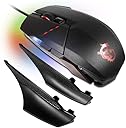
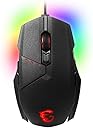
The MSI Clutch GM60 Gaming Mouse combines a high-performance Avago PMW3330 optical sensor with fully customizable RGB Mystic Light and durable Omron switches rated for over 50 million clicks. Designed for PC gamers seeking precision, personalization, and long-lasting reliability, this lightweight USB-powered mouse is compatible with multiple Windows versions and fine-tunes settings via MSIโs Gaming Center software.


| ASIN | B075B2DM87 |
| Additional Features | Ergonomic Design |
| Antenna Location | Gaming |
| Are Batteries Included | No |
| Are Batteries Required | No |
| Best Sellers Rank | #129,763 in Video Games ( See Top 100 in Video Games ) #3,390 in PC Gaming Mice |
| Brand | msi |
| Built-In Media | Gaming mouse, accessories, quick setup guide |
| Button Quantity | 3 |
| Color | Black with RGB Backlights |
| Compatible Devices | Personal Computer |
| Connectivity Technology | USB |
| Customer Reviews | 4.4 out of 5 stars 1,033 Reviews |
| Enclosure Material | Plastic |
| Global Trade Identification Number | 00824142146491 |
| Hand Orientation | Right |
| Hardware Platform | PC |
| Item Type Name | MSI Gaming USB RGB Adjustable DPI Programmable Gaming Grade Optical Mouse (Clutch GM60 GAMING MOUSE) |
| Item Weight | 0.25 Pounds |
| Manufacturer | MSI Computer |
| Model Number | Clutch GM60 GAMING MOUSE |
| Movement Detection | Optical |
| Movement Detection Technology | Optical |
| Number of Buttons | 3 |
| Operating System | Windows 10, 8.1, 8, 7, Vista, XP |
| Power Source | USB Powered |
| Range | 8.0 meters |
| Special Feature | Ergonomic Design |
| Style Name | Clutch GM60 |
| UPC | 824142146491 |
| Warranty Description | 1 Year |
C**S
Excellent build quality
Excellent build quality. Has a rubberized finish, so you don't get that sweaty feeling you get with a cheap plastic finish. Customization options in the included software are robust, and you don't have to keep the software running in the background for the customizations to continue working (big plus for me). Even with the weights, it's still a light mouse with all plastic construction, but I find this a good thing. With a few weights in the mouse, it's heavy enough to not slide around too easily, yet light enough for feathery movement. The style is a bit gamer-ish, but not so gaudy that I'm confusing it with a Transformer. You can also turn the lights off to have more of a normal looking mouse. Do take note, however -- this is a pretty beefy mouse. Recommended for medium to large hands. The design of the mouse is also preferred for palm grippers, not claw grippers. All in all, excellent mouse with a couple of extra buttons than normal for mapping in games. One last note -- some people are complaining that the colors on the scroll wheel are permanently set, and don't jive with the color of the computer system they built. This is half-true. However, out of the 5 colors offered, you can adjust the DPI settings of that particular profile. So, for me personally, the DPI settings the red profile were too high for me to use it efficiently, and lowering to a different color profile with a lower DPI, like a blue profile, doesn't jive with my system. So I adjusted the DPI settings on the red profile, and viola.
A**R
Hyperbole impossible; it's that good.
I've purchased 4 of these over the last few years. My original build used this mouse, and after 5 years I finally replaced it. It still works at 95%, but the middle mouse button now clicks 2-6 times per press, which ruins my game bindings. I still have that as a backup and simply bought a new one. There are very few mice on the market that can provide this kind of quality and feel at this price point. The surface feels almost like powder-coated metal, and the buttons are all medium-effort and sturdy-sounding when clicked. Programmable button mapping, LED lighting, and DPI settings with included software make this little thing a powerhouse of a basic gaming mouse. It is great for people with average to small hands, and it's laid out in a way that prevents accidental activation of the side/top buttons. If you want a mouse with 2-4 extra programmable buttons, nice back-lighting, and a really quality build for a good price, look no further. I rarely freak out over input devices, but this mouse has really held up to some brutal usage demands. As such, I will buy them until they stop making them (and will probably stock up when they do!).
M**O
Huge expectations for a huge mouse.
MSI is not exactly known in the gaming peripheral world, but I was willing to take the risk seeing as the price, looks, and features were too appealing to pass up. Now that I have it right here in front of me, I see that my initial judgement was spot on. The mouse is a well-built machine with an excellent fit and finish. The texture is a rubber-grip, matte type finish that feels solid and comfortable. The lights are the perfect brightness and the software included to change the color and assign buttons works well in tandem. The weight is adjustable, giving me the perfect amount of wiggle room in terms of picking my weight for FPS or MMO applications. The mouse is just solid and works like a great gaming mouse should. Speed, looks, bells and whistles: they're all there. I would recommend this mouse to anyone not wanting to buy a Razer and save about $30-$40. (Note: I have HUGE hands! This mouse is perfect for those not able to find gaming mice big enough for them to feel comfortable with. Those with small or normal hands may feel that this mouse is too big, You have been warned.)
C**R
Nice mouse. I bought it to use on my ...
Nice mouse. I bought it to use on my MSI laptop and did not expect to like it as much as I do. The texture is pleasant, not too coarse, but not smooth either. I would like for it to be slightly more grippy, however. The scroll wheel is fantastic, it is large, smooth, looks like it would be easy to clean, and presses in easily. The three side buttons and one top button are a nice extra. The laser sensor tracks well. The right side bulge is something that I had to get used to, but it's not bad. Overall it feels comfortable and I have found myself using it much more than I had intended. The software that MSI developed to go along with this mouse is functional -- it gets the job done. However, it's not the most intuitive. The mouse has 5 profiles, each one having 5 DPI levels (ranging from slow to faster than you would ever want to use). Each profile has its own scroll wheel backlight color, and each of the 5 DPI levels have their own DPI button backlighting, but these are not user-modifiable. This took a while to figure out, and I'd like to see them work on the software a bit more. But it does work.
K**A
This mouse is perfect.
I've had this mouse for a little over a year now, got it after the scroll wheel on my Razor Naga broke and all I needed was 5 programmable buttons. This mouse has been awesome, perfect size for my hands. My index and middle finger would get pretty bad cramps from the way my hand sat on the Naga but I have no issues with this mouse, it's more of an open palm than a claw mouse. Overall the design is comfortable and I think it looks good as well. The software included with it is pretty good but it has some kinks. The macro set-up takes some getting use to and the DPI, point speed, acceleration ect. settings go from painfully slow to light speed easily, it can be hard to find the right middle ground. Setting up bindings for the buttons is very easy and changing the lights is just as simple. Other notes: I don't use a mouse pad, it's sitting on a solid black glass desk and works fine, the plastic pads on the bottom has held up so far, haven't had to use the replacements yet. There were a few times I booted my pc up and for some reason the cursor was stuck to the left or right of the monitor and I was only able to move it up or down, not left or right. Restarting my pc fixed the problem. If it were to break I would buy a new one for sure.
B**N
Clutch GM70 Review
Pay attention, this review is for the CLUTCH GM70. No other MSI mouse. Summary: Decent build quality for the price and looks good. If you own other MSI Mystic Light compatible products and have the money, buy this. Pros: - RGB looks great - Adjustable DPI - Wireless and Wired connections - Customizable Cons: - Customizable but plastic pieces aren't as sturdy as I'd like. They are plenty sturdy if you're pushing down on the mouse like you normally would, but they come off very easily with pulling out or down on the mouse. Feels great in normal use but if you game on an uneven surface like your lap or a couch with folds, watch out. The side pieces might be coming off a lot.
Y**N
This is just the best mouse I had so far
I've been using this mouse for the last four years, and I keep using it with delight every day. Build quality is top notch in every way, it's very comfortable to use and precise, the buttons click quietly, and it features a long soft braided wire. And what to say about the lighting.. gosh, it's just sooo nice, powerful and living! This is a big mouse indeed, but having thin hands I haven't found it so annoying; and it is well-suited for left-handed people too as its design is quite symmetrical. Its weight can be adjusted through the use of weights, and they do make a difference.. and, as an extra measure, MSI added a set of replacement feet, which is a nice touch. I haven't played much with the software, though it looks to work as intended, on a Windows 7 rig at least. In a nutshell, I would totally recommend this mouse, even for day-to-day use. But you should check whether it is compatible with Windows 10 first.
D**R
Good mouse with some petty but annoying downsides.
Let me preface this by saying that i am not a FPS super twitch action gamer. I play a ton of Eve Online and War Thunder and am writing this review after my first day of heavy use with the Interceptor. My previous mouse was a Razer Death Adder but i needed just a few more buttons on my mouse. I bought the Interceptor because of the 5 star reviews here and because it was within my budget, and lets be honest, its a good looking mouse. Pros: This mouse is extremely comfortable. It is very form fitting to your hand with contours to rest your thumb and fingers on. The texture of the mouse is hard plastic with a very slight texture for grip. The buttons are mostly very well placed, although the front thumb button is a bit of a reach even for my big hands. The driver software it came with is easy to use and is self explanatory. I love the braided cord, gives it that battlestation look and feel. Customizable color and 5 different button profiles make this thing pretty and functional. DPI is adjustable all the way up to 16,400 according to the software which is honestly useless, you have zero control at that res. 2 of the 9 buttons are "up and down" buttons located directly below the control wheel, i like this for having my volume control even though they suggest using it as DPI+ and DPI- buttons. Cons: The weight system that it comes with is cool but the very tiny weights make little to no difference in the feel of the mouse. As of yet i cant figure out how to change all the LED colors, the software gives no option to select a "zone" and the mousewheel, "arrow buttons" and dragon logo are all different "color zones" the dragon logo is the only one that reliably changes. i now have a tri colored mouse and can only change one of the colors. Im putting this as a seperate paragraph because it is probably the most important thing that i havent seen mentioned in any of the reviews: My PC will not recognize the extra mouse buttons as seperate inputs (Mouse button 4,5,6 ect.), they must be bound to the predefined "windows functions" that the software offers you or you must bind them to a key combo. This is highly annoying when trying to set up all your games. You have to pick an obscure key combination that isnt bound to any other action and bind it to one of your mouse buttons. This may seem like not a big deal at first but for a gaming mouse it's pretty unacceptable.
Trustpilot
2 weeks ago
2 months ago