Desertcart purchases this item on your behalf and handles shipping, customs, and support to France.
⌨️ Elevate your workspace with the MX Mechanical Mini — where precision, style, and flow collide.
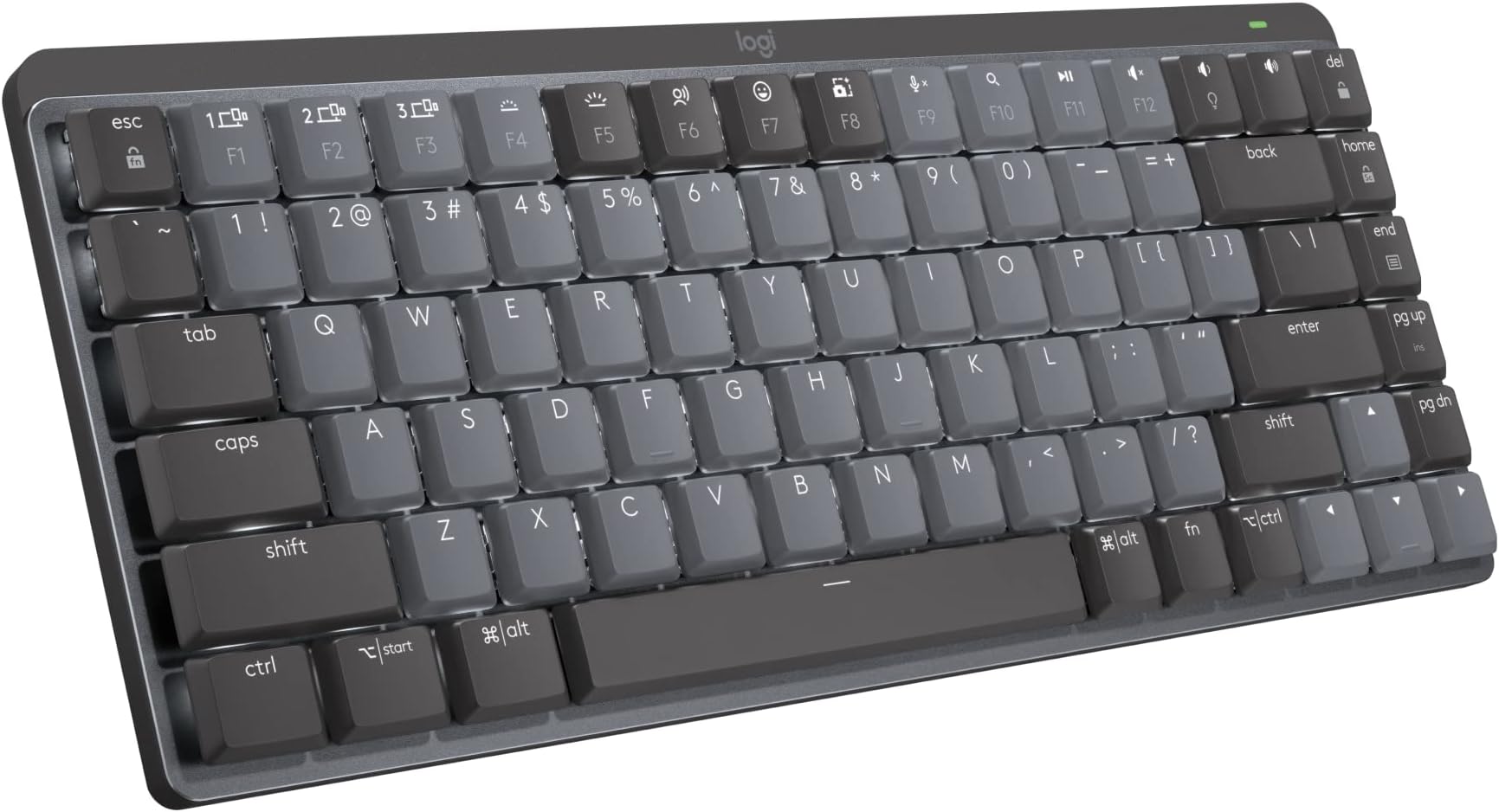
The Logitech MX Mechanical Mini is a compact, wireless mechanical keyboard featuring tactile quiet switches for precise, low-noise typing. It supports multi-device Bluetooth pairing with up to 3 devices, smart adaptive backlighting that responds to hand proximity, and USB-C quick charging offering up to 15 days of battery life. Designed for ergonomic comfort and sustainability, it incorporates recycled plastics and customizable function keys via Logi Options+ software, making it a premium choice for professionals seeking productivity and style.


| ASIN | B09LK73VHG |
| Additional Features | Illuminated |
| Antenna Location | Office |
| Best Sellers Rank | #22 in Computer Keyboards |
| Brand | Logitech |
| Built-In Media | Logi Bolt Receiver, Master Series MX Mechanical Wireless Illuminated Performance Keyboard, USB Cable, User Documentation |
| Button Quantity | 19 |
| Color | Graphite |
| Compatible Devices | Smartphone |
| Compatible Operating System Family | ChromeOS, Linux, MacOS, Windows |
| Connectivity Technology | Bluetooth |
| Customer Reviews | 4.2 out of 5 stars 2,244 Reviews |
| Enclosure Material | Information Not Available |
| Global Trade Identification Number | 00097855174680 |
| Hand Orientation | Ambidextrous |
| Item Dimensions L x W x H | 13.6"L x 6"W x 2.3"H |
| Item Highlight | Low-profile full-size, 3 device Bluetooth pairing, Smart backlight auto-adjusts, USB-C rechargeable, Up to 15 day battery |
| Item Type Name | Keyboard |
| Item Weight | 1.7 pounds |
| Keyboard Backlighting Color Support | Single Color |
| Keyboard Description | Mechanical |
| Keyboard Layout | QWERTY |
| Manufacturer | Logitech |
| Mfr Part Number | 920-010550 |
| Model Name | MX Mechanical Mini Master |
| Model Number | 920-010550 |
| Number of Items | 1 |
| Number of Keys | 108 |
| Number of Packs | 1 |
| Number of Sections | 1 |
| Power Source | Battery Powered |
| Recommended Uses For Product | Office |
| Series Number | 920010550 |
| Special Feature | Illuminated |
| Style Name | Tactile (quiet typing) |
| Switch Type | Tactile |
| Theme | keyboards |
| UPC | 097855174680 |
| Unit Count | 1 Count |
| Warranty Description | 1 Year Limited Hard Warranty |
| Water Resistance Level | Not Water Resistant |
Y**N
Never thought I'd love a keyboard so much...
It's taking a little getting used to the slightly different arrangement of some keys but man... overall, this keyboard KICKS TAIL!!! I love how it lights up, I'm always working in low light or the dark and my eyes aren't what they used to be so I just can't tell you how much of a difference it makes. I also feel like the key symbols won't/can't wear out because they're backlit. Typical keyboards have letter and words wear off over time, but I don't see how that's possible with this keyboard. It's not a "gamer keyboard" it's just a great basic keyboard with all the functions you need. Keystrokes feel amazing! Not sure how to describe but when you're typing it just feels really nice. A real quality built product and worth every penny. I'm considering buying another before they don't make them anymore... LOL Oh, the battery lasts forever on this thing too. You can turn it OFF when you're done for the day and you can set the keyboard to pair/work with multiple computers (even have keys configured differently if you like). The backlight shuts off when you remove your hands from the keyboard or stop typing for about 5 seconds, but its got this really cool "motion detection" feature that once you put your hands over the keys again or start typing it lights right back up! I'm telling you if you're in the market for a new BLUETOOTH keyboard and are willing to pay a little more for a NICE one... this is the board to have!!! I really love it. I'll give you the 1 thing I didn't like about it as I began using it... The FUNCTION ROW of keys has no space above the NUMBERS or Number pad, etc. So it's super easy to hit the wrong keys sometimes. I'll often go to use the "home" key and end up hitting the key to switch between machines, or the biggest one is the "lock" key the farthest top right key over the number pad's "minus/dash" key. I often go to hit the "minus/dash" key and end up locking my windows (having to sign in again). HOWEVER, using the Logitech software that is used to configure the keyboard I was able to just disable that lock key. I don't need a KEY for that anyway. When I want to lock my Windows session (log out) without shutting down, I'll just do it the normal way with my mouse (Start > Power > Lock). No big, been doing that forever anyway. Anyway, this keyboard is awesome. Especially, once you get used to it. Most times I get a new keyboard and have to get used to the key arrangements and different spacing anyway. Might as well do it with a great keyboard. 😊👍🏻 P.S. I have always been a Microsoft keyboard/mouse kinda guy. I didn't think much of Logitech until I got the MX Master 2 Mouse, which is now also my favorite ever. This keyboard goes with that mouse it's sold in bundles they're of the same product set.
V**U
Satisfying typing experience
I love this keyboard. I use the same monitor for my gaming PC and for my work Surface Pro. I had a wired keyboard which I had to unplug from the gaming PC and plug into the docking station every morning and then do the reverse after my work hours. It became tedious after a while, so I decided to upgrade to a wireless keyboard that can switch between multiple devices without having me crawl under my desk to do so. This one seemed not too expensive, had full width, and reviews were decent. I'm very pleased. Switching between devices is handled with 3 dedicated buttons for this specific purpose, no crawling required. I used the dongle to pair it with the gaming PC, and Bluetooth to pair it with my work computer. Now I can work from the kitchen or the yard if I want to. It's slightly louder than I expected, but is by no means clickety like some others I've used. Typing is now completely satisfying. The texture of the buttons is soft and the feedback is addictive and makes me want to type forever. As an unexpected bonus, I was able to connect the keyboard to my phone and type in mobile apps with a full keyboard!! What a novel and refreshing experience. The only complaint from my daughter is that it doesn't have colored backlight. It's just plain white.
T**H
**Exceptional Comfort and Performance: Logitech MX Mechanical Wireless Keyboard Review**
I recently upgraded to the Logitech MX Mechanical Wireless Illuminated Performance Keyboard with Tactile Quiet Switches, and it has been a game-changer for my daily work and gaming sessions. Here’s why I think this keyboard deserves a top spot on your desk. ### Design and Build Quality The first thing that caught my eye was the sleek, professional design of the Logitech MX Mechanical. It’s a full-sized keyboard with a minimalist aesthetic, making it a perfect fit for any workspace. The build quality is superb, with a sturdy frame that feels solid and durable. The backlit keys add a touch of elegance and are particularly useful for working in low-light conditions. ### Performance and Functionality Performance-wise, this keyboard is outstanding. The tactile quiet switches are a highlight, providing a satisfying typing experience without the loud clicks typical of mechanical keyboards. This is ideal for shared workspaces or late-night work when you don’t want to disturb others. The wireless connectivity is flawless, and I’ve experienced zero latency or dropped connections, even during intense gaming sessions. ### Comfort and Usability One of the key features of the MX Mechanical is its ergonomic design. The key layout is well-spaced, reducing finger strain during long typing sessions. Additionally, the keyboard’s slight incline helps maintain a comfortable wrist position, further enhancing the typing experience. The illuminated keys are customizable, allowing you to adjust the brightness or choose specific lighting patterns that suit your style. ### Battery Life and Charging Battery life is another strong point. On a full charge, the keyboard can last several weeks, even with the backlight on. The USB-C charging port makes recharging quick and convenient. I also appreciate the smart energy management features, which automatically adjust the backlighting based on ambient light and activity. ### Conclusion Overall, the Logitech MX Mechanical Wireless Illuminated Performance Keyboard is a fantastic investment for anyone seeking a high-quality, reliable keyboard. It combines excellent build quality, top-notch performance, and thoughtful features that cater to both productivity and comfort. Whether you’re a professional, a gamer, or just someone who spends a lot of time typing, this keyboard will not disappoint.
M**I
Flicker screen !?
I've had logitech keyboards for a LONG time and my old one (K850) was great but I wore down the keys over the course of 5+ years to where you couldn't see the lettering anymore.... So I needed a new keyboard and I've used an MX Keys at the office for about two years and I use an MX Mini as my goto/travel keyboard - and I was just going to get an MX Keys since it works great, but I longed for the old mechanical feel so I ended up getting this one instead. In general it's a great keyboard, on par with everything else from Logitech and it just works. (I mean, it's a keyboard, what do you expect) There is however a huge drawback that I haven't come across before and that is the height / narrowness (is that a word?) of the keyboard... The top of the keys are probably 3/4" to 1" off your desk, which is quite a lot, and because it's a "slim" keyboard there's really nothing between the edge of the keyboard and the keys themselves. This results in frequent accidental (left) CTRL press as you're typing away / resting your palm on the desk and depending on what software you're using at the time, s-t starts to move around and you have no idea why. As a casual gaming keyboard it's great but as a work keyboard it's not so great as you hit CTRL+random key at the time, at least once per day and it's super annoying.
B**6
Great first mechanical keyboard
I just finished my first long work session with this keyboard. I'm glad I bought it. It's very easy to type on. It's my first mechanical keyboard of any kind. I went with the quieter version. You still get the clicking sounds, just not super loud. I finally understand what people mean when they say typing on a mechanical keyboard feels more satisfying compared to non-mechanical ones. Highly recommend this keyboard if you're looking to get into mechanical keyboards. Definitely won't be my last.
A**S
Very disappointing for a $150+ keyboard.
I was very disappointed when I started using this overpriced keyboard. First of all, the build quality is inexcusable for a $150+ keyboard, especially from a brand like Logitech. The space bar and the backspace keys squeak horribly every time I press them. I understand that can be fixed by applying some white silicone grease, but I shouldn't have to do that with an expensive keyboard right out of the box. In addition, the rubber foot across the back of the keyboard has already started to peel off. I purchased the tactile (quiet typing) version, and while it isn't the loudest keyboard I have ever typed on, "quiet" is not at all how I would describe it. Someone in the next room or cubicle would definitely be able to hear you typing on this. I wonder how loud the "clicky" version is... And now, to address the backlight issue: Several reviews have mentioned problems with the backlight. It seems to function "as intended", but the design choices really make me scratch my head. The backlight will turn off just a few seconds after you stop typing, and doesn't turn on again until you press a key. That means that if you aren't constantly typing, the backlight will be turning on and off in a way that is very visually distracting at the bottom of your vision. If you take your hands away from the keyboard, you will not have the keys illuminated to help orient your hands when you start typing again. In a dark room that means you can't see anything on the keys. Even the timing of the backlight is inconsistent. Sometimes it turns off while I am still typing, sometimes it stays on for a minute or two with no input, like it got stuck. At first I thought I just had to adjust the timeout settings on the Logi Options+ app. Nope! No options! Just a couple of annoying, distracting backlight animations (like, random keys illuminating, why would anyone want that?!). I'm not sure who signed-off on the design for this thing or what they were thinking. Furthermore, the caps lock key has a distracting blinking whenever it is on, especially annoying if you are gaming and caps lock is set to something like toggle run/walk. The keyboard is Bluetooth only, which seems to work fine. But I would have liked to have the option to plug it in like a normal USB keyboard. As far as I know the USB plug is only for charging, but also leaves an always illuminated and fairly bright "charging" LED, very obnoxious if your computer is in your bedroom. In short: Don't waste your money on this. I will be returning mine.
V**9
Worthy Upgrade
I replaced a Logitech 860 with the MX, the quality and feel of the MX is very good. I love the feel of the keys. The key setup is more tighter than the 860, but after a couple days I’ve became accustomed to it and I like it. The difference in the feel and quality is significantly better than the 860.
D**.
Beware the USB dongles
Original review: It's a keyboard an it works After hearing people rave about mechanical keyboards, I decided to get myself one. I am not sure how representative of mechanical keyboards this one is, but I find it to be very similar to everything I have used before. The keys don't feel "clicky" at all. In fact, I am constantly running into an issue of resting my hands on the keyboard, and "mushing down" a key by mistake (in other words, "wwwwwwwwwwwwwwwww" because my finger pressed a key without me even noticing). I think I can get used to pulling my hands away from the keyboard to keep that from happening, but I find it weird that I now have to do this. I assumed the keys would be harder to press, not mushier than the cheap-o keyboards I have had. Another issue I have had is that the keyboard is not flat. I have tested it on multiple surfaces, including a glass table. I ended having to prop one side up with some paper. Not too happy about that. For whatever reason, this does not have a print screen key. Luckily you can remap it using the Logi Options+ software. Honestly, at this price, I am not sure I would recommend this keyboard. Ok, so why 4 stars? It does have some positive points. First, it looks pretty sharp. Second, aside from not sitting flat, it feels solid / well-built / quality. It is small, yet it is heavier than most keyboards. I am used to keyboards lasting "forever", so I will update here if/when I run into issues. Third, switching between different machines works flawlessly. Fourth, it allows me to bring my settings to all computers (e.g. remapping the screen capture key). Fifth, it has a rechargeable battery and it lasts long enough that I never have to worry. I do have a charging cable right on my desk, so every once in a while I just leave it plugged in, so I have never seen it go below 85%. What else can I say, it is a keyboard and it works. ----- Updated review: beware the USB dongles. Logitech mouses and keyboards (e.g. "MX Mechanical", "MX Master 3s", "MX Anywhere 3") connect either via Bluetooth, or via a USB dongle. However, the USB dongles are not all the same. For example, the "MX mechanical" keyboard only connects to a "bolt" dongle; and the "MX Anywhere 3" mouse only connects to a "unifying" dongle. Unfortunately, there is no clear guide / summary for which devices go together. You just have to check each device before buying to see what dongle it uses. Devices in the same generation are *not* guaranteed to use the same type of dongle. Here is my experience: I setup for myself a MX mechanical keyboard + MX Master 3s mouse and everything works fine. Both devices connect to a "bolt" dongle, so I have a "bolt" dongle on my laptop, and another "bolt" dongle on a desktop computer. I can switch between laptop and desktop with a press of a button. The keyboard/mouse itself is fine, the review can be seen above. My wife saw my setup and wanted the same, but she didn't want the MX Master 3s mouse ("it is too big"), so I got her a this same "MX Mechanical" keyboard and a pink "MX Anywhere 3". As it turns out, the mouse does not come with a "bolt" dongle, it comes with a "unifying" dongle. So now I have one "bolt" dongle which connects only to the keyboard, and one "unifying" dongle which connects only to the mouse. Thus, to "fix" this situation, I either need to use Bluetooth for everything (which I was trying to avoid to begin with), or I need to purchase 1 extra bolt dongle and 1 extra unifying dongle, so that each computer has both a "unifying" and a "bolt" dongle. Let's hope I have enough USB ports, or I will also need a USB hub. Even if you are aware that different dongles exist, you still need to be careful. If you buy a "MX Anywhere 3", you get a "unifying" dongle, but if you buy a "MX Anywhere 3 for business", then it has a "bolt" dongle. This is, by the way, how I ended up with a "unifying" dongle - while browsing the products, I opened up two tabs, one with a black MX Anywhere 3, and one with a pink MX Anywhere 3, except one of them was "for business" and the other was not. You might think this mess would warrant giant disclaimers ("DOES NOT HAVE A BOLT CONNECTOR"), or some kind of guide for which devices go together, but nope. For extra hilarity, Amazon bundles a "MX mechanical mini" (bolt) with a "MX Anywhere 3" (unifying). The whole thing is confusing, misleading, and just terrible user/customer experience. If I could start over, I would just get something else.
P**H
Lovely Product - but US layout not clear in product description
Product is excellent, but be aware this is a US layout keyboard. If you want a UK layout (or European) you need to look for this specifically on Amazon.
G**Y
Best office keyboard to date
This keyboard is pretty amazing. I own a HHKB, and a Pok3r. I build and customize my own keyboards. I bought this mainly because of the Logitech Flow feature. But first, I wanted to talk about the keyboard itself and why I think this is the best office keyboard to date. The build quality is amazing. It's sturdy, and the internals are very tight, which means, no rattling, no added noise or reverbiation. As a result, this is a very quiet mechanical keyboard (I can only speak for the brown switch version). The keycaps are made out of recycled plastic, but they don't feel cheap. They are quite smooth and easy to type with. The typing experience is very consistent and smooth (see type test photo). My typing speed is consistent with my other keyboards, but for me, it's definitely feels much better to type with tactile silent switches compared to my other keyboards. Even though this keyboard is a low profile keyboard, there are flip up feet at the bottom of the keyboard to lift it up a little more to get a better angle if that's what you prefer. The lights are nice, but what makes this keyboard really stand out is when it doesn't use the lights at all. Without the backlights on, this keyboard can do 10 months on 1 charge, which is completely unheard of for a mechanical full size wireless keyboard. I've had this keyboard for a couple of days on the whole time, and by now, my other wireless 60% would have died and required a recharge. There is only one issue with this keyboard which is customization. For Macros, only some of the keys (F Keys and Cursor Targeting Group) can be customized vs what I am used to, which is being able to customize every single key. For customizing the physical look itself such as changing the switches or the keycaps, this keyboard cannot be customized like that. The spacebar doesn't use standard stabilizer stem widths. You can replace every key cap except for the spacebar. You also cannot change the switches unless you know some soldering which is not recommended. As for the reason why I bough the keyboard. I absolutely love it! The logitech flow option allows me to move from my multiple computer setups with only one keyboard and mouse. I often multitask, I have a computer running 24/7 as my "smart tv" as well as my personal laptop, and my work computer. Considering how I can flow through all those computers from one set of mouse and keyboard without having to physically switch the mouse to use that specific computer is absolutely game changing. I feel like I am using one computer, even though they are all completely seperated. Whenever a product can make someone's life easier, is when you know you have something truly revolutionary. For work and every day use, this is absolutely the best office keyboard to date.
A**R
An Excellent Successor to the Venerable K800 Wired/Wireless Keyboard - Different but AWESOME!!
I really like this keyboard!!! In fact, I would say that this is a good/reasonable successor to the magical, venerable K800 Wireless and Wired I (like most) have an old wired K800 (attached to my work laptop), and was sooooo sad to see that I couldn't get another one. I took the leap and purchased the K800 wireless as a backup (what I writing this on..) for my personal laptop, and it truly is such a wonderful easy feeling keyboard. Again, logitech has discontinued the wireless one - enter to MX Keys (full size) I think that this one has that old school IBM-style feel, yet waay more robust, heavy (surprisingly), and modular (regarding key caps and triggers) I think, if past is prologue (as it invulnerably i..) this product to will either disappear, or get worse - I will by a 1 or 2 for safe keeping
P**S
Does not state that this is a US keyboard layout (on sale in the UK)
This is a US layout keyboard on sale in the UK... but no mention of that on the description.
A**N
Excellent keyboard with a few minor issues
This keyboard is a solid little keyboard. It’s very well built and has a satisfying feel and noise while typing. I really like how easy it is to switch between different computers. I have it set to use both my desktop PC and my MacBook Air when I dock it on my desk. It knows which is which and changes the keyboard layout accordingly. Everything just works. The battery life is excellent and it charges up really quickly over usb c. The Logitech Options app is really easy to use with everything laid out in such a way to just make sense. Also; the back lighting is simple but still nice. Ok onto my complaints. First I wish the key caps were a better material. They get glossy really quick from the slightly dirtiest fingers. I dunno if that’s due to the dark grey colour or the material itself. But for the price it should have better key caps. Second; I wish this thing had full rgb backlighting. The white is nice; but full colour would be better. Ok that’s it. So overall this is a great desktop keyboard that you could also take with you if you wanted to use your laptop or iPad on the go with it. It’s great for multi device use and the typing experience is really nice!! If you’re coming from the keyboard that came with your Mac or PC… or want something small and portable; this is definitely for you!
Trustpilot
1 month ago
1 week ago