

Buy anything from 5,000+ international stores. One checkout price. No surprise fees. Join 2M+ shoppers on Desertcart.
Desertcart purchases this item on your behalf and handles shipping, customs, and support to France.
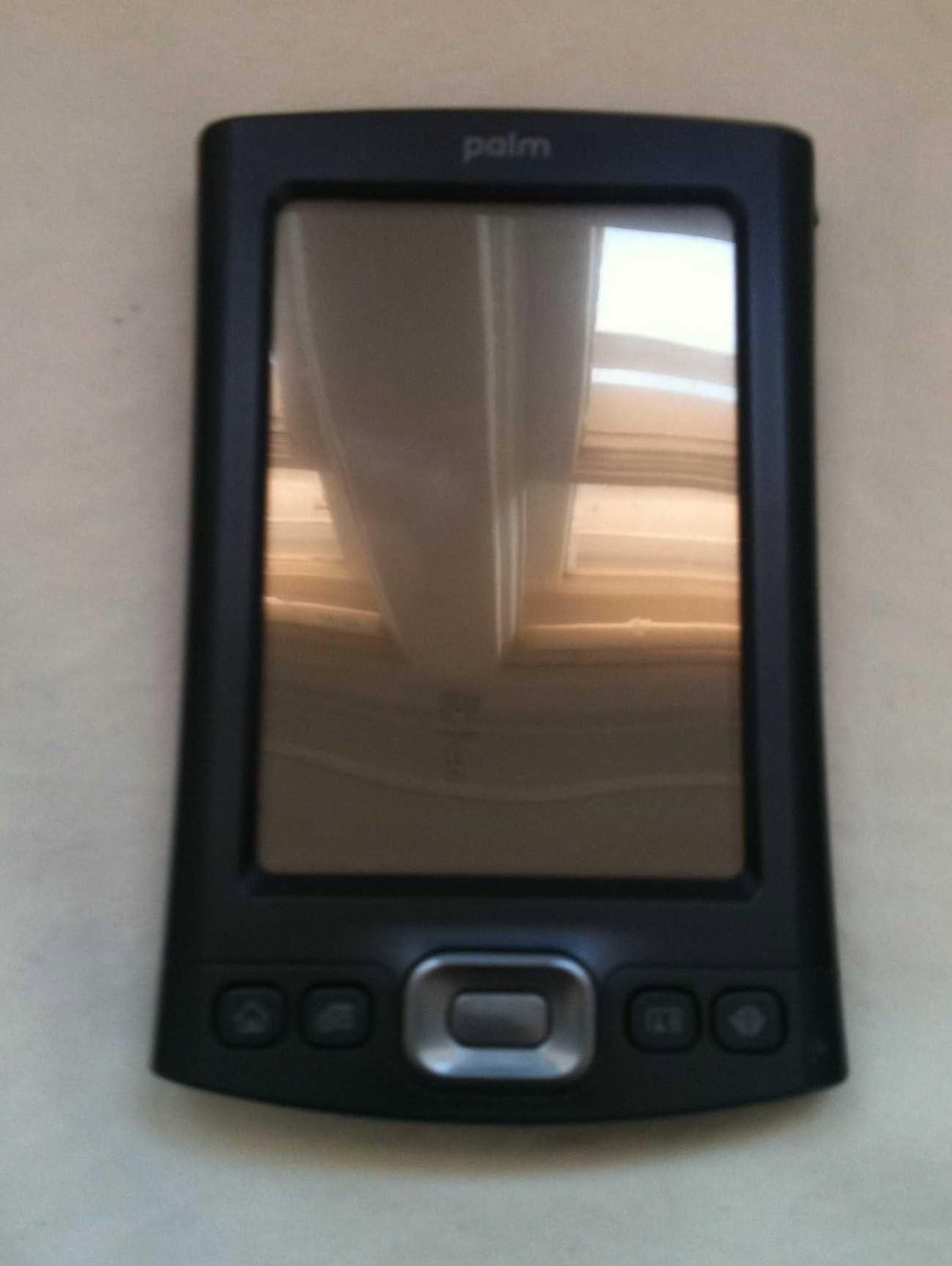
🚀 Power Your Mobile Office with Palm TX — Because Staying Ahead Never Goes Out of Style
The Palm TX Handheld is a sleek, lightweight PDA featuring a sharp 320x480 color display, 128MB of flash memory, and built-in Wi-Fi and Bluetooth connectivity. Designed for mobile professionals, it supports MMC, SD, and SDIO expansion cards and comes preloaded with productivity software including Documents To Go for editing Microsoft Office files. Compatible with Windows and Mac via Palm Desktop software, it offers seamless synchronization with Outlook and reliable on-the-go email and file management. Its combination of portability, connectivity, and office-ready features makes it a standout choice for professionals seeking efficient mobile productivity.
| ASIN | B000BI7NHY |
| Best Sellers Rank | #318,964 in Office Products ( See Top 100 in Office Products ) #32 in Handhelds & PDAs |
| Brand | Palm |
| Color | midnight blue |
| Customer Reviews | 3.9 3.9 out of 5 stars (858) |
| Date First Available | April 2, 2004 |
| Is Discontinued By Manufacturer | No |
| Item Weight | 5.2 ounces |
| Item model number | 1047NA |
| Manufacturer | Palm |
| Manufacturer Part Number | 1047NA |
| Product Dimensions | 4.76 x 3.08 x 0.61 inches |
A**J
Brilliant Piece of Mid-Priced PDA Engineering
First of all, I had been, as of late, only sporadically using a Zaurus ZR-5000, itself, a neat piece of useful and easy to use electonics. With a huge, b/w screen you can write on, it had amazing capability for its time, including wi-fi capable -- and this was for an item from the early '90s! However, with its built-in mini-keyboard and large LCD screen, it is relatively large and cumbersome. I used it primarily for contacts and sometimes for tasks and appointments, but it was really too large and heavy for me to carry around all the time (I don't carry a briefcase and rarely use a shoulder bag.). Using it for appointments just really didn't make sense if I wasn't going to carry it around. It had synching capabilities with a desktop, but it was slow and the built-in software was only marginally compatible with Microsoft's products. My wife has a Psion and, while more up-to-date than the Zaurus, was still in that league. I had been eyeing Microsoft CE products and Palms, but I thought they were expensive for what they did, and I wasn't too thrilled with the Graffiti writing. But finally seeing how streamlined, fast and capable the new ones are, I wanted to investigate. There are the Microsoft versions such as those put out by HP and Dell, but those are still pretty expensive. Then there were the Palms that were either high-priced as well, or the less expensive ones which were pretty much good for appointments and contacts. Not bad, and the new Z22 is a great value for something like that, but the Palm TX seemed, from other online reviews, seemed to be more reliable in terms of build quality than some in the recent past. Moreover, I have read that the Microsoft-based products tended to crash alot (the computer software has an internal conflict and inadvertently shuts down.). I saw this unit on Amazon for $270 with a short-term offer of a free Palm wireless keyboard. That sold me, and I knew Amazon offered a 30-day trial anyway. Having used it for about 6 weeks, I can tell you that it's brilliant for the money. The built-in office programs seemlessly integrate with the real things (and I understand that the software used by Palm is better than Microsoft's own stripped down PDA versions.). The internet browsing software works very, very well. It's not as robust as the one on your computer, but you'll be surprised as to how good it is. Blazer, the browsing software, is selective as to the sophistication of content it will download. While it's as fast as broadband, for sure, it's faster than my dialup used to be. There is also an option for text only downloads which is extremely fast. The screen is extremely bright and resolution is quite good. I use a Sony CRT at home, so I'm used to great color and resolution, but this is quite good. In sunlight, it's not great. This is not a substitute for a laptop, but for checking email on the go, or doing a quick Google, it's pretty amazing. We were in a theater a few days ago, and we were trying to figure out the background of an actress. There happened to be a wireless connection in the house, so I was able to quickly get on the internet and Google the actress and got our answer. As for the memory and processor, it's plenty for most lay-users, unless you're going to download LOTS and LOTS of games. On the other hand, with the SD card slot, you could load LOTS and LOTS of games on a card or two or three. The processing speed? Palm has chosen well for this price range. The TX cannot multi-task. When you leave one thing, it will close down when you open up another. This means the processor does less work. Because of the uncanny methodology of the browser, the speed of going around the internet is usually good, and has been tested to be faster than the basic Dell model which has a faster processor. The reason why the Dell seems slower is because the Microsoft operating system is more cumbersome. It is capable of multi-tasking, but it's greater sophistication results in slower everyday tasks performed on the PDA. The top of the line Dell is supposed to be terrific and potentially worth it for someone who is doing a lot of sophisticated stuff on their PDA, but it's almost twice the cost of the TX. For those who must have an even faster processer, the Palm Mobile Manager, retailing for $100 more than the TX, has a 33% faster processor and 4gigs of built-in memory (as opposed to the 128megs built-into the TX). For me, the TX is extremely impressive and I don't need the Mobile and I didn't want to spend more money. Considering the deal I got (w/free keyboard), it was a no-brainer. I have also bought two games for it, Village Sim and Bejeweled 2, and the bright, rich screen is just the ticket for them. And by the way, the Palm wireless keyboard works flawlessly.
J**N
Palm gets it just about right
As a compulsive gadgeteer I've been using handheld devices for years, including the Apple Newton, the Sharp handhelds, Casio, Dell, Handspring and others. All of them have ultimately been disappointing and far too limited or quirky for daily use. The Palm Treo 650 is a good unit, but I found myself constrained by it because of the the screen size and lack of WiFi. I looked at the LifeDrive and the TX and chose the TX. And I am absolutely delighted with the TX. It is not perfect, but it comes within spitting distance of being so. Since my list of the TX's deficiencies is short, I'll list it first. Battery life and non-removable batteries. That's my personal list of shortcomings, though I am sure others will have different opinions. The internal battery is not removable. I think that's a dumb move on the part of Palm or any other handheld device manufacturer. Bluetooth and WiFi connectivity quickly run down the battery, seemingly within a couple of hours or so. Third party battery extenders provide some relief, but being able to pack a spare battery or two for extended use would be a joy. The rest of the story is all good, all praise. The 320 x 480 screen is gorgeous. Not quite bright enough to easily use in bright daylight, it is more than usable under all other conditions. Rendition is very crisp and small type is surprisingly easy to read. Photographs are well displayed and video has no trace of ghosting. The built-in speaker is weak and, except for alarms, useless. Music and other audio listened to with headphones, however, is robust and rich. Video playback is very good. I've observed no skips so far using TCPMP. Graffiti2 is a delight. Much easier to use than earlier implementations adn far more tolerant of scrawls like mine. The touch screen is very responsive and I am able to write almost as fast on the Palm as I can using pen and paper. Very, very impressive. Palm's 5-wey toggle is, for the most part, a delight to use. Neither too squishy nor too firm, the only drawback for my large fingers is the center button. Ultimately I'll remember to use only a fingernail to access it. Until then I will accidentally hit one of the other toggles from time to time. Palm's normal applications are, as always, Palm's typical applications and I suspect most users will supplement or replace them with more powerful third party applications. The standout Palm app is the Blazer browser. So far it has handled every page I've thrown at it with grace, reformatting them nicely to fit. The four function keys can be easily programmed and are responsive to a fairly firm touch, which is nice because they will turn on the unit. The power switch is slightly recessed and requires a firm touch. A nice way to prevent accidental power-ups, but sometimes a bit of a pain when you want to quickly turn the unit off. The WiFi implementation is flawless. Set-up takes seconds and WEP is provided for. I have used my home WiFi outside at distances of more 100 feet. I've connected to three other WiFi nets without problem. Bluetooth is easy to set up. I've used the TX with a wireless keyboard and, frankly, the combination could replace my laptop in many instances. I'm glad to have chosen the TX over the LifeDrive. With 2GB SD cards selling for less than $100, I can get all the storage I need without the delay and possible fragility of the 4GB microdrive in the LifeDrive. Many have complained of the lack of a microphone on the TX. Since I've never used the voice recording capabilities of any of my handhelds, I don't see it is a lack. Others with different needs may justifiably disagree. Overall the TX is a pleasing purchase. It isn't perfect but it is the best handheld device I've owned to date. Now if they would add a camera and a phone in the same form factor . . . Jerry
A**R
Still pleased...4 month update
Based on some of the reviews, I bought this product with some trepidation. This is my 4th PDA. All have had the Palm OS operating system. My most recent PDA was a Sony Clie. It operated trouble free for two years. However, it recently met with an unfortunate end on an asphalt driveway. In selecting a new unit, I decided that I did not want to go through the learning curve of a new operating system and I wanted built in WiFi. This limited me to the Palm TX or the LifeDrive. From there, weight and function for the dollar, lead me to pick the TX. I have had the TX for 5 days. I did not have any problems getting it up and running. (I made sure that I downloaded all the latest software drivers and patches ). My Outlook data and Clie settings loaded with no problems. I have loaded music on to it and I connect to the internet daily (the 801b is a bit of a pain since our wireless at home is normally set for 801g). I like to use the TX for quick checks of email, without having to boot up the computer and get distracted reading the news and sports. Downloading of my Yahoo mail into Versamail has worked flawlessly. I have not had a problem with battery life when using the internet. I have not used a memory card. I will have to try that next. The screen resolution is superior to my Clie and a choice of display options allowed me to select colors easiest on my eyes. It has been easy to find functions, perform set ups and use the functions of the unit, without having to consult documentation. However, this is probably due to the fact that I am already very familiar with Palm OS. I am apparently one of the few people in the world who liked the old Graffiti. The TX uses Graffiti 2. Graffiti 2 is more like regular print, which has required some getting used to. I have no use for Bluetooth at this point. The TX is compatible with my old ThinkOutsidetheBox infra-red keyboard. I also purchased the cradle, which I regret. It takes two hands to remove the unit from the cradle, unlike my Clie, which I could grab and go. Given the fate of the prior PDA, I also bought a leather case. The leather case also hides the obvious plastic housing of the TX. (the comparable HP beats the TX on looks in my book). If one buys the case, it is probably easier to simply use the cables that come with the unit. That way, one does not have to remove the TX from the case in order to charge it.(Update - actually the cables do not work well with the unit inside of the case either) Update - 4 months later I added a one 1G memory card, which I keep in the unit at all times - no problems. After installing the correct driver - my ThinkOutSide key board works flawlessly. I also enjoy PocketTunes. I put music and an audio book on it, which was great for travel. It also picks up wireless networks reliability when I traval. It is better than my laptop at snagging the "hot spot". This has been the most functional and fun Palm I have owned. I hope it lasts at least as long as my Clie.
D**D
Rating a 1 is giving over credit! Not impressed!!! Palm is a horrible company!!
1st of all, The palm TX has alot of good features, I actually liked it, not having any problems for the first 4 months. After that though is when the nightmares started. The on off switch started going bad, the palm kept on crashing, and the 3.5 mm earphone jack went out. I called Palm support, the call is forwarded to a call center in India, after talking and argueing for 4 days, speaking to about 8 different people and 3 different supervisors, all telling me different things, I finally got the authorization to get my palm sent in. Well about 2 weeks later it came back... different device, all the programs i purchased for it didnt work on it... well about 3 weeks later the same problem occured with the palm. The earphone Jack went out. The same problem with both devices. Well i had to start the procedure over again, calling palm, by this time they are disgusted with me, because i dont back down. I want to know every detail, seeing i work in customer service, and i have to deal with alot of othe companies for my work. I got no help and they told me to call Corporate. Well this didnt go so hot either.... After about 5 hrs on the phone, i finally got hold of someone that well could kinda understand what i was saying, but offered no help, Amazon is awesome, they helped me very well in the situation, gave me a full refund. I would not recommend Palm to anyone, The company is going to fall apart if there customer service keeps this garbage up. Other than that.... It was an alright product, rated about 1/1100th out of a 1000.
A**R
Great device
I recently purchased the Palm TX (new) from Amazon. But before i did, i compared features and reviews of the Tx to the other brands on the market. After seeing it being listed in the top 5 PDAs, i eventually made it my choice. Everything about this gadget is great and being a systems engineer most of the software for it is compatible with my working environment. Using a palm vpn client along with PalmVNC, i can remote desktop connect to every system at work or home which runs standard VNCserver, via WiFi, bluetooth or using the hot sync cable connected to an internet connected computer. Accessing files remotely over vpn is a breeze (provided SMB signing is turned off on the server). From the mail client to the blazer browser is great although some websites with extremely large content generates a "page too large to be displayed" error, but that is a minor issue. I run my own email server and the blazer handles the SSL version of the webmail pretty well and also does a great job of displaying the pages. The Versa mail also sends and retrieves my emails using the imap protocol very well without any problems connecting to my server. As far as the battery life is concerned, it really does lasts long. When i first got the Tx, I had it powered on for more than 5 hours (with both wifi and bluetooth activated) experimenting with all it's features and testing it's interoperability with my home network (6 comps) and during that time the battery charge never fell below 97%, i even left it on for another 2 hours and it never changed. The hot sync feature also works well and keeps my items up to date. I even tried hot syncing over a VPN connection and it worked flawlessly The WiFi feature is excellent. It had detected some Wifi hotspots that my laptop could not even sniff furthermore detect. Even with a 1 bar signal the Tx connects with excellent speed while maintaining a stable connection. Overall this is an excellent device and what makes it better is that there are a lot of third party software for the Palm TX OS like Resco Explorer which supports SMB signing and Print Boy which allows printing of a wide range of document formats to a network, bluetooth or infared printer. This device has everything which suits my needs and more and it's far better than walking with a laptop since it cannot fit into my pocket. The Palm Tx defines the meaning of modern connectivity and since I've had it, i've never experienced any of those problems other users complain about especially with the battery life, the frequent reboots and the lockups even though i have a fair amount of third party apps installed. I now see why the TX is listed in the top 5. A formidable device when compared to some of the other more expensive "top dogs for it's price.
S**R
A Great All-Around PDA
The Palm TX is, IMHO, the best balance between price and functionality. This model lacks the bells and whistles of some previous Palm offerings, such as a built in camera or voice recorder. But what it lacks in flash, it more than makes up for in substance when it comes to the nuts and bolts features you need and use everyday. The built-in WIFI is very useful on the road and long overdue in a Palm device in this price range. The ability to check mail or look up an online reference on the go extends the device's useability tremendously in an online-centric world. Add to that a large screen, Documents to Go version 7 in ROM (for handling common Office documents), Bluetooth connectivity for your cellphone plus Pocket Tunes for listening to music, and the TX's utility approaches that of a laptop. The Non-Volatile File System (NVFS) has improved since its inception on the T5, although there are still occasional drawbacks such as slower application starts and sluggish Graffiti performance in certain situations. These, however, are easily overlooked when compared to the peace of mind in having a PDA that is very hard to kill in terms of losing data from a dead battery. Add a memory card and a good backup program (I use BackupMan-2.0), and it's virtually impossible to lose data for any reason. I may be one of the few people I know who prefers to carry a separate PDA and cellphone, rather then expect one device to do both jobs well. With the TX, I can let my V3-Razr be a small, light comfortable device for voice, while the PDA does the graphical heavy lifting and web access I need away from the office. I have yet to see a convergence device that was both comfortable to use as a phone and practical to use as a laptop replacement, but the phone/TX combo gets it done. I highly recommend the Palm TX as a balanced solution for the busy professional.
I**.
Lackluster Device from Palm does a little of everything poorly.
The Palm TX certainly has promise. It says it does a lot of things -- web browser, contact and data management, audio and video content as a media player... but it fails to deliver on almost all fronts. Most of the time, it's the little things that really detract from the device though. The handwriting recognition is embarassingly innaccurate at times, making it impractical for any kind of note taking. The device will frequently fail to power up when pressing the power button or any other button -- I'll usually have to mash the buttons three times before the device responds. I have a Mac, and it doesn't really sync well with it. Neither did the PocketPC I owned, so that's probably more the computer than the device, or the third-party syncing solution I bought. Battery life is so-so. The UI is clunky and while worlds better on the "high-res" screen compared to the Z22 or older low res screen, it's still feels dated, ugly and non-customizable. The browser is a joke. I thought this even before Apple delivered Safari on the iPhone. It's ugly, and it can't really render pages, it can't cache anything so you're forced to download pages constantly. Versamail was buggy and was of no use to me, either. Bluetooth syncing never worked right, the device would constantly drop the connection. Not sure again if this was my computer or the device, but it still never delivered. The only thing this device kind of sort of does right is contact and task management. I use it primary for that purpose. Everything else is impractically marred by its frustrating UI. But $250 is a lot to pay for a device that's supposed to be so much more but in reality is no good for anything beyond what it's cheaper sibling, the Z22 can do. But I bought TWO Z22's and they both died on me within a week, which basically forced me to buy the TX. The Tungsten E2 is a cripped version of the TX with no wifi and without that it's just an overpriced device. Palm really needs to change itself in order for me to ever consider buying another device. The Palm OS is dead and needs an overhaul, and I only keep this device around because I can't afford to buy anything else right now - I begrudgily keep it. It is much better than the PocketPC I owned, but when people ask me if I like the device, I have to say no. I don't like it. It works, sort of, and I so I merely tolerate it. I shouldn't have to to say that about a device like this.
B**R
Palm TX
I recently purchased a new Palm TX after my first one was damage during a unexpected dunking. Why would I purcahse another TX to replace the old one when there are smartphones which does the same thing in both the Palm and Windows OS? Simple because I was thrilled with the old one. There are people who will complain that the Palm OS is old, and that Palm needs a new one, but these are the reasons that I love my TX, and the Palm OS that is in existence. It was easy to operate right out of the box, therefore insuring that I was able to get organized quickly without spending a lot of time figuring out how to operate it. I get all the benefits of an iPod at the same time I have an organizer, a book to read, games to play, internet connection, all in one easy to use package, and with SD cards I don't have to worry about running out of memory. And usually if I need something else to make my life easier there is software galore to choose from, and quite a bit of it free, which fits my budget very well. Liftestyle enhancer: As a student I found the flashcard programs very helpful in studying, I found software to help me keep track of my teachers' offices, my grades in the class, and the homework assigned. As a worker, I found software which helped me keep track of the hours I worked as well as what I earned on each day, clocks to alert me when it was time to take a break, and a time to return to work or study. While waiting in lines I could study, play a game, listen to music or even watch a movie or a videopod of the news, or even read a book. At wi-fi hotspots I could check my email, my stock portfolio, or even im a friend, co-worker or fellow student. Do I care that the OS that Palm has is an old one when I can keep track, with ease, of my schedule, have a little fun and relaxation, and not have to carry around a lot of devices in order to do so? It works, it did all that I wanted it to do when I first purchase it, and I have found even more things to enjoy about it. Palm TX ROCKS!!!!!!!!!!
P**R
Still prefer this over my smartphone
Much easier to stay organized with this than with anything else. The battery's also a lot better.
S**E
Four Stars
Good working condition. It is working well.
O**G
Five Stars
Good item. Thank you.
C**N
Five Stars
Bon produit, délai de livraison respecté. Tout est parfait.
R**R
Compatible with Windows 8 but not Outlook 2013
A little disappointed as I had contacted the supplier to determine compatability with Windows 8 and Outlook 2013. It will sync via Bluetooth with Windows 8 but will not sync with Outlook 2013. Otherwise it seems to be a good product.
Trustpilot
2 weeks ago
1 week ago