Buy anything from 5,000+ international stores. One checkout price. No surprise fees. Join 2M+ shoppers on Desertcart.
Desertcart purchases this item on your behalf and handles shipping, customs, and support to France.
๐ Elevate your home network to WiFi 6E speed and coverage โ because buffering is so last decade!
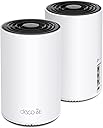
The TP-Link Deco AXE5400 Tri-Band WiFi 6E Mesh System (Deco XE75) delivers cutting-edge WiFi 6E technology with a dedicated 6 GHz band, covering up to 5500 sq.ft. Its AI-driven mesh intelligently adapts to your environment, supporting up to 200 devices at speeds up to 5400 Mbps. Easy app setup, Alexa compatibility, and robust security features make it the ultimate upgrade for seamless, future-proof home networking.


| ASIN | B09VW5JHPH |
| Antenna Location | Gaming, Home |
| Antenna Type | Fixed |
| Best Sellers Rank | #2,059 in Computers ( See Top 100 in Computers ) #6 in Whole Home & Mesh Wi-Fi Systems |
| Brand | TP-Link |
| Built-In Media | 1 x Quick Installation Guide, 1 x RJ45 Ethernet cable, 2 x Deco XE75 units, 2 x Power adapters |
| Color | Black and White |
| Compatible Devices | Gaming Console, Laptop, Personal Computer, Security Camera, Smart Television, Smartphone |
| Compatible devices | Gaming Console, Laptop, Personal Computer, Security Camera, Smart Television, Smartphone |
| Connectivity Protocol | Wi-Fi |
| Connectivity Range | 5500 Square Feet |
| Connectivity Technology | Wi-Fi |
| Control Method | App |
| Controller Type | App Control |
| Coverage | 5500 square feet |
| Customer Reviews | 4.4 out of 5 stars 4,357 Reviews |
| Data Transfer Rate | 5400 Megabits Per Second |
| Frequency | 6 GHz |
| Frequency Band Class | Tri-Band |
| Frequency band class | Tri-Band |
| Global Trade Identification Number | 00840030707131 |
| Is Modem Compatible | No |
| Item Dimensions L x W x H | 10.5L x 10.5W x 16.9H centimeters |
| Item Type Name | WiFi 6E Mesh |
| Item Weight | 2.69 Pounds |
| LAN Port Bandwidth | 10/100/1000 Mbps |
| Manufacturer | TP-Link |
| Maximum Upstream Data Transfer Rate | 2402 Megabits Per Second |
| Mfr Part Number | Deco XE75(2-pack) |
| Model Name | Deco XE75 |
| Model Number | Deco XE75(2-pack) |
| Model name | Deco XE75 |
| Number of Antennas | 3 |
| Number of Ports | 6 |
| Operating System | RouterOS |
| Other Special Features of the Product | Alexa Compatible, Guest Mode, Internet Security, Access Point Mode, Beamforming, Parental Control, QoS |
| Security Protocol | WPA3-Personal |
| Special features | Alexa Compatible, Guest Mode, Internet Security, Access Point Mode, Beamforming, Parental Control, QoS Special features Alexa Compatible, Guest Mode, Internet Security, Access Point Mode, Beamforming, Parental Control, QoS See more |
| UPC | 840030707131 |
| Unit Count | 1.0 Count |
| Wi-Fi Generation | WiFi 6E |
| Wireless Compability | 802.11ac, 802.11ax, 802.11b, 802.11g, 802.11n |
| Wireless communication standard | 802.11ac, 802.11ax, 802.11b, 802.11g, 802.11n |
F**B
excellent
excellent
M**D
Very good router.
I replaced my expensive linksys router with this one and I am more than satisfied. Very much recommended if youโre having and internet connection upto a gig.
H**D
Used item and damaged box
Product received is not new and package was damaged
M**R
Power plug difference
I bought the extension to add more units to my house so that's a sign that the main product is great However, these shipped with American power plugs and now I need something to convert them to the UAE plug version
H**I
ุงูู ูุชุฌ ู ู ุชุงุฒ . ุชู ุฅูุตุงู ู ูุชุฌ ุบูุฑ ุฌุฏูุฏ
ุชู ุฅุฑุณุงู ู ูุชุฌ ู ุณุชุนู ู
W**N
ู ูุชุฌ ุฌูุฏ ุฌุฏุง
ู ูุชุฌ ู ู ุชุงุฒ ููู ุงูุงู ุงูุซุฑ ู ู ุณูุชูู ูุดุบุงู ุงูู ุดู ุชุญู ุฌูุจ ุงูุฑุงูุชุฑ ุงููุงูุจุฑ ู ู ุบูุฑ ุญูุงุฌุฒ ุนุดุงู ู ุงููุทุน
M**E
One of the very best mesh routers you can buy
I am a techno-geek. Have degrees in electronic engineering and in computer science (networking). Have been working in the computer and telecommunications fields for the past 45 years. Way before Al Gore even invented the internet. I have a ranch style house with full basement; approximately 3,000 sq feet + 2 car attached garage. I normally have 2 routers active; main router for all ethernet connected devices as well as providing VPN connection (Linksys WRT3200ACM); which also connects to the 2nd wireless router a netgear R7000 for my normal open WIFI for non VPN traffic and guests. Both routers are in the downstairs, centered, and work good. The VPN router/WIFI covers the areas of the house for fixed/PC/Laptop that use VPN; but the netgear providing clear WIFI couldn't cover the entire house with a usable signal; even though the R7000 is a very good high end wireless router. It covered MOST of the house, but none to the garage and very little outside front or back; and a couple of sketchy places in the house. I tried wifi extenders and even another router as an access point. Problem with those are there is no smooth transition when walking around with a cell phone, tablet, taking laptop out on the back deck, and other mobile scenarios. Great if you're going to a spot and staying there; but extenders and AP are not good if you're moving around. So, I went with a Mesh system; the TP-Link AXE5400 XE75. This has been awesome. Setup is easy, just follow the app instructions. I left my primary Linksys VPN router as is, and simply removed the Netgear R7000 and replaced it with the TP-Link. (Yes, double NAT is fine for 99% of traffic; IF the primary router, in my case the linksys, is set up properly to allow traffic flow to the TP-LINK to work properly). Anyway; the main TP-LINK router is where the netgear was, and I wireless connect the second slave node on the main floor. This is working great. My VPN linksys wired/wireless router still covers the 2 home offices that use the vpn; and most of the house for the other rare vpn occasions. The new TP-Link XE75, between the downstairs node and the main floor node, are covering every inch of the house, garage, back yard, and front yard. And being I gave it the SAME SSID name and password that the Netgear USED TO BE, I didn't have to change any settings in ANY of my wifi devices. Not even security cameras, Roku, AppleTV, phones, tablets, laptops, etc... All the devices were instant connections. And when I roam around the house, yard, deck, etc... the portable devices like phones and tablets transfer from the one node to the other node seamlessly. I was considering getting a 3rd node, but after using this for the last month, there's no reason to spend more money. This is the best setup I could have wanted. Definitely buy it if you need PORTABLE WIFI COVERAGE for phones, tablets, etc... that move around a lot. If your devices are pretty well fixed and don't move, like streaming tv boxes, smart tv, laptop/computer in an office, etc. then learn to better position your existing wifi router for better coverage or look into using an extender. Extenders are great if you're staying in one place; because it's shows a different SSID than the main and your device can't auto switch between them. But for fixed devices or scenarios where you stay put for long periods of time, extenders are great. Especially for the cost of the TP-Link. I got it on sale, but an extender is still much cheaper. But if you need the mesh technology so you can be more mobile with uninterrupted connections, then this is the mesh wifi for you.
K**S
nana
muy bien internet mas estable
J**.
Best router I have used so far. Super FAST!!!! and setup in the app was easy
I typically don't write reviews but this time I feel I really want to write one for this product. My home is is not that big (~2000 sq ft) and in the past I have been using Google Nest router with a Nest point. The next router is located in the living room and the point is in the office. The connection in office is every weak and unstable. My internets speed is 400M download but I only get around 20M download in my office, and recently it even dropped to around 1M. I tired to reset and router and place the point at different locations but still no help. And the signal on my Ring doorbell and another Ring camera right outside of garage door were also very week. My Tesla on the drive way can barely detect the wifi signal. Finally I decided to try a different router. After reading so many reviews, I decided to go with Eero 6+ and I bought the package with two Eero 6+ units. Setup process was not smooth and it took me a couple of trials to get it up running and I can get over 100M download speed in my office. Much better than before so I was happy, until soon after I realized this product has ZERO parent control functions in the App unless you pay $99/year for the subscription???? this is totally absurd. I immediately returned the Eero 6+ and purchased this TP-link Deco AXE5400. The setup process was smooth and I could setup everything in less than 10 minutes. I placed the second Deco unit at the same location as the previous Nest Point. When I tested the internet speed, I was totally blown away!!! 400+M download speed everywhere in my home now!! I should have thrown away the Nest crap much earlier and switch to this product. Why should I have been suffering slow internet connections for such a long time when paying for 400M internet? This TP link Deco router is great, and App is easy to use. The only thing needs to improve is that it is hard to tell which device is which as the name shown in the App is not obvious. For example, we have three iPhones with different name in the family but all three are shown as "iPhone" so I need some extra work to figure out which devices are kids devices in order to setup parent control. But overall this is a great product for this price.
A**R
Fastest wifi ever
This is the second time I buy this two unit mesh router. The whole rather large house is now well covered. I highly recommend it.
Trustpilot
1 month ago
5 days ago