We remain fully operational. Our teams are working around the clock to ensure your deliveries continue safely.

DOWNLOAD THE APP


Copyright © 2025 Desertcart Holdings Limited
DOWNLOAD THE APP


Buy anything from 5,000+ international stores. One checkout price. No surprise fees. Join 2M+ shoppers on Desertcart.
Desertcart purchases this item on your behalf and handles shipping, customs, and support to France.
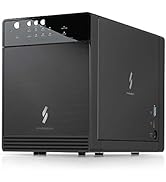
💼 Elevate your data game with the ultimate 4-bay storage enclosure—because your files deserve the best!
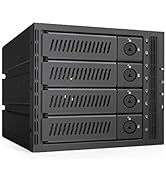
The Mediasonic PROBOX 4 Bay DAS enclosure supports up to four 3.5" SATA drives with a combined capacity of 120TB, featuring SATA III 6Gbps transfer speeds. It offers dual USB 3.0 and eSATA connectivity with a one-button interface switch, built-in temperature sensors, and smart fan control for optimal cooling. Compatible with Windows 10/11 and Mac OSX, this metal-constructed enclosure is designed for professional-grade storage expansion and reliable high-volume data management.







| ASIN | B09WPPJHSS |
| Best Sellers Rank | #68 in Enclosures |
| Brand | Mediasonic |
| Built-In Media | Main Unit + Accessory |
| Color | Black |
| Compatible Devices | Desktop, Laptop |
| Customer Reviews | 4.1 4.1 out of 5 stars (355) |
| Data Transfer Rate | 6 Gigabits Per Second |
| Enclosure Material | Metal |
| Hard Disk Form Factor | 3.5 Inches |
| Hardware Interface | USB 3.0, eSATA |
| Hardware Platform | Windows, Mac |
| Item Dimensions L x W x H | 6.8"L x 4.9"W x 9"H |
| Item Weight | 4 Pounds |
| Manufacturer | Mediasonic |
| Memory Storage Capacity | 72 TB |
| Supported Devices Quantity | 4 |
| UPC | 629329002368 |
| Warranty Description | 1 Year Warranty from Mediasonic Store |
T**M
Quick, easy, and effective
Replaced an old Proliant Micro server (NxxL 1st gen) that would keep losing cheap Flex ATX power supplies every year or two. Was looking for a replacement that also had 4 bays, low power consumption and no need for RAID to drive a headless Linux media NAS with several Docker apps installed. Paired it with an older EliteDesk USFF which was already doing other related duties. Fit and finish is fantastic, better than expected. It's still slightly on the cheesy side and the lights are excessively bright (I'd recommend some black tinting tape). Drive installation was very easy. Much smaller than I expected. Options are dead simple and you basically know how to operate it from the small labelled picture on the folded quick start guide. Fans are quiet, even on max, although I'm not yet sure how well they are cooling the drives. Auto-sleep function also works well (I wouldn't use the auto-off as it fully powers down and doesn't power back up). I have been using it in USB mode since I am using a tiny, slim desktop with no expansion options and it has worked well so far. Drives were detected right away. I have not yet gained S.M.A.R.T. visibility but hope to at least get a basic "healthy" status. It's not technically supported (Linux that is) so not something I'd ding it for since I can read :-) Really nice unit so far. If all goes well, may pickup the 8-bay version for my backups. MAY 2025 UPDATE - Still running strong, no new fan noise/vibration, good disk health, never once had to reset due to disk communication loss. Have had power loss in my home where I had to manually turn the enclosure back on, but basically non-issue. Maybe people have problems with the USB 3.2 version and/or RAID? Was happy to see Mediasonic back in stock so immediately ordered the 8-bay eSATA/USB 3.0 when it became available. Both connection options exceed the network connectivity to the attached PC so no need for 3.2
A**E
Bright Lights, Good Value,
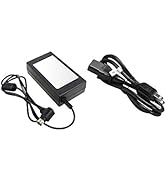
I add my voice to the small group who think that a drive activity indicator does not need to be bright enough to read the fine print in a EULA. There is a six-inch piece of black electrical tape in the future of my ProBox. The unit came with a map-fold sheet labeled 'Quick Installation Guide' on the front, and a 'Thank You' note. Both had different web links that offered a manual. I could not make either of these links work. When I came to write this review I discovered a bullet in the 'About This Item' section that offered a link to a manual. After scrolling up and down the page for a while I found the link rendered in the smallest type, just where the bullet said it would be. This link worked for me and led to a PDF version of the same map-fold sheet that came with the unit. In spite of what it says on the front, that sheet apparently is the manual. As such it offers pretty good graphics with mediocre and obviously translated accompanying text. The most glaring fault is the total absence of technical specifications. It does have enough information to get the unit set up and running. One of the things you may need the manual for is how to get the unit open. It features a unique set of molded plastic latches, one for the hinged front panel (which comes off when you open it) and a different style set-of-two to remove the plate that holds the drives in their bays. These appear fairly sturdy but I wonder about their longevity in the warm environment. Fortunately they don't appear to be necessary for the operation of the unit. As a person with experience using external drive enclosures I found the setup reasonably easy. The unit and all drives were immediately recognized by my eSATA I/O card and have run seamlessly for about a week. I am not a fan of power bricks and this one looks particularly vexing because it uses a right-angle connector to plug into the side of the unit at the back. This means you can't put that side up against anything or have two units side-by-side without a gap. I read some comments about overheating. I have not experienced this. I loaded the ProBox with four 7200RPM terabyte-sized drives and set it to a multi-hour backup task. I never saw temperatures in excess of 41°C. It didn't even ramp up the automatic fans. In any case there is a manual fan control that can turn them up to a dull roar. I used eSATA to hook the ProBox to my MacPro and discovered I had to disable the automatic shut-off feature because it would not wake when the computer came out of sleep mode. This might work better with a newer computer or over USB. This isn't a big power-waster because the computer system spins down the drives in sleep mode. I found the operation of some of the front panel push buttons less than intuitive. To change the interface mode you must hold the button for several seconds. To power the unit on you push and release the power button. To power it off you must push and hold the power button. Bottom Line: In spite of some quirky design choices, overall this appears to be a reasonably well constructed unit at an attractive price. I liked the first one well enough I ordered another.
R**D
I highly recommend this enclosure
I**L
I got my original boxes that were USB 2.0 and eSATA and have used them non-stop for over 10 years... they are simple to use but required a esata card with port multiplier to use, which made them a bit complicated to set up. The only situation I had for all those years was a power supply for one that died and had to be replaced. When COVID hit, one of the boxes died and I replaced it with a newer esata/USB 3.0 model but it was used as all new stock were impossible to find. And 2 years later, that is the box that has now died on me, but it is possible that it's due to power surges and such as these last few months, the city has had a lot of problems due to many storms and such, and it may have also damaged my UPS that should have prevented damage to my devices including these boxes... I'll never know. But that said, this box is replacing that other one (and is the exact same) and I will hope that it will last as long as my other older boxes that are still going strong so far. These boxes are simple to use, with only one annoyance of needing a small handle to be installed on the drives. The fans are very silent and aside the situation that requires me to get a replacement, have been very solid and working very well for a lot of year. In time I will most probably need to replace them for a more modern setup as the old boxes are supposedly limited to 4TB drives (while the newer ones are able to use much larger drives) and will switch to USB 3.0 (or better) and leave the eSATA in the past so to prevent the headaches I've had due to that. I almost went with the 8-bay boxes, but reviews have been alarming in reference to the number of issues that people have had compared to the 4-bay ones, so I'll have to see when the time comes. But for now, these boxes have been great, have been through constant use (24/7) and I've enjoyed them greatly, and for a price range that left all competition far behind.
S**N
Bought this to house 4x SATA drives from a broken PC. Really easy to assemble and place the drives, and no problems accessing them once seated. Intructions are fairly idiot-proof as well.
H**I
Works well as a JBOD, good data transfer speed. Front cover is held down by a flimsy plastic catch the broke on the second opening.
W**R
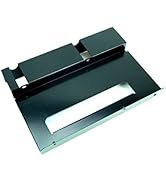
The blinken lights I find a bit too bright, especially the drive access ones as they flash quite brightly on and off a bunch. The set up was quite reasonable. The instructions were clear enough and the process only required the use of the included and rather cool little screwdriver for the drive brackets. I fell one could get by without screwing them on but YMMV. The actual plug in and access to the drives was as painless as anything i have experienced in the past 25 years. Speeds seem to be right. I am seeing the expected SATA 3.0 speeds I would be getting over a native SATA port and cabling. I also found the cabinet's construction to be much sturdier than expected. The internal plate that covers the drives and acts as a brace being a solid metal piece was a welcome surprise. The unit itself is sold and doesn't feel cheap.The case front and its plastic could have been better but it is adequate for its purpose. I had a coupon and an Amazon Rewards voucher so my cost was less than the price shown. Would buy another.
Trustpilot
1 month ago
1 month ago