

Buy anything from 5,000+ international stores. One checkout price. No surprise fees. Join 2M+ shoppers on Desertcart.
Desertcart purchases this item on your behalf and handles shipping, customs, and support to France.
๐ Print Smarter, Ship Faster, Stay Ahead!
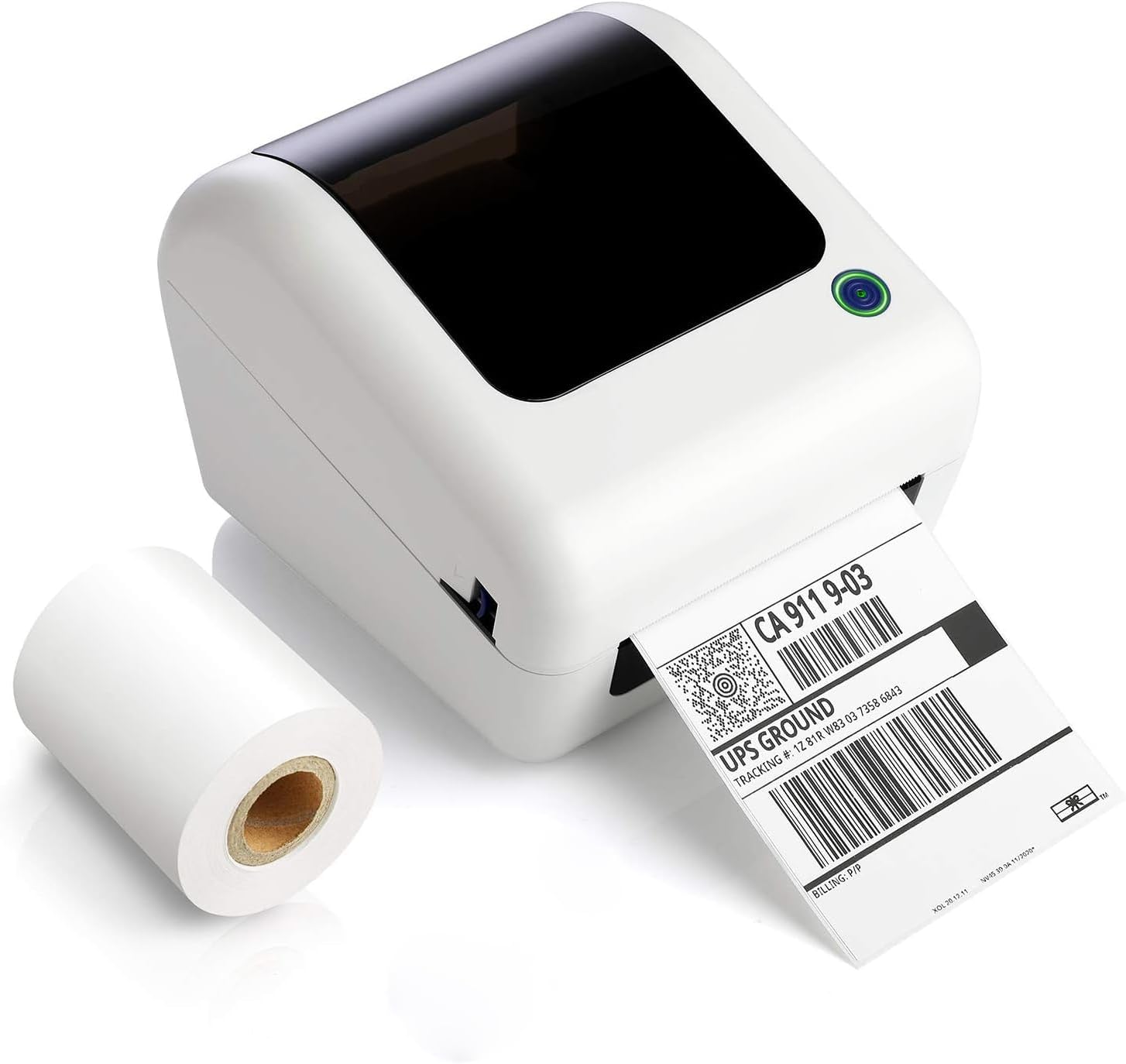
The JADENS Bluetooth Shipping Label Printer is a compact, high-resolution (203 DPI) thermal printer designed for small businesses and professionals. It supports wireless printing via Bluetooth from iOS, Android, and Windows devices, compatible with major shipping platforms like Amazon and Royal Mail. With no ink or ribbons required, it offers mess-free, crisp label printing on 1.57" to 4.1" wide thermal labels. The package includes 100 free labels and all necessary accessories for quick setup, making it an essential tool for efficient, professional shipping and labeling.


| ASIN | B08VRX5FK5 |
| Additional Printer Functions | Print Only |
| B&W Pages per Minute | 150 |
| Best Sellers Rank | 6,472 in Business, Industry & Science ( See Top 100 in Business, Industry & Science ) 22 in Desktop Thermal Label Printers |
| Box Contents | Bluetooth Printer with Label Holder, USB Flash Disk with driver installation, Quick Start Guide, Power Adapter & Cable, USB cord, Type C Convertor, Test Labels |
| Brand | JADENS |
| Brand Name | JADENS |
| Color Depth | 1 bpp |
| Color Pages per Minute | 150 |
| Colour | White |
| Compatible Devices | Smartphones |
| Connectivity technology | Bluetooth, USB |
| Control Method | App |
| Controller Type | Android, iOS |
| Country of Origin | China |
| Customer Reviews | 4.5 out of 5 stars 1,580 Reviews |
| Dual-sided printing | No |
| Duplex | Simplex |
| Hardware Interface | Bluetooth |
| Ink Colour | Black |
| Is Electric | Yes |
| Item Dimensions D x W x H | 10.8D x 7.7W x 7.1H centimetres |
| Item Weight | 0.4 Pounds |
| Manufacturer | JADENS |
| Maximum Copy Resolution Black and White | 203 dpi |
| Maximum Copy Resolution Color | 203 DPI |
| Maximum Copy Speed Black and White | 14.4 ppm |
| Maximum Print Resolution Black and White | 203 DPI |
| Maximum Sheet Capacity | 100 |
| Maximum Supported Paper Size | 4.1 inches |
| Maximum print Resolution Color | 203 dpi |
| Model Name | JD-168BT |
| Model Number | JD-168BT |
| Model Series | JADENS |
| Model name | JD-168BT |
| Network Connectivity Technology | Bluetooth, USB |
| Number of Drivers | 1 |
| Number of Trays | 1 |
| Other Special Features of the Product | Wireless |
| Output sheet capacity | 100 |
| Paper Size | 4.1 inches |
| Power Consumption Size | 12 Watts |
| Print media | Labels |
| Printer Output Type | Monochrome |
| Printer Type | Thermal |
| Printing technology | Thermal |
| Processor Count | 1 |
| Resolution | 203 DPI |
| Scanner Type | Portable |
| Special feature | Wireless |
| Specific Uses For Product | Label Printing |
| Total USB Ports | 1 |
| UPC | 788419698611 |
| Unit Count | 1.0 count |
| Warranty Type | limited |
| Wattage | 12 watts |
O**Y
5 Stars - Fantastic Label Printer!
(Review on behalf of Francesca Kennedy) 5 Stars - Fantastic Label Printer! I am absolutely thrilled with this label printer! Itโs incredibly easy to set up and use, even for someone who isnโt tech-savvy. The print quality is sharp and clear, making my labels look professional every time. Iโve used it for organizing my office, shipping packages, and even labeling my pantry, and it works like a charm each time. The speed is impressive tooโlabels print quickly without any delay. I also love that itโs compatible with a variety of label sizes and the software is intuitive. Iโve had zero issues with connectivity, and it works seamlessly with both my PC and smartphone. Overall, this printer has saved me so much time and hassle. If youโre looking for an affordable, reliable label printer, this is definitely the one to go for. Highly recommended!
N**A
Great, Works with Mac OS!
Great, I use this regularly, and it works amazingly with Mac, which is hard to find. It's a nice size, it makes barely any noise, and it's so quick you barely notice. Super easy to set up, instructions from memory were in Chinese, but it's so easy, just plug in the dongle, download the driver, and you're set.
S**R
Great budget label printer, but with some initial head-scratching
It was with some scepticism that I decided to take the plunge on this budget price printer, but some favourable reviews and what appeared to be good support pages on the Jadens website, I purchased one. Initial impressions were of a good quality item that was well packaged and instructions/drivers were supplied on a USB stick, so no paperwork to lose. Installation via USB was easy enough on Windows 7, but I did need to use the supplied USB lead as my existing cable plug was too tight to fit into the printers socket. I was unable to install the Bluetooth driver successfully, but that may be down to my PC's BT setup. A test print initially appeared fine using the few supplied labels, but when it came to printing a Royal Mail Click & Drop label, the results were somewhat inconsistent, resembling output from an inkjet with a blocked print nozzle. I tried some premium labels, with the same result. It transpired that the print quality was due to the fact that I was printing the labels direct from the PC browser which displayed the labels and if I saved the file and opened in a PDF editor, the resulting print quality was fine. So far there have been no problems with the Post Office scanning any of the QR/Barcodes. My only gripe is that the printer seems to take a non-standard roll size (maybe 350 labels) which don't seem to be that easy to find. I bought a roll of 500 and just reeled off enough so that the spool would fit in the unit. Hopefully it can be topped up with the surplus labels once the roll is empty. I knocked off a star due to the Bluetooth issue and initial print quality woes, but would not hesitate to recommend this to anyone who regularly send letters or parcels via eBay or similar.
B**Z
Great little wi-fi printer with minimal instructions
I bought this printer to move away from laser labels to heat transfer labels on shipped mail. I originally had the printer sited in the packing room which is away from the desktop or laptop PC's that I pull orders into. Hence the preference for a wi-fi printer over a hard wired one. Setup is simple and the driver installation easy from the CD provided (so long as you have a CD/DVD player on your PC). Strangely the printer works from my desktop PC but no amount of install and uninstall on the laptop would get the printer Bluetooth connected. The printer is visible but the printer never came available with error driver missing. All very strange as both the desktop and laptop are on the same network and use the same operating system and version number. So, I never have been able to print labels from my laptop with this printer. If I use the laptop to process orders I need to pdf email a label file to the desktop to print. I could see if setting up the printer as a shared desktop printer would enable a laptop print but I don't need to do that so I haven't done that. The printing was fine in the initial months over the network but it started to struggle to print with unknown error. It would take several send to print to actually print. I figured the data was getting scrambled on transmission so I moved the printer into the same room as the desktop so a lot closer to a wi-fi access point and it is printing fine again. So whether the quality of the network degraded or the printer receiver has degraded I do not know. At the end of the day it's a cheap printer so if I get a year or two out of it that's good enough for me. Its a printer I can recommend with only the nagging doubt over will it work on every PC as a wi-fi printer as I'm at only 50% on that score.
B**S
Easy from iPhone, difficult from MacBook Pro!
Bought this to print Royal Mail click n drop labels. Great little printer, comes with half a roll of 6x4" labels. VERY quick to get it working on my iPhone. Under a minute! Scanned the 2D barcode, downloaded the app, selected the label PDF, clicked print and out the label came, perfect! 10 out of 10! I then tried to print from my MacBook Pro. This is where the problems started. The Jadens help pages were no use, very out of date screenshots. Had to download a driver file and install it. Still could not print by clicking print, but then I tried downloading the same app as I used on my phone. This worked eventually, but I cannot print by downloading the file and opening it in the app...it just does nothing when I select the file. In the end, I tried sharing but the Jadens app was not in the list of destinations. Eventually, after a few hours of perseverance I found that opening the PDF in Preview and then sharing and selecting Image Publish from the list of destinations, this opened the label image in the app and I could then print it. Bit of a palaver but I got it working in the end!
S**E
Really impressed!
Purchased to speed up Vinted postage - zero regrets! Pumps it out sooo quick, great quality, so bloomin easy! Set up was quick - just make sure you watch the YouTube of how to feed the paper (if it spits out multiple you didnโt follow instructions) once set you are good to go. Came with a roll of labels too, and with internal storage the whole thing is neat and tidy. App easy to use, I save the label to file, access the file from the app, crop, rotate if needed and print. Spits it out immediately (scared the bijeezers out of my hubby).
R**S
Nice device which always delivers (set up's a breeze)
We have bought over 10 of these now and they work perfectly well in a medium/low volume setting we deploy them. Thjey suit our purposes and we will continue to order more. The main way they beat the competition is that installation and sizing the print to fit the label is a breeze, unlike many, vastly more expensive models on the market which take over an hour to calibrate (and then the results are "best available" instead of perfect) It would be nice of they took a slightly larger label roll (12cm dia) but this isn't a show stopper.
P**R
Excellent product
I was a bit sceptical at first and kept looking at this printer on and off, with the initial cost, the only thing i can say is i wished i had gone for it a lot sooner! itโs absolutely brilliant and worth the outlay!
A**N
Great Product for the Price!!!!
I purchased this printer in July after doing a lot of research and looking around. I wanted one that would be Bluetooth compatible and contain the labels on the inside of the printer so I didn't have to have two devices and a bunch of wires on my very small desk. I hesitated to buy this because I heard that Dymo printers were the best and this one was an unknown brand (I figured I might as well spend a bit more money on a printer that was good, rather than only a little bit less on one that didn't work well). Thankfully after looking at the price and some of the reviews of the Dymo, I decided to purchase this one and made sure I had time to return it if need be. This has to be one of the best purchases I have made for awhile, I waited a few months before leaving this review to make sure everything was good and so far my printer works great. Setting it up seemed daunting at first but if you follow the instructions it's actually super simple, clear and straightforward. Every question I had was answered somewhere in the instruction manual. The Bluetooth works better than most, I can print from my laptop from the other side of my house when other Bluetooth devices I have do not reach near as far. I can't say anything from personal experience about the Dymo because I've never had one but if you're looking for an affordable label printer, I would absolutely recommend this one. :)
P**L
Amazing printer for the price.
It was troubling at first, I couldn't get the drivers to install on one computer, but they installed on another. The installer would freeze at "Installing" and never complete. This seems to be an issue with some versions of windows 10/11 like enterprise, edu, etc. After a bit of work I found that there are drivers made for the "Beeprt BY245BT" available from SeagullScientific that work perfectly fine. (see my screenshot) I spent a few hours looking into the driver issue, but hopefully you won't have to, just get the driver I mentioned above if you have issues with the driver provided on the USB stick that came with the printer. After that it's been working great. It prints quickly and around the same quality as a Dymo or Zebra. Excellent device for the price. I really like how it can use generic rolls of paper and doesn't require special Dymo labels or any of that proprietary nonsense, and how the roll is contained inside the device so it saves a lot of space. Very satisfied with the printer.
E**N
Printing blocks for barcodes
Printing blocks for barcodes. This is not good at all. I was really relying on this because I have 60 orders due by tomorrow and I received this item today- straight out the box and it is not working correctly. Set it up as it was supposed to be yet as you can see, the way that it is printing the barcodes are coming out as thick blocks instead of individual lines. And yes i tested it and the barcodes are not scanning. This machine is pretty much useless as the post office is not going to accept 60 items without being to scan the barcodes because they will refuse to type in the tracking number individually for each item and I do not blame them. This is not worth 160$ at all. Maybe 5$. I am so disappointed and kind of mad. I want my refund. And I will be giving this childโs toy back to the business owner.
S**D
Good value, fast, and economical. Works very well.
Been using this a few days now. So far, I like it a lot. Its super fast, and I love that there is no ink involved, although I don't understand how it works without ink - magic, I guess. I ordered this because I like the feature that the labels are contained inside the unit, instead of laying around looking messy. I give it 4 stars, if I can get it to work completely by bluetooth without the usb attached to my computer, I will upgrade to a 5...but either way, I save on paper, tape and ink, and I don't have to run to another room for the label. A ream of paper cost me almost $10 the other day at Walmart, so, this will save on that as well, as the labels are very cheap, and I am not wasting over 1/2 a sheet that I never used. Recommend.
B**Y
Easy to use with Printing services, Just Not amazon return labels
I love this things, I use it for 3 of my shipping label services and it works out amazing, if you are looking for a machine to do amazon return labels, look elsewhere, I tried their pdf upload thru the mobile device, and it is a real pain, and takes so many steps, its honestly just faster to just print to printer and cut and tape them. I like how it prints first class mail, it is still to blurry for stamp metor mail, but I am working on those settings. the Footprint on this is very nice and fits in a small area, con is everytime there is a power outage or you turn it off, it pushes two labels out no matter what :( I live in Michigan where we get high winds and bad storms and lose power about once a month at least, and I know we lost power by just looking at the label maker cause it will have two plain labels out :(. We had a really bad storm come thru and the power flickered like 3 times in 2 mins, so yeah that was fun :( I just went thru and turned all the machines I have off, my house sounded way to robotic.lol
Trustpilot
2 months ago
4 days ago