


VGA KVM
Product ID: 390316447
Details
- BrandYinker
- Connector TypeVga
- Contact TypeNormally Open
- Current Rating2 A
- Item dimensions L x W x H4.02 x 2.56 x
- MaterialPlastic
🔄4-port seamless switching
🔌Plug & Play, no adapter
🖥️1920x1440 max resolution
Desertcart purchases this item on your behalf and handles shipping, customs, and support to France.
🔄 Switch Smarter, Work Faster — Own Your Multi-PC Command Center!
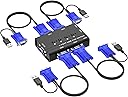
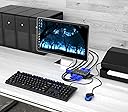
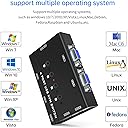
The Yinker 4 Port USB VGA KVM Switch lets professionals control up to four computers with one keyboard, mouse, and VGA monitor. Featuring a push-button manual switch, plug-and-play setup, and support for resolutions up to 1920x1440, it ensures seamless multitasking across Windows, Mac, Linux, and more. Integrated USB hubs expand connectivity, making it an essential tool for efficient workspace management.


| ASIN | B097YB6533 |
| Actuator Type | Push Button |
| Best Sellers Rank | #464 in KVM Switches |
| Brand | Yinker |
| Brand Name | Yinker |
| Circuit Type | 1-way |
| Color | black |
| Compatible Devices | Windows 10/8/7/XP/Vista, Mac, Linux, DOS, Netware, Unix, USB devices (printer, USB speaker, U disk), Online games |
| Connectivity Protocol | Usb |
| Connector Type | Vga |
| Contact Material | Copper, Brass |
| Contact Type | Normally Open |
| Control Method | Touch |
| Control Type | Manual |
| Controller Type | Push Button |
| Current Rating | 2 A |
| Customer Reviews | 4.2 out of 5 stars 174 Reviews |
| International Protection Rating | IP53 |
| Item Dimensions | 4.02 x 2.56 x 1.02 inches |
| Item Weight | 16 ounces |
| Manufacturer | Yinker |
| Material Type | Plastic |
| Model | 460KL |
| Mounting Type | Plug-In Mount |
| Number of Items | 1 |
| Number of Positions | 4 |
| Operating Voltage | 120 volts |
| Operation Mode | Automatic |
| Part Number | 460KL |
| Specification Met | Ip54, Automatic |
| Switch Type | Push Button |
| Terminal | Button |
| UPC | 796042176826 |
| Unit Count | 1 Count |
S**.
Good KVM Switch for VGA PCs
Connection was very easy and straightforward. KVM Switch works very well. Good video quality through the switch. The only thing that I noticed is that the switch resets itself to "PC1" once you turn off both PCs. Therefore, if you go back to use the PCs the next day and you decide to use "PC2" only, you will need to select "PC2" manually via the switch before you can start. Not an issue, just a little tidbit of info. All-in-all, good price and works as intended.
S**O
Good all around devive
Easy set up, works well. Read the instructions on switching. Depending on the order of putting computers in sleep mode an switching the Yinker, a computer may need to be turned back on to work by controls. When up and running, I am very happy with it.
I**L
Great
Repeat order, fits perfect You will not be disappointed
D**H
Works
Attached two computers and it worked fine. Small and lightweight, led indicator for pc port.
A**R
Constant USB Disconnect / Connect Issues
I experienced constant Windows 10 disconnect / connect notifications ongoing about 30 seconds apart on an HP EliteDesk pc. Problem is with USB mouse and keyboard connectivity as there would be lost data in the several second time between the disconnect and the reconnect. Removed the usb mouse and keyboard and then the box did not illuminate the switch setting. VGA video worked fine. Can not use this product.
D**N
Yinker switch
The switch was easy to set up and works great for one monitor and two desktops.
V**A
Solución para usar dos PC's al mismo tiempo
Es muy intuitiva su instalación y práctica. Me sorprendió lo diminuto del equipo, lo cual es positivo ya que ocupa poco lugar. Excelente lo de los puertos USB para usar un solo mouse y teclado en dos equipos
S**Y
For 2 computers need to remember which to switch click
Working perfectly 👌
A**X
Bra val!
Nyttig
P**K
Ok
Ok
R**E
Gute Ware
Gute Ware
伊**昇
使える。
正常に動作して使える。
O**R
Works well. I like it.
Works well. I like it.
Trustpilot
3 weeks ago
1 day ago