



LIFX Smarter Switch
Product ID: 389454100
Details
- Operation ModeON-OFF
- Current Rating5.2 Amps
- Operating Voltage120 Volts
- Contact TypeNormally Open
- Connector TypeClamp
- BrandLIFX
✨Sleek Design
📱Wi-Fi Control
🔋Energy Efficient
Buy anything from 5,000+ international stores. One checkout price. No surprise fees. Join 2M+ shoppers on Desertcart.
Desertcart purchases this item on your behalf and handles shipping, customs, and support to France.
Illuminate Your Life with Style! 💡
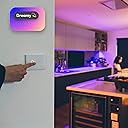
The LIFX Smarter Switch is a state-of-the-art smart lighting control solution featuring a sleek glass finish, customizable buttons, and seamless Wi-Fi connectivity. Designed for easy installation and energy efficiency, it allows users to effortlessly manage their lighting environment while enhancing the aesthetic appeal of their home.
| ASIN | B09NP1CF8J |
| Actuator Type | smart touch |
| Best Sellers Rank | #80,210 in Tools & Home Improvement ( See Top 100 in Tools & Home Improvement ) #276 in Electrical Light Switches |
| Brand | LIFX |
| Brand Name | LIFX |
| Circuit Type | 4-way |
| Color | White |
| Compatible Devices | Amazon Alexa, Google Home, smart lights, average lightbulbs, other Wi-Fi enabled smart devices |
| Connectivity Protocol | Wi-Fi |
| Connector Type | Clamp |
| Contact Material | Copper |
| Contact Type | Normally Open |
| Control Method | App |
| Control Type | Full Control |
| Current Rating | 5.2 Amps |
| Customer Reviews | 3.8 out of 5 stars 153 Reviews |
| Included Components | LIFX Switch, Glass White |
| International Protection Rating | IP20 |
| Item Dimensions | 4.72 x 2.83 x 1.42 inches |
| Item Weight | 8.96 ounces |
| Manufacturer | LIFX |
| Material Type | Aluminum, Glass |
| Model | SWAU2G4WH |
| Mounting Type | Wall Mount |
| Number of Items | 1 |
| Number of Positions | 4 |
| Operating Voltage | 120 Volts |
| Operation Mode | ON-OFF |
| Part Number | LFSWWHT4FUS |
| Smart Home Compatibility | Smart Home Compatible |
| Specification Met | UL |
| Switch Type | Touch Switch |
| Terminal | Screw |
| Unit Count | 1.0 Count |
| Upper Temperature Rating | 104 Degrees Fahrenheit |
| Warranty Description | 2 year warranty. |
| Wattage | 1800 watts |
E**Y
A slick looking smart light switch
I have many LIFX light bulbs around my two houses, which is the main reason why I went with this particular switch. I needed to replace an old automatic timer switch that the previous owner installed for a flood light that seemed to come on randomly no matter how I messed with it. The smart switch does have some overlap with my typical use of LIFX smart bulbs around the house. Typically I use the bulbs on a strict schedule in areas where I want them on or off at those times regardless of what day it is. However, there are applications where you want a light to be manually operated at times, perhaps in combination with a schedule. My flood light was exactly that. I'm generally not at that property, and don't need to be wasting electricity. This smart switch gives myself or anyone else the ability to turn on the light without the phone app. The physical switch has a really nice look and haptic feel with a satisfying click. I also like the glow around the two buttons that makes it easier to find in the dark, though this may not be desirable for all people. My biggest complaint is that no where on the switch or in the instructions does it tell you "hey, there are 2 buttons and the top one can be programmed but the bottom one always toggles it." So, you may have a guest that wonders what the heck button does one, and it may be reasonable to assume the top button is On and the bottom button is for Off, which is not the case. In fact, the top button is meant to activate a scene in your LIFX app, which could be any combination of things. That can be super useful, but confusing or not necessary in my case. Though not specific to the switch, I also have problems with the LIFX setup via iOS in general. For one, it's always trying to force me to setup through Apple Homekit, which I will not use. But the big issue is it doesn't always work with my phone. I've tried every troubleshooting tip for my iPhone 12 and it won't work 90% of the time. Sometimes I've tried the setup over 10 times and it fails at the last step until then. This has been going on for years, on multiple phones, so usually what I have to do is try on my wife's phone and her Android seems to have better luck. The physical installation of the switch is pretty straight forward and similar to any timer switch. Your local government may require you to use a licensed electrician, and definitely do not attempt without verifying power is off at the wires no matter what you think you did with the breaker. It's also important to note that the switch, like most smart or timer switches, required a neutral wire so that it can draw power at all times. It's common for simple light toggle switches, especially in older homes, to be wired without one and this will not work. It's also somewhat of a large device and will need a box big enough to fit everthing.
C**Y
Great Apple Home Switch; setup not so great.
As with the lights, works great after setup. Pairing is an ordeal. IMO, ditch the LIFX app & setup directly through Apple Home App. All sources of LIXF instructions I could find were not helpful. I don't think you can pair both the LIFX app & Apple Home at same time. I love the switch though. Nice to just hit a button rather than fumbling through the app every time. For the 2-button model, there are only up to 6 options you can program. It has once un-paired itself & had to be manually set up again.
B**R
LIFX is Awesome
I’ve been a LIFX customer for years. Most of my hose is LIFX bulbs and some switches. Just remodeled my game room and put in all new can lights throughout, with that I took all of my switches and replaced with LIFX switches, qty=5. They are totally programmable for both LIFX & non-LIFX Bulbs. Pretty amazing! I can program buttons for individual lights, groups, and specific scenes. Pricey? Yea maybe, but very robust, an energy saver, and very techy! Only downfall is, no internet, no control… you can force bulb on, but I think it’s worth it! Also, total remote control of EVERYTHING on your phone!
K**I
Doesn't work with Google WiFI
First thing's first, this wasn't the easiest installation for someone who has never installed a lightswitch in their life. Things weren't made any easier when the colors of the wires on the switch didn't exactly match up with the colors that were in my wall. After some research I was able to figure it out and successfully get the switch installed. It even worked right away with my dumb lights that the previous lightswitch controlled. Unfortunately that was just the beginning of my problems. No matter what I did, no matter what instructions I followed, no matter what suggestions I found online, I was not able to ever get this switch connected to my Google WiFi. The app saw the switch, could connect to the switch, could even update the firmware on the switch, but when it came to connecting it to my home WiFi network it would fail 100% of the time. Homekit found the switch, wanted to try and connect to the switch, but wanted a code for the switch which was not present in any of the materials provided. Apparently you need to connect the switch to the WiFi first before it can generated a Homekit code to connect it that way. Very backwards. I went back and forth with LIFX support to try and get this working, even providing them a bunch of requested logs, but ultimately they deemed a return was needed. This is disappointing because I really wanted this switch to work since it worked with my dumb lights, which was the entire reason for purchasing it.
M**!
When they work.....
They work well. But if you have a power outage, there is a less than 50% chance that the switches will reconnect to your network. And the biggest, most annoying thing about the lifx app is not having a way to reconnect devices without deleting them and setting them up again! AND the setup? IYNYK! PAINFULL! Again when the products work they are great! No reconnetion process and horrible setup process.
M**T
I want these for every switch!
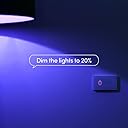
Everything I wanted and more. Very simple to install; the switch is already wired, and you just connect it with wire nuts. It's a pretty deep switch, but it fit fine in all my existing 1-gang boxes already full of wires. This button can control a physical light, but can also trigger any other Lifx lights or scenes. Since I am using Lifx bulbs everywhere, I just set it to always leave the bulbs powered and control them by cloud. The buttons are touch-sensitive, so don't have any travel, but have haptics, so you will feel it when it triggers. They trigger comfortably from a light touch. The buttons themselves are backlit, and can be configured for color and brightness.
G**S
Great choice for LIFX users
Absolutely one of the best smart switches...if you're a LIFX user. I love the haptic touch buttons with the subtle backlight. The smart switch functionality works fine with any conventional bulb through the LIFX app or any connected smart home platform, but the additional LIFX functionality only works with LIFX products.
P**B
A good idea but a bear to setup
The Good: This light switch is exactly what I've been looking for. It can do a combination of 'plain old lightswitch' AND 'smart switch' tasks. It has two wiring modes where the connected devices are 'dumb' and 'smart'. In dumb mode, the switch just toggles power (no dimming AFAICT). In smart mode, it keeps power on and relays command directly to the programmed devices. Nice! It's similar to the Lutron Caseta series, but better adapted for smart devices. The Bad (and the reason I take off two stars): It is a PAIN to setup. The LIFX app asked to scan a QR code, but there was NO QR code anywhere! Not on the box, the manual pamphlet or the device itself. Not my first rodeo with smart devices so to the manual process I went. This involved waiting 15mins, then connecting to the switches mini-wifi which caused it's own set of problems because my iPhone didn't recognize it as a legitimate connection. After lots of trial and error I finally got the switch connected and updated. Another nit are the double press and long press switch haptics. The double press is flaky and you have to get the timing 'just right' for it to recognize. Also, the long press isn't a 'press and hold' like you would expect with a dimmer but rather long-press-and-release to get the function. Just kinda weird. I would order this device again, but beware the setup. Maybe I got an early lot which didn't have the QR codes. I also have LIFX lights which did come with setup codes and those were an absolute breeze.
R**S
Quick & reliable response
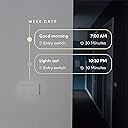
Switch set up was a lengthy process as my switch arrived with the older Firmware. The LIFX in-app instructions were good with links to their support page for additional assistance. I had to play around with the router to get the switch to connect. (Switched the router to 2.4ghz during set up). Once connected, the switch has been great to use. Kids love the ability to use the bottom button to set scenes on LIFX bulbs in our kitchen. The top button is set up for a non-smart LED under the kitchen cabinets. We have the Ecobee set up to automate the lights at night. So far the connection has been very responsive. The physical switch looks and feels like a quality device (not like the cheaper smart switches with weird squishy buttons). Switch has a lot of different options for customization. LED button colours can change, buzz feedback can be set to different levels, 6 different actions can set for various types of button presses. Within the 6 types of button presses there are a lot of different options for further customization. Great switch. I will buy again.
A**N
turn any switch into a smart switch
this switch is really cool, two buttons, but you only need one button to turn on or off, the 2nd button is for any programmable scene you'd prefer. really slick to making a low budget switch to smarter lighting. I suggested 3 lights to a friend and now he has 12 light bulbs, 2 led strips and two of these switches and Alexa controls it all. I have 7 bulbs and 3 LED strips my self. the voice control thru Alexa is so fast I can walk while I command a light in my path without bumping into anything. very happy, great for wow factor from guests, would buy again
A**M
Horrible setup process
1st the wire-to-wire connection adds unnecessary bulk and it barely fixes into the switch box. Lifx needs to use pole connections like all other switches out there. 2nd the Wi-Fi setup of this device is idiotic! it says to use HomeKit, but they provide no QR code, and it won't detect when the phone is close to the switch. You can try to set it up without HomeKit but you have to wait 15min (WTF). You can't go directly to a manual setup, you must try HomeKit first (again WTF). After that 15min, with the phone connected to the switch's WI-FI connection, it does nothing, you can't move past the new product setup. Someone seriously dropped the ball during the design process.
Trustpilot
1 month ago
2 weeks ago