Desertcart purchases this item on your behalf and handles shipping, customs, and support to France.
🎮 Dominate your desk with the lightest, fastest, and most colorful wireless mouse ever.
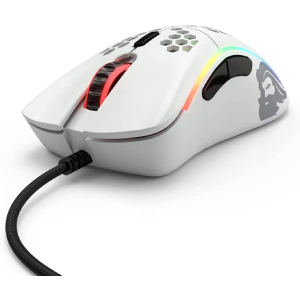
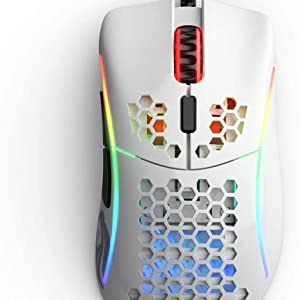
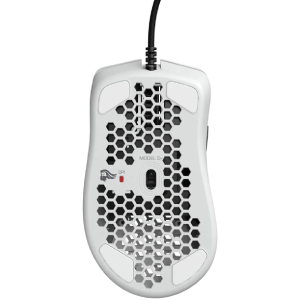
The Glorious PC Gaming Race Model O Wireless Mouse combines ultra-light 69g honeycomb construction with cutting-edge 2.4GHz wireless tech delivering 1ms latency. Featuring a pro-grade BAMF sensor with up to 19,000 DPI and 1,000Hz polling, it ensures pinpoint precision. Customize your RGB lighting across 16.8 million colors instantly, and enjoy up to 71 hours of battery life for marathon sessions. Ambidextrous and built with durable 20M click-rated Omron switches, it’s engineered for both competitive gaming and professional productivity.


| ASIN | B0D38BLL4Y |
| Batteries | 1 Lithium Ion batteries required. (included) |
| Best Sellers Rank | #15,967 in Computers ( See Top 100 in Computers ) #505 in Computer Mice |
| Country of origin | China |
| Customer reviews | 4.1 4.1 out of 5 stars (54) |
| Item model number | GLO-MS-DWV2-MW |
| Product Dimensions | 12.65 x 6.02 x 0.25 cm; 66 g |
| Release date | 5 June 2024 |
S**.
10/10
Very Good
A**N
you need to trie the mouse
over power for gaming and working
A**A
👍
افضل ماوس لاسلكي المعروف لايعرف كان عندي السلك قبله انصح بالنسخة المطفية مايتوصخ بسرعة
J**N
Very fancy and responsive mouse
It works great. Fast delivery.
G**.
Buen mouse
3 años con el y aun sirve (juego minecraft 1.8)
M**O
Mouse topo de linha com preço mais acessível que o dos concorrentes
Nào vou mentir, a primeira compra que fiz do mouse recebi uma unidade defeituosa com um sensor que não funcionava, mas a glorious foi mega atenciosa e rápida pra me oferecer um reembolso, envio de um produto novo ou crédito na loja, realizei o pedido por uma segunda unidade e dessa vez sim de fato fiquei satisfeito, o sensor bamf é excelente, possuindo as características do pmw 3370, possui rastreio extremamente preciso, o mouse conta com configurações de tempo de resposta do clique estando um passo a frente de muitos concorrentes, software bom contendo todo o necessário, os cliques são todos muito confortáveis e precisos, a qualidade de construção excelente, bem melhor do que a apresentada no model o com fio, scroll firme, switches precisos, botões praticamente sem pre / post travel, a bateria dura menos que a do logitech g pro e razer viper mas se sai mais do que bem, jogo com o rgb ativado em 20% da luminosidade e consigo tranquilamente usar o mouse por 2 dias seguidos sem precisar carregar, embora nunca deixe descarregar completamente para preservar a saúde da bateria, no geral mouse entrega muito pelo preço e não perde em nada pros concorrentes mais caros
M**C
If you cant afford the Logi Superlight or Razer ultimate, Get this mouse
TLDR: Fantastic mouse for the money. Good RGB, Program could be better, great feel, good battery life. -If you can’t afford or just can’t bring yourself to justify a $150 mouse like a superlight or viper ultimate id highly recommend the Model O wireless. Pros: -Good color and quality -Battery life -USB-C charging -Comfortable feel -Great buttons -Good RGB -Good Program for customization Cons: -It’s a con and a Note IMPORTANT!!!! DO NOT USE THE “MODEL O” PROGRAM!!! For whatever reason it doesn’t work 90% of the time and it’s a well-known issue HOWEVER USE THE “Glorious Core” program off their website and this mouse works just fine! -I hate to say it but there’s really no cons to the mouse, if there is it’s a personal and opinion based one, objectively there’s nothing wrong with the mouse. The Long: For better understanding of my review id like to preface that I’m a full-time video editor and I do play games heavily too. I’m also not the richest person so when I buy something I’m looking for what makes sense for the money and value. I searched for months for reviews between the top three mice in the game and industry and those are the Logitech Superlight, the Razor ultimate and this the model O. Now when I saw the price tags at the time respectively $150~, $120-100, $80~ I just couldn’t financially bring myself to spend over $100 BEFORE tax and shipping on a mouse I just couldn’t justify it. I spent $98 total for this mouse and online all the reviews put it in the same class with the “best gamming mouse ever made” the superlight. And I mean from my analysis its literally the competitor like if you compared a GT mustang to a Challenger and Charger classed cars respectively it would come to user preference. Any complaints on this mouse were nit picky at best about, 3-5 grams of weight (something I highly doubt a regular person would ever notice) or the specific “things” it comes with. I mean the superlight gets hated on for not having USB-C. So, here’s my honest opinion from what I can deduce. -----If you have the money and simply just want the best thing to say you have it, then buy a super light, if you want that but in Razer for some reason for their awful program that takes over you computer? Then buy the ultimate. BUT! If you’re a “normal” person who can’t justify spending over $100 on a mouse, then this is the bets you’ll ever do. The fact that its sub 100 and is in the same class ass the other two means something! I daily this thing and I went from an old cool master to a razor viper to this and I fell in love. For refence I have big meaty hands and the only downside is that for right-handed people the right side where your pinky rests is thinner then a viper so it took some time for me to get used to a “hour glass shaped” mouse. For $80 at the time, you get beautiful RGB, I do like it I mostly keep my turned off because it saves a bit of battery life as I use mine all day every day, the color of the mouse is a nice “matt” white, so it has this premium look to it like the color and texture they choose is beautiful. The clicks and center wheel are fantastic. As far as I can tell its light weight. I don’t personally notice the honeycomb so that’s a personal preference miles may vary. It comes with the charging cable that’s long enough to act as the mouse cable if you need to charge while you play and it’s a braided line so its almost like its not there HOWEVER you wont even use it long! Because this is USB-C it charges in a matter of minutes. I’m not joking, if my mouse gets to 30% ish ill plug it in and no lie walk away to get water come back it’ll be at 50% ill maybe google something watch one video or que for a match and it’ll be at 100% like its insane and as to why Logitech doesn’t use USB-C I can’t for the life of me understand its so useful. The Dongle it comes with is good quality and I usually leave it plugged in on my desk so when I need to charge ill just unplug the dongle and plug the remote in and done. The program is what sold this for me. Now, throw back to my previous note the “model o” standalone program just dose not work. No one knows why and it’s been an issue for years, the “glorious core” program works perfectly fine and recognizes the mouse with no issues and has plenty of customization. Some specifics, you can move your DPI sliders you get 5 I believe, and they can be color coded to what ever colors you like I usually set my blue to 2000 DPI and just keep it there but you can set them where you like and depending on what your doing you can adjust the DPI on the mouse and the color under the mouse will indicate which DPI setting its on. You can adjust the color brightness in increments which is insane to me I’ve never seen RGB where the brightness is a slider!! And the best part you can separate the RGB from the mouse “plugged in” or not, let me explain. If the mouse is plugged in you can tell the program what percentage of RGB brightness you’d like it to be and if its unplugged what you’d like it to be for example when my mouse is un plugged I have it set to 0% (again I run mine all day so I like to keep the RGB off ) but, I have it set to 60% when plugged in so while its off when I’m using it the second I plug the mouse in to charge the RGB kicks on. I just think its super cool, you can set it for battery life to if the battery gets to low you can have it adjust the RGB. As for battery life it works for days without charging. I haven’t killed it yet but I also frequently forget to turn it off, the mouse does have a setting for sleep mode so if you don’t use it for a while it “sleeps” itself saving your battery life this is annoying if your in game and don’t move for a while you have to jiggle the mouse to get it to turn back on BUT this setting can be adjusted or turned off so no worries! Again, with me frequently forgetting to turn it off ill only have to charge it maybe every 3 days at the worst. The longest I’ve gone is 5 days no charge. Again, that’s someone using it all day every day and then when I need to charge it I usually find a coinvent spot like if I need to go to the bathroom or make food that’s when ill charge it and its always done when I come back it’s like charging isn’t even an issue that I’ve ever noticed, I’ve never been annoyed by it.
Trustpilot
2 weeks ago
2 weeks ago