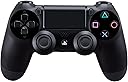
![Sony Playstation PS DualShock 4 Wireless Controller for PlayStation 4 - Jet Black [Old Model] for Gaming Console](https://m.media-amazon.com/images/I/71x2s-+HtPL._AC_SL3840_.jpg)


🎮 Own the game, share the glory.
The Sony PlayStation DualShock 4 Wireless Controller (Jet Black, Old Model) delivers enhanced precision with improved analog sticks and triggers, a dedicated Share button for instant gameplay sharing, and innovative features like a touchpad, light bar, and built-in speaker. It supports private audio via a 3.5mm jack and recharges conveniently through the PS4 or micro-USB, making it a must-have for serious PlayStation 4 gamers.


| ASIN | B00BGA9X9W |
| Additional Features | Wireless |
| Best Sellers Rank | #14,896 in Video Games ( See Top 100 in Video Games ) #91 in PlayStation 4 Gamepads & Standard Controllers |
| Brand Name | PlayStation |
| Button Quantity | 13 |
| Color | Black |
| Compatible Devices | Playstation 4 |
| Compatible Video Game Console Models | Sony PlayStation 4 |
| Connectivity Technology | wireless |
| Controller Type | Gamepad |
| Customer Reviews | 4.6 4.6 out of 5 stars (6,825) |
| Global Trade Identification Number | 00711719100379, 20711719100342 |
| Hardware Platform | PlayStation 4 |
| Item Dimensions | 2.5 x 6.75 x 7.25 inches |
| Item Dimensions D x W x H | 2.5"D x 6.75"W x 2.5"H |
| Item Weight | 11.84 ounces |
| Manufacturer | Sony PlayStation |
| Manufacturer Part Number | CUH-ZCT2 |
| Model Name | DualShock 4 Wireless Controller |
| Model Number | 10037 |
| Package Quantity | 1 |
| Power Source | Battery Powered |
| UPC | 714520304271 012301019216 711719100379 798762692358 |
G**T
OG
Good product🤘
N**M
Nothing to complain
Nothing to complain. Purchased more than a month ago
M**R
PS4 is my life
Wonderful features.
A**A
Horrible experience with both the product and platform
I would have given a much lower rating if that was an option. The product had issues from the very first day. The return procedure / process was also confusing and not at all helpful.
B**.
Not an original product
Not original product
H**H
When we are paying the full price then why sell us fake controllers?
When we are paying the full price then why sell us fake controllers? The issues with the controller that tell you it’s fake are listed in the video.
R**H
Faulty product
item received was faulty first time and it was returned back , but second time also I received faulty product, it worked for few days and then stopped working
A**T
Defective piece
Very bad quality don’t buy it from amazon buy it from any ps shop
O**A
Mando muy cómodo y bien construido
Lo he comprado principalmente para jugar en PC, basicamente puedo jugar a cualquier juego que sea compatible con el 360 gracias a un software de tecereros, muy facil de instalar y usar. La verdad que siempre he sido de Playstation, cuando jugaba en consola tuve todas las Playstation, descontanto la PS4. y ahora que he usado a PC como plataforma principal para jugar, vi la necesidad de tener un mando para algunos tipos de juego como Lucha, sandox en tercera persona, entre otros. Y parte de que he sido de PS toda mi vida, me hizo hacer totalmente a un lado al mando de Xbox One. Bueno, el DS4 esta muy bien construido, veo totalmente positiva la evolucion del DS3 al DS4, no es que tenga manos enormes, pero el DS3 me parece un poco pequeño, cosa que en el DS4 arreglan, la sensacion de los gatillos laterales es muy buena, como un gatillo se deberia de sentir. Los joysticks son sensacionales, amo la forma en la que están posicionados, cabe destacar que en PC puedes cambiar el color del LED posterior a tu gusto, me pareció excelente para poder hacer que combine con mi teclado y mouse. y lo mejor de todo es que te sirve para jugar con el PS3, lo unico malo es que el boton de PS no sirve en PS3 :/ Para conectarlo al PC cualquier cable tipo micro usb te servira, pero recuerda que el cable tiene que tener la capacidad de enviar y recibir datos. Tambien lo puedes conectar inalambricamente via bluetooth, si tu PC no tiene bluetooth puedes comprar un dongle bluetooth, los cuales no son muy costosos y te servira bien con eso. Creo que no me queda nada mas que decir por parte del mando, solo hablare del servicio de Amazon, lo pedi por amazon via importacion. con envió gratis y todo salio muy bien, llego antes de lo esperado, muy buen servicio. Ya habia ordenado un SSD en el pasado de la misma forma y también, todo excelente.
E**A
Pari al nuovo
Ottimo veramente
A**E
Controller
Neu, absolut empfehlenswert, robust und sehr zufrieden. Wurde schnell geliefert, so das wir auch schnell zocken konnten, top.
V**A
Don't buy
It said free delivery but there is actually a fee which wasn't on the information
M**R
This Will WORK WIRELESS on DESKTOP PCs Running WINDOWS 8.1 (64-Bit)
This is the best playing and best feeling gaming controller on the market, and yes, you can use it wirelessly (via Bluetooth) on a desktop PC running Windows 8.1. There are many tutorials on the internet that explain how to do this, but 4/5 methods I found and used completely failed. Most were intended for Windows 7 users. My rating for this controller is 5 stars because it is an outstanding contoller. The remainder of my review will be a quick tutorial on how to get it working quickly and easily any time you want to use it, without messing with your computer's settings or opening up the command prompt- so read on only if you want to know how to get it working on Windows 8.1 64-bit. If you have a somewhat newer laptop, you almost certainly have Bluetooth. If you have a desktop, there's a good chance you don't. Either way, open the control panel. Everything should be alphabetical, if you don't see a Bluetooth setting, you need a dongle to use the controller wirelessly. They're pretty cheap, but many aren't compatible with Windows 8+. This one worked for me and arrived in 2 days to Southern California, (with the "standard shipping" option), shipped in the same box as the controller I had purchased simultaneously: http://www.amazon.com/gp/product/B00EW3WS9M/ref=oh_aui_detailpage_o00_s00?ie=UTF8&psc=1 Install the Bluetooth software with the USB dongle plugged in. (I disabled most of the startup entries associated with the aftermarket Bluetooth and had no issues with it working properly afterwards). Bluetooth: Check. Next you need to download the latest XBox 360 device drivers for Windows. Microsoft will tell you that no further software is needed for Windows 8.1. Disregard and download the XBox 360 drivers for Windows 7 64-Bit and install. (You're free to disable the Xboxstat.exe startup entry). If you've researched this at all, you've probably heard that you need DS4Windows, (now know as "Inputmapper"), to get this to work. You don't. So don't download that program and don't donate money to make their ads go away. It's unnecessary and doesn't work, (in my experience), when the remote is wireless on 8.1. However, you DO need to download special software. Download the files needed here: [...] Open the zip folder and extract the entire "ScpServer" subfolder to C:\Program Files (x86). Plug in the Dualshock 4 controller via USB to Micro USB cable. (The same one you charge Android, and some Blackberry, phones with). Order one of those as well if you don't have one. Watch this video and follow all the steps up to 4:55 (STOP there as he makes the process overly complicated): [...] If you followed the aforementioned steps carefully, then all you should have to do to connect the Dualshock 4 to your Windows Bluetooth is hold down the Playstation button for a few seconds. It will blink a once or twice before Windows recognizes it. When the main light on the Dualshock 4 lights up red, your device is connected and should be recognized by your games. The downside to following this method is that your Bluetooth device will ONLY work for the Dualshock 4 controller, (it will no longer work for Bluetooth headphones, etc.). Also, games will think that you are using an X-Box controller, so when controller buttons are shown on screen, they will appear as X/Y/B/A instead of ⬛/🔺/X/🌑, and the main LED light will not change colors based on the game as they do when connected to a PS4.
Trustpilot
2 weeks ago
2 weeks ago