Desertcart purchases this item on your behalf and handles shipping, customs, and support to France.
🚀 Elevate your smart home game with a button that does it all—fast, sleek, and smart!
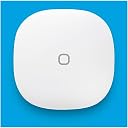
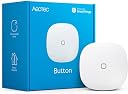
The Aeotec SmartThings Button is a compact Zigbee remote control designed for seamless integration with SmartThings and other smart home hubs. Powered by a CR2450 battery, it offers reliable wireless control over compatible lights and appliances across a 3000 sq ft range. Featuring an integrated temperature sensor and easy magnetic or adhesive mounting, it delivers instant, tactile smart home commands without the need for apps or voice assistants.


| ASIN | B095TW4TT8 |
| Additional Features | Integrated temperature sensor, Smart home integration, Dedicated app |
| Best Sellers Rank | #194,472 in Tools & Home Improvement ( See Top 100 in Tools & Home Improvement ) #242 in Home Automation Hubs & Controllers |
| Brand | AEOTEC |
| Button Quantity | 1 |
| Color | White, Gray |
| Compatible Devices | Philips Hue, Ring, Arlo, EcoBee, Honeywell, Bose |
| Connectivity Technology | Zigbee |
| Controller Type | Ring, SmartThings |
| Customer Reviews | 4.5 out of 5 stars 320 Reviews |
| EU Spare Part Availability Duration | 1 years |
| Manufacturer | Aeotec |
| Mfr Part Number | GP-AEOBTNUS |
| Model Name | SmartThings Button |
| Model Number | GP-AEOBTNUS |
| Number of Batteries | 1 CR2 batteries required. |
| Number of Buttons | 1 |
| Number of Items | 1 |
| UPC | 810667025458 |
| Unit Count | 1 Count |
S**O
Good product. Uses Cr2450 battery, not CR2.
First, the battery called out in the product description, CR2, is NOT accurate. The button uses a CR2450 (see photo attached of my delivered unit). I expect this is a typo and not a change in the design (based on the size of the button and difficulty of fitting a CR2 into this form factor). Not sure if I missed this somewhere in another review or not. Second, this button works very well. It has a nice positive feedback feel when pressed. It paired very easily with the Smartthings hub. The process had quite a number of steps, but none were difficult. I wish this was z-wave so it would mesh with the other z-wave devices I have, but it seems to have good range and works all around the ~3000 sq ft, 2 story house, including the attached garage. The use case: I use it on an end table in our living room as a way to adjust a set of lights (by setting a scene), toggle power on our kitchen lights (which are frequently left on by accident while we are in the other room) and turning off all of a group's lights (again, by setting another scene). This is much quicker than getting my phone out, opening ST app, finding the favorite and running it. It is also faster than asking Alexa to complete the task as there's no time spent waiting for me to spit out the request. I will very likely buy another one for use as a remote switch in the basement work area. The three functions would likely toggle an outlet's power (for running whatever tool is plugged in, typically a shop vac), turning some task specific lights on/off, third would be available for expansion later. This would function as a remote switch for the tool (likely shop vac) so I wouldn't have to be next to it to flip the switch and can use the long hose away from the canister. This is typically used for cleaning up at the drill press, workbench or other location without having to move the whole vacuum to each location or walk over to the switch. It is also quieter when it's not right next to you and the exhaust doesn't blow stuff where you don't want it. First world problems, I know. I will probably purchase a set of rechargeable CR2450 cells and charger if I purchase additional buttons. Drawbacks: -The button cell likely doesn't last as long as the CR2 that was specified in the product description would have. This may not be too bad of an issue based on usage. -The way this button pushes, it wouldn't work well if you carried it around in your pocket. It would likely inadvertently push if you moved around, bent over, etc. Not a design flaw, just is a result of the way the button case moves with respect to the housing. -Wish there was a z-wave option, but this is very nitpicky Bottom line: good product, would buy it again as it works well. TL;DR: Uses CR2450 battery, good product, good range, works as expected
I**R
Easy to use
Great project. Connected to Home Assistant no problem! Battery life is great as well.
F**N
A must have
I love these SmartThing buttons. we have them on our bed side tables and can just push a button to operate our SmartThing devices. They are easy to program, long battery life, and very durable. grab a couple of them and see if you love them as much as we do.
S**N
Solves Rinnai junk
This is a great product as it solves the issue Rinnai created when they discontinued their remote (RWMPB01) which controls their also discontinued Control-R module that allows remote activation of their recirculation system for their tankless water heater the RUR101iN (garbage, zero stars). I spoke to Rinnai directly (via text chat because Rinnai does not have live person available via phone any longer) and they told me I had to buy a new module and new remotes if I wanted to replace one of my old remotes that stopped working. I had three remotes and one stopped working and Rinnai doesn't make them any more so it was going to cost me over $500 for just the parts to replace the module and three remotes. This Aeotec remote paired with the existing Rinnai RWM101 module and works fine. 4 stars because there is no light on the front to acknowledge that the button is being pushed, and the entire face is the button so depending on where it is mounted or stored, can be easily pressed by mistake.
J**Y
Work with Rinnai water heater
This button pairs with Rinnai water heater. The size is much smaller than original Rinnai version. Was not sure it would work or not before ordering. It does work if you are like me need a replacement. I have the first generation wifi recirculation control. Highly recommended as the replacement of original one. Smaller size in general, bigger bottom itself, also cheaper. Will buy few more.
A**N
Great Little Button for Remote Control
We installed a hot water recirculating pump in our house that only runs when we turn it on (so it doesn't waste heat, but we have hot water in our master bathroom, which is far away from the water heater, when we want it, err, at least within about two minutes of when we want it), and most of the time we turn it on via Alexa, but if one of us gets up early before the other, we wanted a way to silently but remotely turn on the pump too. This button solves that. It just sits in one of our bathroom drawers, and you simply open the drawer, hit the button, and a few minutes later we have instant hot water as soon as we turn on the faucet. So far, it is has worked flawlessly, and it was easy to setup.
M**J
Samsung SmartThings Replacement Hardware
This is the same button as the now discontinued Samsung SmartThings one. The only difference is the label on the back says Aeotec instead of Samsung. I was saddened when Samsung discontinued their SmartThings hardware, but happy to discover Aeotec would be selling it under their name now. This button is magnetic like the Samsung one, so you can move it from place to place without leaving behind sticky residue. There is also a built in thermometer to let you know of the temperature variances throughout the day, viewable within the SmartThings app. It's also made with high quality materials so it doesn't look cheap like many knockoff competitors. I find the range to be suitable and have encountered no issues. This is a great product!
P**E
Slightly defective
Eventually got the button working with Hubitat, the device is way too expensive for what it is, there are plenty of better / cheaper options available. The form factor is nice, smaller then I was expecting, and the build quality of the plastic housing was great. The problem I had was with the battery and its contacts. Rather then using a standard con cell battery contacts (usually in the form of strips of metal, the battery compartment used thin wire, one wire for contacting bottom of the battery (-) and a small bit of wire on the side contacting the side of the battery (+). The battery was also held on to the cover of the battery compartment. The combination of these design elements proved the downfall as there was not enough good contact with the battery of the unit to power on out of the box with the battery tab removed. This proved frustrating as there is no indication of its lack of power aside from a led on the top of the button, this lead to a frustrating experience getting the device to pair. Eventually between using my volt meter and visual inspection with magnifying glass I found the side contact would not make good contact with the battery. The magnets holding the battery pulled it away from the contact, and also prevented the simple solution of using some paper to push the battery in contact with the contact, instead I had to re-bend the out word to make good contact with the battery, of course this took several iterations as too much bending could cause the contacts to snap. Eventually I got it working, and once the device was powered correctly it was easily paired with Hubitat.
J**E
Me encanta
Me encanta. Es compatible con Smartthings y alexa. Puedes configurar tres tipos de Clicks, cada uno para asignarlo a un dispositivo, rutina o escena que tengas configurado. El botón cuenta con un sensor de temperatura. Muy recomendable!
Trustpilot
2 weeks ago
1 week ago