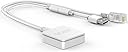
🚀 Tiny device, massive WiFi power — never miss a beat!
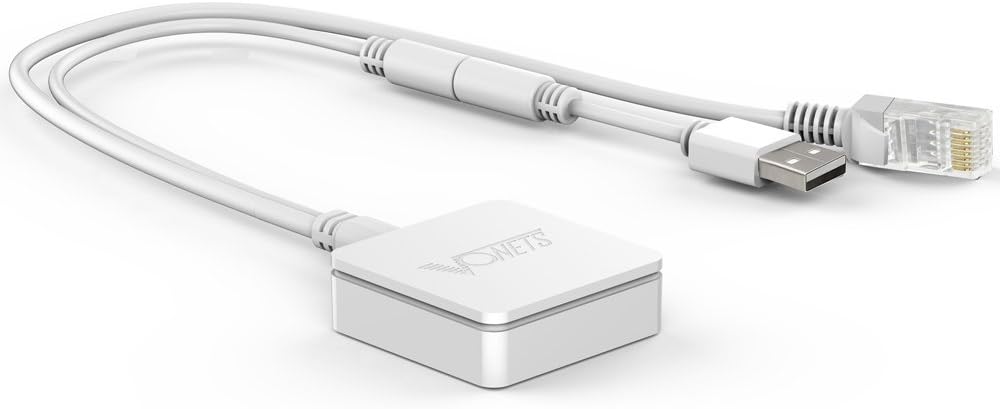
The Vonets VAR11N-300 is a pocket-sized, multi-functional wireless router delivering up to 300Mbps via 802.11n protocol. Featuring innovative TAFC technology for stable signals and dual interchangeable WAN/LAN ports, it supports router, bridge, and repeater modes. Its ultra-compact design and low power consumption make it ideal for business travelers and home users seeking reliable, flexible WiFi solutions.


| ASIN | B01199OGK0 |
| Best Sellers Rank | #101,881 in Computers ( See Top 100 in Computers ) #1,391 in Routers |
| Item model number | VAR11N-300 |
| Manufacturer | Vonets |
| Product Dimensions | 4.3 x 4.3 x 1.3 cm; 65 g |
E**S
I ordered this to use with my SolarEdge inverter. The North America models don't come with WiFi, so when it was installed, it got a cellular modem for monitoring. The cellular connection was spotty, since I live in a rural area, and it had only one bar of service at best. SolarEdge sells a "Wifi Gateway" for $300+, but since it has an Ethernet jack and a USB port, I thought that I'd give this a try. I set it up on my computer in WiFi Bridge mode and made sure it was working. The network speed on this isn't that high, but it's more than enough to handle the inverter monitor data. I installed it inside the inverter, and since it's so small, it was easy to find a permanent space for it. It's been working perfectly, and now my solar monitoring is stable and updates more frequently. This was a LOT cheaper than going with the OEM route, and I'm guessing that works just as well - if not better. I have had other travel routers like this one before, but I really like that the cables are permanently attached. I guess it wouldn't be great if you wanted longer cables, but for what I'm using it for, the short length is perfect. Don't expect this to perform as well as a full-size router or WiFi bridge. It's a tiny, low-power device, so expect it to perform accordingly.
S**N
Great service came on time I installed and it's been working just fine
F**T
I purchased this device to use in places where I have the following: 1. No existing wireless network, 2. No internet service, and 3. No 110/120 Volt A/C power. I bought this to connect an inexpensive USB wireless 2.4 Ghz 480P/1080P IP camera (think baby monitor) over wifi to an IP Camera viewing app on my cell phone and/or tablet. This worked great. I did not have to plug in this units wired RJ45 Plug (LAN or WAN connection), or the units other built-in RJ45 jack (LAN or WAN connection), to anything, to have it work. I just connected this units USB plug to USB power, and began the first wireless connect and configuration using any internet browser on either my wireless laptop, tablet, or cell phone. The device needs minimal configuration in first-time power up: 1. For device management security, change the password to something other than default web page mgmt login and password. 2. Change the SSID to something you like 3. Set a WPA2-PSK password on the new SSID Done. I had it configured in 10 minutes. Then connect any 2.4 Ghz Wireless b/g/n wireless devices to it by selecting the new SSID and putting in the new SSID password. Be sure to have your wireless devices set as DHCP IP address assigned, and this device (in “router” mode) will assign unique addressable IP addresses to the wireless devices automatically. The device comes defaulted to “Router” mode, which is what I wanted to create my isolated and dedicated boat wireless network. Other modes/uses of this unit is an alternate home/work internet wifi range extending “repeater” mode, and a non-wifi ethernet device to wifi “bridge” mode use. I have not tested the wifi range extending “repeater” mode, nor the wired to wireless device “bridge” mode use of this unit. It worked great for me to create a isolated and dedicated wireless network on my boat between my wifi tablet or wifi cell phone and a Wansview 480P/1080P live view camera using only DC USB power from cigarette lighter type power receptacles and related cheap 5v 1 amp USB socket/chargers on my boat. Now, for safety, I can watch a forward facing camera view (behind my boat windshield and dry under my boats top) on my phone, tablet, or laptop of my forward slow trolling boat while I sit facing rearward watching my fishing poles. All I need is USB power to both the Wansview Camera and this router. My cell phone and tablet have their own power, or can use USB power too. No A/C power needed for this dedicated and isolated wireless boat network.
K**R
I use this to connect my Xbox 360 to my wireless network and it works well and is a lot cheaper than finding an official wireless adapter. Setup was not difficult. Disconnected wifi on my laptop, connected this adapter to a usb port and ethernet jack and followed the very small print instructions. The only negatives so far: 1) I think the adapter maybe has a sleep mode? Occasionally i get a connection error downloading games on my xbox 360. If i try the download a second time, it works. 2) Its not as fast as I'm used to now. But I think the 10/100 Ethernet port presents a bottleneck that wo3uld limit its speed with a faster adapter... I think.
P**L
Used this to add wifi to an OG Xbox. Setup was a little confusing and I had to guess the default password, but it wasn’t overtly complicated. No issues after the initial setup. :) Would definitely recommend. UPDATE: Default password is printed on the label on the adapter itself. Has started to heat up really bad under normal use and requires a power cycle every time I try to use the Xbox to connect to the network. Still working about 90% of the time. UPDATE 2: Constantly overheating and disconnecting from network. Have to reboot it every five minutes by disconnecting from power. Went from decent device to completely useless very quickly.
Trustpilot
2 weeks ago
2 weeks ago