Buy anything from 5,000+ international stores. One checkout price. No surprise fees. Join 2M+ shoppers on Desertcart.
Desertcart purchases this item on your behalf and handles shipping, customs, and support to France.
🎙️ Elevate your meetings—anywhere, anytime, effortlessly.
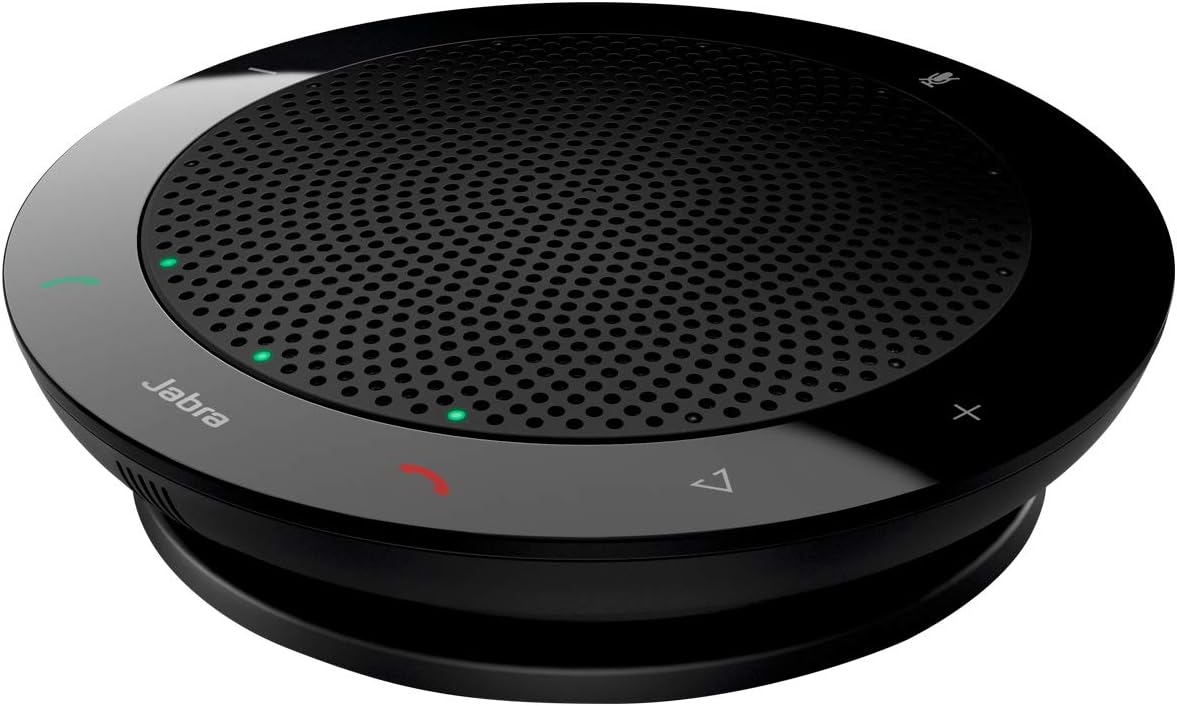
The Jabra Speak 410 is a professional-grade corded speakerphone designed for seamless audio conferencing. Featuring 360-degree microphone pickup, plug-and-play USB connectivity, and a compact, travel-friendly design, it delivers crystal-clear sound optimized for Microsoft Skype for Business and other UC platforms. Perfect for millennial managers who demand efficient, high-quality meetings on the go.


| ASIN | B004ELA7TA |
| Additional Features | Noise Cancellation |
| Age Range Description | Adult |
| Antenna Location | For Computers |
| Audio Driver Type | Dynamic Driver |
| Audio Output Mode | Stereo |
| Battery Average Life | 12 Hours |
| Battery Charge Time | 5 32nds |
| Best Sellers Rank | #90,473 in Office Products ( See Top 100 in Office Products ) #36 in Telephone Audio Conferencing Products |
| Brand | Jabra |
| Built-In Media | Accessories, Warranty statement, Speaker |
| Color | Black |
| Compatible Devices | Universal |
| Connectivity Protocol | USB |
| Connectivity Technology | Wired |
| Control Method | Touch |
| Controller Type | Corded Electric |
| Customer Package Type | FFP |
| Customer Reviews | 4.7 out of 5 stars 1,340 Reviews |
| EU Spare Part Availability Duration | 2 Years |
| Enclosure Material | Plastic |
| Frequency Response | 6.5 KHz |
| Global Trade Identification Number | 00706487011835, 05706991012927 |
| Input Voltage | 120 Volts |
| Is Electric | Yes |
| Is Waterproof | FALSE |
| Item Dimensions D x W x H | 5.1"D x 5.5"W x 1.9"H |
| Item Weight | 4.6 Ounces |
| Manufacturer | Jabra |
| Maximum Range | 10 Meters |
| Model Name | Speak 410 |
| Model Number | 7410-109 |
| Mounting Type | Freestanding,Plug Mount |
| Number of Audio Channels | 2.0 |
| Number of Batteries | 1 C batteries required. |
| Number of Items | 1 |
| Power Source | Corded Electric |
| Speaker Maximum Output Power | 1000 Watts |
| Speaker Size | 4.7 Inches |
| Speaker Type | Component |
| Specific Uses For Product | personal |
| Subwoofer Connectivity Technology | Wireless |
| Subwoofer Diameter | 120 Millimeters |
| Tweeter Diameter | 1 Inches |
| UPC | 706487011835 666673001845 737069181691 823019642067 804993491193 650415478736 638084694435 642125185066 800011271280 163121518028 033584341573 801593228198 806792029508 640206686501 809302011468 |
| Unit Count | 1.0 Count |
| Warranty Description | 2 year |
| Warranty Type | Limited |
| Water Resistance Level | Water Resistant |
| Wireless Technology | Bluetooth |
| Woofer Diameter | 120 Millimeters |
M**E
Great audio performance, and excellent design
I recently purchased the Microsoft Lync-compatible version of the Jabra Speak 410 (from Amazon), and have been using it daily for about 3 months. My experience has been excellent and I highly recommend it. This is a very well-designed product. Functionally, it integrates very smoothly with MS Lync and the audio settings of my laptop (the software downloaded via Jabra's website is very easy to set up and use). It's about the diameter of a CD, and about an inch thick - with the supplied soft case it tucks away nicely in my laptop bag for on-the-go use. The sound quality of the speaker is excellent - I've used it for both conference calls, VoIP phone calls via Lync, and listing to music and CDs from my laptop. In all cases, it sounded as good or better than any external computer speakers I have ever used (excluding outboard subwoofers, etc.). It gets plenty loud and can easily fill a small to medium size room with sound. People whom I am speaking with via the Jabra 410 have told me that my audio quality (i.e. the Jabra 410's internal microphone) sounds excellent, however I have not been able to actually hear how I sound to others when using the Jabra 410 so I can not compare the Jabra 410's mic sound quality to more traditional wired headsets or dedicated external mics. All my use of the Jabra has been from my own home office or small conference rooms, so I can not confirm how it performs in large conference rooms with many people speaking in a group (Jabra claims the microphone is multidirectional, and it does appear to be). It has a jack for an external headset, so you can listen to calls/music/audio privately if others are in the room with you, and when doing so it continues to use its own internal microphone in case you need to speak. I have not tried this, but I suspect the headphone jack would also allow you to connect the Jabra to an outboard audio system or the audio input of a computer monitor with speakers (and I suspect when doing so it would maintain full duplex audio). The onboard controls (volume, mute, etc.) are touch-sensitive and work very smoothly, and when pressing them the Jabra's LEDs light up and you hear a soft "click" sound through the Jabra's speaker to confirm (really slick, actually). A feature I particularly like is that when you press the "Mute" button, all 12 of the LEDs around the outer ring of the device light up red, and do NOT blink when you are on mute. The LEDs will stay red as long as the unit is muted, so at a quick glance you can verify that you are on mute, even from several feet away from the unit. I can't stand mute lights that blink when on mute, especially when on long calls where I am not a key participant and am on mute for most of the call. My only complaint is that it is a wired device and isn't wireless/battery powered. I'll bet Jabra's working on a wireless version though (if they aren't they should be). Also, it would be nice to have a hinged base or "kickstand" so you could angle it toward you rather than having it point straight up all the time. If you're looking for a true hands-free audio conferencing experience via MS Lync that is similar to that of traditional and far more expensive conferencing equipment (like Polycom, etc.), the Jabra Speak 410 will work nicely.
D**T
Perfect solution for all the on-line meetings we have at work these days
I work for a large global company with colleagues on nearly every continent. We're heavy users of on-line audio and video conferencing, and have standardized on Microsoft Lync and Lync-compatible in all our conference rooms. I wanted something comparable and compatible for my office so purchased the same Jabra Speak 410 speakerphone that we use broadly. It has proven an ideal solution as I get full audio control (volume up/down, mute, hang-up) from the speaker itself and so can use it both when I'm at my computer in a meeting solo or have other folks in my office and we need to participate as a group. It works great on my Mac as well as on Windows PCs, and is easy to connect and use as it gets signal, power, and control via a single USB cable. The built-in cable is long enough to allow easy placement and coils conveniently into the speaker's base so it doesn't snake all over my desk when I'm not using the speaker. Build quality seems excellent as the unit is both compact and solidly made. I like that I can easily take the unit with me and use it for team meetings in some of our open group space. Audio quality is great, and there's plenty of volume even with other participants are faint and hard to hear. The microphone seems to work well as I've never had any other meeting participants complain about sound quality on my end.
D**E
Easy to use, great sound
I've been using this for a few days now and I'm really impressed. When I plugged it in, it was recognized by Windows 7 and Microsoft Lync 2013 right away with no issues. I've used it a lot for Lync meetings and as a general purpose PC speaker (system sounds, Spotify, etc.) and it sounds great. Very clear, plenty of volume. I haven't experienced any echoes or other problems with the speakerphone function. My only complaint is that there doesn't seem to be a way to turn off the clicking sound when you press the volume/call/mute buttons on the unit. I even downloaded the Jabra PC Suite software and couldn't find a setting or preference to disable it. But that's just a minor annoyance. Overall, I'm very happy with this purchase. It's great to have nice-sounding, hands-free calls without a headset.
D**N
Brilliant addition to my Mac
My team is scattered around the globe and we use Skype and GoToMeeting to communicate & collaborate. Using the mic & speakers on my MacBook Air made meetings hard to understand and uncomfortable as my employees clustered around my machine. The Jabra Speakerphone has been a dream come true. The sound is true and rich, so much so that others within earshot think that the person speaking over the Jabra is actually in my office. The omni-directional duplex microphone picks up great and I never seem to have difficulty being understood. Its not designed for music, but the sound is good enough to double as a travel speaker for background music or podcasts when I'm in a hotel room. The compact unit is on a 3' USB cord. Touch sensitive controls on the face of the unit manage volume and mute. Cool little LEDs embedded in the speaker indicate volume level and mute setting. There is a standard headphone jack in the unit, allowing privacy when desired. The Mac OS recognizes the device immediately and I only had a small preferences adjustment to make in Skype & GoToMeeting to default to the Jabra. The unit comes complete with a disc with Windows drivers. I'm a HUGE fan!
D**N
Top Notch
This is a great product. It is plug and play and is recognized perfectly every time. The quality of the speaker and the microphone are superb. This works great with Skype, Audacity, Camtasia, and anywhere you just want to listen to any audio files. I like the mute feature for the microphone but would like a speaker mute too, which it doesn't have. The volume +/- touch buttons work pretty fast as an alternative. The headphones out is also handy for use when you need private audio out. This product is worth the money.
S**Y
410 is pretty good for remote work and online meetings
It works well and I recommend it. Reasons it is better than other options I've explored to date: external mic can pick up more than a laptop mic and has better placement options that improve audio fidelity. The USB connection removes Bluetooth as a cause of chunking and other weird audio issues. The USB connection removes the need for a rechargeable battery: if your laptop is on the speaker is on. Indicator lights are obvious and make it clear when mute is enabled/disabled. Volume control on the device is much less fiddly than changing volume on screen. It isn't great for music but not awful either.
C**R
Best Communication Tool Purchase I Have Made
I work from home and travel a lot for business. My company uses Microsoft Lync extensively for internal calls/meetings. I also use Lync to make external calls via the Lync phone. Many headsets/speakerphones have echo and other sound quality issues with Lync. This speakerphone has wonderful sound quality - Ihad people ask me who was in my office previously after I had finished a speaker phone call. It is also compact enough for travel - includes carrying case and built in cord keeper. I love the display that shows when on mute (big circle of red lights around it). the volume level (arc of white lights around it) and the clearly labeled easy to use touch controls. It even senses when I plug in my headset for privacy and switches the call to the headset; it also closes the Lync window when the call is finished. This item is as essential as my mouse and laptop power cord - and I never have to worry about changing batteries since it is USB powered!
S**E
Excellent
Excellent product. I use it for TEAM meetings every day. My Laptop microphone was hard for my TEAM calls hear me just relying on the laptop mic. The Jabra speaker/mic made a huge difference. It was just plug and play, easy to mute and adjust volume. Little lights lit up on the Jabra showing you were to push to operate the various functions . It is about 6” in diameter with the usb cord wraps around it to store in a pouch and place in your laptop bag. You can place out on a table in a conference room for all to use on a conference call.
U**N
Excellent addition to home office for VTC
I first borrowed this device from work to try it out and really love the ease of installation, just plug and play, no software to install and works well with all VTC (video teleconferencing) App such as Zoom, MS Team, video on Messenger, WhatsApp etc. the mute button works with the App too so, if you press 'mute' on the device, your App will also show the mic has been mute and vice versa, if you mute you App, then the tiny LED red lights will light up to tell you that the mute is active. Pros: -Plug & Play, no mess, no software to download/install; -Good quality construct; -Excellent sound quality on my end (speaker) and mic (with clear sound received on the other side of the VTC); -Uses its own power supplied from the USB port it is plugged into; -Price is reasonable; -Fast delivery; -Small, low profile, flat thus very portable (comes with its own zip-up pouch) so I can take it anywhere. Cons. -Cannot really think of one..
A**O
ottimo prodotto
recensione a distanza di 3 anni, suono ancora pulitissimo, prodotto eccellente
C**N
Esencial para las videoconferencias
En mi trabajo tenemos que hablar casi a diario con equipos en otros países. Los altavoces y el micrófono del portátil no son demasiado buenos, y totalmente inútiles si hay alguien sentado al otro lado del portátil. Para estas situaciones, este altavoz es la solución: buena calidad del sonido, buen micrófono (los del otro lado están encantados) y no hace falta instalar ni consolidar nada.
A**0
TOP Freisprecheinrichtung für Skype
Nachdem ich viel im Homeoffice arbeite habe ich mich für den Kauf des Jabra's entschlossen und bereue keine Minute. Sprachqualität: Lautsprecher: Sehr gut, klar bzw. brillant, ohne Aussetzer. Mikrofon: Extrem zuverlässig und auch bei einer Entfernung von ca. 3 Metern noch super! Nebengeräusche bzw. Echo-Effekt: Ist bei diesem Gerät nicht vorhanden, auch wenn die Lautstärke auf max. eingestellt ist. Installation: Extrem einfach, per USB an der Rechner oder Dockingstation anschließen, spezielle Installation nicht notwendig. Einrichtung erfolgt automatisch (auf jeden Fall mit WIN 10). Dauer ca. 1 Minute. Einrichtung für Skype dauert dann auch noch einmal 2 Minuten, inkl. Lautstärken und Mikrophon-Einrichtung. Das wars dann auch schon. Bedienung: Ein/Aus sowie Lautstärke und Mute-Funktion per Softtouch-Tasten. Diese sind intuitiv und einfach zu bedienen. Optik: Sieh aus wie ein kleines schwarzes UFO, ist formschön und unauffällig. Fazit: Eines der besten Helfer im Homeoffice wenn man kein störendes Headset verwenden möchte. Preis/Leistung mehr als optimal.
S**N
انصح به للاجتماعات
رائع وجوده الصوت ممتازه
Trustpilot
1 month ago
1 week ago