We remain fully operational. Our teams are working around the clock to ensure your deliveries continue safely.

DOWNLOAD THE APP


Copyright © 2025 Desertcart Holdings Limited
DOWNLOAD THE APP
Buy anything from 5,000+ international stores. One checkout price. No surprise fees. Join 2M+ shoppers on Desertcart.
Desertcart purchases this item on your behalf and handles shipping, customs, and support to France.
🚀 Unlock your multi-monitor potential and dominate your workflow!
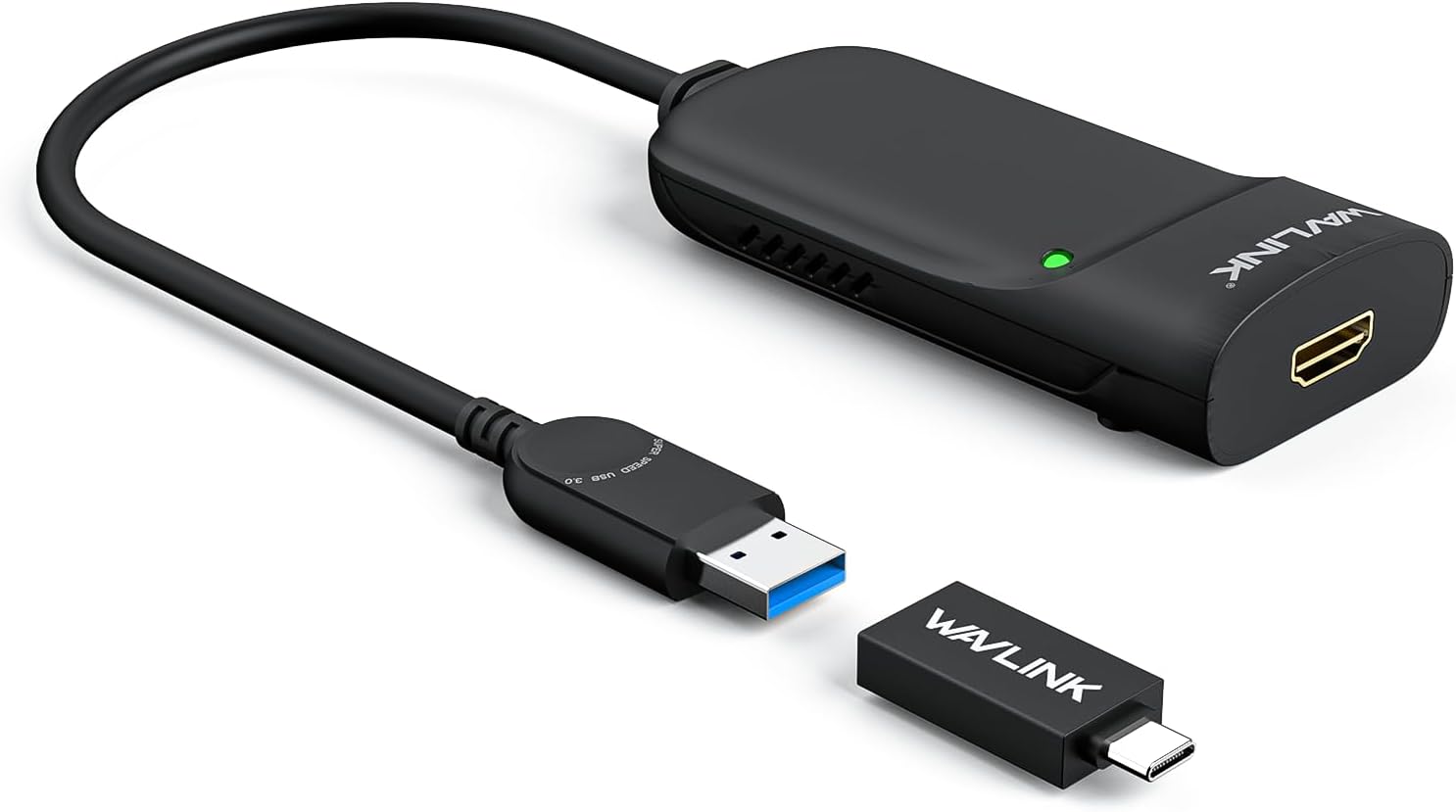
The WAVLINK USB 3.0 to HDMI Universal Video Adapter leverages DisplayLink technology to support up to 6 external monitors with resolutions up to 2560x1440@50Hz. Compatible across major OS platforms including Windows, MacOS, Ubuntu, ChromeOS, and Android, it offers versatile connectivity via USB-C, USB-A, and Thunderbolt ports. Designed for professionals seeking enhanced productivity, it features easy installation, compact form factor, and an 18-month warranty for dependable performance.


| ASIN | B01CSG7TUC |
| Best Sellers Rank | #96 in Audio & Video Connectors & Adapters #151 in Computer Cable Adapters |
| Brand | WAVLINK |
| Color | Silver |
| Compatible Devices | Apple M1-M5,New Macbook Neo and Intel Macs (with macOS 10.14 or later) /Microsoft Surface line/HP Spectre x360 series, /Dell XPS 13 & XPS 15 / Latitude, Lenovo Thinkpad T series. Latitute 7280/ Latitude 5310 2-in-1; Precision 7730/7750; Laptop 5590, HP Spectre Laptop 13-af001TU/ Spectre x360 13t/ Spectre folio/ Specter x369; Elitebook 840 G5 series/ Elitebook X2/ Elitebook x360 1030 G3/ Elitebook 745 G6/ Elitebook 830 G6/ 2018 HP Elite 800 G4; Envy Geforce mx250/ Envy x360 Laptop (15z-ds100); Z book 15u G3/ Zbook 17 G4, Lenovo Yoga 720-13IKB/ Yoga 730/ Yoga 900-13ISK/ Yoga 910/ Yoga 920/ Yoga 930/ Yoga 940-14IIL; 3rd generation Thinkpad Yoga; Yoga15 Thinkpad Ultrabook Pro; Thinkpad E590/ Thinkpad P72/ Thinkpad T470/ Thinkpad X1 Carbon; Legion Y530; Lenovo C930/ T480s/ X390/ 81N8, Microsoft Surface Book 2/ Surface Go/ Surface Laptop 3; Surface Pro 7,Huawei Macbook Mate10 or later; Google Slate (2019); Chromebook C340-15; SanDisk Cruise Glide; Razer Blade 2017 (gtx 1060); Pixel book go 2019/2020 Compatible Devices Apple M1-M5,New Macbook Neo and Intel Macs (with macOS 10.14 or later) /Microsoft Surface line/HP Spectre x360 series, /Dell XPS 13 & XPS 15 / Latitude, Lenovo Thinkpad T series. Latitute 7280/ Latitude 5310 2-in-1; Precision 7730/7750; Laptop 5590, HP Spectre Laptop 13-af001TU/ Spectre x360 13t/ Spectre folio/ Specter x369; Elitebook 840 G5 series/ Elitebook X2/ Elitebook x360 1030 G3/ Elitebook 745 G6/ Elitebook 830 G6/ 2018 HP Elite 800 G4; Envy Geforce mx250/ Envy x360 Laptop (15z-ds100); Z book 15u G3/ Zbook 17 G4, Lenovo Yoga 720-13IKB/ Yoga 730/ Yoga 900-13ISK/ Yoga 910/ Yoga 920/ Yoga 930/ Yoga 940-14IIL; 3rd generation Thinkpad Yoga; Yoga15 Thinkpad Ultrabook Pro; Thinkpad E590/ Thinkpad P72/ Thinkpad T470/ Thinkpad X1 Carbon; Legion Y530; Lenovo C930/ T480s/ X390/ 81N8, Microsoft Surface Book 2/ Surface Go/ Surface Laptop 3; Surface Pro 7,Huawei Macbook Mate10 or later; Google Slate (2019); Chromebook C340-15; SanDisk Cruise Glide; Razer Blade 2017 (gtx 1060); Pixel book go 2019/2020 See more |
| Connector Type | USB Type A |
| Current Rating | 1 Amps |
| Customer Reviews | 4.4 out of 5 stars 1,171 Reviews |
| External Testing Certification | Não aplicável |
| Finish | Hdmi,Mirror |
| Item Dimensions | 8.5 x 6 x 1.6 inches |
| Item Weight | 0.09 Kilograms |
| Item dimensions L x W x H | 8.5 x 6 x 1.6 inches |
| Manufacturer | WAVLINK |
| Mfr Part Number | WL-UG3501H |
| Model Number | WL-UG3501HPDX |
| Number of Items | 1 |
| Number of Ports | 1 |
| Package Quantity | 1 |
| Power Plug Type | Type A - 2 pin (North American) |
| Smart Home Compatibility | Not Smart Home Compatible |
| Specific Uses For Product | Monitor, PC |
| UPC | 695536200712 |
| Unit Count | 1.0 Count |
| Warranty Type | Limited |
J**K
Supports Asahi Ubuntu on Macbook Air M1 at 1080p 60Hz!
I have a Macbook Air M1 that is now running Asahi Linux 6.17.0-1001-asahi-arm Ubuntu 25.10. The external display's HDMI cable is plugged into the Wavlink. The Wavelink's USB-3.0 cable is plugged into its included USB-C adapter, which is plugged into a USB-C port on an Anker 6-port USB-C hub. The hub is plugged into the second USB-C port on the Mabook. At first, it didn't work, but after going to the Synaptics website, then to the DisplayLink Ubuntu drivers page, and downloading the "synaptics-repository-keyring.deb" file, then following the instructions, bingo, it started working, there was a second Ubuntu desktop on the external monitor. Stable, colors look right, no evident cursor lag, it just worked. Didn't even need to reboot the Macbook. Slick. Close the lid, and the "main" desktop jumps to the external display. Open the lid, things go back to how they were. The only downside so far is that the 4K external display is getting a 1080p 60Hz signal, which is definitely a lot more useable than no signal at all. Good enough. Though it is kind of hilarious to use a 43" display at 1080p. Until the day comes when the wonderful Asahi team sleuths out HDMI through USB-C on the MBAs, this is a very workable solution. Recommended!
M**R
Reliable and Easy to Use — Great Display Quality!
This adapter works perfectly for connecting an extra monitor to my laptop. Setup was super easy — just plug it in and install the driver, and it was ready to go. The picture quality is sharp with no lag or flicker, even when streaming or multitasking. It’s compact, well-built, and does exactly what it promises. A must-have for anyone needing a quick and reliable dual-monitor setup!
D**N
Works like it said
Works great
K**M
works great with an iMac, but a 2018 Mac Mini will not wake from sleep
Bought 2 of these to use with an iMac. Including the iMac, I'm running 5 monitors. One of these adapters works every time, the other one works most of the time - on occasion it will not wake the monitor when the computer wakes from sleep. If I unplug the adapter from my computer, wait a couple seconds then plug it back in, it works (I may have to do this about 10 times however before it works) - I shouldn't have to do that, I'm wearing out the USB port/plug, but it works otherwise. I've switched monitors/cable/etc, reset SMC/NVRAM/PRAM on my Mac and still the (same) one adapter works every time and the other does not. Maybe I got a dud..? I thought about buying another one to run a 3rd monitor (giving me 6 monitors total in my setup), but the price of these went up. I've held off in buying the 3rd adapter due to the increased price & not knowing if I'll have activation/waking issues like one I already have (mentioned above). Update 1: I contacted Wavlink about the issue noted above & they sent me another adapter & all has worked good since. (I purchased another adapter a few months later & had a total of 6 screens working- the iMac & 5 external monitors- 2 via Thunderbolt/USB-C & 3 via Wavlink adapters) Update 2: I'm now using 2 Wavlink adapters on a 2018 Mac Mini, both plugged into the USB ports on the back of the Mini. They work great, the only issue is that the Mini will not wake from sleep regardless if I put it to sleep or it sleeps on its own after a set time. Pressing the mouse button or keyboard will wake the Mini, but none of the monitors will show anything. The monitors do light up with a dark grey/black screen & the power LED changed from orange to blue, but that's it. I have to press the power button on the back of the Mini to power-off & then power-on again to fix the problem. To avoid doing this I've enabled 2 settings in the 'Energy Saver' control panel- 'power nap' & prevent computer from sleeping automatically...". I do not like having the computer run all the time & not sleep, but it's either that or shut down/restart everyday.
C**O
The best solution to add multiple monitors to a laptop when you do not have DP_ALT MODE
Easy to install, I do not like that the driver take the control of all video (maybe this is how it should work, it shuts down itself 2 times in a few weeks, I do not know if it is a standby delay or it is a problem, otherwise is a good device. The specs are not sufficient and I did not have time to dig for other places. It should be good to have the full specs on Amazon.
J**S
Works When USB-C / Thunderbolt Display Is Broken
I bought this as a workaround after my Windows 11 laptop stopped outputting video over USB-C / Thunderbolt after a Windows update. Native DisplayPort over USB-C would no longer work, and even Geek Squad couldn’t pin down why it failed. This adapter solved the problem immediately. I plugged it into a regular USB port, connected HDMI to my monitor (through my existing HDMI KVM switch), and the display came up right away. I didn’t even have to install the DisplayLink driver or reboot first, which honestly surprised me. It’s been stable, no flickering, and works perfectly for normal productivity work. This completely bypasses the broken DP Alt Mode path and just works. If your laptop suddenly won’t drive external monitors over USB-C anymore, this is an excellent and reliable fallback. Saved me a lot of time and frustration. Highly recommended.
W**T
Not recognized by Windows 10 on a Dell Optiplex. NOT RECOMMENDED
I have a Dell Optiplex SFF running Windows 10, which this card is supposed to support. My system is recent enough that there should have been no problem installing this. I was very careful about it and had the correct driver (which must be downloaded as it did not install automatically.) Despite this, I couldn't get Windows to recognize this card fully enough to use it. When it did work, it disabled some of Windows, such as the system tray. I returned it after a couple of days of experimentation. Something this hard to set up will only cause constant trouble in the future. Years ago I was a computer repair tech, so I know what I'm doing, but this item does not! I DO NOT recommend this card. I returned it.
K**D
WORKS with M1 Macbook Air 2020 and DisplayLink
I spent weeks trying to figure out how the HECK to set up my work Macbook Air to connect to two external displays so I can increase my workflow. After several youtube videos and online forums, I learned the unfortunate truth that the M1 Macs don't support more than one external display by default. I then went on a search to figure out how, if at all, anyone was able to set up multiple external displays. I kept finding videos by companies who were marketing their own products to allow you to have dual displays, however I found that all of these products either had way more than I needed and/or cost an arm and a leg. Now, I don't make much money and getting this figured out would be on my own dime, so I wasn't about to pay more than maybe $50 on what I needed. My company already provided me with an Anker adapter that can charge my laptop, has two USB 3.0 ports, another USB-C port for data, and an HDMI port. I saw from other reviews and videos that you can connect the second hdmi to your adapter via a USB 3.0 port to HDMI, along with DisplayLink. Again, I'm not trying to spend an arm and a leg, so I was hoping any adapter would work, but I was sorely mistaken. I ordered and return 3 different adapters before finally sucking it up and trying to find a better one that could hopefully work. I was happy to find this item with great reviews seemingly matching what I was looking to do and saying that it worked. This item was the cheapest option I've found thus far and so I decided to pull the plug, thinking ahead that if it didn't work again, I would just give up trying and stick with my laptop screen and one monitor. Shipping did take a little longer than I had hoped but wasn't unbearable. I took a breath before I plugged the adapter in and ALAS, it worked IMMEDIATELY!!!! I already had DisplayLink downloaded on my laptop since I was trying out other adapters before this one, so I didn't need to go through all those steps, but I'm certain you WILL need it in order for this to work. The product itself does contain instructions on how to download DisplayLink if it's your first time, so don't worry about having to figure that out. There are also plenty of videos out there to explain it as well. I've experienced no lag with my mouse or keyboard on the second external display, and it's SO nice to be able to finally have two large screens open rather than having to click through several tabs. HIGHLY RECOMMEND THIS PRODUCT IT IS AMAZING!!
Trustpilot
4 days ago
3 days ago