Desertcart purchases this item on your behalf and handles shipping, customs, and support to France.
🚀 Stay Connected Anywhere, Anytime — Because Dropped Calls Are So Last Decade
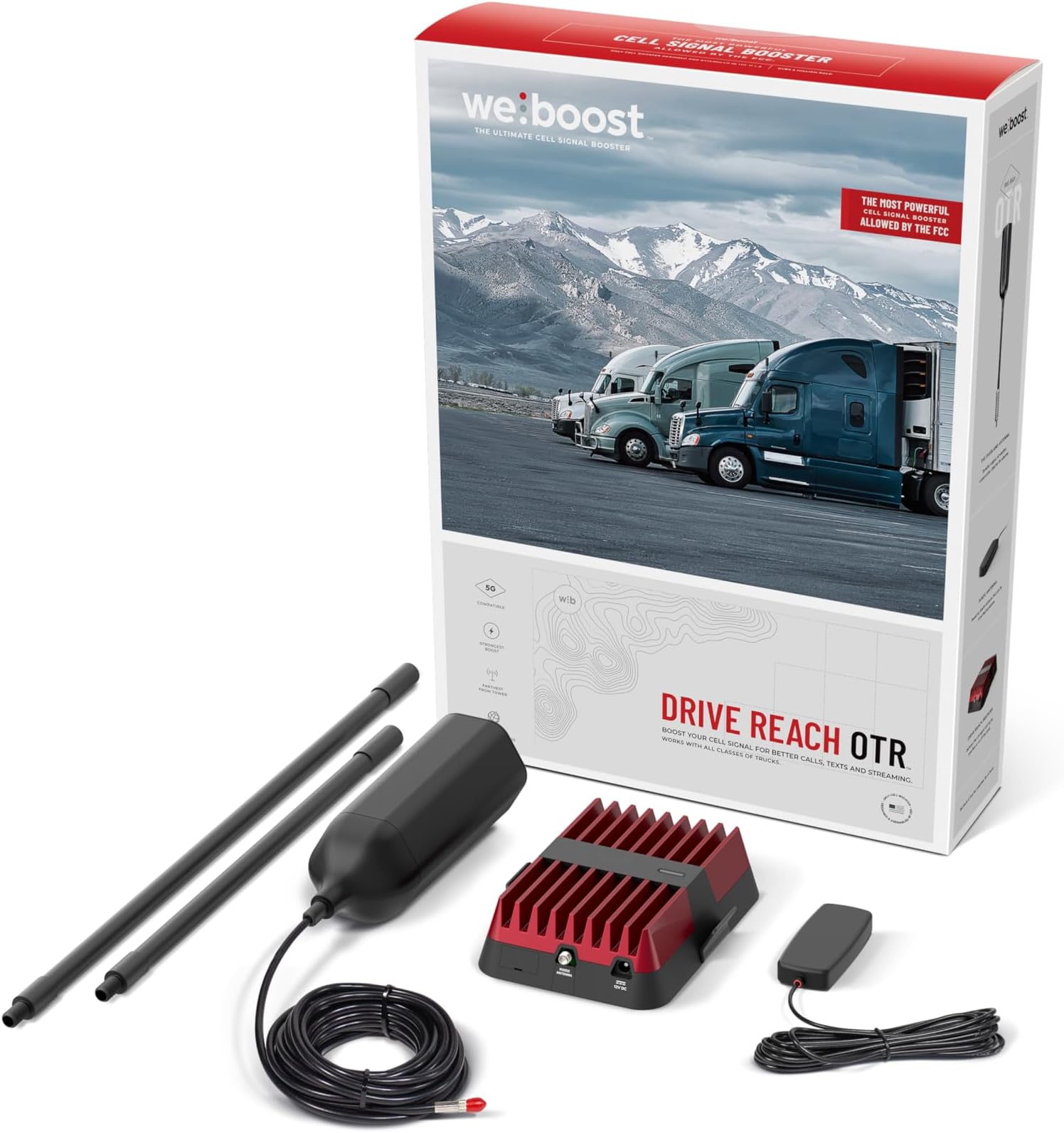
The weBoost Drive Reach OTR is a top-tier, FCC-approved cell signal booster engineered specifically for trucks and SUVs. Featuring a powerful 50 dB max gain and a rugged OTR antenna, it dramatically extends signal reach to the farthest cell towers, supporting all major U.S. carriers and the latest 5G and 4G LTE networks. Designed for multiple devices and harsh road conditions, it ensures reliable voice and data connectivity on long hauls, backed by expert U.S.-based support and a 2-year warranty.


| ASIN | B08WYQND57 |
| Best Sellers Rank | #4,180 in Cell Phones & Accessories ( See Top 100 in Cell Phones & Accessories ) #2 in Cell Phone Signal Boosters |
| Brand | weBoost |
| Built-In Media | Drive Reach Booster, Drive RV Antenna (311229), Mounting, Bracket (901104), Power Supply (850029), Slim Low-Profile Antenna (314419), Coax Cable, Side-Exit Adapter, Mast Extensions (1 13-inch, 1 18-inch), Antenna Spring, Thread Lock Packets, and Cable Adapter |
| Color | Black, Red |
| Compatible Devices | Smartphone |
| Connector Type | RJ45 |
| Customer Reviews | 4.1 out of 5 stars 2,782 Reviews |
| Frequency Bands Supported | BAND 12/17 700 MHz, BAND 13 700 MHz, BAND 5 850 MHz, BAND 4 1700/2100 MHz, BAND 25/2 1900 MHz |
| Included Components | Drive Reach Booster, Drive RV Antenna (311229), Mounting, Bracket (901104), Power Supply (850029), Slim Low-Profile Antenna (314419), Coax Cable, Side-Exit Adapter, Mast Extensions (1 13-inch, 1 18-inch), Antenna Spring, Thread Lock Packets, and Cable Adapter Included Components Drive Reach Booster, Drive RV Antenna (311229), Mounting, Bracket (901104), Power Supply (850029), Slim Low-Profile Antenna (314419), Coax Cable, Side-Exit Adapter, Mast Extensions (1 13-inch, 1 18-inch), Antenna Spring, Thread Lock Packets, and Cable Adapter See more |
| Item Dimensions D x W x H | 3.75"D x 11.5"W x 21"H |
| Item Type Name | cell phone booster |
| Item Weight | 1.8 Pounds |
| Manufacturer | weBoost |
| Mfr Part Number | 477154 |
| Model Number | 477154 |
| Range | 2 times the distance to the previous model's range |
| Smart Home Compatibility | Not Smart Home Compatible |
| Special Feature | High gain trucker antenna |
| Special Features | High gain trucker antenna |
| UPC | 810005963015 |
| Unit Count | 1.0 Count |
| Warranty Description | 2 year warranty |
| Wireless Communication Standard | 802.11ax |
| Wireless Compability | 802.11ax |
F**T
It works great!
I was quite skeptical when I read the description of this product. But I decided to give it a try. I was interested in this device because my family loves camping. And when you go to various campsites most of them have Wi-Fi that you can use that they provide for free. But most of the time the Wi-Fi is pretty sketchy, and it certainly isn’t streaming quality. And on top of it, a lot of these campgrounds are off the beaten path for obvious reasons. So, your cell signal might not be very good. And it's nice to be able to stream a little bit using our mobile hotspots. This device has amazed me and does what it claims. I thoroughly tested it at three different locations that I knew had poor signals. I tried to post the images showing the speed tests, but for whatever reason I wasn’t allowed to. Before and after for the first location was as follows: WITHOUT BOOSTER - “Error. Test Failed to Complete”. WITH BOOSTER - 40 Mbs Download, 5.55 Mbs Upload, Idle Ping: 39, Download Ping: 615, Upload Ping: 786, Download Jitter: 77, Upload Jitter: 82, Packet Loss 0%. So, a night and day difference. Before and after for the second location was as follows: WITHOUT BOOSTER - - 11 Mbs Download, 0.95 Mbs Upload, Idle Ping: 72, Download Ping: 717, Upload Ping: 1663, Download Jitter: 82, Upload Jitter: 94, Packet Loss 0%. WITH BOOSTER – 7.60 Mbs Download, 17.7 Mbs Upload, Idle Ping: 72, Download Ping: 767, Upload Ping: 388, Download Jitter: 84, Upload Jitter: 83, Packet Loss 0%. The dramatic difference is in the upload. Going from 0.95 to 17.7 is amazing. Add in the fact that upload ping went from 1663 down to 388. Before and after for the third location was as follows: WITHOUT BOOSTER - - 15.5 Mbs Download, 0.38 Mbs Upload, Idle Ping: 45, Download Ping: 1085, Upload Ping: 1998, Download Jitter: 100, Upload Jitter: 101, Packet Loss 26.1%. WITH BOOSTER – 22.2 Mbs Download, 5.44 Mbs Upload, Idle Ping: 43, Download Ping: 661, Upload Ping: 760, Download Jitter: 81, Upload Jitter: 73, Packet Loss 0%. The dramatic difference is again in the upload. But the packet loss went from 26.1% down to 0% packet loss. Unreal. I believe I did a thorough test to prove that this device does indeed do what it says it does. It is well worth the money. Dramatic differences in speeds, latency, and packet loss when you compare WITH and WITHOUT the booster. I highly recommend this product.
A**S
YES! IT DOES WORK
My carrier is AT&T and if you have them, then you already know they have been on the decline in terms of celluar signal or data signal, I tavel out of the DFW area to the west coast and to the east cost. signal is terrible. that dreaded 4 dots or sos displaying on the phone is a bummer, i know. well Ive traveled to new york and as far as california testing this product. I can gauurantee this weboost booster is a life changer. I can honestly say I lost signal once and that was on I10 comming and going down that mountain before you get to desert springs in California. I was able to maintain signal for calls and netflix, youtube and spotify worked great. If your are a traveler I have to reccomend this weboost to you. I was about to spend over $1k on a new phone before this purchase and i am glad i tried this out first since you have 30 days to try it. Kinda pricey but well worth it.
Y**X
WeBoost worked/didn't work. HiBoost works as well at a lower price
I go camping and hiking a lot where cell phone signal usually is very spotty, and I also live in an area that practically is dead for AT&T and T-Mobile and barely registers a bar for Verizon. A cell phone booster was provided by T-Mobile for home use and though the receiver shows 1-2 bars, we still only get spotty coverage inside the home. There is something VERY important to keep in mind about signal boosters: they are exactly that... BOOSTERS. They can only BOOST wherever some signal exists. If there is NO signal, then there is nothing to boost. Stronger signals get a stronger boost. With all that in mind, let's go over my quest to find a cell booster that would work for me. For the Superbars, HiBoost, and WeBoost, I installed them according to the manual's and online video instructions: the antenna outside the car away from the windows/glass as much as possible, cable connected to the booster unit found underneath the driver (or front passenger) seat, then hooked up to the inside antenna that is mounted at least 8" away from any human being. In my case, that interior antenna was tested at both the front dashboard and on the ceiling at the center of the car. All claim to work with T-Mobile/Spring, Verizon, AT&T, and other carriers, and that the major 4 already pre-approve these cell boosters for use within their networks. Approval is required per FCC regulation. Mind you, the antenna included is an omni-directional one: meaning, it'll boost signal from any direction but won't be as strong as the types that must be pointed towards the cell tower. 1. SUPERBARS [UPDATE 7/12/2021: Superbars reached out to me, sent a replacement, and had a technical support rep get in touch with me to go over the setup and usage. I was actually quite impressed by that service. Turns out, Superbars is indeed a rebadge of HiBoost. The results of the replacement Superbars were identical to that of the HiBoost -- no surprise since both products are practically the same.] First, I tried a SUPERBARS one. Turns out, it's a rebadge of the HiBoost. Both look virtually identical, down to the manual. It was a disaster. The Supercell did not increase any speed. The app was clunky to use. I had no idea how to use it to determine where to point the antenna to for the best signal. All it showed was a bunch of radio frequencies and how good their signals were. I could not figure out how much of a boost I was receiving. I returned it. 2. HIBOOST Second, I tried the HIBOOST. I knew that it would likely perform as poorly as the SUPERBARS one since both products looked identical. To my surprise, the HiBoost actually WORKED. This leads me to believe that either the Superbars one was a bad copy of the HiBoost, or it was a defective unit I had received. [UPDATE 7/12/2021: Indeed, the Superbars was defective. The replacement worked very identical to the HiBoost.] There were 3 tests performed with and without the booster on. Both times, I'd set the phone into Airplane mode and turn back on so it would grab the closest signal "tower" (or booster antenna). Without booster, I received about 7.15 Mbps down and 0.62 Mbps up on average. The first test had 0 up. This was done in an area near my home where cell phone coverage was spotty despite showing 2 bars on my T-Mobile Samsung Galaxy S21+ phone. With booster, LTE tests averaged 17.17 Mbps down, 1.18 Mbps up. That nearly doubled both directions. Nice! The app was the same as the one used by Superbars, and frankly, I do not understand how to use it. It does not give me information in a friendly way to help figure out where the signal is strongest (to point the antenna towards) and how much of a boost the product was providing. Thankfully, I found another app that was a bit more useful than Superbars'/HiBoost's. That program was what WeBoost recommended. [UPDATE 7/12/2021: HiBoost/Superbars technical support acknowledged my criticism of the app and said they are working on overhauling it.] 3. WEBOOST DRIVE REACH Finally, I tried the WEBOOST to see how it would perform when compared to the HiBoost. I found both products often compared to one another and that there generally is not much of a difference. Some say that the WeBoost amplified the upload speed more, whereas the HiBoost provided a bigger increase for downloads. Depending on what you need your cell phone signal to be, I generally prefer a boost in downloads. Turns out, at the same place as when the HiBoost was tested, the WeBoost gave identical results: a decidedly great increase in downloads and uploads with and without the booster on. I did observe that the WeBoost gave a slight edge in uploads over the HiBoost, but could not increase the downloads as well as the HiBoost. WeBoost recommends downloading the OpenSignal app that is available for both iOS and Android. It draws from a crowdsourced database and can help identify where the nearest cell tower is, how signals have been in specific areas for each of the carriers, and more. Using OpenSignal with the HiBoost/Superbars app gave me a bit more insight into where the boosters might work. CONCLUSION With the tests done, I have found that I'd rather recommend the HiBoost over the WeBoost because I would like to have better download speeds for streaming videos and surfing the Internet faster. Speaking of which, you should be aware that the Internet uses a different frequency as Voice/Text. Just because you have 4 or 5 bars on your phone does not mean you actually have excellent coverage for Internet or Voice/Text. The only, accurate way to verify is to check the phone itself, but that is something you will have to look up yourself on the internet for your particular smartphone (search with "check signal strength"). Apps can help too. Even though HiBoost/Superbars' app was too technical and clunky to use, it does provide dB signal-to-noise ratios for the various frequencies, but how accurate they were, I am unsure. There is a word of caution: even though both the HiBoost and WeBoost worked for the area near my home, neither also worked for many other places -- even where my AT&T/T-Mobile cell phones reported as many as 4-5 bars and 4G or 5G coverage. I could not figure out why. In other words, sometimes the boosters worked, and sometimes they seemed NOT to work. Perhaps signals were very poor to begin with, but for whatever reason, both phones reported excellent strength despite having extremely spotty internet access. Maybe the bars represented the Voice/Text network. Should you get a booster? Are they worth the $400+? Depends on your needs. Well, I'd rather have one in case of emergency than not. Speaking of emergencies, I never leave home without the Garmin inReach Explorer+. Search the internet for "yuenx garmin inreach explorer review" for an in-depth look at how one could save your life and keep your loved ones informed of your whereabouts.
M**8
Works as advertised.
Easy to install on F350 and works well. No complaints. Picks up signal when there is none at times and boosts weak signal
J**R
Marginally worthwhile for marginal signal at premium price.
To summarize: they did a good job of marketing a pretty limited product. Given the price point I was really expecting noticiable difference in cellular coverage. I have seen it work with ATT and T-Mobile but it really seems to have no affect on Verizon. This thing just doesn't deliver. For frame of reference: this unit replaced a 4G antenna and client on my van. I used to have an antenna on the roof to a hotspot in the van. Connect phones and devices good to go. In marginal areas disconnect everything but the primary device to not use up what little bandwidth was present. This worked extremely well but was limited to the one carrier (and no 5G). I have different sims in all the different devices. ATT in the aircard, then Verizon and T-mobile in phone and tablet. I figured with the weboost I would be able to use all the devices and then if I'm in a remote area that doesn't serve the aircard I can use another device and hotspot. Options that would be available because of the weboost. Enter the absolute abysmal performance of weboost. I took out the old setup and replaced it with this and boy am I sorry. This thing will give you one more bar when you have one bar. It will make marginal service less marginal. If you have more than one bar of service it makes NO difference. Run a speed test and it's no different. It in no way shape or form performs better than a hotspot and antenna. The ZTE hotspot was $40 and antennas were $60. This thing was $540!!!! And for that kinda cash I did expect to turn it on and have sheer enjoyment. I figured maybe there is and issue so I started to troubleshoot. I ordered the desktop antenna to see if that would help. That actually makes it worse. What the manufacturer doesn't really do a good job in the marketing is disclosing that the internal antennas can't also be heard by the outside. So the desktop antenna was causing the feedback loop. The feedback loop causes the weboost to shut down. Took that out. Mounted the internal antenna under a cabinet in the inner most part and that seems to work the best. The issue is that you have to be 1-3 feet from that antenna. Another thing they don't really call out. I'm now out $30 for a desktop antenna. Just keep all this in consideration. I wouldn't do this again. IMHO Wilson Electronics, even back to when CB was more popular, has always been all marketing and zero performance. Further .... Wilson Support is terrible. Thier support sold me a product I don't need. Through the use of some online forums I found out more than the support department ever offered. When you register the product it says you get access to premium support. Nope. It's just a different sales group that's prioritizes pushing product over consumer eduction on them product and its many many limitations. If you're going this route... maybe use the sure call unit. As of this review it's cheaper. If they all work the same at least you saved some $$$
J**F
Works but several things
I found this device to work. I tried it with the Drive Sleek. Sometimes it worked better, sometimes slightly worse, and most of the time it performed about the same. The build quality of this unit seems much better. One thing I would gripe about is that the phone still needs to be really close, sometimes essentially touching the booster transponder (whatever you want to call it), in order to work or work best. In other words, it’s kinda nice you get a phone holster with the Drive Sleek, because in my experience many times you need it with this product. The only advantages are the build quality (although it is a larger, heavier unit that takes up precious space in my car camper) and the fact it could work with multiple phones (albeit multiple phones that are both close to the booster). Several times I was able to sit on a camp stool and use my phone away from the booster but most of the time I wasn’t able to. Also, at least in California where there tend to be cell towers even in remote mountain areas, I rarely needed this device. At $500 I just couldn’t justify its steep price tag. The packaging is beautiful and people have mentioned the customer service being good, but when I had bought a larger antenna that was supposed to work with it and it didn’t, you could say I was predisposed to not liking it. This might be helpful if you work in remote areas and absolutely have to have decent signal 95% of the time. This might be a good idea if your wife or kids ruin a camping trip with complaints if they can’t get internet. But for me, I could always just drive five minutes down the road and have signal with or without this device. I would say you could also be more selective about campsites with this device. That’s a truly nice characteristic, I just don’t think $500 is fair. People love products that are build, sold, serviced etc all in the US. But what that also means is a ridiculous price tag. I invite some Chinese company to copy it and sell it at a fraction of the price. To be fair, it’s not their fault it’s limited. The FCC throttles the amount of boost they can provide. But to me, the price just isn’t fair. Maybe it would be if this product was for my entire house every day and not just for a car camper I use four times a year. Peace.
D**J
Great help when traveling in spotty cell service
We use this antenna with our camping van and have used it in many places where we barely have a signal or the signal is there and then it’s not, and have seen our signal strength raise from a wavering 1bar/SOS (no signal) to 3 or 4 bars routinely. We did upgrade to a 4g5g interior whole van antenna (310004) and that was what made the difference for both of us being able to use our phones. The antenna that came with this system was so weak we had to hold it against one phone at a time and even then it was not too good. So that just didn’t work for our needs. Yes we still have to have a mobile Starlink system for areas where there just isn’t any cell service, but we have to purchase months much less often, which saves us a bundle when we travel. This is especially true if we are traveling in a region with spotty mobile service. It is not a fix for every situation, but it is very good at what it is designed to do: take an unusable signal and amplify it enough to make reservations, look up stuff on the web, or watch YouTube or your streaming service. Greatly improves bandwidth and speed. It is initially pricey, but it is a one time fee and based over the years we plan to use it, we figure it is a good investment. We highly recommend.
S**S
Easy Install on Ford Bronco — Quality Build and Great Support
I recently installed the weBoost Drive Reach Overland on my Ford Bronco, and the process was very manageable—even for a beginner. I routed the cable through the hardtop rooftop, using a couple of YouTube tutorials for reference. The manufacturer’s installation guide was clear, and there are plenty of third-party videos that walk you through the process as well. The kit came with everything needed right out of the box, which I appreciated—no last-minute runs to the hardware store. The materials feel high-quality and well-made, giving me confidence it’ll hold up to rougher conditions and off-road use. While I haven’t had the chance to fully test performance yet, especially in the more remote mountain areas where I am, even a small boost will be a valuable improvement. I’m hopeful this will help maintain connection in places where cell service usually drops out. Pros: Easy installation, even for first-timers All required parts included in the box Solid, high-quality construction Clean cable routing through Bronco’s hardtop Great install guides and community video support Cons: Performance results still TBD in real-world mountain use If you often drive through weak-signal areas, this looks like a strong choice. I’ll update this review after more backcountry testing to report on actual signal gains.
M**X
En definitiva, una muy buena compra
Estuve pensando por mucho tiempo en adquirir este producto, si bien es cierto que hay buenas calificaciones y comentarios, solo son de usuarios en US y Canadá, dicho lo anterior, tenía un viaje por carretera México-Guadalajara, ruta que conozco perfectamente de hace 5 años y en más de la mitad de la ruta la señal es muy débil o inexistente, por lo que decidí realizar la compra y probarlo. Una vez instalado debidamente, salí a carretera con una alta expectativa, inicié un playlist en streaming para validar funcionamiento; el primer tramo con señal débil, superado! Mitad del camino, nuevamente baja señal, realice un par de llamadas y sin problema, comunicación estable, finalmente uno de los últimos tramos con prácticamente nada de señal y el celular (Telcel) mostraba señal poca pero suficiente para mantener activo el playlist. En conclusión, trayecto MEXICO- GUADALAJARA, check! Todo el camino con señal y la música en streaming siempre activa. Totalmente recomendable!
P**Z
Excelente
Funciona bien con redes Telcel.
Trustpilot
1 day ago
2 weeks ago