Desertcart purchases this item on your behalf and handles shipping, customs, and support to France.
๐ Unlock Multi-Gig Power & Save Big โ Your Networkโs New MVP!
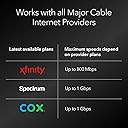
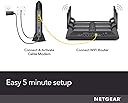
The NETGEAR Nighthawk CM1200 is a DOCSIS 3.1 cable modem designed for cable plans up to 2Gbps. It features 32x8 channel bonding, link aggregation combining two 1G Ethernet ports into a 2G port, and four Gigabit Ethernet ports for multiple wired connections. Compatible with major cable providers like Xfinity, Spectrum, and Cox, it helps users save on rental fees while future-proofing their home network with cutting-edge technology.


| ASIN | B07Q5VM51Y |
| Brand | NETGEAR |
| Built-In Media | Nighthawk Multi-Gig Speed Cable ModemโDOCSIS 3.1 (CM1200); Ethernet cable; Quick install guide; Power adapter |
| Color | Black |
| Colour | Black |
| Compatible Devices | fgh |
| Compatible devices | fgh |
| Connectivity Technology | Ethernet |
| Connectivity technology | Ethernet |
| Customer Reviews | 4.3 out of 5 stars 5,800 Reviews |
| Data Transfer Rate | 800 Megabits Per Second |
| Global Trade Identification Number | 00606449140750 |
| Internet Service Provider | Cox, Spectrum, Xfinity |
| Internet service provider | Cox, Spectrum, Xfinity |
| Item Dimensions L x W x H | 15.5L x 8.6W x 26.2H centimeters |
| Item Weight | 1.01 kg |
| Manufacturer | Netgear |
| Maximum Downstream Data Transfer Rate | 2000 Megabits Per Second |
| Maximum Upstream Data Transfer Rate | 1000 Megabits Per Second |
| Mfr Part Number | CM1200-100NAS |
| Model Number | CM1200-100NAS |
| Modem Type | DSL |
| Number of Ethernet Ports | 4 |
| Number of Items | 1 |
| Number of Packs | 1 |
| Number of Ports | 4 |
| Product dimensions | 15.5L x 8.6W x 26.2H centimeters |
| UPC | 606449140750 |
| Unit Count | 1 Count |
K**6
Works great!
Works great! So much faster than my old system.
J**S
Updated Review: HORRIBLE - STAY AWAY---- Great, Now That It Works..
LAST UPDATE: I now have Frontier Fibre Internet. I sold my cable modem and it was still working great when I did. I am still using the TP-Link Deco x20 (x3 nodes backhauled) and my network has been rock solid all along. I still will never go Netgear again. UPDATED REVIEW: TLDR Listen to Reviews, Horrible Customer Service, 90 Warranty ONLY - You Have Pay for Anything After that! Garbage Equipment. Had Two of these Die!! I should have listened to reviews of this CM1200 Cable modem! First modem I got was garbage and after a month of trying to trouble shoot why my new network setup was't working, it turned out to be the modem. So I got that one replaced with a like kind CM1200. Worked OK for the 5 months I've had it, but I didn't realize what torture I have been living with by doing every other day restarts until the unit completely crapped out. Intermittent dropouts of network connectivity, constant reboots of the modem to get it connected again, which progressively got worse and worse until I had to restart the modem at least every 2 hours just to have connection again. I finally got to the point where i bought a competitors modem (Arris SB8200 Cable Modem Only, and LOVE IT!) and I have been actually sleeping at night again. I literally had dreams at night that the network was down and I had to get up to get it working and couldn't. Never lost sleep over something so ridiculous before, but I did. I've had my SB8200 high speed modem for two weeks and its a joy to come home and not have to hear my kids tell my that the internet has been out again for the last 4 hours. Never again Netgear; you have burned me for the last time. ON TOP OF THAT, the whole pay for service on a product that is less than a year old is INSANE!!! This was the service call: "Hi whats your problem" "My modem is losing constant network connection." "Is the light on for etc, etc, etc, etc?" "Yes, they are all on at the moment, but after a couple of hours, I lose connection even though the lights are on." "Oh, your equipment is fine, so it's not that. But if you want to purchase a service agreement we can forward your issue to our troubleshooting team...." CLICK.... I hung up on that B.S.! WTH is that!!! Company essentially holding me hostage with a $180 piece of garbage paperweight and they wont honor a one year warranty on unless I pay for a service contract. Absolute crap I tell ya. Never again Netgear, never again. I said never!! Stay away from this product, and essentially any of their others. I've had a gaming router of theirs before too, and it had similar issues that I replaced that with a TP Link Deco x20 Mesh Router, and it work awesome. Just dont buy these guys crap, you will regret it in the end. FIRST REVIEW: So the first cable modem I got had to go back. Constant internet drop outs, restarts, reboots, start over! It was a headache for two weeks trouble shooting. I had upgraded my internet service, cable modem and then mesh routers within two weeks. The cable modem/service were first and connection was intermittent. So figured it was my older gaming router and I needed mesh network upgrade for the house and kids demands for connection. Replaced with wifi mesh router and it was a crap shoot for many days. I thought the new router was no good, but then I got a replacement cable modem to rule that out. Turns out my Cm1200 was bad. The replacement has been working great and now I have to update my review on the Wifi routers that I lambasted. Knocked off one star on this cable modem due having to troubleshoot and replace the original purchase. But so far so good. Hope it stays that way.
A**Y
Activated on xfinity and wifi router connected is working but unexpected issue
I activated this modem on my existing xfinity account fairly easily with the xfinity android phone app and xfinity account login. The fast TP-Link wifi router I connected to it is working great and much faster than the xfinity wifi. I first set up the wifi router using the xfinity modem and it worked that way too. I noticed later that on the box it says that the xfinity speed supported for this modem is only 800mbps, but the xfinity compatible routers page states that this modem supports 1Gbps xfinity speed. The unexpected issue is that anything else I have plugged in to the other ethernet ports on the modem do not get an internet connection. The main wifi router connection does work though and the port lights up green on the modem but the other devices light up amber (the other devices do work connected to the wifi router ethernet ports). Tech support and documentation say that an amber light means it is a 10 or 100 mbps connection. Tech support rep said the connection "should work" but nothing will connect to the internet if the light is amber for that ethernet port on the modem(she is wrong, it is not a router or multi lan connect device). Documentation does not say either way but diagram on box shows picture of router, computer, or "compatible routers" connected to the ethernet ports, but nothing is explicitly stated. My computer did connect to the modem's ethernet port and got access to the admin setting page for the modem, but even a second brand new wifi router I have would not get a green light or internet connection, and a Roku ultra didn't work (would not connect to internet). Other than that, and no clear info in documentation on the ports issue, features or specifications, the modem works as indicated, but it is basically working as a 1 port modem with the option of technical set up using the other ports for a single port function. Again, it is a modem with no router functionality, i.e. no multi-port lan connect functionality. Just a side note that nothing on my xfinity accounts billing has updated after the netgear modem activation and there is nothing on my xfinity account to return the xfinity modem so I will have to call them to remove the $15/mo for that and an appointment or return code to return it to them. Update: I called them and they essentially just did a new service plan without the modem, but with the other discounts for the 1 year contract renewal. There was no return code or anything provided, she just said to take the modem and power cord to UPS, they scan the bar code on it box it and return it to xfinity per their agreement with comcast and I did that. It takes "up to 2 weeks" for them to receive it, process it and remove it from your account billing - it was 2 days in my case.
M**D
Better Than Expected!!!
I am a optimum customer and have the 400GBPS plan with them. Over the past 3 years, using their Arris TM1602A modem, I have been frustrated with buffering, when streaming, slow downloads, etc. speed checking, off and on, I would notice speeds as low as in the 100s gbps up to the 300s. I never had hit 400gbps from what I observed. From the provider I would get excuses from copper exposed connectors creating antennas and draining the function to using too many devices to wireless products and so on. I accepted those excuses until I heard a tech person, from a different provider, talking about how their provider throttles the speed in the modems they provide along with monitoring what you use it for... I use it for basic use, from tv shows, live tv and movies (no, not porn) along with gaming and internet use... basic stuff as far as I'm concerned. I do not know if the provider does as I heard, however I wanted to take the chance an see if it is a solution... after all I can always return it with amazon. I did and had a problem. On the modems they install for you, there is this connection between the coax cable and modem, a filter or something. make sure you use it!!! Other than that, make sure your coax cable is not the cheap stuff and you are good to go. I was able to connect by internet (takes a few minutes when new modem connects) with web site address netgear provides. At first the connection is slow - I checked and was told it takes 24-48 hours for full speed for whatever BS reason. Note, if you don't see an improvement soon to a reset on modem (push in button that you need a paperclip for) and restart your router (I use netgear x10) and computer. I saw improvements quickly increase within the 12-24 hour period. Since hook up from 2 days ago this is the numbers I am getting (see picture). I am not a tech geek and was hesitant but this was fairly painless and now I no longer need to lease a provider controlled modem that costs $10 a month that you generally talk to a automated response when you have problems. Now, if you had netgear tech support you will know their tech support has something to be desired with the heavy accent from their support staff... fortunately I rarely needed their help.
A**R
Nighthawk Modem & Router
The Nighthawk modem and router upgrades for me were an excellent choice for my internet needs. It's crazy but the modem came out of the box looking like a Bird of Prey. Both devices were easy to install. I especially appreciate the mandatory registration required for my product security. This level of product is providing me with outstanding signal strength and quality. I would highly recommend this reliable and affordable product for anyone seeking to upgrade their system. The performance is beyond compare.
Trustpilot
1 month ago
2 months ago