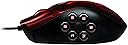


🎮 Elevate your game with the Razer Naga Hex!
The Razer Naga Hex MOBA PC Gaming Mouse is engineered for gamers, featuring 6 customizable mechanical thumb buttons and a high-performance click rate of up to 250 clicks per minute. With Razer Synapse 2.0, you can tailor your settings for an optimized gaming experience. Its ergonomic design ensures comfort during long gaming sessions, making it a must-have for serious gamers.
| ASIN | B007WTAJTE |
| Additional Features | Ergonomic Design |
| Antenna Location | Gaming |
| Are Batteries Included | No |
| Are Batteries Required | No |
| Brand | Razer |
| Button Quantity | 11 |
| Color | Red |
| Compatible Devices | Personal Computer |
| Connectivity Technology | USB |
| Customer Reviews | 4.2 out of 5 stars 804 Reviews |
| Global Trade Identification Number | 00879862005320 |
| Hand Orientation | Ambidextrous |
| Hardware Platform | PC |
| Item Weight | 1.49 Pounds |
| Manufacturer | Razer Inc. |
| Mfr Part Number | RZ01-00750200-R3U1 |
| Model Number | RZ01-00750200-R3U1 |
| Mouse Maximum Sensitivity | 3000 Dots per Inch |
| Movement Detection | Laser |
| Movement Detection Technology | Laser |
| Number of Buttons | 11 |
| Range | 10.0 meters |
| Special Feature | Ergonomic Design |
| Style Name | Hex Red |
| UPC | 012303825839 045555985051 168141474200 879862005320 012301958782 230494864738 876872503242 872182790976 191120002026 112039998279 115970721234 001910305384 099507090508 807320188247 172304243435 803982982933 |
| Unit Count | 1.0 Count |
| Warranty Description | 90 Day Woot Limited Warranty |
U**E
Five Star Mouse For Sure.
From reading some of the other reviews of this mouse I find that people aren't focusing on the actual product and instead they focus on "what would my dream mouse be" which is not the point of a review. This mouse does what it's suppose to do and it does it amazingly. For those using this mouse to play MOBAS, welcome to heaven. To be totally honest you could play a MOBA just fine without this mouse, however this mouse makes things a lot more convenient and for those of us to put active items in their items slots and then forget to use them, then this mouse can definitely fix that. It just makes you use active items a lot more when you have the buttons literally at your finger tip. It was made for moba players so its not going to have crazy software to let you aim EXTREMELY precisely as if we were playing shooters and its not going to have a billion buttons as if we were playing WoW, i feel like it still works really well if you play games like NeverWinter or Smite (obviously). I've used this mouse to play League of Legends (which i play the most of), Smite, Dota 2, Tera, Neverwinter, and even Team fortress 2. It worked really REALLY well. I'm not a big person on mouse sofware because i rarely even use it. My way of thinking is, i can play a shooter with a normal mouse and still do very well, why do i need software to adjust my DPI to a PRECISE point? The answer is you dont. Unless your some type of pro gamer that really wants every edge possible you dont need crazy software like that. The Razer Synapse which is what you will download for this mouse has everything you really need and thats it, just the essentials. It does let you adjust DPI, it also allows you to set up key mappings, pretty regular stuff. I have 4 different key mappings for a couple different games and it worked out really well. So bottom line, if you're reading these reviews and seeing 2-3 stars on some of them. Dont be turned off by it. It honestly is an amazing mouse, it is VERY convenient to have. It looks cool. Also you can turn the lighting off, i notice it gets a LITTLE bit warm sometimes when you play for a long time with the lights on. Its a five star mouse because it delivers on what it was made to do. I could sit here and talk about my "dream mouse" for hours but it wouldn't change the fact that this is a great product. Definitely worth having if you play MOBAS a lot. or if you edit music or videos (like me) it actually helps a lot with hot keys too lol.
T**V
Great Mouse for MOBA/Action RPG Gaming
I've been looking at this mouse for a long time now, and finally had the opportunity to purchase it. When it arrived, it did not disappoint. First thing is first, the left, right, and center (scroll wheel) buttons are a good balance between tactile feedback and the amount of force required to push the buttons down. I had an old Logitech G5 Laser Mouse and found sometimes that I didn't click hard enough, or that I didn't notice I clicked due to the lack of tactile feedback for the clicking. The scroll wheel is nice and smooth and is fantastic to use in games where you can scroll through items using the scroll wheel. Each notch on the scroll wheel is quick and precise, allowing you to stop where you want. Onto the mechanical side buttons. This is the main reason I purchased the mouse. I play a lot of League of Legends as well as some other games such as Diablo 3 and Minecraft. Being able to switch items, use skills, or activate items is a huge boon when time is of the essence. There are games I didn't think I would be using the mechanical buttons for, but found myself using them. I broke out Warcraft 3 the other day and was using Ctrl+1 on the mouse to create control groups without messing up my rhythm. It was pretty neat. The rest point in the center of the buttons took a little getting used to, but about three days later and I retrained my hand where to sit on the mouse. Interestingly enough, this keeps my hand rested and not tense like my previous mouse. This may be because of my body type, or it may be Razer designed it this way from the start. Only Min-Liang Tan really knows I suppose. Aesthetically, the mouse is pleasing to look at, and even though it is nothing more than eye-candy, I'm a fan of the pulsing Razer logo. Overall, this mouse is fantastic and I would recommend it to anyone looking for a few buttons to up their game, or at least save your left hand from doing some work. Razer, if you see this, solid product, keep it up.
R**M
Mostly Praise
After a year, plus a few months, The mouse is almost as good as it was out of the package. Almost. I used it to play MOBAs and MMORPGS, constantly taking advantage of the side keys. The keys are really and quite comfortable to use, they haven't deteriorated in any way. Left and Right mouse buttons are as good as always. The problem with my mouse was that the scroll wheel got screwed up. Being someone who uses it more than anything else on the mouse, it is really disappointing to have a loose scroll wheel. The problem is that after most of the tactile feedback "clicks" I get to a "click" that is loose and it skips over it making me scroll down more than I intended it to scroll. This isn't that big of a distraction, it is still a great mouse and the only thing stopping me from buying it again is that my hands are quite large for it. Stretched, from the tip of my pinky to my thumb, I can cover a distance of 10 inches with one hand. The mouse, at its widest, is roughly 2.5 inches; the length is 4.5 inches. Your main fingers have an inch each to rest and click, your ring finger has a nice place to rest, and your pinky sits off to the side. Overall it is a good mouse, even with me considering it to be small. I use a Fingertip grip since the mouse is small for my hand.
H**Y
Finally found my mouse!!! NAGA HEX
I absolutely love this mouse. I purchased the NAGA 17 button 2 months ago and just could not get used to it. I also bought the G700 and that was ok but too heavy for me. I didn't want to shell out 70 bucks for a new mouse but I finally talked myself into it and I am GLAD I did! I tend to claw grip my mouse and pivot on my wrist bone(right side) and I have smaller hands. I play mostly MMO's and currently back to WoW. Keep in mind I still cannot press the buttons correctly on my NAGA 17 button. With this mouse,within minutes, I was pressing all 9 buttons like I had the mouse for months! The buttons are just laid out so nice. Also the fact that they stick out more help a lot. The two buttons behind the mouse wheel are great for me to hit with my pointer finger. I originally had the original wow mouse and LOVED it. However I could only hit the top four buttons on that and two on the side plus the side button started sticking. I would say I like this Naga Hex mouse even more than that one. Ok back to this mouse..The mouse comes with 3 different size pads for your thumb, they really do make a difference. I ended up liking the mid size..it is pretty close to the largest size and hard to tell which one is which by looking. The small one was too thin and I could not pick the mouse up very well with it. I like to grip the mouse. As far as the 1-6 buttons, I rock my thumb forward and easily hit #2. I rock my thumb backwards and easily hit #5. #1 and #3, I just move my thumb up or down slightly. #4 and #6 I just bring my thumb back(up/down) slightly. The buttons are all laid out just right so that you can definitely tell a difference between them all. I really do not have any complaints on this mouse and would recommend it to anyone wanting a lot of buttons but cannot get used to the Naga 17 button mouse. If I HAD to say what I like the least, it would be that the buttons(1-6) press in very easy. So if you tried to pick it up and had your thumb on #1, you would click it. I do, however, think that over time I will be easily trained to keep my thumb on the thumb rest. I pretty much already do but I could see it being a problem for some. They would never be pushed in moving the mouse side to side IMO. Oh...and this mouse rocks in D3 as well. yes, I am in love. Other notes- I run everything at stock 1800 dpi etc. I am not very technical but as far as I am concered the mouse tracks as good as any other mouse I have had. This review is mainly for comfort and ease of hitting all the buttons. -Shaymon
C**E
looks amazing... has some flaws...
-UPDATE- Sept. 10th 2012 I have been using this mouse on a daily basis since May. It has had some heavy use with Diablo III and Guild Wars 2. Despite some of my nitpicking this mouse is absolutely a great mouse. Once you get past that firmware issue... the glossy top is starting to bother me to the point where i am looking at a new mouse tho... Razer Ouroboros looks pretty awesome. After going through two Logitech MX 518-Metal (both crapped out within a year of purchase) and using a MS Sidewinder (the original... not the crappy X5), I was on the prowl for a new gaming mouse. The MS Sidewinder has been a great mouse, but it never has been a comfortable mouse for me to use and being that Diablo 3 was on the way I wanted something new. Firstly, this mouse is sexy... especially if you like green. (i wanted the red wraith version, but no one has it in stock except the Razer store) I love LOOKING at the nice shimmery green on the top and the mesmerizing glow of the LED lights on the wheel, buttons, and the logo. The cord is nylon braided and of a great length. All in all this is a sexy looking mouse. I did notice right away that this is not a large mouse by any means. It fits my hands just fine, but I prefer a larger mouse. SO, if you have larger hands keep in mind that this mouse may feel a tad small to you. While we are on the subject of touching our Naga Hex... I very well said I love the way it looks, but I do not care for touching the glossy top that this mouse has. I didn't think it would bother me as much as it does, but now I am being reminded of my loathing for glossy top mice from my MX 518 days. A new edition with the rubber top would be awesome. (hint hint) NOW THAT I HAVE THE MOUSE WORKING it is a very smooth mouse to use. All the buttons work as they should and have just the right about of click and travel time for my taste. I will say that I am not crazy about the two buttons being placed behind the wheel. I use a palm grip and it's hard to hit the buttons in this spot. It feels great using a palm grip on this mouse. Glossy top and size aside... I do like this mouse a lot. --???So why the 3 stars???-- Razer Support and Software!!!! I messed around with the mouse for a bit testing it out and what have you. Then I made the mistake of installing Synapse 2.0. The mouse needs a firmware update to use Synapse 2.0 and that firmware update is the heart of the issue. IT IS BROKE AND RAZER NEEDS TO FIX IT! Let me explain... The firmware update for this mouse has a high chance to crash or "just not do anything". When this happens it effectively bricks the mouse rendering it a nice paperweight. If you look at the Razer site and go to the support page for the Naga Hex you will not see anything there at all. NOTHING! If you try a google search for this issue you will discover that it is a wide and well known issue with the HEX. I emailed Razer and after two days of not hearing back I happened to come across a forum where a awesome member had links to zip files that corrected the issues. (he had gone round with them himself for the same issue.) Something is not right when a firmware update, made specifically for this product, kills it... Now that the mouse works i am very much enjoying it, but those issues were enough to make me give it a subpar rating. On another note i will say that the best mouse i have ever owned and still own is a wireless MS Intellimouse Explorer 2.0. Seven years strong ZERO issues ever... ... maybe i should just use that as a gaming mouse... it actually does rock... lol
S**N
My worries were gone as soon as I plugged it in
I ordered this product without researching much into it. It looked like something I would definitely use (enough buttons because I play a ton of ARPGs that this game said it would fit best for). However, post ordering it I was concerned about a few things I read on various websites that had reviewed the mouse. 1.) Plastic casing: The qualm here was that the plastic casing was a terrible design choice for a gaming mouse because after long gaming sessions sweat would build up and contribute to hand slipping. After having used the product for about a week and about 24 hours of total game time, (with a couple of 4+ hour sessions) I can say that I have somewhat encountered that problem. That being said, I'm one of those people who don't have sweaty hands/it takes a lot for me to sweat, so the sweat buildup I've encountered is negligible and hasn't bothered me at all. However I can definitely see this being a problem for other people. I know Razer offers a League of Legends edition of this mouse that is slightly more expensive, but from what I know the mouse buttons are slightly better(?) and it has a matte finish so sweat isn't a problem. 2.) Button placement: When I was doing post-order research one reviewer complained that the button placement was awkward and didn't work well. I haven't encountered this problem at all. I would consider my hand average size (maybe even somewhat small for a male), and I find the button placement perfect, even the button furthest back. The Naga Hex is designed more for claw grip users (if you don't know what that is, check it out somewhere online). That being said, it works equally well for palm grip users in my opinion (I would consider my grip to be a hybrid of palm and claw). Fingertip users will have issues reaching the front most button, unless they have long thumbs. So after using this mouse, I love the button placement and could not see myself going back to a regular mouse for gaming. Now that a couple of the concerns I had are cleared up, I'm now going to go into my personal experience. Like I mentioned previously, I tend to play mostly ARPGs (so far I've just been playing Mass Effect and Dishonored). It took me a while to get used to which powers were mapped where, but after a while it was the best experience I had. The mouse buttons are extremely responsive and I don't have to look at my keyboard briefly so I don't accidentally hit 5 instead of 6. I haven't utilized Razer Synapse 2.0 at all, finding the in-game button mapping better and safer (if Razer Synapse 2.0 stops working at least all my buttons mapping is the same). I also have a collection of FPS/TPS games that allow me to carry multiple weapons that are normally assigned to numbers on the keyboard (Tomb Raider, Borderlands 2, Far Cry 3), so switching them with the mouse wheel would normally be a pain. This mouse works extremely well in these games as well. Though you may only be using a few of the buttons on the mouse, the Hex makes switching between weapons quick and easy (especially in Tomb Raider where some of the weapons have multiple settings that require you to click the same weapon button twice). Though this mouse isn't essential for these games, it definitely creates a certain convenience that I don't want to be without anymore. I don't consider myself a hardcore gamer, so some of the features don't really appeal to me/haven't noticed the switch between a regular mouse (i.e. the DPI settings, Razer Synapse 2.0, ergonomic design). However that being said, I have played around with the DPI settings, Razer Synapse 2.0, and even my grip to try and get the best experience. The mouse's default DPI settings work well right out of the box; Razer Synapse 2.0 isn't necessary for this mouse to work well; and as long as you're not using a fingertip grip this mouse is about as big as any standard mouse and most people will find their grip to work fine. I bought this mouse because I wanted to have faster access to hotkeys, and I was not disappointed. This mouse has just enough buttons and every button is responsive. I would recommend possibly purchasing a gaming mouse pad as well. I bought a Razer Goliathus Speed Edition, and that was a good choice (I'm going to do a review of that as well, but at a later time because I've only been using it for a day so far). I'm also going to most likely be purchasing a Razer Tartarus in the near future (my left hand is starting to fatigue and I need something more ergonomic and versatile).
S**N
Great mouse if you can live without a mouse during the RMA process
The mouse worked great when I first purchased it and the 6 buttons on the side were what I was looking for in a gaming mouse. After one year and approximately six months of use, the right mouse button works when it wants to in game. After spending $80 on a 'gaming mouse', I would hope the main mouse buttons would work without issue. Gaming mice are supposed to stand up to higher than normal use. I contacted Razer Customer Service and they expect me to be without a mouse while I deal with the RMA and pay for the shipping. This is unacceptable. With this kind of customer service, I believe I may be going back to Logitech products. Update 12/10/2013 So after a month long email debate with Razer Support, their solutions were this: 1. Ship the defective device back and be without a semi-working mouse until the new device arrives. 2. Cut the cord on the current device, take a picture of the device with cut cord, email them the picture and they will ship the new device. Upon contemplating how cutting the cord was any different than completely taking a customer out of service by shipping the defective device back, I logged into Amazon and ordered a Logitech G602 Wireless Gaming Mouse. When my Logitech mouse arrived, I opted for option number 2 to save the shipping cost. Well, today the 'new' mouse arrived and it is a refurbished Naga Hex. Upon receipt of a refurbished device to replace my new device, I have lowered my review rating for this mouse due to unacceptable customer service, button malfunction within 2yrs on a 'gaming mouse', and sending me a refurbished replacement device. Make sure you read the Warranty fine print... I will never purchase another Razer device. Back to Logitech I go.
B**0
Far beyond expectations
I bought this mouse for Arma 3. Arma 3 is a high graphics, super realistic, tactical shooting game - not the mainstream killstreak games. There are a LOT of controls. I know most of the people looking at the mouse are some persuasion of MMO-WOW crowd - I'm not at all. My keyboard is devoted to body movement and stance alterations - sprint/crouch/prone/lean left ... as well as actions that won't be used in life or death combat - inventory, compass, map, switch chat channel. My mouse has (the obvious) left button shoot, right button brings up iron sights/optics... but I also include binoculars on the below-mouse wheel buttons (underrated in combat and invaluable in the moments leading up to a firefight) as well as night vision. On the 6 side buttons I have free aim/combat aim (look over your shoulder as opposed to turn your body), switch to side arm, switch optic mode (switch from red dot to distant scope), switch weapon mode (grenade launcher or whatever), switch from 1st person to 3rd person, and chat (Arma 3 has 3D radio chat, so this is a really valuable option to communicate). It truly changes the game from being a cluster - f^@# chinese printing excursion into a seamless, enjoyable, and immersive gaming experience. Just being able to command the movement of my neck by clicking my thumb, while I'm simultaneously aiming/shooting with my wrist and 2 fingers is worth the cost. It feels amazing and you can make all the adjustments you would want to. It looks freaking incredible, like a demonic orb igniting beneath the will of your your palm - but I turned off the lights because I prefer to concentrate on the game. I've been playing games since there were 2 buttons and a directional pad - I'm an old school Mario fan for life. IMO, most games don't require this mouse... However there are a few crowds that should definitely look at Razer... Macro assigning raid oriented MMO players (back when I played EQ we didn't have these options) should probably look at the mouses with more buttons... but the hardcore FPS player should buy this mouse right now.
C**O
Bastante bueno
Tengo cerca de año y medio con el mouse y desde el inicio hasta ahora ha funcionado perfectamente. Es cómodo de usar, personalizable y los botones extra dan bastantes opciones al momento de jugar.
Y**D
Greatest mouse I've ever own!!!
I have always owned standart microsoft or logitech mice. I am a MMORPG gamer and I define myself as a "clicker" whereas I click on the skill I wish to use instead of programming a million shortcuts on my keyboard. This made me a slow and ineffective player. So a friend of mine introduced me to the Razer products. I have decided to try it out and ask Santa for one for Christmas. I DO NOT REGRET IT. Instead of clicking, easy access buttons on the mouse allow me to play effectively without trying to remember the shortcut. Its ergonomic form eases the pressure I felt with a regular mouse in my wrist. Controls are very intuitive. No excess buttons, it is well balanced, precise gaming and every day tool. Bonus: the mouse looks awesome and the red lights on it makes it look prestigious. I have combined this mouse with a G13 Logitech gaming pad and since then, my gamer life has changed. You ought to try it, I give it a 5 star!!!
L**J
Chatarra
Después de un 12 meses apareció el famoso double-click, ya te imaginaras lo frustrante que es tener un mouse relativamente caro y que te double clickee a su gusto. Mi primer y último mouse de Razer NUNCA JAMAS!
B**S
Beast of a mouse!!
Beast of a mouse!! Not to many buttons like some mouses have and very ergonomic. Fits the hand well not to alrge or to small, i have fairly average size hands and would do fine with large hands. The razer program sucks we all know that but you can use the mouse without the razer synapses program.
M**E
Sweaty hands: Avoid glossy mouse tops AT ALL COSTS.
In terms of functionality and comfort, the Hex is AMAZING. The learning curve for the thumb grid is much smaller than a traditional Naga, with less, bigger buttons and a thumb rest. The only real problem I had with the Hex was the glossy top. I have sweaty hands, and a glossy top turns that into a real problem, real fast.
Trustpilot
3 weeks ago
2 weeks ago