

Desertcart purchases this item on your behalf and handles shipping, customs, and support to France.
🎯 Master your workspace with precision and style — the ultimate trackball for pros on the move!
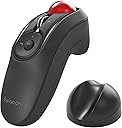
The ELECOM Relacon Handheld Trackball Pointer is a Bluetooth-enabled, ambidextrous thumb mouse featuring 10 customizable buttons and adjustable DPI settings (500/1000/1500). Designed for ergonomic comfort and long-lasting use, it offers a smooth, low-maintenance trackball with artificial ruby bearings and a 6-month battery life powered by 2 AAA batteries. Compatible with Windows, MacOS, and Android, it’s ideal for professionals seeking wireless freedom and enhanced productivity in presentations, gaming, and daily computing.


| ASIN | B08GSCC8RX |
| Additional Features | Wireless |
| Antenna Location | Gaming, Home, Working, Office, Laptop, Tablet, Gaming Console |
| Battery Average Life | 6 months |
| Best Sellers Rank | #14 in Computer Trackballs |
| Brand | エレコム(ELECOM) |
| Button Quantity | 10 |
| Color | Black/ Red Ball |
| Compatible Devices | Desktop PC, Laptop |
| Connectivity Technology | Bluetooth |
| Customer Reviews | 3.6 out of 5 stars 2,133 Reviews |
| Enclosure Material | Plastic |
| Hand Orientation | Ambidextrous |
| Hardware Platform | Laptop, PC |
| Item Dimensions L x W | 4.4"L x 1.6"W |
| Item Type Name | Trackball Mice |
| Item Weight | 2.7 ounces |
| Manufacturer | ELECOM |
| Mfr Part Number | M-RT1BRXBK |
| Minimum Required Operating System Version | Windows 10 |
| Model Name | Relacon Trackball |
| Model Number | M-RT1BRXBK |
| Mouse Maximum Sensitivity | 1500 dots_per_inch |
| Movement Detection | Trackball |
| Movement Detection Technology | Trackball |
| Number of Batteries | 2 AAA batteries required. (included) |
| Number of Buttons | 10 |
| Operating System | Windows 11、Windows 10、Windows RT8.1、Windows 8.1、Windows 7、Windows Vista、macOS 13 Ventura |
| Power Source | Battery Powered |
| Range | 10.0 meters |
| Special Feature | Wireless |
| Style Name | Wireless Trackball Mouse |
| Unit Count | 1 Count |
| Warranty Description | 1 Year Manufacturer |
J**N
No mouse is perfect, but this one is darned close
When I read the other reviews, I worried that the ball might fall out when you turn it upside down, but no, it is not like that. I set this thing on the table on its side without the cradle and I have no problems. What people are talking about is if you drop this, then maybe the ball will pop out like the Logitech (and every other brand's) trackballs do. I don't know, because I like this too much to let myself drop it. Before going any further, let me stop and just say that I love this mouse. I have only had it a couple of days, and it is about as quirky as I am, but this mouse is really and trully everything I had hoped it would be. First, keep looking back at the price, which is amazingly affordable. Second, take a look around and the nearest similar device is a bulky version with a finger loop hole and basically everything to signal that it is for videogaming and not for the office. By contrast, this is like the classiest possible way to control your laptop during a presentation. If you had this, connected to a Macbook, controlling Powerpoint, people would assume it is some hot new tech they never heard of, rather than an actual obscure company with an idea that is bold and forward-thinking. That is if they even notice it, being so compact and discreet. For anyone with limited mobility, this could be a really enabling device on a whole other level. The quiriest detail is also it's coolest feature once you master it, and that is the variable speed control beside the "on" switch. I never knew there would be such benefit to changing my mouse speed conveniently. This will be the key to enabling maximum mobility with this mouse. There is one small drawback. I have medium-sized hands, so there is one motion that requires two hands, which is to move from side to side. You have to push down the scroll wheel and then roll the ball. That is the only feature I found here that requires two hands, excluding the moves that require that I hit shift on the keyboard before a mouse move. However, if you are planning to work with this thing up to an hour strait, then you should anticipate switching hands or fingers to keep from getting a cramp. When I do switch hands and fingers, I am able to manage and not cause that type of cramping. Doing this also helps you to find the most relaxed sort of default ways to hold this. One way is if you slide your hand back, so that your first and second fingers are only at the very edge of each trigger button, then that promotes a hand position that is curled at an angle very close to the natural resting postion of your hand. One final considerataion is that your success with this mouse will be linked to the task you most hope it will benefit. I got this almost entirely for graphic design, because the mousepad on my Macbook is not working ideally for my workflow, and the stylus-type pads are for drawing more than for designing. With most devices, the challenge is threefold. First, it is very easy to summon the left click on the Macbook trackpad, to the extent that it is so annoying and constantly in my way that I forget it's also a quick access to certain features. With this mouse, I am suddly actually using that left click and noticing it's options and benefits. Secondly, when I pull my finger off the Macbook trackpad, my cursor position is subject to a slight jump. That is a problem in precision graphics, and even the Wacom tablet or IPad with the Apple Pencil are not safe from this hiccup without a fair amount of finesse. This mouse solves that problem the second you get your ideal mouse speed calibrated, and get oriented to the device. The weight of the ball means the cursor absolutely only wiggles when you touch the trackball. This is the precision I needed. I can get used to the muscle memory of pressing the trackball to make it zoom in/out, and the two handed side-to-side movement is not too bad once I got in the habit of switching hands. Why would you want to switch hands, you ask? Well, welcome to your new reality, because you don't have to be ambidextrous to use this mouse with either hand. That is another reason I feel this would be a really great and affordable solution for enabling people who may have limited mobility. If you don't end up liking this mouse, it could only be because of a very limited number of reasons. Maybe you want to use this for many hours a day without changing up your grip or which hand you use, then this may not be the most comfortable mouse, unless you learn how to master that looser grip that I explained earlier. Another of the limited reasons you might not like this may be because of the size. This is probably most ideal for small-ish hands and least ideal for really large hands. My average-sized hands are maybe a small bit larger than what is ideal for this. Really, the bottom line is that if you are a person who wants to hold your mouse in your hand, not working it on the desktop, then I am convinced that this is the model to get, especially if you want it to be discreet. But that is why this seems like such an ideal mouse for giving a presentation, because it is nice and small in your hand and not like the handle-bar look it would have if it was the most ideal comfort for a large hand. Some reviewers commented on this mouse, feeling that it was too light and not sturdy. Well, think of this as a mouse, because this is a...well, a mouse. It is equal in durability to the average mouse you have seen. This is not a piece of sporting equipment like a Wii controller that offers a rubber cover because it expects betting mistakenly tossed. Please do not toss this mouse. This is a tool that is sleek and designed for a professional who wants to whip their cursor around their monitor screen with an impressive sense of command and agility. This is my ultimate mouse. Oh yeah, and the button to calibrate the speed is what you hold down to get the mouse to sync with your other gear. This can confuse you when you return to your Bluetooth menu on your laptop and click the old icon, which takes you nowhere. Again, hold down that calibration button beside the power switch on this mouse, and it will pop up in your menu as a new Bluetooth option. There are so many amazingly well-thought-out features in this device. A feature that I really love and did not expect, is that I can control my music on iTunes or Spotify in the background, while I am designing on Affinity software, without having to summon the player window to appear in front of my graphic window. The circular play controls function independently of which app window is in front. I mean...wow...really and truly, this thing checks every box I could have hoped for. We should be grateful they did not make this thing heavy for no reason, or three times this cost for no reason. This is simply a great product for a great price. I am thrilled with this purchase! Put the batteries in it and the weight is perfect!
S**N
Very good for presentations
This is definitely one of the better models of handheld trackball, but I have to echo some of the gripes in other reviews: - Tracking can be choppy, esp. if line of sight to the paired device is interrupted or you move too far away - If your hands do poorly with 90% thumb-operated devices, this will be rough - I really would have liked a recharging port on the device vs. having to swap batteries All that said; if you use this in the obvious ideal circumstances (classroom and work presentations) - fantastic, no notes. It'[s affordable, it works perfectly well in those environments, and it has plenty of controls; the scroll wheel in particular is nicer than many similar devices, so if you find yourself doing a lot of scrolling through slides, a solid pick. You can use it as a substitute remote for a smart TV, and it's excellent if you need to flex your wrists more while using a PC. So I'm still searching for my perfect device... but this is very close, and certainly quite good for the intended uses.
M**V
Abysmal Connection and Range
Unfortunately, after using several Elecom products, I have come to the conclusion that they're absolute garbage, which is a pity, because they look cool and are very ergonomic. Whoever designs their connectivity package should not be employed making consumer electronics. Either that, or they have restricted Bluetooth and USB dongle transmission power to the absolute minimum., to save battery. All their products have abysmal connectivity and range. This goes for both the Bluetooth and USB versions. Sure, you may say...But unknown Amazon reviewer, why are you being so unreasonable? Surely, it's not that bad. Oh yeah it is. Their Bluetooth trackball has connectivity issues with my laptop...from the huge distance of one keyboard length away. Yes, Amazon review readers. This device has a range of 1ft/30cm. Same goes for their other trackball products. Anything between 1ft and 4ft will result in stutters and cursor jumps. Anything at 5ft and the connection will be dropped entirely. But wait, can it get any worse than that? Glad you asked. Yes, it can. You can actually block the signal entirely if you position your body between the device and the receiver. Yes, you basically need line of sight to make this work. You know how Bluetooth products usually work from different rooms in your house? Not this one. It's wireless as long as you can see the device you're connecting to and you're not more than 1 keyboard length away. Yes, I have tried different machines, Bluetooth adapters, drivers, etc. Their hardware is simply garbage. Stay away from their products and get yourself a Logitech or alternative products. As it is, most of their wireless offerings are simply unusable. Other points unrelated to connectivity: - Accuracy - 2/10. Track ball is jumpy/sticky when it first starts moving, still not smooth afterwards. - Ergonomics - 9/10. Well designed. - Buttons/features - 8/10. Scroll wheel is nice, buttons are intuitive and well placed. - Build Quality - 2/10. Cheap, flimsy plastic. Feels like a 15$ product. - Software - 10/10 if you like software that was designed in 1998. Otherwise 0/10.
L**N
This thing is genuinely awesome
This is essentially a one-of-a-kind product. I'm kind of shocked that handheld pistol grip trackball mice like this aren't an entire established subcategory. Long battery life, very responsive trackball, and a lot of remote control features on the mouse itself (pause/play, volume, skip/rewind, next/previous browser page.) It's also extremely ergonomic, which is where I give it the most points. Essentially no pressure on your hand joints, as it naturally creates a perfectly neutral palm position, and you have total freedom to rest your arm wherever you want. Much better than even the Logitech Ergo M575 I was using beforehand. It's also naturally ambidextrous, so you can split the load between your hands over long periods without needing a dedicated left hand version. This is my second time purchasing one of these, with the first one still functioning fine after years. I bought a second one for the Bluetooth version to use with mobile devices. If I had to point out criticisms, I'd first direct my attention to the strength of how well the core pieces hold together. The battery plate and trackball attach to the mouse fine, but somewhat loosely. If you drop it even a small distance (especially onto a hard surface,) it is possible that the battery plate will fall off, and very likely that the trackball will pop out and roll away. The Logitech was much better in that regard, to its credit. But the strengths of this mouse make me prefer it much more, even if it's something of a glass cannon by comparison. The other minor thing is that if you are frequently moving between mouse and keyboard use, you have to either set this mouse down on its side, or deliberately fit it into the provided mount when switching to keyboard use, then pick it up again to resume using the mouse. This creates a layer of micro-friction in a workflow context that is not present with mice that naturally rest flat on a desk. I might call it strongest as a casual/recreational use mouse, as I've never used it in a professional context over a long period as in an office or remote job. But if I did have such a job, this mouse is the first I would attempt to use for it.
D**.
Amazing mouse, especially for carpal tunnel syndrome. Just wish it was perfect.
Overall I love this mouse and I now use it the majority of the time. The things I like about this mouse: - I’ve had hurting wrists (probably carpal tunnel syndrome) and they have hurt less since switching to this mouse because I can use it with my arms and hands in any position. Also my index finger hurt a little bit from all the left clicking and trackpad clicking from other devices, but it hurts less now since these buttons are so easy to press and they can be used easily with either hand. - The buttons are all pretty silent. - Makes using my computer on a bed more comfortable. - Probably about 95% of the time works smoothly with no lag. - Fits my hand nicely. - It has a hole at the bottom to add a wrist strap, like on wii remotes and cameras. You do need to be about 2-3 feet by your computer for it to work well before it starts lagging in my experience, but I never need to be far from my computer so this doesn’t really affect me. What I don’t like: - The trackball is kind of loose when used tilted or sideways. It slightly moves the cursor with every movement. It’s not terrible but it’s the reason I give this 4 stars since I use this sideways a lot. - You have to turn it off when done. I’m not sure how this affects battery life. - Update after writing this review: The trackball loses smoothness at certain angles, even still being 1-2 feet away from the computer, and with completely fresh Duracell batteries, which is disappointing. Using them under my desk also causes lag and disconnection sometimes, so obstructions make it weaker. The Bluetooth transmitter just seems weaker than average, unless it is just mine. To the designers, I would probably pay $100+ for a version that had these things (in order of importance): - the trackball was placed in tightly so that using it sideways feels the same as using it upright, but still feels smooth. - it had a button that allows you to use the trackball as a scroll wheel. That would be awesome. (For example, click the button to toggle the scroll mode, scroll with the trackball, then toggle it back to normal mode.) - it could connect to 2+ devices with Bluetooth and additionally with a USB dongle in case the Bluetooth isn’t great or not available (and shows you which one it’s connected to with small LED lights, such as on other Bluetooth mice). - the stand recharged the mouse wirelessly + additionally the mouse had a USB-C port for charging. - OR for a battery powered version, it would be cool to be able to store an extra pair in the stand. It would make great use of the space that is otherwise not used for anything else. - it had a microphone. When my wrists hurt, I use Voice Control to control my Mac, and having a mic on the mouse would be awesome. - if it had extra programmable buttons would be cool too. Like buttons that I could program to do copy/paste, full screen, switch screens, open an app, etc. - if the scroll wheel could be tilted left or right slightly for more functionality. For example, that could be programmed to go backwards or forward, or scroll left or right, move to the left/right desktop, etc. It could be part of the programable buttons. - it had a button to remove the resistance on the scroll wheel, like on the Logitech G502 mouse. - it had RGB LED lights around the mouse to make it look cool. EDIT: I dropped this mouse from a table and the scroll wheel broke, so this thing cannot be dropped. I contacted Elecom and they sent me a replacement one for free, but they sent the wrong version (which they offered solutions for), so always be specific when contacting them. EDIT: Downgrading from 4 to 3 stars because: I must have bought about 3+ of the USB version, either from returning and buying a new one or giving mine away as a gift. All of the USB versions have had a flawed scroller. I'm assuming that I haven't just received 3 defective ones in a row and that all or most of them are like this. It doesn't fully scroll the way it's supposed to and it is annoying. The bluetooth scroller one worked fine for me for the first one I had, but it broke when I dropped it and really didn't even work that time. So I bought a new one, which worked fine for a while, but suddenly started to have an imperfect scroll also. Like, 1 out of 3 times when I rotate the scroll by 1 position, it doesn't scroll, or it scrolls down and back up, resulting in a choppy and not smooth scrolling experience. So now it seems I'm gonna have to ask for a replacement all over again. I will update this if they do replace it for me.
O**O
Appears to be the best of its kind
I switched to using a thumb trackball mouse from a logical technology company years ago. I was happy with it until recently when wrist aches made me turn back to the idea of a handheld trackball mouse. Previously I had tried a couple different units that featured a tiny, green trackball. Both units felt like junk and operated even worse. This time I was specifically looking for a bluetooth handheld trackball mouse so I didn't need a dongle tying up a USB slot on my laptop all the time. This Elecom unit turned out to be precisely what I was looking for. I am delighted with the functionality and features. The build quality feels on par with any logical technology trackball mouse and the performance merits the price. Initial setup was easy enough (despite foreign language instructions) and now when I turn it on, it connects to my laptop almost instantly. I'm happy with all the default button functions. I have smaller hands and find the device comfortable and easy to use. The tracking is spot on and I've been able to use it for work and play without issue. This mouse has several more buttons than I had before and I'm finding them all quite useful. I like that it uses AAA batteries as opposed to a built-in rechargeable. I'd rather swap out a couple batteries every 8 months than have to plug it in and wait. Not to mention I can pull the batteries for long term storage, if necessary. Also, those rechargeable batteries can only charge so many times before they fail, and good luck finding a replacement when it does. Alkalines for the win! Same goes for gasoline... But I digress. It's a great mouse, it's got a lot of features, seems of adequate quality, and is well worth the asking price. I read a complaint about the ball moving when the mouse is tilted to the side. I notice the slight movement as mentioned, but it has no impact on performance and I can use the mouse at almost any angle my hand can hold it without a problem. Holding it upside down, the ball will rise slightly before functioning as normal, but why on earth would you hold it upside down? Also worthy of note is that I can have the mouse and my headphones both connected to my laptop simultaneously without any issues. I cannot connect both my headphones and a bluetooth gamepad at the same time without problems, so I was concerned about that when I ordered this mouse.
J**S
This feels cheap.
I bought this as an auxiliary mouse because I've been having pains in my arm from extending it to use my desktop trackball. Now, I know from experience that thumb-driven trackballs take a little time to get used to, and that it's difficult to get the same precision with them until you've spent a couple weeks with them. I've done that dance before, so I was expecting it. This trackball, however, makes that problem ten times worse. When you're trying to roll the trackball, it randomly sticks in place - badly. Then, when it lets go, it jumps you across the screen. This makes it impossible to get any precision out of the device. Plus, though this is a handheld trackball, the ball sits so loosely in its cradle that if you twist your hand without holding the ball in place, it will shift, moving the mouse on you. The only way to prevent this is to keep your thumb firmly planted on the ball at all times... which is going to make it very hard to use any of those other buttons, which are all accessed with your thumb. I realize that these two problems don't seem like they can even exist together in the same device. That's the kind of bad design we're working with here. The scroll wheel is clunky. The position of the extra buttons is awkward (But truthfully, I'm not sure anything can be done about that. You have to put them *somewhere* if you're going to have them, and there isn't really a great place for them...) The entire device feels like it's made from exceedingly cheap plastic, especially for the price. Speaking of the price, it seems like that little cradle they give you to set the trackball in when it's not in use ought to be a battery charger for a built-in battery, rather than being an inert hunk of plastic, and making you buy AAA batteries for it. This trackball comes with a premium price tag, but completely lacks premium features. I returned this after using it less than a day. I couldn't tolerate it any longer than that. I would not recommend this to anyone. The only reason I rate it a 2 instead of a 1 is that it does, technically, do what it says it will. It just does it very poorly. As always, your mileage may vary.
J**H
Pretty good, but not perfect.
This mouse does not recharge. Requires 2 AAA batteries. The dock is just a ‘dumb dock’ it does nothing but sit there. No recharging. Still a nice piece though. The ball is pretty loose, which isn’t a bad thing. Should allow less cleanings. The front buttons are reverse of what I would like, but have no way to fix that, as it’s a second mouse on the system, and mouse settings are global. I would prefer the left click to be on top. It is lightweight, is working well, automatically connected as soon as I installed the batteries and turned it on. I do wish it was 10-15% larger. And had a recharging feature when placed in the dock.
C**N
Ottimo
Perfetto per fare Cyclette e lavorare contemporaneamente. È possibile regolare la sensibilità della sfera per il puntamento, dopo un po' di pratica è un mouse ottimo.
M**T
Génial et difficile à trouver
Ma copine ayant une tendinite à l'épaule, cette souris convient parfaitement car elle n'est plus obligée de lever le bras. Elle est légère et ergonomique. Bien penser à avoir un adaptateur bluetooth et installer le logiciel ELECOM pour paramétrer la souris comme il faut.
J**N
Lite för dyr för vad man får.
Uppfyller behovet av att kunna styra pekaren utan att ha ett underlag tillgängligt. Bra med scroll och volymknappar. Men i förhållande till hur kulan beter sig (reagerar lite dåligt och svårt med precitionen) är den väldigt dyr. Man hade kunnat förvänta sig bättre funktionalitet för de pengarna - eller ett lägre pris; 3-400 kanske.
P**V
This is perfect for laptops
Great little trackball, very comfortable to use. When you first get it your going to think the left and right mouse buttons are the wrong way around, but you soon realize its designed for index finger only and it all falls comfortably into place. Scroll wheel is a little bit tight, but it needs to be that way, otherwise you would accidentally knock it around. Track ball is very comfortable to use with thumb with it set to the middle resolution speed or the lower one. This trackball is very effective for using with laptops. Edit two years later, still like this trackball scroll-wheel has loosened nicely. Right handed and I use this left handed as well. BT model had no issues with old laptop, new laptop seems to disconnect from the trackball, but this is looking like a issue with the Acer laptop disabling BT service.
O**Z
Mal producto y no te regresan el dinero
No funciona y no te reembolsan tu dinero no compren con ellos
Trustpilot
1 day ago
3 weeks ago