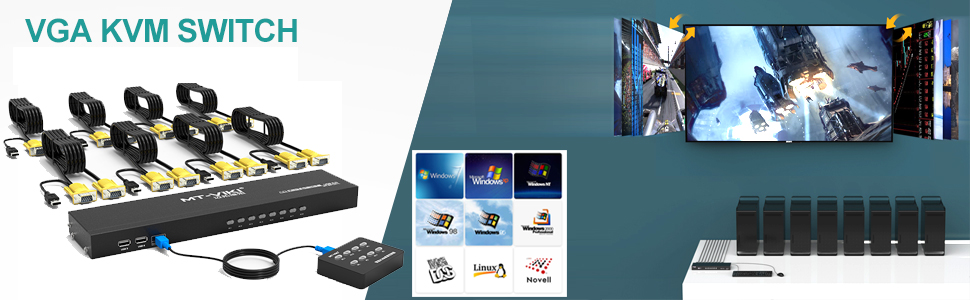
🎯 Master your multi-PC setup with one sleek switch — control, simplify, dominate!
The MT-VIKI 8 Port KVM VGA Switch empowers professionals to control up to 8 computers using a single USB keyboard, mouse, and VGA monitor. Featuring dual switching options, broad OS compatibility, and a compact rackmount design, it offers plug-and-play convenience without needing an external power supply. Included are 8 durable USB+VGA cables in varied lengths, making it a turnkey solution for streamlined multi-device management.


| ASIN | B0881RPWCJ |
| Actuator Type | Push Button |
| Best Sellers Rank | #43 in KVM Switches |
| Brand | MT-VIKI |
| Circuit Type | 8-way |
| Color | Black |
| Connectivity Protocol | Usb |
| Connector Type | Vga |
| Contact Material | Metal |
| Contact Type | Normally Open |
| Control Method | Remote |
| Controller Type | Push Button |
| Current Rating | 0.5 Amps |
| Date First Available | May 27, 2020 |
| International Protection Rating | IP56 |
| Item Weight | 1 pounds |
| Item dimensions L x W x H | 1.5 x 2.81 x 5.98 inches |
| Item model number | MT-801UK-L-US |
| Manufacturer | MT-VIKI |
| Number of Items | 1 |
| Number of Positions | 8 |
| Operating Voltage | 5 Volts |
| Operation Mode | ON-ON |
| Product Dimensions | 1.5 x 2.81 x 5.98 inches |
| Terminal | Button |
| UPC | 749185499871 |
| Unit Count | 1.0 Count |
M**R
Works great as a dedicated USB Switch
I had the need for a 8-port USB switch between multiple computers. Most dedicated USB switches are 4-port so I knew I was looking for a unicorn solution. I thought I would try to use this 8-port KVM VGA switch and just not connect the VGA cable. Pros: - using as an 8-port USB switch only worked perfectly, I just never connect the VGA cable - no beep when switching ports - I see this as a pro - left/right brackets included to mount in a 1U+ rack - I used a 1U rack to mount the switch under my desk, worked perfectly - I didn't realize the switch is actually 2/3 the height of a 1U rack row so I have a 1/3 space which is OK - port switching isn't faster or slower than any other USB switch I have used in the past - 2-3 seconds to switch - mine came with a power supply, I am guessing this might help with the switching speed and the glowing active switch red light - USB input ports on the front and back - comes with a full set of 8 KVM cables, amazing for this price point - case is metal, doesn't feel like it will fall apart I am not using the remote, but I tested it out and it works. With the buttons not marked (i.e. PC 1) I would have to remember which button is for which computer. Not a deal breaker, but I like pushing the marked buttons on the face of the switch.
R**.
As advertised
When I purchased this product, the first KVM switch arrived entirely nonfunctional. It was little more than a buzzer. Fortunately, after some brief troubleshooting the seller (MT-VIKI) was willing to send a replacement which works great. It's a KVM switch and it does what it advertises. Simple enough. No special drivers needed, it even works in BIOS/UEFI. I appreciate that it comes with all the cables required and includes a few different lengths. I also like that there is a proper 4 port USB hub for input, not a miserly 2 ports. I have it daisy chained to another 2 input KVM switch and have not observed any odd behavior. I noticed that the remote from the first KVM works on the replacement, meaning that the remote and KVM are not paired. If you plan on putting multiple of these together in close proximity, the remote will likely affect both. Since the remote is IR, this shouldn't be a problem unless they're literally next to each other. Maybe I'm old school, but a RS-232 or 485 serial port would be nice for some additional control and monitoring. I'd also appreciate a physical power switch, although I admit I can't imagine needing to flip it often.
M**P
Works great...a few annoyances for my preferences
This works quite well and comes with all eight HDMI cables you will need to use the eight ports. I am taking one star off for the following reasons: (1) they use custom cables that also have a USB cable splitting off at the computer end. This is great as you do not need an extra USB cable for sharing keyboard and mouse. However the USB cable is quite short and is problematic if you are using a laptop that had the HDMI and USB ports on opposite sides (2) it makes a loud beep when switching and I do not see any way to turn this off (3) the KVM automatically switches to a newly connected computer on a previously unused port. I don't see a way to disable this (4) switching between ports is rather slow.
S**E
Outstanding value for the money and support is responsive to questions
It was time to replace our old rack mounted PS/2 based KVM switch. Using PS/2 to USB adapters with the newer servers had problems with connections from time to time. While we have virtualized our network, we like to have physical access to our servers via a KVM switch just in case. I ran across this 8 port KVM switch and the pricing was very attractive. I was a bit dubious but decided to give it a try anyway. It has worked extremely well. It works with our servers and our surveillance system without any issues. Each port has its own light on the front of the KVM switch so you can tell at a glance which KVM port is active. I did have to buy a 10 foot KVM cable to reach a device but the vendor at least had them readily available. They also have a 16 foot version as well. I also had reason to contact the company for support several times and they usually responded within a day to my questions. One of my questions was about the cabling for the remote controller which is mini USB to mini USB. The 6 foot cable was too short to reach where I wanted to put the remote controller. They told me that it was a standard USB wiring. It is very difficult to find a longer mini USB to mini USB cable, so I finally bought a 15' USB A to mini B cable along with a USB A to mini B adapter from Amazon. This made the total length about 15.5 feet. Works like a champ and we no longer have to get up from our server workspace to change ports on the KVM switch. One previous reviewer said using a cable extension for the remote controller did not work for him and even claimed it must be a custom cable configuration. It is a standard USB cable. The thing that caught my attention was that he was trying to use a 20 foot cable. I think that is beyond USB specs for cable length. Beyond about 16 feet, you need a USB cable with a repeater. What makes this a five star item? *Great price which includes the KVM cables *Quality - works well with no problems so far *Support is responsive to questions
J**S
Overall Experience Out of Box
This unit works as expected. Although I with metal was just a bit thinker gauge, the momentary switches feel sturdy. The unit works as expected in all functions. It is cheap, does what it advertises, and the cable length is sufficient for most applications. I would and probably will purchase this again as long as product lifespan lives to expectations. Little to no noise is produced and the functions work quickly between screens. The brightness of the LED indicators is sufficient although I wish it could be just a bit brighter. Only additional plus would be the addition of an ethernet port for IP style communications and KVM access but that is not advertised nor expected at a product in this price range.
N**S
Works very well, just make sure you only need about 4' of cable as they are custom and not super long.
J**H
buen producto, buen precio
M**Ş
ürünü uzun zamandır kullanıyorum. işlerimi çok kolaylaştırdı. en kısa sürede tekrar stoğa gelmesini bekliyorum. tekrar alacam.
A**E
Ich habe 5 ältere Computer damit eingebunden. Funktioniert seit Wochen ohne Probleme. Sehr praktisch, nur einen Bildschirm und eine Maus verwenden zu müssen. Umschalten geht recht zügig.
E**P
This works exactly as described. I've had no issues with it. It allows me to switch easily between my work laptop and personal laptop, using the same monitor, mouse and keyboard super easily, without having to dismantle anything.
Trustpilot
2 weeks ago
2 weeks ago