

Desertcart purchases this item on your behalf and handles shipping, customs, and support to France.
๐ Unlock convenience and security with every codeโbecause your garage deserves the best.
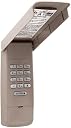
The LiftMaster Garage Door Opener keypad offers advanced Security+2.0 rolling code technology for enhanced protection, powered wirelessly by a single 9V battery. Its weatherproof flip-up cover and backlit keypad ensure durability and ease of use in any condition. Compatible with all LiftMaster openers since 1993, itโs a hassle-free upgrade that combines convenience, security, and timeless reliability.
| ASIN | B00LBGVLS2 |
| Batteries | 1 9V batteries required. |
| Batteries Included? | No |
| Batteries Required? | Yes |
| Battery Cell Type | Zinc Carbon |
| Best Sellers Rank | #554,379 in Tools & Home Improvement ( See Top 100 in Tools & Home Improvement ) #1,919 in Garage Door Keypads & Remotes |
| Color | Black-v341 |
| Customer Reviews | 4.7 4.7 out of 5 stars (2,909) |
| Date First Available | June 26, 2014 |
| Is Discontinued By Manufacturer | No |
| Item Package Quantity | 1 |
| Item Weight | 2.08 ounces |
| Item model number | 877max |
| Manufacturer | Chamberlain |
| Number Of Pieces | 1 |
| Part Number | 877max |
| Product Dimensions | 8 x 3 x 0.05 inches |
| Size | Mini-v341 |
E**R
Liftmaster Replacement Remote Garage Door KeyPad - Very Easy to Install, Works Great
My keypad had been half working for ages. Sometimes it would work and sometimes not. I procrastinated thinking it would be hard to get a new one to work, but this was so simple. We have an older Liftmaster Garage Door Opener, and this worked great. The hardest part was getting my old one off because it was an off brand and I could not get the battery cover off to get to the screws. The set up was not hard at all. The nice thing is that the instructions are right in the lid of the keypad unit. So I got up on a ladder where I had to press the learn button and followed the instructions. There are a lot of buttons to press and the first time I must have messed it up because it did not work, but the second time worked like a charm. My door opens every time I use it now. The keypad attaches with one screw that goes into the spot where you are installing it first. Then you hang the opener sort of like hanging a picture on the wall. A second screw secures it that goes in right below the battery with the battery door off. It comes with both screws that you need. Also this is definitely a name brand unit and the name is embossed on the door. It comes in a box with more information than I needed to install it. It was up and working in a few minutes! Thanks for reading my review Becky Brooks
P**A
Easy, easy, easy
Installation was easy, instructions to program are easy, operation is easy. It has been two years and I just changed out the battery (which was easy). Just read the product description to make sure it is compatible with your opener, which was pretty broad. You will need one of these for each opener but the 4-digit codes can be the same. Theyโve made my life easier. Would purchase again if needed.
T**D
Great back up way of setting up code access for ...
Great back up way of setting up code access for your garage door. I set it up recently and it was incredibly easy. No wiring is needed since it pairs to your garage door wirelessly. You can also simply close your garage door by hitting "Enter" on the keypad as well. Great for when you need someone to close the garage door on the way out but don't necessarily want to give them the code. I use the Liftmaster MyQ remote garage door opening to let my housekeeper into the house and when she leaves she doesn't need to let me know. She simply just hits enter on the remote and it closes the garage door behind her. I found that adding a lot of these remote solutions allows me to get a lot done without having to be at home. I'm definitely happy i decided to add that option and pair it with the MyQ garage door controller.
L**E
Simple and extremely useful device. Bought one for a relative and now will get one for myself.
A very simple device that will come in very handy if you have managed to lock yourself out of your home! I bought this for my mother, who has had such an experience on too many occasions. Simple to install and simple to program to communicate with the garage door opener. Be advised, though, that you need to follow instructions on your opener carefully in order not to wipe out programming for existing remotes (I did this and freaked out a bit until I reprogrammed them, too). Also be advised that if possible, locate the opener NOT directly on the jamb of the garage door unless you have a roll-up door. If you can put the opener on the side of the house, that will prevent any possible accidents caused by a traditional door opening and hitting you.
M**R
Good match
Replaced one that was ten yrs old. Good match.
P**H
Keypad works with Chaimberlain 1160LM 1/2 HP
I gave this 4 stars because it worked but it had challenges with setup. I was tempted to give it only 3 stars, but in reading reviews on other units is seems like this is the only unit that will work with the 1991 Chamberlain 1160LM 1/2 HP. Here are some of the gotchas with the product, which are really not the fault of the keypad, but more of the fact the garage opener is old. 1) The key point to look for seems to be (in my case) the yellow programming button, despite the fact that this keypad states it works with units back to 1993 only. Mine was a 1991 so I took a leap of faith with the 'yellow button' option...,and it paid off. 2) Programming was a 'pain in the a$$' to say the least, but it finally worked more by luck than anything else it seems. I thought I had nailed in 15 mins, I followed the instructions, type the pin and hit Enter and it opened, then type the pin and hit Enter and it closed. Then by chance I hit just Enter and realized that it opened and closed without the pin. I was stumped. It was obviously talking to the unit but ignoring my need for a pin. As I had a repeating digit in my pin, I thought it might be that, so I tested with 1234, no luck.After the first day I gave up, pulled the battery on the unit and decided to try another day. Next day I went though the same thing again. One person had noted to hit the opener learn button between steps 1 and 2: 1. Press the * and the # keys until the keypad stops flashing. 1a. Press and release the learn button on the motor unit 2. Enter a 4 digit PIN number 3. Press and release the enter button ___ times, as indicated above. 4. Press the 0 key to complete the programming. 5. To test, press the PIN number and the Enter key This seemed to not work for me either. I also tried by reversing 1 and 1a. I finally read an option on the back of the instructions that said to hold down buttons 1 and 9 for 10 seconds to disable the single 'Enter' button to close, forcing you to enter a pin to open AND close. After programming '1234' several more times, I was about to give up and I entered my original code and Enter and 'bingo;' it worked. I think the key point here is that this opener cannot differentiate between an 'open' instruction and a 'close' instruction from the keypad, so therefore it was allowing just 'Enter' to work to open and close. I toggled the 1+9 option on and off and it went from 'pin+Enter' to 'Enter only'. I would suggest to anyone else to program per the manual, but then use the 1+9 key hold to disable single Enter close. If the instructions fail, then try adding in setup 1a above. Having got it working I did not want to go through the whole programming exercise again. Point to note: This was nto a Sears Unit, but Chamberlain and the model is printed on the front housing under the light cover, not the back. Build quality is good, buttons well lit, mounts easily. Would recommend to others as it seems the only unit out there that will work with this older 1991 unit. Take note to not open close the door too many times, mine actually overheated after about 30 mins over opening and closing. I left it for 30 mins or so to cool down and all was good after that. Good luck!
A**A
This hooked up right away very easy to install
This opener works great easy instructions easy installation bought this from my parents so they can come and go from their house without worrying about bringing keys now they just push in a 4 digit code and press enter and leave though garage instead of front door
K**O
Replaced old one in less than 10 minutes!
Took it out of the box - this thing looks identical to the old one I replaced. Now ... the instructions are different than the old one and it is close enough. And the instructions are easy enough to follow. The unit also includes a 9V battery - nice! (Even though I have a ton of 9V batteries at home - this is a very nice thing. Not everyone stock 9V I suppose.) If you already have an old one - all you need is to unscrew the bottom screw, slide the unit up and that takes cares of removing the old one. To put the new one in - make sure you programmed and tested it 1st! Then, slide it in the existing top screw and replace the bottom screw. That's it! Took less than 10 minutes. In case if you are wondering. The old one was installed in 2014. One of the number button are "wearing out" ... I guess. So we decide to get a new one. Let's hope this time that particular number key will last longer than 6 years :).
A**R
Simple to install.
Great devise.
D**N
Great addition to any garage door
I have purchased 2 of these Keypads, one for my house and one for my detached garage. Easy to install and program to door opener by yourself. Holds up great in all kinds of weather. Easy to follow instructions are included. Much better then having to go inside to open the garage door or using the opener in your vechicle
D**L
great product
Works perfectly. Easy to set up, no issues at all
A**S
Right tool for the job
This came highly recommended by the a garage door specialty company. It arrived quickly, installed easily and works flawlessly. What more could we ask?
C**N
It is really nice, the buttons light up and is easy to ...
It is really nice, the buttons light up and is easy to use. My only complaint was that I could not get it to work by following the directions. I called Liftmaster customer support and the person was really helpful. She asked me the model # of my garage door opener, and as soon as i told her she knew why it didn't work. The yellow learn button on my garage door opener did not do what the instruction manual says. She (the service rep I spoke with) told me to go to the hardwired wall unit in my garage that was installed by the technician when I had the unit installed on the ceiling. She had me hit the learn button twice on the hardwired wall unit, then had me enter my code, then had me hit the # button twice and the hit enter. I then punched my code on the keypad and the door closed. She explained that the learn button on the ceiling mounted unit is not really well made - hence her getting me to use the hardwired wall switch. She was very helpful and now that it's working, it is really a good product.
Trustpilot
2 days ago
2 weeks ago