We remain fully operational. Our teams are working around the clock to ensure your deliveries continue safely.

DOWNLOAD THE APP


Copyright © 2025 Desertcart Holdings Limited
DOWNLOAD THE APP
Buy anything from 5,000+ international stores. One checkout price. No surprise fees. Join 2M+ shoppers on Desertcart.
Desertcart purchases this item on your behalf and handles shipping, customs, and support to France.
🚀 Upgrade your connection, upgrade your hustle.
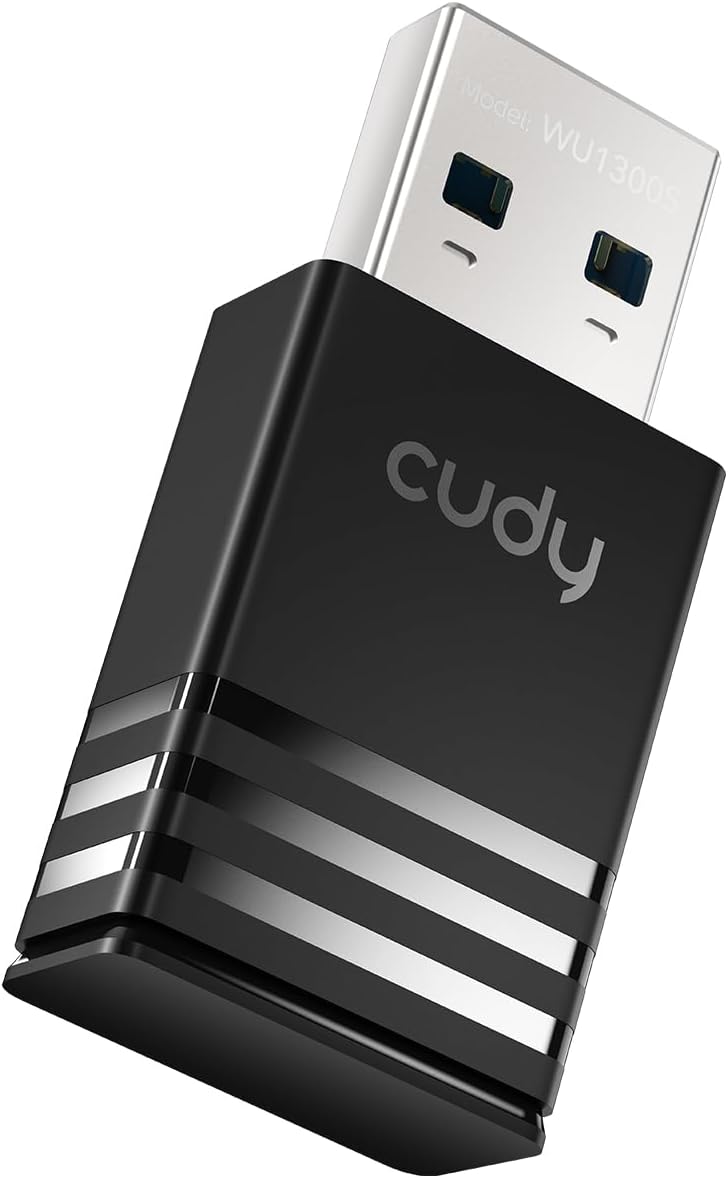
The Cudy AC1300 WiFi USB 3.0 Adapter delivers dual-band wireless speeds up to 867Mbps on 5GHz and 400Mbps on 2.4GHz, leveraging 802.11ac technology for superior performance. Its USB 3.0 interface ensures rapid data transfer, while the compact design makes it ideal for mobile professionals. Featuring Soft-AP mode, it can convert wired internet into a WiFi hotspot. Compatible across Windows, Mac, and Linux platforms, this adapter is a reliable, versatile solution for enhancing your desktop or laptop connectivity.


| ASIN | B084FS7BWF |
| Best Sellers Rank | #174 in USB Computer Network Adapters |
| Brand | Cudy |
| Built-In Media | Installation Guide, WU1300S |
| Color | Black |
| Compatible Devices | Desktop, Laptop |
| Compatible Operating System Family | Linux, Windows |
| Customer Reviews | 4.2 out of 5 stars 4,122 Reviews |
| Data Link Protocol | USB |
| Data Transfer Rate | 867 Megabits Per Second |
| Hardware Interface | USB 3.0 |
| Item Dimensions L x W x H | 1.48"L x 0.67"W x 0.33"H |
| Item Weight | 4.8 Grams |
| Manufacturer | Shenzhen Cudy Technology Co., Ltd. |
| Mfr Part Number | WU1300S |
| Minimum Required Operating System Version | Windows 7 |
| Model Number | WU1300S |
| Product Dimensions | 1.48"L x 0.67"W x 0.33"H |
| UPC | 644925515111 |
| Warranty Description | 2-Year Warranty |
B**J
Perfect For Linux !!!
**UPDATE** . I still feel this is an awesome adapter and perfect for Linux, the commendations in my original post, ( see below ), have not changed. I'm updating this in order to add some context and info for folks who may be wary of purchasing this based on comments that the adapter has "stopped working", or that it no longer connects. . A note \ observation about Operating Systems in general, and specifically Linux installations. . . Operating System "updates" can have serious negative side effects on 3rd party devices, including causing them to stop working. Even Windows updates do this sometimes, that's why you'll see lots of Windows KB Articles regarding 'broken' devices after an update. Linux is no different, and in fact, it may be less forgiving. . Windows and Mac operating systems have more of a "...let's try to do everything for the user because the vast majority of 'typical' users don't really know what's going on under the covers anyway...". However, Linux is, generally speaking, for the more geeky crowd, it's not always a good OS choice for the faint of heart, and sometimes requires messing with the system to get things to work. . . That said, and to that very point, I *just* had an Ubuntu Update take place on my PC, and after reboot, my Cudy WiFi adapter no longer worked, in fact, Ubuntu didn't even recognize it existed. Does this mean the adapter is garbage and no longer works? Absolutely not, ( I'm using it right now to type this ), does it mean that Cudy produces low quality equipment or drivers? Again, no. What it *DOES* mean is that the Ubuntu Update removed the previous installation of the Cudy WiFi driver. That is **NOT** Cudy's fault, Ubuntu \ Linux removed the drivers. . . Why? When Linux distros update, they sometimes take stock of what's been installed, particularly drivers. If the drivers aren't recognized by that Linux distro, it might think the drivers are old ones that have been deprecated and are no longer needed, hence it will actually uninstall the drivers, which can also remove the entries for the driver in the system config files for the network adapter. At that time, rebooting the system will come up with a completely missing WiFi adapter. . The remedy for this is incredibly quick, simple, and painless. Re-Run steps 5 and 6 in the installation manual. Those are the "sudo make" and "sudo make install" commands, then, reboot. Once you do that, the WiFi adapter will "probably", ( your mileage may vary depending on your distro ), be alive and well and you'll be back online. . Again, Linux isn't for everyone, it's VERY easy to have things "stop working", that doesn't neccesarily mean that thing is bad, it very often simply means that thing's drivers are no longer installed. . ** Here's my Original Post ** . I got this adapter a couple weeks ago, and It works perfectly with Ubuntu 18.04 & 20.04, Mint 19 & 20, ( both Ubuntu and Mint are Debian based ), as well as Fedora 33, ( which is Red Hat's desktop fork of Linux ). . One thing to note is you need to extract the driver and build/install it, ( using the make commands ), in order to use it. For people unfamiliar with how to do this, or who may be unsure that they are technically capable, the adapter has very good documentation in the folder on the included disc, ( you can also find the driver and documents on Cudy's website for those who would like to view it before purchasing ). . I whole-heartedly recommend this adapter, even for people new to Linux. 🙂
D**B
External USB Wi-Fi Adapter
I received the USB 2.0 802.11N wireless 300 Mbps adapter with the PC. It worked well for about 6 months, then it began to drop the internet. I bought the CUDY AC 1300 Wireless Dual Band USB Adapter. I downloaded the following driver: Realtek 8812BU Wireless LAN 802.11ac USB NIC. For the past few days, it has been excellent. Totally worth the price. Does not drop the internet. Connected to the 5GHz.
E**N
Needs Attention/Updated Support
With the cable companies upgrading to dual band 2.4/5 ghz, I decided it was time to upgrade my Wifi adapter to match these needs. The previous adapter I had was also only a USB 2.0. That being said, I had high expectations for this Cudy adapter. Was grateful that the overall completeness of the product (the installation, extra user-friendly LAN utility program, the driver download location) was seamless. However, for a 3.0 USB adapter at this price (which I've used many of in my work setting), I was hoping for a better range capability. Fast forward a month and Microsoft rolls out their Windows 10 Cumulative update January 5th 2021. With this update, several hours over the last two days troubleshooting, and then later discovering the Cudy's updated 2020 driver for this product, coupled with the Windows update renders the whole adapter undiscoverable, not to mention the Windows update restricts certain website proxy situations (which Cudy uses, boy was that a struggle just to get the driver download to finish before being labeled "forbidden") I've come to two conclusions about this product: 1. For the price, there should be continued, vigilantly updated driver support from their website that coincides with all system updates and also from a shared file hosting link within the Amazon description. There should also be a secure weblink from which to download these drivers so that people wont have to compete with proxy issues 2. The product overall is probably better suited for laptops and hotspots or desktops/TVs that are within a 10 foot radius of the router (I'm in the next room down the hallway but it's still only about 15' max). Because cable companies are offering two-in-one gateways with a forced dual band auto-connect function, most people are going to want to be close enough to ensure they remain on the fastest signal (not the most reliable). And for that reason, you need an adapter that is responsive enough, reliable and strong enough to keep you from being kicked to the lower ghz signal. In summary, I would probably recommend this product to someone who needs an adapter just to get by with a decent connection, or a user that is on-the-go. But not to someone who intends to remain system updated, or in a business setting where reliability is key. It's a solid product and at a decent price, but I do feel there might be a couple better options out there.
E**L
Fantastic accomplice to internet connectivity!
These little things are magical. I have a DELL XPS 13 from around 2018, and its wifi adapter, for whatever reason, conked out a couple years ago. Not a problem with this doodah; it plugs in, and, after an initial disc setup, seemlessly connects me to wifi after thirty seconds or so of being logged into the PC. I have tried other solutions in the past (a taller usb antenna, Ethernet-to-usb plug-in, rebooting x10000 times), and this dongle’s consistency is second only to the Ethernet cable. Plus, it’s wireless! Now, a couple complaints. 1: the size makes it simultaneously small enough to lose AND, strangely, also big enough to potentially snap off into your usb port haha. My XPS happens to only have two usb ports, and one of them is right next to the usb-C, so when I have this wifi dongle plugged in next to that usb-C port, it makes for some clunky finagling. 2: it does take a bit for it to connect to the internet. For someone like me who has concentration issues, this can eventually be too frustrating to be worthwhile. But, friends— it is all a perspective game. I certainly appreciate being even *able* to connect to the internet, and this price is great for the reliable product that this has been so far. I got my first one in December, and it served me fantastically until a couple weeks ago when I lost it. Not to worry: I bought a new one and use that, and then just a couple days ago I discovered my first one! I saw in other comments the recommendation to have two anyway (since apparently they die every couple years). Worth. It.
Y**Z
Update - this products performance with Ubuntu is great until in stops working in a few weeks.
1st update. When the device was working, it worked really well. But... After about 2ish weeks the adapter disappears from settings, the wifi tab is just gone. The only way to get it to work again is to completely reinstall the device. This last attempt to reinstall, it failed completely. I run a standard Ubuntu 20.04 LTS installation with no mods. This most recent time I ran lsusb and the device is listed, but it's not showing up in a fashion to be used. I added the driver name to /etc/modules to make sure the driver loads at startup, still stops working after a few weeks. Bus 001 Device 007: ID 0bda:b812 Realtek Semiconductor Corp. 802.11ac NIC Response from Cudy was fast, but ultimately useless. The last communication they told me to test it on a Windows PC, pretty useless since I don't use Windows. Their solution from their support was to check Github for a solution. Cudy says they offer linux support, they obviously copied their installation instructions from somewhere else and have zero idea about how to support Linux. And the return window expired a week before I last contacted them again trying to get this resolved, which is just great! /s Cudy support is responsive, but useless if you're expecting Linux support. I'll be digging for a solution on my own just because I can't let it go. If you're not adept at troubleshooting USB device issues in Linux, AVOID Cudy. If your device works for a few weeks and then just stops, your device is a big fail. If you say your device is supported by Linux, then darnit have someone on staff that knows how to troubleshoot these kinds of things, and not just say check somewhere you're on your own. First, this is not plug and play. 5 minutes of CLI work and you're in business. Go to the manufacturers website. Got to Support > Downloads center > Adapter > WU1300S Click on the Driver link. Go to the bottom of that page, download the the driver and guide files and follow it exactly. For my Ubuntu 20.04 LTS install it was spot on. Speedtest for ping, upload, and download are the same as wired tests. If I remember I'll give updates over time. Almost no reviews give review updates for 1 year+ of product use. Those are the most useful IMHO.
S**H
PLUG-AND-PLAY!
Honestly, I bought this thing over a year ago and forgot I had it! When Amazon asked me to rate it, I was like "what, did I never receive that or something?" But nope - it was in my tech drawer. I guess I had just ordered it as a backup and never had a use-case for it until now, but I'm certainly glad it was on hand. I needed it to connect my main machine, which is ethernet only, to a secondary router I'm using on a hidden network which acts as a private NAS - you know, the kind you hide in the cupboard no one uses. I wanted to be able to access the NAS on this network, as well as the separate one on my other network, with the simple click of a button in the WiFi selection area. This way, I could have access to both but a guest who will be staying with me can only have access to one. Well, I plugged it in, and literally before I knew it the Network Selection popup on Windows 10 was up and showing me all available networks. I didn't even have to wait for any drivers to install, and I certainly didn't have to try and find a way to play that mini disc that comes with the package. Just popped it in, and it figured out the rest. Nice when products can still workout this way in the modern age. Wanted to give them a shout-out while I was thinking about it, so here I am. Works as intended and with considerable range for its size.
T**M
Works great under Linux, but Linux driver not on CD
Using for Linux, I had to download from github, copy to USB key to get to the target computer, and then compile there. Install went fine, picked up the wifi, connected immediately, great speed. Linux driver source is not included on the CD.
C**E
More complicated than meets the eye
Good item, eventually did what it was supposed to (connect my old Windows 7 computer to the Network via my new router), but installation was more complicated than the instructions indicated. They suggested I could just plug it in, run the CD-Rom, and it should install automatically. I had to install it manually, with the help of a tech person from my server, and also from my extremely tech-savvy son. Once installed, though, it works great!
Trustpilot
1 week ago
2 days ago