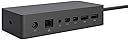
⚡ Transform your Surface into a desktop powerhouse—effortless, fast, and sleek.
The Microsoft Surface Dock is a compact, high-performance docking station designed to instantly convert your Surface device into a full desktop setup. Featuring two HD video ports, four USB 3.0 ports, a gigabit Ethernet connection, and audio output, it leverages Surface Connect technology to deliver fast data, video, and power over a single cable, minimizing desk clutter. Compatible with multiple Surface models, it offers quick plug-and-play setup to boost productivity for professionals on the go.
| ASIN | B01BOVBQ4C |
| Best Sellers Rank | #1,078 in Laptop Docking Stations |
| Brand | Microsoft |
| Color | Black |
| Compatible Devices | Microsoft Surface Pro 3 |
| Customer Reviews | 4.2 out of 5 stars 655 Reviews |
| Global Trade Identification Number | 00885370996425, 00889842013771 |
| Hardware Interface | Ethernet, USB 3.0 |
| Item Dimensions L x W x H | 5.12"L x 2.36"W x 1.18"H |
| Item Weight | 550 Grams |
| Manufacturer | Microsoft |
| Number of Ports | 4 |
| Product Dimensions | 5.12"L x 2.36"W x 1.18"H |
| Total USB Ports | 4 |
| Total Usb Ports | 4 |
| UPC | 885370996425 889842013771 |
| Unit Count | 1.0 Count |
J**R
good product
good product
B**N
Works great
Works like a charm
S**.
Great used pick-up for my older Surface Pro 4
This thing is nice and HEAVY with a gripping bottom so it doesn't move when I insert/remove a thumb drive. Also the only way that I know of to connect a Surface to multiple monitors, or to a wired Ethernet port (as opposed to WiFi) for gigabit/sec network speeds. Great for my office. Perfectly good as a used part. Looks nice and inconspicuous.
D**.
Docking Station connection to monitor not working
Monitor connection did not work. Computer would not detect. Will return.
M**R
Works great!
It works perfectly and allows for multiple monitors to be hooked up and additional USB slots.
E**L
Perfect fit
I needed a replacement dock and this was perfect.
B**A
Exactly what I was looking for
Work
R**E
Second monitor
The second monitor doesn't work when using this thing. It may be that I need an 'active' and not a 'passive' HDMI to minidisplay cord. Don't ask me what that is. I had to search a bunch of YouTube nerd videos to come to that suggestion. If the active cable doesn't fix my issue them this thing is useless.
Trustpilot
1 month ago
2 months ago