


Buy anything from 5,000+ international stores. One checkout price. No surprise fees. Join 2M+ shoppers on Desertcart.
Desertcart purchases this item on your behalf and handles shipping, customs, and support to France.
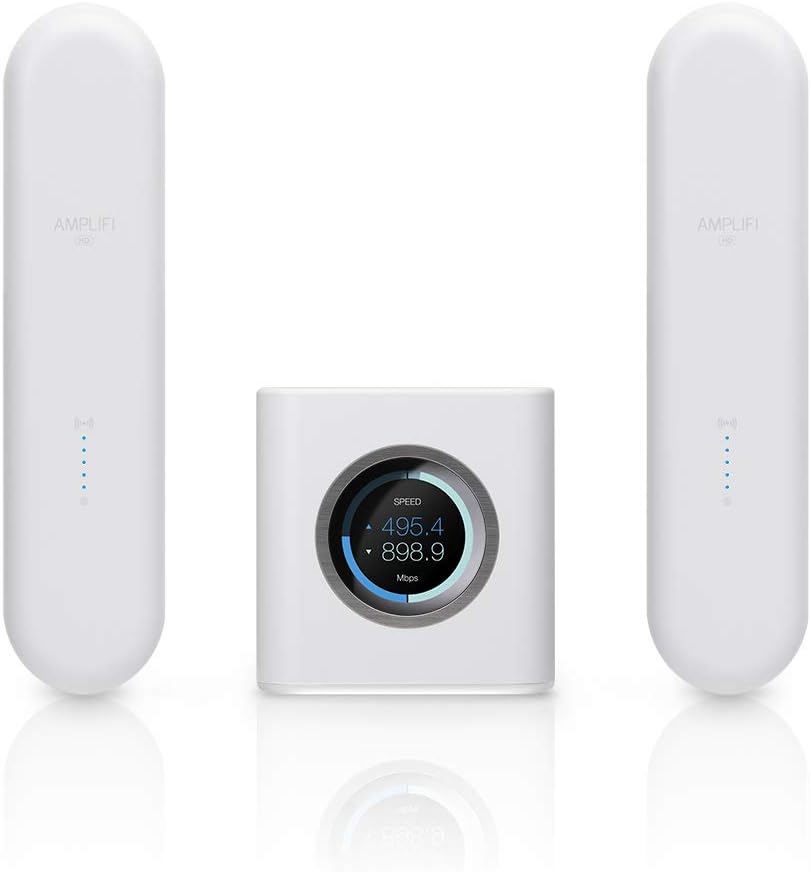
Enjoy stronger, more useful connectivity with this AmpliFi HD mesh Wi-Fi system. The included router and MeshPoint devices work together to help eliminate dead zones and provide a more stable and usable Wi-Fi network. Review: Product works extremely well - Let me start with the rating of the user interface. I am a network engineer. The UI is a bit too simplistic and it is limited on advanced configuration. For instance I would prefer to configure my DNS with OpenDNS as opposed to the default broadband DNS system. The UI does not permit you to change the DNS settings for the DHCP scope. If you have ever used a nest product and were satisfied with it, then you get the same feel of quality and simplicity from this product. I have not had to interact with tech support so I can accurately judge / rate that so it got a 5 star by default. The packaging: Extremely well packaged. Much like, apple, nest, beats packaging, very nice first impression The hardware: Well built and sturdy. The base is a bit smaller than a small tissue box. The mesh antennas are almost twice the size of a standard wall outlet. The antennas are connected to the 3 prong power adapter by high powered magnet. The antennas do pivot if required, which is neat. The application was easy to download and interact with. Initially it connects a default ssid automatically. The wizard walks you through configuring the system. Very simple to follow steps and if you do them right it will connect to the internet and suggest a firmware update, most likely. If you have the mesh antennas, make sure they are plugged in and connected to the base before updating firmware. I have AT&T Fiber. I just disabled my wifi on the ATT router. Plugged the Amplifi base internet port into the router switch port. After going through the wizard it was internet connected and all wireless devices were connected. I used the same SSID and WPA2 Preshared key that was configured on the ATT router. This way I didn't have to reconfigure all 20 plus devices in my home. It was that simple to install. Make sure you use the Ethernet cable that comes with Amplifi. I was using a bad cable and was getting poor performance. I have not had any performance problems at all with the device since it has been installed. This does support IPv6, Port Forwarding, Band Steering, NAT UPNP, Bridge Mode. I was only disappointed I could not adjust the DNS settings in DHCP settings Review: Nice system! - Setup was super simple and the mesh points connected immediately. I like the front LED screen which gives me great information on the status of the WiFi setup. This seems to offer greater speeds than my previous AmpliFi Instant setup.
| ASIN | B01NAFVWBJ |
| Antenna Location | Home |
| Antenna Type | Internal |
| Best Sellers Rank | #5,706 in Computers & Accessories ( See Top 100 in Computers & Accessories ) #154 in Whole Home & Mesh Wi-Fi Systems |
| Brand | AmpliFi |
| Built-In Media | Router, 2 x Wireless HD Mesh Extenders |
| Color | white |
| Compatible Devices | Personal Computer |
| Connectivity Protocol | Ethernet, Wi-Fi |
| Connectivity Range | 6000 Square Feet |
| Connectivity Technology | Ethernet, Wi-Fi |
| Control Method | App |
| Controller Type | Vera |
| Coverage | 6,000 ft² |
| Customer Reviews | 4.5 out of 5 stars 416 Reviews |
| Frequency | 5 GHz |
| Frequency Band Class | Dual-Band |
| Has Internet Connectivity | Yes |
| Has Security Updates | No |
| Is Modem Compatible | No |
| Item Weight | 5.5 Pounds |
| LAN Port Bandwidth | 1000 Mbps |
| Manufacturer | Ubiquiti |
| Maximum Upstream Data Transfer Rate | 867 Megabits Per Second |
| Mfr Part Number | AFI-HD |
| Model Name | AFI-HD |
| Model Number | AFI-HD |
| Number of Antennas | 2 |
| Number of Ports | 4 |
| Operating System | Android |
| Other Special Features of the Product | WPS |
| Router Firewall Security Level | basic |
| Router Network Type | wireless |
| Security Protocol | WPA2 |
| Special Feature | WPS |
| UPC | 817882029377 |
| Unit Count | 1 Count |
| Wi-Fi Generation | Wi-Fi 5 |
| Wireless Communication Standard | 802.11ac |
| Wireless Compability | 802.11ac |
E**D
Product works extremely well
Let me start with the rating of the user interface. I am a network engineer. The UI is a bit too simplistic and it is limited on advanced configuration. For instance I would prefer to configure my DNS with OpenDNS as opposed to the default broadband DNS system. The UI does not permit you to change the DNS settings for the DHCP scope. If you have ever used a nest product and were satisfied with it, then you get the same feel of quality and simplicity from this product. I have not had to interact with tech support so I can accurately judge / rate that so it got a 5 star by default. The packaging: Extremely well packaged. Much like, apple, nest, beats packaging, very nice first impression The hardware: Well built and sturdy. The base is a bit smaller than a small tissue box. The mesh antennas are almost twice the size of a standard wall outlet. The antennas are connected to the 3 prong power adapter by high powered magnet. The antennas do pivot if required, which is neat. The application was easy to download and interact with. Initially it connects a default ssid automatically. The wizard walks you through configuring the system. Very simple to follow steps and if you do them right it will connect to the internet and suggest a firmware update, most likely. If you have the mesh antennas, make sure they are plugged in and connected to the base before updating firmware. I have AT&T Fiber. I just disabled my wifi on the ATT router. Plugged the Amplifi base internet port into the router switch port. After going through the wizard it was internet connected and all wireless devices were connected. I used the same SSID and WPA2 Preshared key that was configured on the ATT router. This way I didn't have to reconfigure all 20 plus devices in my home. It was that simple to install. Make sure you use the Ethernet cable that comes with Amplifi. I was using a bad cable and was getting poor performance. I have not had any performance problems at all with the device since it has been installed. This does support IPv6, Port Forwarding, Band Steering, NAT UPNP, Bridge Mode. I was only disappointed I could not adjust the DNS settings in DHCP settings
D**E
Nice system!
Setup was super simple and the mesh points connected immediately. I like the front LED screen which gives me great information on the status of the WiFi setup. This seems to offer greater speeds than my previous AmpliFi Instant setup.
J**S
Easy set-up, strong coverage
I am definitely NOT a tech savvy person, so I always approach a new Wi-fi network cautiously. I pulled the devices out and charged up the remote units and then followed the quick start guide to get the main unit up and connected to our cable modem with a cat 5 cable. The remote units synced-up after a couple of attempts and I placed those at their permanent homes. Next, we started connecting devices and this went very smoothly for all 15 or so devices for the family. Its worked flawlessly for about 3 weeks now. There are no drop spots in the house and I can pull our Sonos Move speakers all the way out to the back yard (70-80 feet from the house) and have no issues. One thing to note is that many mesh routers have issues with Sonos systems and this router was recommended by the AV expert who sold me the Sonos equipment. So far so good! Speed is really fast and even with two kids on gaming computers, we don't see any delays or glitching. Really happy with this!
R**O
Make your internet signal more powerful
I have had many issues with my internet signal at my home due to the distance between the router and other electronic equipment that work with Wifi. The AmpliFi resolved the issue. I was about to get another internet carrier thinking having more giga would resolve it, no need to increase giga or internet prices, AmpliFi resolved this issue. Recommended, it's not cheap, but it is cheaper than paying higher internet services every month.
S**S
Not a hassle
Very strong connection and very easy set up! Has many features to choose from while being very simplistic. Easy 10/10
N**G
Works great, not item pictures. Older Model?
Product works great, but it was not the item pictured
D**E
AT YOUR OWN RISK
First, tech and customer service is non existent! Ordered product was what was received, and that where the greatness is gone. Never worked right from the beginning, after numerous it’s you provider and it’s not our product. Got a RMA# from them for a replacement, hold on wait they want me to go “BUY” a temporary router while I send this junk back to them for a replacement. So anyways router does not perform does net reach gig speed over WiFi constantly dropping connection. Now I am just trying to get a refund while I go buy my temp router. So at your own risk! Oh and customer service is a joke, just a joke.
B**I
3-4 years tops, then you’ll probably have issues.
These units last about 3-4 years before they crap out. Not very happy about this. My brother and I both had the same experience. He got his before me, and it broke a few years back. I got mine after him, thinking his was a dud… mine is now on the fritz, and I’m having to reset it all the time. Not the most lasting hardware, I guess.
S**R
Outstanding Router
Outstanding router. Really does an amazing job creating strong wifi connectivity throughout our home and outside.
A**R
Todo muy bien!
Todo muy bien!
C**.
Excellent product Great for large homes
Works well in large home and extends out to pool area over 80’ away. Highly recommend this unit
Trustpilot
5 days ago
1 day ago