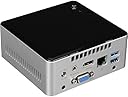
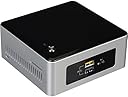
🚀 Tiny Titan: Big Performance, Zero Compromise
The Intel NUC Kit NUC5PPYH is a sleek, ultra-compact mini PC featuring a quad-core Intel Pentium processor, 8GB DDR3L RAM support, and versatile storage options. Designed for professionals who demand desktop-grade performance in a minimalist footprint, it offers 802.11ac wireless, HDMI 1.4b output for 4K visuals, and Energy Star certification for efficient, quiet operation. Perfect for multitasking, media streaming, and everyday computing with a modern, space-saving design.
| ASIN | B00XPVQHDU |
| Additional Features | TOSLINK Audio Output, Infrared Sensor, Energy Star Certified |
| Aspect Ratio | Unknown |
| Best Sellers Rank | #63,555 in Computers & Accessories ( See Top 100 in Computers & Accessories ) #1,942 in Mini Computers |
| Brand | Intel |
| Built-In Media | Fan and Heat Sink Included |
| CPU Model Number | N3050 |
| Cache Memory Installed Size | 2 |
| Color | Silver with black top |
| Compatible Devices | External Storage Drive, Headphone, Keyboard, Monitor, Mouse, Projector, Speaker, Television |
| Connectivity Technology | HDMI |
| Cooling Method | Fan |
| Customer Reviews | 3.9 3.9 out of 5 stars (211) |
| Display Resolution Maximum | 1920x1080 |
| Display Type | LCD |
| Global Trade Identification Number | 00735858300018, 05032037075213 |
| Graphics Card Interface | Integrated |
| Graphics Coprocessor | Integrated Graphics |
| Graphics Description | Integrated |
| Graphics Ram Type | 72-Pin EDO SIMM Memory |
| Hard Disk Description | SSD |
| Hard Disk Interface | ATA-4 |
| Hardware Interface | HDMI |
| Human-Interface Input | Keyboard |
| Item Dimensions | 5.39 x 4.92 x 4.52 inches |
| Item Weight | 2.6 Pounds |
| Keyboard Description | Standard Keyboard |
| Keyboard Layout | QWERTY |
| Manufacturer | Intel |
| Memory Clock Speed | 1600 MHz |
| Memory Slots Available | 1 |
| Memory Speed | 1600 MHz |
| Memory Storage Capacity | 8196 MB |
| Model Name | BOXNUC5PPYH |
| Model Number | BOXNUC5PPYH |
| Model Year | 2015 |
| Native Resolution | 1920 x 1080 |
| Number of Component Outputs | 1 |
| Operating System | Windows |
| Optical Storage Device | BD-R |
| Personal Computer Design Type | Mini PC |
| Power Plug Type | Type A - 2 pin (North American) |
| Processor Brand | Intel |
| Processor Count | 4 |
| Processor Series | Pentium |
| Processor Socket | LGA 100 |
| Processor Speed | 2.4 GHz |
| RAM Memory Installed | 8 GB |
| RAM Memory Technology | A8 |
| RAM Type | DDR3 SDRAM |
| Ram Memory Maximum Size | 8 GB |
| Resolution | 3840 x 2160 |
| Screen Size | 1 |
| Security Features | Kensington lock |
| Speaker Type | External Speakers Required, Surround Sound Support |
| Specific Uses For Product | Everyday Use |
| Specification Met | Energy Star Certified |
| Style Name | Minimalist |
| Total Expansion Slots Quantity | 1 |
| Total Number of HDMI Ports | 1 |
| Total Usb Ports | 4 |
| UPC | 735858300018 675901343640 796594715252 |
| Unit Count | 1.0 Count |
| Video Output | HDMI |
| Video Output Interface | HDMI |
| Video Processor | Intel |
| Warranty Description | 3-year limited warranty |
| Wireless Compability | 802.11a, 802.11b, 802.11g |
| Wireless Network Technology | Wi-Fi |
| Wireless Technology | Wi-Fi |
S**Y
Great Linux desktop workstation.
I am really pleased with my NUC N3700. I added 8GB of Kingston SDRAM and a spare laptop hard disk to begin. I eventually plan to use this NUC as a quiet low-energy headless home server. Connected a keyboard, mouse and display. Easily updated the Intel BIOS firmware from version 031->048. Installed Linux Mint 17.3 (Rosa) from a bootable USB flash drive. The default Linux Mint kernel (3.19) supported the Realtek Ethernet port but did not have a driver for the Intel wireless / bluetooth hardware. It was a simple straightforward process to upgrade to a later version kernel (4.2.0) from the Mint software repository. After reboot the wireless hardware worked perfectly. This NUC is fast enough and very usable as a general desktop workstation. I did try at first installing Debian GNU/Linux testing (Stretch) but ran into several issues during installation: systemd-ifupdown conflict, unreliable video display sync, non-free firmware version alignment, etc. After a couple of hours, I had to give up. Linux Mint just worked.
J**.
Awesome computer with one flaw
This is a good little computer. Easy to put together and got it up and running with little difficulty. So everyone is aware, this has only USB 3.0 ports on it, so if you are thinking of putting Windows 7 on it, be prepared to integrate the USB 3.0 drivers from Intel into the Windows 7 installer before you'll find success. Luckily Intel has a specific tool on their website that will do it for you. I found it didn't work for me so I had to use a different method, but was able to. Installing Windows 8/8.1/10 on it should be a breeze. My only knock for it is the design. You can mount this to the VESA holes on your monitor. That's great. The problem is that the power button is near impossible to hit with it behind any monitor larger than 19" or so. Yeah, yeah, you can just sleep your computer so you never have to hit the power button, but this went to my dangerous-with-technology mother-in-law, so that ain't happening. She's too old to reach behind the monitor (22" by the way) to feel around for the power button too. With it sitting on the desk she has a hard time seeing the button. Intel, I'll give you your 5 stars once you either design an IR remote power button or some other easier to reach design for us. Hell, just a simple short cable with a power switch would work.
D**.
This model has a lot bang for the buck.
This model has a lot bang for the buck. Pentium with 4 cores, and 4 3.0 USBs, SD slot and VGA. It's a Barebones, so I added 8gb ram and a 250gb SSD Drive. I bought Windows 7 and upgraded that to Windows 10. After all the trouble I had with W7, I'd have been better off just buying W10 for the extra $35. Windows 7 does not understand USB 3.0 and I had to copy my W7 disk to a bootable USB and inject the drivers for 3.0. That took a little bit of Googling and a lot of sitting around. I'd rather have just gotten the W10 disk. I use this primarily for Web Browsing, It play videos just fine. I have heard that the latest games will choke it, but I don't play games so that's no problem for me. It comes with a VESA mounting plate and I mounted on the back of an old widescreen monitor.
R**T
Nothing Positive To Say About This NUC
I have heard great things about the Intel NUC brand of computers but am having trouble finding anything nice to say about this one and I will be returning it tomorrow. Pros: Can't think of any. Cons: The fan is very loud, not what you want when you want to use it as an entertainment PC. There is no USB 2 support (other than on the motherboard and it is not a standard connection). Consequently, you will have a hard time installing Windows 7. Windows 10 installed with no problem. It boots very slowly even with a SSD. Most annoying of all, the USB 3 Ports have radio signals that interfere with your wireless keyboard and other USB 2 Devices. Had I done my research I would have known this. If you want your wireless keyboard, in my case the Logitech K400R to respond properly, you need to put the dongle on an extension cord to move it away from your NUC. Adding extension cables to a small form factor PC kind of defeats the purpose of owning one. Make sure you Google NUC and Wireless Keyboard Problems unless you want to move your dongle away from the computer. Please read the reviews on other sites before making the same mistake I did.
S**H
It's really a weak Atom CPU
Marketing gimmick by Intel. This ain't no Pentium, it's really a weak Atom CPU masquerading as something it's not. Apps are not as snappy as you would expect, even with an SSD. You can get better for this price range, for example MSI Cubi-002BUS comes with an Intel Pentium 3805U which is a real Pentium CPU. Just do the research you will see for yourself. I wish I had done more research prior to buying.
M**X
I don't recommended this for Linux distros
I don't recommended this for Linux distros. I tried Ubuntu 14.04 (this is what I need for LTS), 15.04 and 15.10 (Kernel 4.2) none of them work, update firmware, etc. Just spent hours and it ended bricked (Trace fails). Also be carefully that Amazon policy for returns has changed, I was lucky to return this item at no fee. If you need a small factor PC and more Linux support, try Gigabyte as this is what I end doing. Quality is not as good as Intel and its fans are noisier but hardware has better Linux support. Edited. Changed to three starts, mainly Amazon service and the quality of the product is very good.
S**N
Bonjour, Juste reçu, juste mis en place. Objectif petit PC secondaire et Media Center. Monté avec un SSD 240 G (65 € en 2"5) et 8G de Ram (je sais c'est beaucoup, mais vu le prix 30 € je ne vais pas me prendre la tête). Ca fait la config a moins de 300 € sans OS, sans clavier/souris. Mais petit, silencieux, efficace. Pour la mise en service, ouverture en 1 min, disque et ram installé en 2, passé en Windows 10 sans soucis, même pas un problème de Driver. Attention si vous voulez le passer sous windows 7, il faut passer par des bidouilles d'install a cause de la présence de l'usb 3, tout est sur le site intel. Donc bon, sous W10 (via une clé USB créé) pas de soucis. Pour linux, je n'ai pas essayé. Perso je suis passé par la génération d'image Windows 10 sur clé USB et installer sur le bidule. je n'ai plus qu'a entrer la clé de mon vieux Windows 7 que je n'avais pas encore passé en 10. et ca marche. Coté performance, les flux MKV 1080 passent, youtube aussi (en HD) pas de lenteurs particulières. Office 365 aussi. Navigation fluide. Je n'ai pas essayé de jeux, c'est pas trop pour ça que je l'ai pris. Sinon connectique, elle est complète, USB, VGA, HDMI donc je peux même recycle mon vieux moniteur, passer sur la TV... Vu la taille du bidule, on a plus qu'a le trimbaler en fonction des besoins. De plus le chargeur est tout petit. Pas de problème de chauffe, pas de bruit. Coté look, il n'est pas moche. Et en fait on s'en tape il est tellement petit que je le cache dans le placard, ou derrière une pile de Dvd. Petit reproche. On aurais plus avoir un slot mSata pour le SSD principal et garder le 2"5 pour un DD "classic"... mais là je chipote.
P**B
Después de unas semanas de uso, puedo decir que este mini-PC cumple totalmente con mis expectativas. Lo completé con el disco duro y la memoria que se recomendaba en la propia página de AMAZON y le puse el Windows10 como sistema operativo. Mi idea era usarlo como ordenador de oficina, no como reproducor o centro multimedia. De este uso no puedo dar opinión, pero como ordenador le doy un 10. El procesador Intel es rapidísimo, el nuc no se calienta y hace apenas ruido (mi anterior torre acabó pareciendo un reactor) y ocupa un mínimo espacio en la mesa de despacho tras la pantalla (sí, no he tenido la experiencia intermedia del portátil para eliminar torre + pantalla). Mi total recomendación
S**E
Very nice NUC at the price point that will work as a perfect desktop for light work. Very low power consumption (equivalent to thin laptops). Obviously not recommended for heavy work. This is barebones so you will need to buy a RAM and HDD/SSD as required. As of now this is a quite dated model, so users should look out for equivalent in more recent models (like NUC7PJYH having a 4 core processor or its lower powered brother with 2 cores NUC7CJYH -- latter is not recommended since 2 cores are usually not enough nowadays even for light work so be sure that you want it).
J**U
After doing some research on internet and trying to buy a cheap, small and usefull minipc for my living room TV, I found the NUCs were a great option. You have simpler N3050 and N3150, but I wanted to try to get the quadcore N3700, which is slightly better (The new Braswell core CPU has intel generation 8 graphics with 16 execution units in this particular model. This gives this NUC hardware decoding of HEVC (H.265) video.). The i3 probably perform better, but they are more expensive and do not feature VGA output. If you are lucky, you can get the N3700 for 110GBP. This NUC is well featured and has wireless AC, 4 USB 3.0 ports, (two in the back, two in the front, one of which is fast charging 1.5A), VGA port, full size HDMI, SDXC slot , Gigabit Ethernet port and Bluetooth 4.0 , infrared sensor for remote control and more. It is very easy to take apart (4 screws) and it has a caddy to slot in a 2.5" drive. Very nice solution using the VESA mount to directly put it in the back of your TV or laptop monitor. My system has 8GB ram (Crucial 8GB DDR3 1600 SODIMM 1.35v CT102464BF160B), and a 120GB Crucial SSD. Just flies. Performs quite well with youtube, Amazon Prime videos and office. Have not tried games. Regarding noise, can not hear it at all since I have it on the back of my TV and always play music. I have it with Windows 10. Very easy to install, just burn an ISO on a usb stick/pendrive and fairly straight forward. Can also install windows 8/8.1. With windows 7, you need to follow internet tutorials regarding the USB 3.0 ports drivers. PSU is included, and power adaptor comes with various fittings to suit different countries outlets. It is not a bulky like a laptop rectangular adaptor. It is a just a slightly "bigger" power plugin adaptor. The unit is backed by Intel's decent 3 year warranty.
J**O
Ersetzt meinen Desktop-PC. Der NUC ist wirklich sehr klein. Arbeitsspeicher 8GB Kingston KVR16LS11/8 1,35V installiert und Samsung 750EVO 250GB. Ausführliches UEFI mit allen Einstellmöglichkeiten und Erklärungen (rechte Maustaste). UEFI war 7 Monate alt, Update unter Windows (von INTEL empfohlen) problemlos. Win10/64-Installation problemlos über USB-Stick. Alle Treiberpakete von der Intel-Seite installiert (Chipsatz, Graphik, Netzwerk, Audio, Wlan, Bluetooth, Infrarot, Serial IO, Trusted Execution). PCMark8 Work 1750 Punkte, 3DMark Skydiver 1920x1080: 1250 Punkte. Selbst Firestrike läuft durch allerdings nur mit 1 FPS :). Alle alten Benchmarks laufen durch (Futuremark 3DMark 2000, 2001, 2003, 2005, 2006, Vantage, 2011). Selbst das gute alte Unreal Tournament 99 läuft ganz passabel. 4K-Videos mit Kodi ca. 20% CPU-Belastung (konst. Taktrate CPU 1,6Ghz eingestellt, dynamisch geht auch). Um die Gesamtleistung zu vergleichen installiere ich noch W7/64 und vergleiche mit W10. Ergebnis wird nachgereicht. Sehr leiser Lüfter, dreht kaum hoch (unhörbar bei 1500-2000 u/min, bei 3000 ganz leise hörbar, bei 6000 u/min deutlich hörbar, aber nur bei starker Benchmark-Belastung). Im BIOS lässt sich die Kühlmethode konfigurieren. Der Rechner steht neben meiner Maus. Durch Toslink sehr guter Sound mit den Edifier S730D von 2010 (Die Boxen doppelt so teuer wie der Rechner...lohnt sich aber). Die optische Schnittstelle bzw. Digital Audio-OUT ist bei mir obligatorisch, gibt es leider nur bei diesem NUC, NUC Celeron und NUCi7; ideal wäre der i3 mit optischer Schnittstelle. Das HDMI Signal zu splitten kommt für mich nicht in Frage. Hinten mehr USB-Schnittstellen wären gut (die 2 internen USB2 Schnittstellen nützen nicht viel weil ich das spezielle Kabel für die Mini-Stecker bisher nur in USA gefunden habe). Habe an eineder beiden hinteren USB-Schnittstellen einen alten USB2 Hub (passiv) angeschlossen (für Maus, Tastatur und Drucker), wird beim booten erkannt bzw. durchgeschleift ---> komme ins UEFI, Eingabe mit Maus und Tastatur über Hub möglich. An die zweite 2te hintere Schnittstelle kommt die externe 2,5" 2TB Datenplatte. Verpackung von Amazon miserabel, Service dafür vorbildlich. Der Minicomputer wurde ohne nennenswerte Dämmung in einen viel zu großen Karton gesteckt. Der Kingston Speicher war auch nicht dabei, laut Lieferschein schon...na toll. Der Karton war vom Volumen her 10x so groß (30x25x25cm) wie der Artikel (12x13x13) cm. Die "Dämmung" bestand aus einem einzigen Blatt Pappe. Hey....das ist ein Computer und keine Ananas. Der PC-Karton wurde an den Ecken eingedrückt und Klappergeräusche waren zu hören. Also zurückgeschickt und den fehlenden Speicher gemeldet. Speicher wurde anstandlos sofort zugeschickt, der Rechner war kurzfristig nicht mehr am Lager, nach 4 Tagen war er da. Beim Ersatzrechner das gleiche (gleicher Karton, 1 Blatt Pappe!!)...der Rechnerkarton war diesmal nicht eingedrückt aber das gleiche klappern (kam von einem Adapter)...trotzdem ausgepackt....alles ok. Die Lagerarbeiter von Amazon werden bald durch Robotor ersetzt, hoffentlich können die das dann besser (passendes Video: "Humans need not Apply" von CGP Grey).
Trustpilot
2 days ago
2 months ago