Desertcart purchases this item on your behalf and handles shipping, customs, and support to France.
🚗 Upgrade your drive: Bluetooth brilliance meets effortless control!
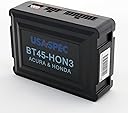
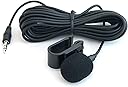
The USA SPEC BT45-HON3 is a premium Bluetooth integration kit tailored for 2003-2014 Honda and Acura vehicles. It delivers CD-quality music streaming, hands-free calling with steering wheel control compatibility, and automatic audio switching on calls. Featuring a 3.5mm AUX input and a 2.1 Amp USB charging port, it ensures seamless connectivity and power for your devices. Easy to install with a 14-pin connector, this kit transforms your car audio experience without the hassle of replacing your head unit.

| ASIN | B00NMXMUW8 |
| Additional Features | Automatic Call Switching |
| Audio Input | 3.5mm Auxiliary |
| Audio Output Mode | Stereo |
| Audio Output Type | internal |
| Best Sellers Rank | #179 in Bluetooth Car Kits |
| Bluetooth support? | Yes |
| Brand | USA SPEC |
| Built-In Media | USA SPEC (BT45-HON3) Bluetooth Phone, Music & AUX Input Kit for select 2003 -2014 Honda and Acura models |
| Color | black |
| Compatibility Options | Bluetooth |
| Compatible Devices | Bluetooth-enabled devices |
| Compatible with Vehicle Type | Honda & Acura Vehicles |
| Connectivity Technology | Auxiliary , Bluetooth, USB |
| Connector Type Used on Cable | 18pin molex plug |
| Control Method | Touch |
| Customer Reviews | 4.5 out of 5 stars 677 Reviews |
| Global Trade Identification Number | 00824254900011 |
| Hardware Interface | Bluetooth |
| Includes Remote | No |
| Installation Type | Plug In |
| Item Type Name | Vehicle Input Kit |
| Item Weight | 0.01 Ounces |
| Manufacturer | USA SPEC |
| Model Name | BT45-HON3 |
| Number of Channels | 2 |
| Power Source | Corded Electric |
| Rechargeable Battery Included | No |
| Special Feature | Automatic Call Switching |
| Supported Application | iHeart Radio, Spotify, Google Maps, Waze, YouTube |
| Supported Media Type | StandardAudioFormats |
| Supported Standards | Bluetooth 2.1 + EDR with aptX, A2DP, AVRCP 1.4 or higher |
| UPC | 824254900011 |
| Voltage | 5 Volts (DC) |
| Wireless Compability | Bluetooth |
M**H
Great Sound Quality, Easy Install, Very Happy Overall
Music Audio Quality: The music sound quality is near perfect, if not 100% perfect CD/iPod quality. It recognizes my device when I get in the car within 5-10 seconds without me having to do anything. Be careful not to leave your volume up too loud when you get out of the car, as when you get back in the car, the female voice that says "Connected" might leave your ear ringing for a second =) Phone Call Audio Quality: Exactly what you would expect for a car Bluetooth device. No better and no worse than anything I've experienced in any other vehicle that is Bluetooth compatible. I have my mic mounted near my rearview mirror, and I've never had any issues with anyone not being able to hear me, whether stuck in traffic or driving down the highway (windows up, of course... it's not THAT good). It is very nice how it integrates perfectly with my steering wheel controls. A simple press of the up fuction button on the steering wheel answers the call, down hangs up. If you are listening to radio, it will switch over to the AUX channel that your Bluetooth connection operates through so that the call can take place through the vehicle speakers. Note that when you hang up, it will stay in the AUX setting, so you will have to switch back to the radio if that's what you were on. Of course, if you were just listening to music through your phone via Bluetooth, which is already on the AUX, your phone will resume play of the music from your phone (at least my iPhone does). Note on iPhone Voice to Text: Speaking of iPhone, another thing to be aware of is when you are hooked up to Bluetooth, if you press the voice-to-text button, you have to wait 2-3 seconds to start speaking, as it is sending the signal through the Bluetooth connection and, thus, it is recording your voice-to-text through the Bluetooth microphone installed on the car. So, you don't need to hold your phone up to talk into it directly. That said, you do need to project as you normally would on a phone call so that your voice-to-text function can pick up on each word. You may even need to speak up a little more than you are used to. I use voice-to-text all the time, and while it does take a few weeks to get used to, I have no problems with it, and I'm picky about voice-to-text. Install: This works awesome in my 2006 Honda Ridgeline. The install was pretty simple. With that said, there are two ways you can install this in the Ridgeline. Option 1 is more complicated, but only necessary if you plan to keep your XM radio channel functional, as XM and AUX/Bluetooth need to share the same channel. Option 2 is much simpler, and perfect if, like me, you do not need XM radio functionality. I simply Googled how to pull the dash off (easy), pulled the head unit so it was loose in the dash and I could access the back (easy), pulled out the glove box so I could tuck the BT45-HON3 box back there (easy), and then clipped the microphone to my map light above the rearview mirror and ran the microphone cable under the ledge of the headliner and then behind the trim running up the passenger column (moderately simple). I was initially considering ordering this from Crutchfield thinking I needed to pay more for the vehicle-specific install instructions, but I'm glad I didn't. Resources abounded online, at least for my simpler hookup, and I know there are instructions on the Ridgeline forum for those doing the more complicated hookup. Conclusion: This is a great solution for the money for anyone who wants to be able to listen to music from their phone without having to mess with CDs, USB connections, or wires. 3 months in and I haven't looked back since I installed it. Pandora, Spotify, and Apple Music all play into my vehicle steering wheel controls seamlessly. The sound quality is excellent, and it is nice being able to take hands-free calls while driving. I was considering doing a complete overhaul of my audio system initially and I am so glad I didn't. I know the fact that the Ridgeline already has a decent sounding sound system plays into this, but if you don't want the hassle of having to install a new head unit and all that comes with it, you will be extremely happy with this regardless of your vehicle.
A**R
Installed easily, works very well
I installed the BT45-HON3 in a 2006 Odyssey touring (NAV, RES, etc). I chose to install it next to the radio, not at the XM tuner. We use XM, and didn't want to lose the XM2 button assignments. Plus, we really don't care too much about text display. My radio doesn't have a CD/AUX button as described in the manual, but does have a DVD/AUX button. With all DIP switches down (in the ON position), the BT45 takes over the AUX setting. Everything else on the radio/RES continues to work as before. Pairing with the BT45 worked easily, and once paired, devices connect quickly. Playback sound seems excellent -- at least as good as XM or a CD. Hands-free calls work well, although the caller sounds like they're in a bathtub. Still, I can understand the caller, and they can understand me clearly. I mounted the mic at the top of the windshield, just to the left of center. When using the bluetooth, the display reads CD1 - D4 - Txx, where the last is the track number in your playlist. The CH +/- keys on my steering wheel work to navigate tracks. When the phone rings, pressing CH+ answers, and CH- hangs up. The unit has a (loud) voice that so far as I can tell only does two things -- scream "connected" when you pair, and read out the phone # when a call comes in. You can enable/disable the voice with the Seek +/- buttons on the radio. Installation was pretty easy; running the mic cord was the hardest part, as it was hard to fish the cable in some spots. Still, from start to finish it was probably an hour's work. There are plenty of videos on youtube that show you how to proceed. I did have to run the cable that goes to the back of the radio under and around to the right (there's empty space there), as there didn't seem to be enough room anywhere else for this fairly thick cable to come through. I left the cable, the BT45, and the mic cord resting on top of the radio behind the climate controls, where it all fit nicely. One bit of advice -- make sure you have your anti-theft codes before you start, just in case. While I can't compare this to any of the other solutions on the market (e.g., the GROM unit), I can say the BT45 seems to work about as well as I can imagine any of them doing.
D**G
Expensive but sound is great! (on a 2006 Ridgeline, no Nav, but with factory Subwoofer)
I looked high and low for a phone/streaming music connectivity option for my 2006 Ridgeline. After trying 2 other failures, I think I've found the one that fits! First I tried the Aux input from a cheaper option (about $25) but omg the interference and engine noise was horrible! It was unbearable to listen to. So then I tried replacing the head unit altogether.. and lost my subwoofer and sound quality in the process.. The 2006 (and I think most of the gen 1 ridgelines with the factory subwoofer) actually have a 5-channel head unit, 4 door speakers plus and extra channel and amp built into to the head unit for the subwoofer. The sound without it is hilariously bad. If you want to replace your head unit, be prepared to also buy and wire up a subwoofer amp because if you don't your sound will be awful! Alas, I was beginning to think I wasn't going to find an option that worked for me.. but I decided to give this Bluetooth module a try.. and boy am I glad I did!! It's easy to wire up and after tweaking the EQ settings a bit on the factory head unit I got it dialed in to near CD quality sound over Bluetooth streaming. The sound is so good I actually don't even use my FM tuner anymore at all, I stream my local radio via apps instead because it sounds that good!! Haven't actually tried the hands-free calling yet but I'm sure it'll be fine, my big desire was getting my phone tunes to work and they work great!! Great bonus feature: the Bluetooth feeds through the name/band of the music (pretends to be XM) and also the steering wheel next/back works great too!! It's expensive but just spend the money and get this.. unless you feel like rewiring your sound system this is by far the best option! Thanks for fixing the sound in my truck!!!
M**A
Easy, inexpensive upgrade - totally worth it.
This is a real easy way to upgrade your OEM stereo. I have a 05 Acura TSX with the XM stock radio. The way this works is that it piggy backs on your XM tuner (or you can plug it in directly to the back of the stereo if you don't have an XM tuner in your car). The install is real easy since the tuner is in the rear-right panel in the trunk (I say this because I watched someone else install it). Just unplug the XM tuner, place the USA SPEC BT in between with the cables and that's it. The instructions are simple and easy to follow, so just make sure that you disconnect the 2-cables that come in the package, since one is for the XM stereo and the other is for the non XM, but they come packaged plugged into each other (we had the issue where it wouldn't trigger the phone-call BT option.) Things to note (negative and positive). The Positive: 1 - Once paired, it will always remember the device you connected when you get in the car. Takes about 10 seconds to recognize and re-connect. 2 - Phone call quality is really good. I had my mic placed just above the rear-view mirror and it works great. 3 - sound quality is surprisingly good, much better than those plug-in FM tuners. The Negative: 1 - If you are also using XM in your car, the BT Tuner causes a weird delay when you interact w/ your XM channels. 2 - Since it uses your XM1 connection, you lose the ability to have 12 stations between your XM1 and XM2. That part sucks. 3 - If you're listening to music and get a call, make sure you pause the music before you get out of the car or when you end the call your phone will start blasting your music as you're getting out of the car. 4 - There's a weird voice enabled feature that talks to you when you connect, disconnect, get a call and recites the number. The recordings are a lady's voice with a foreign accent speaking not-so-good english which is somewhat entertaining, but it is SUPER-LOUD when it speaks so It will freak you out when it screams at you. No worries though since it is easy to deactivate, which I highly suggest. Regardless, great product for the price and if you take it to best buy they will install it for about $65, which is worth it since you have to run the mic all the way from the trunk to the front of the car. Highly recommended if you can get passed the 4 acceptable negatives mentioned above.
K**E
Fantastic product!
Worked perfectly in my '06 Civic Si with nav. Fairly easy to install (buy some trim tools), connects to my phone with no hassle, and sounds great! Manual was well-written and easy to understand. My steering wheel controls also worked great, just be sure to install it in CDC mode if that feature is important to you. Overall this thing is worth every penny, I'm very impressed!
M**2
Works perfectly in my car
I was one of the lucky ones. I was able to mount this in the trunk of my used 2005 TL. Pretty simple, especially relative to what a dash install would have been like. My expectations were pretty realistic. I knew the speakers it was going to tie into were decent but the stock head unit is, well, meh. But for the 30 min it took me to install and seal up, the results are spectacular. Solid sound quality. Stable Bluetooth connectivity. Absolutely better than the cassette adaptor and radio broadcaster hacks I’d long ago tried and thrown out. Highly recommend, just don’t expect it to turn a 20 year old stereo into a brand new one. My only gripe is volume. I have to crank it really high on my phone and head unit. Not yet sure if that’s because I have a volume limit setting on the phone somewhere or not.
C**E
Best mobile game changer available today for older vehicles with dated radio technology. Amazing!
Update 8/13/20. I bgt this product in 2016 and the unit blacked out after 4 years. I pulled out the jack from the back of the unit and boom! Back in play! The dang thing is beast!! If this thing goes out permanently, I may have to get a new car. Lol. My Acura MDX is playing my music nicely as my phone conects seemllessly thru Bluetooth. 2016 review —> I ordered this product because I'm not ready to trade in my 2005 Acura MDX Touring yet. The truck has 140,000 miles and rides just as sweet as the day we purchased back in Dec 2004. Besides, we cannot afford an new vehicle at this point. My wife and I listen to pandora and Sirius through apps on our phone at home via portable Bluetooth speaker. The only problem we had which was pretty darn annoying was the fact that we could not connect through our factory stereo in the MDX. Bluetooth connection was not available for radio back in 2004. It would only connect for phone calls. We have a small portable speaker we would put on the dash board and connect via Bluetooth and it was not the same as listening to music via my Bose system. I ordered this product as I felt it was the only product which would meet our needs. Well! I was blown away and not disappointed! I watched a video on how to install the product. I ordered the item on Amazon on a Sunday nite. The product showed up at my door on Tuesday nite. I was so excited when I got home that I decided to install the darn thing outside my garage around 9pm. Lol. I used my iPhone over the visor as a flashlight while I began to remove the radio's double din harness. The removal was a bit tricky but simple enough. If your a handy person than you'll have no problem installing the product. I have an xm radio with no Nav so I had to install the BT-Hon behind my radio. There is no song tags as CD/AUX does not allow it. Only numerical tracks are shown. (Not a factor for me). After an hour and a half I was done! I ran the cable from the back of the radio and down thru the inside of the panel leading to the passenger side. Some people placed the box below the air conditioning controls above the radio. I decided not to as I would like to use the USB port behind the box and have it accessible (for charging only) so I decided to place the box under the corner end of the passenger side floor mat. I followed instructions to a tee. Running the microphone was the only nuisance as I had to run the thin cable from the inside driver side visor to the windshield frame down and across the front windshield tucked nicely so it goes unnoticed and down the passenger side and underneath. I never tested the item before I closed everything up. My confidence level was high due to some of the reviews I had previously read before ordering the unit. I paired the phone almost instantly. Just hit the CD/Aux button twice to get to the AUX position on your radio. Go to Bluetooth settings on your Celly and turn it on. Scroll down to the BT-Hon device and click on it. Your phone discovery will sound over your car stereo with "Connected." And boom! Your in! I raised the volume on my Celly so it will allow me to get maximum loudness from my car stereo. I click on the pandora app on my phone and began playing my music. I was blown away! WOW! I finally got my music life back in the Acura. Makes long trips bearable. (Regular radio tends to suk and has mediocre sound) I had discontinued my xm radio service years ago as it got to be so expensive. I have the app thru the family. I played it thru the radio and it was truly amazing. I played one of my playlists from my ITunes and was blown away once again. I do have great music!! Lol. I took the car on the highway for a final spin while I turned Aerosmith and enjoyed the clear sound of my Bose sound system. It's amazing how this small unit has transported my MDX radio into the current state of music listening in 2016. My MDX radio plays the same apps that my daughters 2014 Mazda 3 does. The next morning I had my wife pair her phone which took all of 1 minute. She played her pandora app and was also blown away. I called her on her cell phone, the ring was soft and the voice prompt switched from music to announcing the phone number coming in. I instructed her to hit the volume up tab on the steering wheel and the phone call was connected. She spoke and I heard her clearly on my phone. I spoke and voice was not overbearing in the car. It was very clear. I really can't say anything bad about this product. It is literally game changing. If you feel you cannot install yourself than spend the $65 at bestbuy and have them install it. Last two words: AWESOME product!!!!! UPDATE 11.25.2016: Still amazing! No issues at all. My wife actually watches music videos on her i-phone through her YouTube channel when we're on long trips and the sound is incredible. My Bose system still takes music to the next level. Please keep in mind the music suffers very slightly as its coming from an outside source but not enough to really complain. I just have to say... It is, what it is and we love it! I have recommended to friends and family and they are blown away by the product. Cheers and good luck!
Z**3
Hard to install on a Ridgeline and works well but could be better
I am very handy with cars and this thing was a royal pain to install on qla 2014 Ridgeline. You have to remove the rear seats to get to the XM box and then remove all the trim to run the microphone wire back up front. The seats are heavy and very awkward to remove for 1 person. I managed but I don't think many could without 2 people. I wouldn't recommend even attempting it. The whole process took probably 2.5 hours and a lot was spent on the seats. I used automotive double sided foam tape to secure the device so it wouldn't just bounce around. Once installed, it connects easily and sound is very good coming from a galaxy s23 plus. The bad part is that the phone calls portion is only mediocre. It is quiet so you have to turn radio way up. Also people say you sound muffled a lot. This is very disappointing. I had a grom audio version years ago and I would get than one instead. Easier to install and phone part worked better.
Trustpilot
5 days ago
1 day ago