
🎮 Elevate your game with precision, power, and style — don’t just play, dominate!
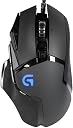
The Logitech G502 HERO Special Edition gaming mouse features a cutting-edge HERO optical sensor with up to 16,000 DPI for pixel-perfect accuracy, 11 programmable buttons for ultimate customization, and adjustable weights to match your playstyle. Its LIGHTSYNC RGB lighting synchronizes with your gaming setup, while durable mechanical switches ensure rapid, reliable clicks. Compatible with Windows, Mac, and Chrome OS, this wired mouse is designed for serious gamers seeking performance and personalization.

| ASIN | B019NFPE2G |
| Antenna Location | Gaming |
| Are Batteries Included? | No |
| Are Batteries Required | No |
| Best Sellers Rank | 13,558 in PC & Video Games ( See Top 100 in PC & Video Games ) 397 in PC Gaming Mice |
| Brand | Logitech G |
| Brand Name | Logitech G |
| Button Quantity | 11 |
| Colour | Black |
| Compatible Devices | Laptop, Personal Computer |
| Connectivity technology | USB |
| Customer Reviews | 4.5 out of 5 stars 3,966 Reviews |
| Enclosure Material | Rubber |
| Global Trade Identification Number | 05099206062313 |
| Hand Orientation | Right |
| Hardware Platform | Gaming |
| Included Components | other |
| Item Dimensions L x W | 13.2L x 13.2W centimetres |
| Item Weight | 0.13 Kilograms |
| Manufacturer | Logitech |
| Manufacturer Part Number | 5099206062313 |
| Minimum Required Operating System Version | Windows 11 |
| Model Name | G502 (Old Version) |
| Model Number | 910-004617 |
| Mouse Maximum Sensitivity | 12000 Dots per Inch |
| Movement Detection | Optical |
| Movement detection technology | Optical |
| Network Connectivity Technology | USB |
| Number of Batteries | 1 Lithium Ion batteries required. |
| Number of buttons | 11 |
| Operating System | Windows |
| Pattern | G502 Wired |
| Power Source | Corded Electric |
| Product Features | Dedicated to Game, Scrolling Wheel |
| Product Warranty | 2 Years |
| Range | 10 meters |
| Special feature | Dedicated to Game, Scrolling Wheel |
| Style Name | East Europe Version |
| Theme | Video Game |
| Unit Count | 1.0 count |
K**Z
Wheel of fortune
This mouse meets most of my expectations. I'm not using it for gaming, I wanted something with programmable buttons, macros and a selectable free scrolling wheel with good angular momentum for work/study. I spend a lot of time navigating interminably long documents and websites so I wanted a mouse with a zero resistance scroll wheel. I managed to get this one to spin for 24 seconds with one hard flick! That may not impress you but it gave me a massive grin. Incremental mode gives you firm and accurate notch by notch control. The mode is changeable with the button behind the wheel instead of pressing down on the wheel like other mice. The wheel press (aka middle button) can also be assigned a function as can the left and right wheel tilt presses. By default the wheel press engages auto-scroll mode. I like to have choice in my navigation methods. I have been enjoying the thumb rest, my previous mouse didn't have one and I didn't know I needed one. But, now I'm thinking about my neglected little finger. Perhaps. this mouse could be improved by adding a little finger rest to the other side. That's a nice-to-have rather than a bad point though. It's great having a mouse with adjustable weight, never had that before. I do find it helps me to locate clickable objects with better accuracy on high sensitivity settings. With the zero-resistance scroll mode engaged the wheel can occasionally move fractionally during vigorous mouse movements making the page move. It will definitely move if you bang the mouse down sharp onto your hard surface. I don't do this but if it's a regular thing for you then bear it in mind. A great mouse for my needs. I will update this review if anything changes...
L**S
The perfect mouse!
Being a gaming enthusiast at 16 years old this mouse has been perfect. Loved the RGB, interchangeable weights, 11 remapping programmable buttons (done via software, more details in user manual) and the Logitech software is very easy to use and has tons of features. It's great that you can sync the colours with your Logitech keyboards and headsets too. Software recognised the mouse instantly and the Logitech account containing your products is amazing. Great sensitivity range, beautiful RGB colouring, unlimited scrolling and I see why it's the world's most popular mouse and so many pro eSports players use this exact mouse. The closest button to the user is to change between 3 profiles indicated via the side lighting, which are customised by using the software allowing to change your colours, effects and sensitivity on the go, without all of the fuss. It has aided me in stepping up my gaming performance at the same time as being comfortable and a breeze outside of gaming. No complaints what so ever.
C**G
Good mouse for gaming and, surprisingly, boring office work
Great gaming mouse. Very responsive and have all the trinkets needed to make a first person shooter, mmo etc exciting. I also use it as my work mouse - makes for switching between windows, deleting tabs etc. a one handed job without using the keyboard. Of course these options have to be addd manually, but the software is very user friendly (I have a Corsair M65 as well, and the Logitech software is definately better in my opinion). The options to remove and add weights in different ways also helps with balancing the mouse to your desire. The only downfalls is that the scrolling wheel isn't very definiative - it gives a muddled feeling when scrolling. And being metal-bodied, it can slip sometimes if you're being over-zealous with your scrolling speed. The tracking is also great, but can mess-up on certain surfaces (it skipped on a wooden surface, whereas my M65 didn't) - of course this problem can be mitigated using a nice mousemat (as you should). Overall, a very pricey, but well-worth peripheral for both the average PC worker and gamer.
B**E
Comfortable, Easy To Use and Customisable
I'm gonna start of by saying that there is not "11 programmable buttons" all the buttons are as follows: Left click, right click, scroll wheel, scroll left (by pushing the mouse wheel to the left, because this apparently counts as a button), scroll right (yes it is this much of a stretch the mouse wheel counts as 3 buttons), DPI up, DPI down (the two buttons coming off of the left click), DPI Shift (button right in front of your thumb), Forward, Backward (the two buttons above your thumb (these are the only two I've been able to use in games), Switch profile (the smaller button behind the scroll wheel, used to change between DPI profiles) and finally, a button that allows you to change your scroll wheel between smooth scrolling and incremental scrolling, it's the bigger button behind the scroll wheel. of these buttons, two are actually customisable in games, the rest (except for the one that changes the scroll wheel) can only be edited in the logitech software you can download (Which is a really nice wee engine actually totally recommend it) so i guess there is technically 10 programmable buttons but in my opinion there's really only 2 because in a gaming mouse you should expect the vast majority of the additional buttons would be usable in games. So the mouse itself. the entire left side is comfortable and fits my hand great, the right side of the mouse on the other hand leaves my pinky hanging off the edge rather uncomfortably. Not too uncomfortably mind you but still a design flaw, especially when it's a gaming mouse. The whole "16.8" million colours thing is just funny, the software i mentioned briefly (i'm not going to go into detail about it just know it's really solid and adds a lot to the mouse) allows you to select 1 of 3 colour settings "cycle", "fixed" or "breathing", on the fixed and breathing options you get giving a wee colour wheel, and that is your 16.8 million colours, a bog standard colour wheel, yeah it's okay i guess but i can't think of anyone who wouldn't choose cycle because it's just better to look at. The DPI options are awesome. The range as stated in the products way too long name on amazon is 200-12,000 which is just fantastic, you get to make three profiles each with five customisable DPI levels each, which is great, allowing for a ton of variety and all those DPI buttons help make switching quick and easy. Finally the weights that come with the mouse help the mouse feel so much better to move around, it feels weighty and helps prevent you from overshooting with your mouse movements, and they are easy to take out. in conclusion: it's a really solid mouse with mild comfort issues and a bit of false advertising. I'd totally recommend it.
A**R
God Dam Yes!
Feels great, responsive, not cheap material, enough well placed buttons for the average gamer. Basically this mouse is a investment and worth it, the only issue I have with it is that had to go to the Logitech website to download the right program to alter stuff on the mouse. But that’s not really a problem considering just how SATISFYING this mouse is.
R**D
Fortnite players, this is for you.
This mouse is light, slick looking (especially with the RGB logo) and is perfect for gamers who play games that require many binds (Such as walls, roofs, ramps and platforms in Fortnite). The mouse has around 7 buttons on it: perfect for easy-access binds so you can quickly carry out specific actions in intense gameplay situations. The software that runs alongside this product could be better (not as good as the Razer software) but the product is better than anything I have used and I have used many gaming mice.
L**N
Great mouse, came with a good amount of weights ...
Great mouse, came with a good amount of weights making it pinpoint, i liked the extra side buttons on the side of the mouse as it makes it a lot easier to personalise to certain commands, the flashing symbol adds a unique touch and overall the mouse has a great feel and works well with a mouse matt.
D**E
the last mouse you'll ever buy
This is the last mouse you'll ever own. I have had 4 other mice between purchasing this in 2018 and now, 2026, and all of them have been returned for failing in month 13 or sooner. every time a mouse fails i swap back to this. Im not buying mice any more. i give up. the rubber on this mouse is wearing thin, and when its totally effed i'll get this mouse again. 10 out of 5.
G**.
Brauchbarer Nachfolger für die G500
Die G502 habe ich als Ersatz für meine G500 gekauft, die mir mehr als fünf Jahren treue Dienste geleistet hat und nun die ersten Alterserscheinungen zeigt. Ich bin kein Gamer, die Maus wurde aber jahrelang durch intensive Benutzung in der Fotobearbeitung strapaziert und erwies sich als absolut zuverlässig. Weil es für mich wesentlich war, mindestens so viele Tasten wie bisher mit frei wählbaren Zusatzfunktionen belegen zu können und dabei die gleiche Tastenbelegung wie bisher verwenden zu können und wegen der erhofften vergleichbaren Zuverlässigkeit habe ich mich für die G502 entschieden, eine bessere Alternative für meine Bedürfnisse konnte ich nicht finden. Die Maus macht zwar insgesamt einen guten Eindruck, sie ist einigermaßen wertig verarbeitet, aber wohl nicht ganz so robust wie die G500. Ich hoffe trotzdem, dass sie genauso lange hält und dass es sich bei den Exemplaren, die wegen baldiger Ausfälle schlecht bewertet wurden, um Ausnahmefälle gehandelt hat. Sie liegt sehr gut in der Hand, insbesondere mit den eingesetzten Gewichten. Es war nicht schwierig, die Zusatztasten genau nach meinen Vorstellungen zu belegen, insbesondere Strg, Alt und Shift auf den linken Zusatztasten waren mir für Photoshop wichtig. Dennoch ist, wie in einer anderen Rezension erwähnt, eine kleine Umgewöhnung notwendig. Die unterste Taste auf der linken Seite wurde von Logitech so angeordnet, dass sie nicht mehr mit der Daumen-Innenkante, sondern mit der Daumenspitze zu bedienen ist. Dies führt dazu, dass man den Daumen nicht mehr ausgestreckt anlegen kann, weil man sonst Gefahr läuft, die Taste zu betätigen, und somit die Maus geringfügig anders halten muss als gewohnt. Ich glaube, dass ich mich daran gewöhnen kann, wenngleich ich die G500 bequemer fand. Was mir sehr positiv auffällt ist die für mein Empfinden deutlich höhere Präzision und die Verwendbarkeit auf beinahe jeder Oberfläche. Jetzt gelingt es mir endlich, die Maus im Bildbearbeitungsprogramm wirklich pixelgenau zu platzieren; das war bei der G500 selbst auf der niedrigsten Geschwindigkeitsstufe kaum möglich. Die Maus kann per Software für unterschiedliche Oberflächen angepasst werdern, sie funktioniert bei mir nun sowohl auf einem Mauspad als auch auf einem glänzenden Marmortisch, meinem Hosenbein und auf dem nackten Knie. Auf die Lichteffekte lege ich keinen Wert. Sie können getrennt für das Logo und für die Auflösungsanzeige abgestellt und in der Helligkeit geregelt werden, dezent einfarbig ist mir am liebsten.
M**E
superb
nearly 7 yrs of use and no issue, excellent and ergonomic. barely any pressure needed to right click. hassle free movement for the slider. no wrist strain!
D**L
Muy completo y cómodo
Buena compra. Llevo un tiempo usándolo y estoy muy contento con él. Se adapta muy bien a la mano y es muy configurable a través del software de logitech. Tiene 3 modos que se cambian con un botón, y para cada modo se pueden configurar 4 dpis distintos (hasta 12000), iluminación led rgb (se puede especificar el código rgb), macros... Respecto a la ergonomía es muy cómodo. Cumple con algo que me parece imprescindible en un ratón gaming, y es que la forma de los lados va hacia el interior y luego hacia afuera, gracias a esto el dedo "engancha" y es fácil de levantar. Además su peso es ajustable. En general estoy contento con la compra, lo único malo es que mi mano es grande y el botón para el pulgar lo pulso sin querer, y parece que es obligatorio tener alguna función asignada a los botones, no puedo hacer que ese botón no haga nada.
P**E
1 Jahr hat sie bereits hinter sich
Update 03.08.2019 Die Maus läuft nach drei Jahren noch immer einwandfrei und teilt sich ihren Platz nun mit einer Corsair K95 Platinum. Genau am 17. Mai 2016 habe ich mir die Logitech G502 Proteus Spectrum gekauft, um meine zweite defekte ASUS Gladius (innerhalb von einem Jahr) abzulösen. Zwar spielen die G502 und die Gladius im selben Preissegment, doch die Unterschiede überraschten mich bereits am ersten Tag. Verarbeitung: Ich erinnere mich noch an das gute Gefühl beim Auspacken. Alles fühlte sich wertig an - wertiger als bei meiner alten Gladius von ASUS, für die ich ebenso 70€ bezahlt habe. Der Kunststoff der Logitech ist einfach weitaus besser verarbeitet und bietet eine enorm höhere Steifigkeit. Kein Knarzen, nichts. Da sie von Haus aus schon ein (für mich) gutes Gewicht lieferte, verzichtete ich auf die mitgelieferten Zusatzgewichte. Die Halterung für diese ist im Übrigen sehr leicht zu öffnen und dank Magnetismus dennoch stabil. Mir gefiel vor allem die Passform, da die G502 sich sofort gut in meine Hand legte. Mit der ASUS hatte ich da so meine Probleme - manchmal sogar leicht verkrampfte Hände. Das ist aber bei jedem Menschen anders. Wenn ich mich aber so umhöre fällt auf, dass die Logitech allgemein gut in der Hand liegt. Noch einige Worte zum Mausrad: Es ist gewöhnungsbedürftig. Die Verarbeitung ist top, aber die Rasterung fühlt sich anders an als bei jeder Maus, die ich zuvor hatte. Nach einem Jahr komme ich aber vollkommen damit zurecht. Das freie Scrollen ist übrigens sehr hilfreich in allen möglichen Anwendungen. Software und Funktionen: Angesteckt und los geht's: Die Software ist wunderbar einfach zu installieren und wirkt im Gegensatz zum ASUS-Treiber völlig ausgereift. Hier kann man wirklich verdammt viel einstellen. Schnell habe ich auch ein passendes Setting gefunden und mehrere Profile auf der Maus abgespeichert - falls ich sie mal mitnehmen mag oder einen neuen PC habe. Die Konfiguration der LED's ist auch bequem. So habe ich für Filme ein Profil abgelegt, was die gesamte Beleuchtung abschaltet. Um Profile zu wechseln gibt es einen eigenen Button auf der Maus - der sich, wie alle anderen, auch frei programmieren lässt. Etwas skeptisch schaute ich dann das so genannte "Tuning" für Mauspads an. Aber dennoch probierte ich es für mein Corsair MM300 Extended aus. Das Ergebnis war gut, die Präzision hat sich leicht spürbar verbessert. Also kein Gimmick. Mit dem Treiber lassen sich übrigens auch Heatmaps erstellen. Insgesamt bin ich von der Software voll und ganz überzeugt - die Menüführung ist zudem flüssig und leicht. Performance: Kurz gesagt: State of the art. Der Sensor übertrifft noch einmal den der Gladius und hatte innerhalb der letzten 12 Monate niemals einen Aussetzer. In Anwendungen wie Photoshop und After Effects unterstützt die Maus mich jeden Tag. Aber auch in Games, wo es ebenso auf hohe Präzision ankommt, fühlt sie sich "just right" an. Von Civilization über Battlefield, The Witcher 3, etc. bis hin zu Rainbow Six: Siege ... es passt. Zugegeben: Den Sniper-Button habe ich noch nie genutzt, da er mir etwas zu weit weg liegt. Ich hatte zuvor keine präzisere Maus in der Hand. Sehr hilfreich ist auch der Fakt, dass die Maus keine Glättung verwendet und alles so überträgt, wie man sie über das Mauspad gleiten lässt. All in all: Mit meiner Corsair K70, dem Corsair MM300 und meinem restlichen Setup harmoniert diese Maus wirklich top. Ein wunderbarer Allrounder. Ich kann jedenfalls eine klare Kaufempfehlung aussprechen und werde diese Rezension in Zukunft up to date halten!
A**O
Perfecto
Ratón perfecto para mi gusto, es un ratón grande, pero quizás algo estrecho, al final te acostumbras, pero hay gente a la que le resulta incómodo, sobre todo al principio, por la colocación del dedo anular y el meñique puesto que es algo estrecho si tienes las manos grandes y por su lado derecho no tiene apenas zonas donde apoyar esos dedos. Una vez acostumbrados al ratón es una maravilla, deslizamiento, sensibilidad, precisión y una barbaridad de botones configurables que pueden ser el doble, puesto que al apretar el botón "sniper" se puede configurar el mismo para que asigne otra función a cada botón mientras está apretado. Por lo demás la iluminación es un tanto espartana, deberían haber puesto más zonas donde resultase visible, pero es una cuestión de gustos. Un ratón perfecto tanto para jugar como para el día a día.
Trustpilot
1 month ago
1 week ago