Buy anything from 5,000+ international stores. One checkout price. No surprise fees. Join 2M+ shoppers on Desertcart.
Desertcart purchases this item on your behalf and handles shipping, customs, and support to France.
🚀 Power up your productivity with Anker’s all-in-one USB-C hub!
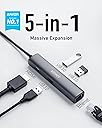
The Anker USB C Hub Adapter is a compact 5-in-1 device that expands a single USB-C port into three USB 3.0 ports, a 4K HDMI output, and a 1 Gbps Ethernet port. Designed for professionals using MacBook Pro, iPad Pro, XPS, Pixelbook, and more, it delivers fast data transfer, crisp video, and reliable wired internet in a sleek aluminum enclosure backed by an 18-month warranty.


| ASIN | B07X8ZLYLR |
| Additional Features | HDMI™️, Powered |
| Best Sellers Rank | #875 in USB Hubs |
| Brand | Anker |
| Color | Gray |
| Compatible Devices | Laptops, Monitors, Mouse, Tablets, USB Flash Drives |
| Customer Reviews | 4.7 out of 5 stars 7,445 Reviews |
| Data Transfer Rate | 5 Gigabits Per Second |
| Enclosure Material | Aluminum |
| Global Trade Identification Number | 00194644015336 |
| Hardware Interface | Ethernet , HDMI , USB 3.0 Type A |
| Item Dimensions L x W x H | 4.41"L x 0.91"W x 0.67"H |
| Item Weight | 0.12 Pounds |
| Manufacturer | Anker |
| Mfr Part Number | AK-194644015336 |
| Model Number | A8338 |
| Number of Ports | 5 |
| Operating System | Linux |
| Special Feature | HDMI™️, Powered |
| Total USB Ports | 5 |
| Total Usb Ports | 5 |
| UPC | 194644015336 |
| Warranty Description | 18-month warranty |
D**.
It's a good USB-C dongle, but it's not magic!
Honestly, this is an excellent USB-C hub if you just need a couple more USB ports or an extra display output. I've now purchased two, one for my Razer Blade for over a year, and one for my wife's Surface Pro 7. On both systems, it was very much plug-and-play. As soon as it was plugged in, Windows recognized it, and we were ready to go. At home I use it on my Razer for an RGB keyboard, wireless mouse receiver, wireless headset receiver, and HDMI output to keep my desk area looking clean, and be able to connect/disconnect all my extra peripherals with one cable. While traveling (pre-COVID), I used it for it's RJ-45 jack and hooking up my travel peripherals with one cable. It worked great for both, no issues to speak of. My wife uses it on her Surface for pretty much the same purpose, which is really nice to have considering the Surface's lack of outputs. It works great on her device as well. The hub is lightweight, feels sturdy, and works as expected. You just need to make sure your computer's USB-C ports support what you're trying to do with it. This hub won't magically turn a USB-C port on your computer into an HDMI port or RJ-45 jack unless your computer supports it, so make sure you check your ports specs in the manual or on the manufacturers website. Only downsides are that it can run a little warm while using it. But considering it's passively cooled, as long as you're not covering it up, it should be fine. Also, a little personal gripe is that the cable feels a little too short. But that's just me, and I make do just fine.
S**N
Unleash the Full Potential of Your Device with the Versatile Anker Hub Adapter!
The Anker Hub Adapter is a must-have accessory for anyone looking to expand their device's capabilities. This 5-in-1 adapter offers a convenient and efficient way to connect multiple peripherals to my MacBook Pro, iPad Pro, and other USB-C enabled devices. The 4K USB C to HDMI port delivers stunning high-definition video and audio output, allowing me to enjoy my favorite movies, presentations, and content on a larger screen. The Ethernet port provides a stable and reliable wired internet connection, perfect for faster data transfers and lag-free online experiences. The three USB 3.0 ports offer blazing-fast data transfer speeds, making it effortless to connect various USB devices simultaneously, such as external hard drives, flash drives, or other peripherals. This feature comes in especially handy when I'm working on the go or need to transfer large files quickly. The sleek and compact design of the Anker Hub Adapter makes it highly portable, and it seamlessly complements the aesthetics of my devices. The plug-and-play functionality ensures a hassle-free setup, and I appreciate the convenience of having all these connectivity options in one single hub. As a frequent traveler and a professional on the move, this adapter has become an essential part of my tech gear. It has significantly improved my device's versatility, allowing me to be more productive and creative, whether I'm at home, in the office, or on the road. If you own a MacBook Pro, iPad Pro, XPS, Pixelbook, or any other USB-C enabled device, the Anker Hub Adapter is an absolute game-changer. It offers an impressive range of connectivity options in a compact package, making it an ideal solution for expanding your device's capabilities. I highly recommend this adapter to enhance your productivity and connectivity experience!
L**G
Awesome little dock
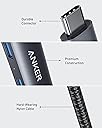
The build quality on this is exceptional for the price. Really solid, mostly metal with a nicely braided cable. Really good for the price, I bought this at $35, and I would have paid more if I knew what I was getting. Way better than my old cheap plastic dock that broke. This is the second Anker product that I've bought (the other one is a battery power bank), and both products have exceeded my expectations. I will update if anything goes wrong with it, but so far this has been a really good buy... UPDATE: After using it for a little while longer I have noticed that when the ethernet cable comes unplugged if I just plug it back in, my laptop won't recognize the ethernet connection. The lights will still turn back on on the port, but my laptop won't connect with it. In order to fix this, I have to unplug the dock from my USB-C port and plug it back in. After that, no issues. It's also worth noting that the port isn't super secure, so this happens more often than it should. Not really a dealbreaker for me, but it might be for you depending on where you put your dock, so keep that in mind if it's going to be in a place where it might easily fall out. It's definitely an inconvenience. I have also been reading other reviews that say that this dock doesn't work with their computers. It works well with my computer which is a Dell XPS 15 9560, and the only USB-C port it has is actually a thunderbolt 3 port. Just thought I'd mention that because that might affect compatibility. I don't have any other computers on hand to test it with, so I can only confirm that it works with my model. Look at other reviews if you have a different computer and you're worried about compatibility.
R**S
Ethernet Jack (RJ45) did not work for me (Edit: It does now)
Update: After a couple of restarts, and continuing to plug in the Anker 5-in-1 USB C hub in different ports, followed by plugging various cables in different order, I found that I need to plug the RJ45 cable in FIRST, before the HDMI and the USB 4-port extender I use. For some reason, one of those was preventing the Ethernet connection from working, but if I plug in the USB C hub first, then plug in the Ethernet, THEN plug in the HDMI cable and USB A hub cable, it works for me. I updated my review from 1 star (I was very disappointed) to 5 (I am happy!). I am happy with Anker's high build quality and this feels more like a user error and/or an unusual/unintended use case. But Anker engineering, take heed - I plugged (your) 4-USB port extender into the USB C hub's USB A port and it somehow prevented the RJ45 port from working - I have a keyboard, mouse, and webcam hooked up to the USB 4-port extender and I can't even begin to imagine why that would cause the RJ45 port not to work - but, thought I should share my experience in case others have similar issues. Original post: I love Anker's cables and batteries, they have worked flawlessly for me and I love their build quality. For this USB C hub, I (accidentally) purchased two units of this product. That means I was able to test 2 of them and neither of them could make the RJ45 port work on a 2019 MacBook Pro, which the listing claims it is compatible with. I know the Ethernet cable/connection works because I have a Dell USB C to Ethernet dongle, which when I plug THAT in, Ethernet works great. However, when I plug in the Anker USB C Hub [Upgraded], 5-in-1 USB C Adapter, I cannot get the RJ45 port to work. I tried one and it didn't work, so I thought "maybe this one just happens to have a bum RJ45 port", but I then tested the other on all 4 Thunderbolt ports on the laptop and the Anker USB C hub RJ45 ports did not establish an Ethernet connection on either unit. I am returning for a refund - the RJ45 port and the small form factor were the key reasons I purchased this USB C hub. I will note that everything else worked flawlessly. The HDMI connected first time to a 32" external monitor, the USB A ports connected a mouse and keyboard and a webcam. My sole issue is the RJ45 port, which I could not get to work on 2 separate, brand-new Anker USB C hubs.
G**T
Great quality build and high performance, longevity
I have had this device for more than a year. This device is very nice. It is light, handy, and has all the ports I needed. I run multiple computing environments simultaneously at my desk, and this helped simplify the ports and switching better than a KVM would have. Speed of the ports are as advertised; I won’t dive into specs since you can consult them in the listing itself. I can vouch that the connectors are good quality and sturdy, not flimsy like some lesser devices. The device itself is metal, and does radiate a small amount of heat when using the HDMI port (which I do all day every day). Nothing concerning though. The USB-C end of the dongle wire has good wire stress relief, and the cord itself is a decent gauge. I suppose if I had to nit-pick I would like the wire to be a bit larger gauge. As you can see by my picture, to improve longevity of the dongle I have rested the wire and therefore the USB-C connector on my laptop stand. I liked it so much that I bought a second one for my daughter’s Mac, and my wife bought one for her Surface. All are working great.
M**K
Very reliable without being bulky
I’ve had several of these and they have always been very reliable for usb and Ethernet. HDMI is definitely subpar and you will have a lower frame rate most likely. I recommend just using a usb c to HDMI cable if you have an open port. Despite this, I still give it 5 stars because the Ethernet and usb is what I needed it for the most. Plug fits snugly and the braided cord is sturdy while also having enough flexibility. 5 stars.
G**D
Ethernet problems: need to force update of driver, then no more problems
The Ethernet problems have been resolved after I installed a driver from realtek.com. I received a link to the correct driver from Anker's customer service (they respond fairly quickly). Updating the driver using the Windows "update driver" feature did not achieve anything, you need to download the file from realtek.com. With that issue resolved, I have no more Ethernet connectivity problems. I also experience what some other reviewers commented on, that the hub gets hot, but I don't think that's a problem (the metal casing allows for heat exchange, and while it's hot, it is not too hot to touch). Glad this is a good product, after all! Earlier review: (was 1 star) I bought this to make videoconferencing more stable, but the connection fails within one or two minutes, and it is difficult (time-consuming) to re-establish. Every Zoom call is lost, which is particularly bad if you host a call. Wi-Fi was disabled while using this Ethernet hub. I used this with a 2020 HP Spectre x360, running Win 10. I contacted Anker, and they were nice and let me return the hub for a replacement, but the replacement is not any better. Only upside: if you just need a regular connection, for email and web browsing, the Ethernet connection is *very* stable. The problems arise only when video-conferencing.
R**S
This well-made hub/adapter works great with my laptop!
This well-made hub/adapter works perfectly for my external mouse, keyboard, and wired network connection on my laptop. I’ve never experienced any lag or slow data transfer, and I would definitely buy it again.
L**T
Premium product for an acceptable cost
Fantastic USB C hub. Compared with other's at a simlar price this device has an awesome build quality - up there with hubs that are twice the price. Would definitley reccomend this product.
A**N
Excellent quality device with all the ports you need
Very useful to connect a MacBook Air to Ethernet, printer, external drive, full-size keyboard and a monitor. Just a perfect design with exactly the ports I needed and from Anker whose products I have bought before and trusted. As another reviewer noted, the USB cable could be a little longer but that said, if I tidied my desk it would work just fine. No problems at all in use so very happy.
M**L
Works perfectly
Compact dongle with a nice braided cord. Great build quality and I love that the cord lets me move the dongle around so it's perfectly positioned. Great convenience and gives me confidence that it wont damage my laptop. Everything works when I plug it into the dongle. It gives me more functionality on my laptop when I need it. Something very necessary for any macbook user because so many things still need the old USB plugs. It's also great to have an ethernet port for uploading and downloading files.
O**R
Excelente más de 5 años funcionando sin problema
Funciona ok
J**N
Worth for the money
The build quality is very good and worth for the money
Trustpilot
2 days ago
1 month ago