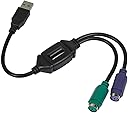
⌨️🔌 Keep your classic gear connected—no compromises, just productivity!
The Monoprice PS/2 Keyboard/Mouse to USB Converter Adapter is a compact, driver-free solution that enables seamless use of legacy PS/2 keyboards and mice on modern USB-only computers. Ideal for professionals who value their trusted peripherals, it supports KVM extender setups and works across major operating systems, preserving your investment in high-quality input devices without sacrificing convenience.

| ASIN | B00IACID2C |
| Best Sellers Rank | #531 in Computer Cable Adapters #3,884 in Computer Cables & Interconnects #6,073 in Televisions & Video Products |
| Brand | Monoprice |
| Color | Black |
| Customer Reviews | 4.6 4.6 out of 5 stars (3,343) |
| Date First Available | August 6, 2012 |
| Is Discontinued By Manufacturer | No |
| Item Dimensions LxWxH | 4.8 x 7.1 x 0.7 inches |
| Item Weight | 2.24 ounces |
| Item model number | 110934 |
| Manufacturer | Monoprice |
| National Stock Number | 0 |
| Product Dimensions | 4.8 x 7.1 x 0.7 inches |
| Standing screen display size | 70 Inches |
M**T
WORKS with an RT9470 Multimedia Keyboard.
Plugged my RT9470 Microsoft Ergonomic Keyboard in to this adapter and then into a USB port. All functions seem to work, at least the ones I use the most. Other adapters didn't seem to work. Very Happy with this.
U**D
Economical way to preserve investment in favorite older PS/2 keyboards and mice like Kinesis Classic
Pros - Economical - Works to adapt older PS/2 style round plug keyboards and mice to modern USB computers I have an older Kinesis Ergo Classic keyboard that is around 20 years old and has the older PS/2 style round keyboard connector. I hadn't used it in years since those PS/2 ports went away and switched to USB. I had actually purchased a newer Kinesis USB keyboard to use with newer computers because I didn't realize that these PS/2 to USB adapters exist. Once I bought one and tried it, I was able to use the 20-year-old keyboard again with all my current USB computers. It's been working well on all Mac computers that I've tried it on. No drivers are needed. The Mac just sees it as a standard USB keyboard. And Monoprice makes great economical cables and adapters that I've used in the past with no reliability problems. I highly recommend this PS/2 to USB cable adapter to anyone who loves their old PS/2 keyboards or pointer devices and wants to keep using them!
C**E
Don't throw that old PS/2 or AT keyboard out yet!
I have a couple of old keyboards (25+ years) that could only be used on one of my PCs, an old workstation. Three have an AT connector and one has a PS/2 connector. This adapter allows me to use an AT keyboard, with an AT-to-PS/2 adapter that I already had. The keyboard connects to the AT->PS/2 adapter, then that connects to the Monoprice adapter, which connects to a USB 2.0 or 3.0 port. It has been working great, and I get to enjoy a keyboard that was collecting dust. If you have an old AT or PS/2 keyboard that is going unused due to lack of connectivity options, you should check out this Monoprice adapter. Highly recommended! Thanks, Monoprice!
B**E
Works with Windows 10 Pro - Random Keypresses?
Update: After a week of daily use I've noticed, very infrequently, that sometimes random keypresses and repeated/multiple keypresses of the same key can occur with this adapter. It's happened three times in 7 days. After looking over reviews, it seems this is a known issue. It's not enough to deter me from using it, but for gaming and order entry (or other highly accurate keyboard needs) you might want to look into a true USB keyboard. Deducting one star for this erratic behavior. I'm typing this review on a Windows 10 Pro PC with a HP KB-1156 Keyboard running through the Monoprice PS/2 adapter. Given the negative reviews, I was skeptical it would work... but I took a chance and I'm happy I did. Details on how I got it to work (the first time) are below Pros: - Takes a single USB slot for both PS/2 Keyboard & Mouse --> You can plug in just a keyboard, just a mouse, or both at once - OS Compatible (listed on package) with all versions of Windows from Windows 98/SE to Windows 7, Mac OS9 & OSX, and Linux - Works with Windows 10 (at least the Pro version) - Inexpensive! Cons: - The only con I have is it didn't have 2 day shipping... but at this price and functionality, it's worth it. Mine arrive in about a week HOW TO INSTALL ON WINDOWS 10 (Probably why you are still reading this!) Note: This most likely works on all versions of Windows Bottom Line: You have to let Windows fully detect the device BEFORE you connect your mouse and keyboard. If you initally try to attach the converter with a keyboard and/or mouse it has a high probablility of failing to detect. 1.) Boot Windows 10 fully 2.) Do NOT connect your keyboard or mouse to the adapter yet 3.) Plug the adapter into a free USB slot, Windows 10 will detect and install the device 4.) Once it's installed (takes a few minutes), connect the keyboard and/or mouse and it should work perfectly This will get daily use (from November 2018) on. If it has any issues in the coming months/years, I will update the review accordingly. For now, it's a solid 5 star product. If this review helped you, please give it a thumbs up so it can help others!
S**Y
Works great!
This is a great way to use an old keyboard on a modern computer. Works on Mac, Windows, Linux. It would be nice for it to be in a smaller form factor, but that's just a nitpick. I've had it for 3 years using it occasionally, but continuously for 6 months. I am ordering a second one to replace the first as it started becoming flaky such that the frequency of brief disconnects or stuck keys has increased, so overall not bad. Hoping the next one lasts longer. Update: No improvement with the new one. I'm also using this on a KVM, which is another variable in the equation.
W**R
hace su trabajo
excelente producto!
H**L
Converter works very well
Works great to connect old-style PS/2 keyboard/mouse to modern USB
F**D
Perfect!!!
Great!!!
D**N
Good product 👍🏻
A**.
Llegó a tiempo y en buen estado, en las ultimas semanas no ha dado proble alguno y me permitio dar uso de nuevo a mi viejo teclado
T**S
Great for use with older keyboards and mice
A**.
Its ok but it doesn't have the appropriate scancode for the scroll lock key
R**E
Works fine for basic keyboard and mouse use. Don't expect to get full media control functionality (if your keyboard supports it) from your keyboard though.
Trustpilot
1 week ago
3 days ago