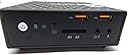
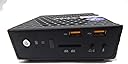
๐ฅ๏ธ Silent power, endless possibilities โ your deskโs new best friend!
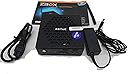
The ZOTAC ZBOX CI320 Nano is a compact, fanless mini PC featuring an Intel Celeron N2930 quad-core processor, passive cooling for silent operation, and versatile connectivity including 802.11ac Wi-Fi, Bluetooth 4.0, and Gigabit Ethernet. Designed as a barebones system, it supports up to 8GB DDR3L RAM and 2.5-inch SATA drives, with dual video outputs (HDMI and DisplayPort) for high-resolution displays. Ideal for professionals seeking a quiet, customizable, and space-saving desktop solution.
| ASIN | B00VFLSIHA |
| Additional Features | 2.5" SATA 3.0Gb/s (9.5mm Height), 3-in-1 Memory Card Reader, 802.11ac, Bluetooth 4.0, DisplayPort, HDCP, HDMI, Wifi, passive cooling |
| Aspect Ratio | 16:9 |
| Best Sellers Rank | #181,019 in Computers & Accessories ( See Top 100 in Computers & Accessories ) #5,845 in Mini Computers |
| Brand | ZOTAC |
| Built-In Media | Monitor |
| CPU Model | Celeron N2930 |
| CPU Model Number | N2930 |
| CPU Speed | 1.83 GHz |
| Color | Black |
| Connectivity Technology | Bluetooth, Ethernet, USB, Wi-Fi |
| Customer Reviews | 3.7 out of 5 stars 44 Reviews |
| Display Resolution Maximum | 3840x2160 |
| Display Type | External |
| Global Trade Identification Number | 04895173604164 |
| Graphics Card Description | Integrated |
| Graphics Card Interface | Integrated |
| Graphics Coprocessor | Intel HD Graphics |
| Graphics Description | Integrated |
| Graphics Ram Type | Shared |
| Hard Disk Description | SSD |
| Hard Disk Interface | Solid State |
| Hardware Interface | USB 2.0, USB 3.0 |
| Human-Interface Input | Buttons |
| Item Dimensions | 5 x 5 x 1.8 inches |
| Item Weight | 1.9 pounds |
| Keyboard Description | No keyboard included |
| Keyboard Layout | QWERTY |
| Manufacturer | Zotac |
| Memory Storage Capacity | 8 GB |
| Model Name | ZBOX |
| Model Number | ZBOX-CI320NANO-U |
| Model Year | 2014 |
| Native Resolution | 1920 x 1080 |
| Number of Component Outputs | 2 |
| Operating System | Windows 8, 7 |
| Personal Computer Design Type | Mini PC |
| Processor Brand | Intel |
| Processor Count | 4 |
| Processor Series | Celeron N2930 |
| Processor Speed | 1.83 GHz |
| RAM Memory Technology | DDR3L |
| RAM Type | DDR3 SDRAM |
| Ram Memory Maximum Size | 8 GB |
| Resolution | 1920 x 1080 |
| Screen Size | 2.5 inches |
| Specification Met | No, certified frustration-free |
| Style Name | No SSD, No RAM, No OS |
| Total Number of HDMI Ports | 1 |
| Total Usb Ports | 6 |
| Video Output | DisplayPort, HDMI |
| Video Output Interface | DisplayPort, HDMI |
| Video Processor | Intel |
| Warranty Description | 1 year parts & labor |
| Wireless Compability | 802.11ab |
| Wireless Network Technology | Wi-Fi |
| Wireless Technology | Bluetooth, Wi-Fi |
S**O
Perfect Home Theater PC
Perfect Home Theater PC!! This thing stays turned on 24 hours a day and 7 days a week without a single hiccup!! I installed a 120GB SSD Drive as well as 8Gb of memory. My OS is UbuntuGnome with KODI/XMBC installed. My family can use this setup with no issues, the kids can surf, do school work and write papers, watch movies, check email, AND SHOP... I have this box hooked up to a Vizio 50" at 1080p via HDMI and all is wonderful! This system runs a quad core Celeron N2930 at speeds more than acceptable for anything except very hard core gaming. Everyone that comes to my house can not believe that this little thing can do so much in such a small footprint. The whole family has now adopted this little PC as the main attraction. Well worth the $129 and the little bit extra for drive and memory...very very satisfied!! I also own a Gigabyte BRIX I7-4500 as my main office PC and although VERY fast, I am amazed at how his little Zotac can satisfy the needs of my entire family. A well done piece of technology!! Many of my friends have also purchased this same unit due to my experiences. Hope this brief review helps...
E**R
keep in mind the specs of this mini computer when deciding the use you will give it and just like me you will be very pleased wi
as many have said before, keep in mind the specs of this mini computer when deciding the use you will give it and just like me you will be very pleased with it, personally i have tested it as htpc with kodi and as home/home laboratory router with pfsense with excellent results. - the case is plastic but seems sturdy yet light enough - the multitude of ports is definitively a plus - the included wifi mini card is intel AC dual band, very good - easy to open for adding ram or hard disk mine is equiped with a 500 gb mechanical hd and the average ambient temperature of my city around 32ยฐ - 34ยฐ C i think are the reasons why pfsense reports cpu core temperatures of up to 65ยฐ C, wich are not bad for this particular conditions for a fanless mini pc but i'm buying an ssd for replacement, cooler is always better i will test it as home nas with freenas and maybe a couple of virtual machines with vmware esxi 6, if anyone is interested let me know and i can share the results
D**R
ABSOLUTE GARBAGE
I bought this on January 25, 2016 and ALREADY it has quit working. Was not tampered with up until this point. I called ZOTAC support and they were not only extremely rude but very dodgy when trying to figure out who to talk to about an exchange. They said it was out of warranty. I thought 90 days was fair and they state it is not. The power supply fried the CPU and bios. Since the CPU, Power Supply and Motherboard are all integrated, theres no way to field replace the units. It's not a very expensive piece of garbage. I am extremely unhappy and will NEVER buy a ZOTAC or associated product ever again. My company will look elsewhere. UPDATE 04/22/16: I FINALLY received a replacement on April 13, 2016 and installed Windows 10 Pro 64 bit, 4 GB DDR3 and a 250 GB SSD. Seems to be kind of okay. I am having an issue where my built-in clock quits working. It's not a problem with Windows AFAIK because Time service is running and have the same problem after shutdown or sleep. Also happens in my live version of UBUNTU (not installed but run from flash drive). ZOTAC support finally reached out (only via email because phones are way too advanced for these guys) and sent the following: Zotac Support <[email protected]> 2:54 AM (9 hours ago) to me Dear Sir, You may check the system clock without boot into Windows. Adjust to the correct time and date from BIOS menu. Wait over night. Check the clock from BIOS menu again. If the clock or date is incorrect, that may be a failed unit. You may contact the ZBOX seller for a replacement. B.rgds ZOTAC Support Session [email protected] ---------------------------------- Yeah, useless. So it looks like I'll be looking into yet ANOTHER replacement or a straight up refund because of this. I cannot believe how many issues I've had after this because I've heard such great things from the fake reviews on here, lol.
B**3
Boots up but won't recognize bootable windows install usb.
I WILL UPDATE THIS IF SUPPORT CAN ASSIST IN GETTING THIS WORKING UPDATE; their support had me use their provided iso to usb booting tool. Once I did this win10 was recognized (even though the tool says it's for win7). Very strange that I would need a custom zotac bootable iso app versus just using dd on mac terminal. My usb bootable thumb drives booted just fine on other computers. I'm removing 1 star because this should be provided and explained on their website without having to contact support. Other than this, it has been an awesome little machine for tanscoding 1080p plex streams to chromecast as well as handling torrent downloads. So far I can't get it to boot to an OS installation usb drive. I have updated the firmware to the latest available on zotac's website (a version dated march 2017) and still I am not able to boot to any of my tested Win10 bootable usb thumb drives that work on other computers. Like all the directions, I set UEFI to Legacy. (Some people mentioned an Operating System selection but my bios does not have this or I could not find it). I reboot and hit F8 to select my bootable usb drives and neither of them are recognizing. (Win10 and Wint7 iso written to usb using dd utility on osx) Doesn't work for me! I have reached out to support and I will update this based on their feedback. This is very unfortunate, I consider myself well versed in this stuff and I've wasted nearly an entire day trying to get this working. very frustrating.
J**E
Zotac C1320
This is for the n2930 So far so good this little box has handled everything i toss at it no problem i put 8 gb of ram and a 120 gb soild state hard drive in it it is running wimdows 7 ultimate 64 bit and boots verry fast it has had no trouble handling the data processing or file transfers i toss at it as well as playing hd video at the same time i might pick up a few more. Update. I have had this little box running 24/7 for over a year and it still shows no sings of slowing down. I have ordered a second one. On average i have 4 hd video streams running through this box and i haven't had any lag or more then 20% processor and 40% ram used. I have 4 external 3tb hard drives hooked up to the usb 3.0 amd store all my video on them. I also have it plugged into Ethernet and dont use the wifi
J**D
Sweet machine!!
While it took some time to figure out how to boot from my hard disk that had Linux already installed on it, but after I got it working the thing is awesome! It's a fairly powerful little machine for what it is! I would recommend it to anyone that would like a quiet machine for a media machine in their living room or bedroom!! UPDATE: Well I've have this computer for 4 months now and now the integrated video has went out. It was a good computer while it worked!! So i'm going to have to take 3 stars away for low quality parts.
J**N
Over heats under a load.
I really wanted to like this device and in many ways I do. I installed Linux Mint 17.3 on it intending to use it as a HTPC, it boots quickly and is pretty impressive considering what I paid for it. The issue I am having with this until is that it locks up under a load, my house is 76-77 degrees F and the unit is in a well ventilated area.I have trouble making it through an episode of a TV show without it freezing. I have a small house fan on it now and it works fine but that defeats the purpose of having a small fan less HTPC. I have a 64gb SSD drive with 8gb of RAM installed.
E**N
Digital audio output (Toslink) and Passive Cooling are the winning features of this model.
I have 2 other Zotac Nano PCs that have fans, one with Intel Celeron CPU and the other an AMD A4-5000. Unfortunately, I can hear the fan noise when using them as HTPCs. So the passive cooling feature of this Zotac makes it a clear winner for HTPC use. For audio, I use a Toslink cable (Toslink-3.5mm adaptor provided) and use the built in DAC in my Marantz Amp. The sound quality is so much better than regular audio out into the Marantz Amp. The N3150 costs $25 more than this N2930 for about the same performance but a little better power consumption. As I do not leave the PC on 24/7, the N2930 is good enough for me.
Trustpilot
2 weeks ago
2 days ago