We remain fully operational. Our teams are working around the clock to ensure your deliveries continue safely.

DOWNLOAD THE APP


Customer Services
Copyright © 2025 Desertcart Holdings Limited
DOWNLOAD THE APP
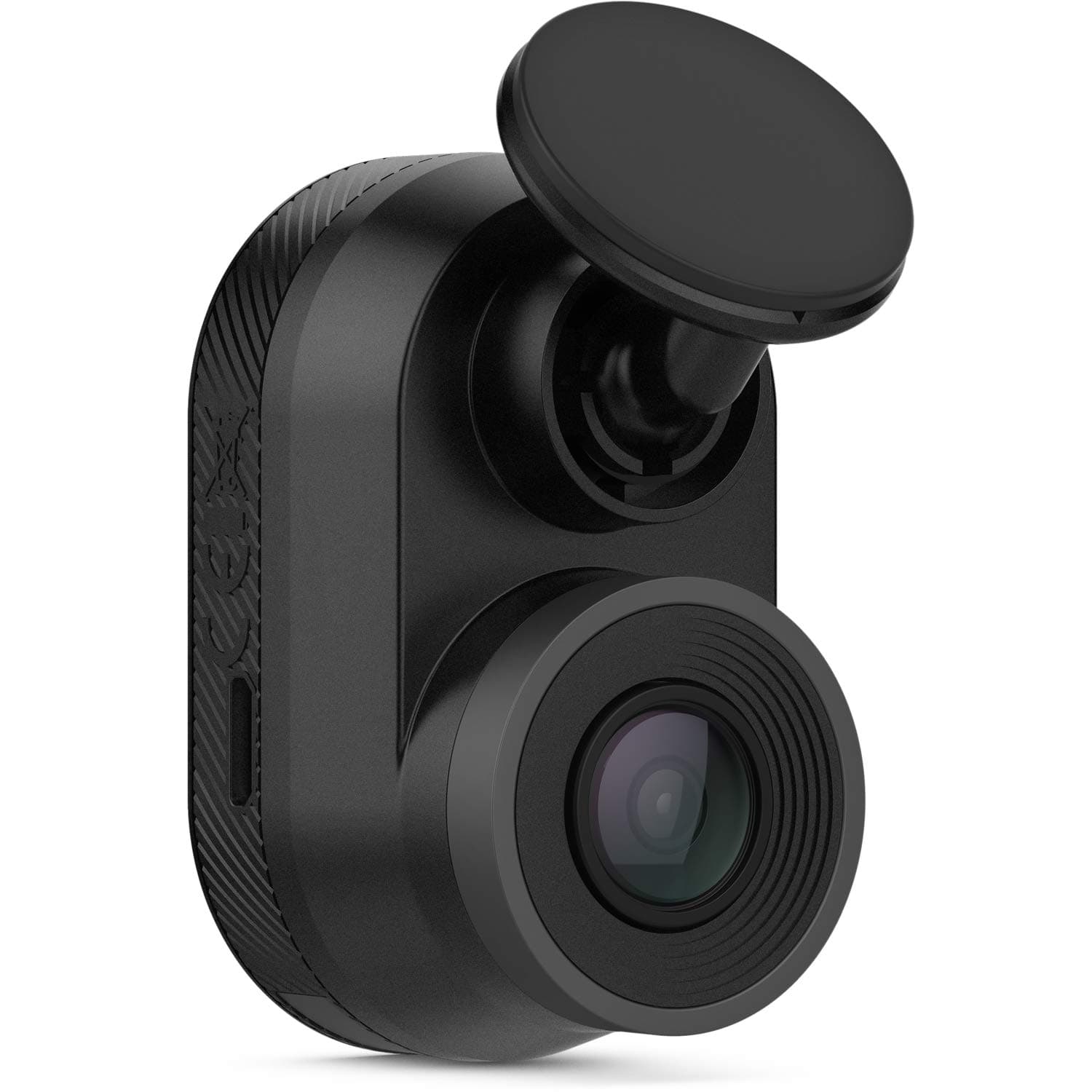
🔒 Capture every drive, stay one step ahead.
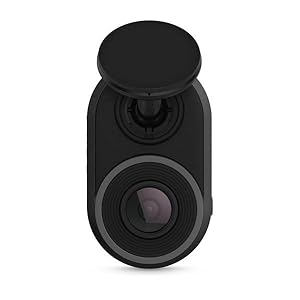
The Garmin Dash Cam Mini is a sleek, car key-sized dash camera that records sharp 1080P HD video with a 140-degree wide-angle lens. Designed for discreet installation, it automatically detects and saves incidents, powered by a durable super-capacitor for extreme weather resilience. With built-in Wi-Fi, it effortlessly syncs footage to your smartphone via the Garmin Drive app, making it the perfect compact companion for professional drivers who value reliability and subtlety.
| ASIN | B07R638L8N |
| Are Batteries Included | No |
| Auto Part Orientation | Front & Rear |
| Auto Part Position | Front |
| Battery Cell Type | Lithium Manganese Dioxide |
| Best Sellers Rank | #106,580 in Electronics ( See Top 100 in Electronics ) #1,467 in Car On-Dash Mounted Cameras |
| Brand | Garmin |
| Built-In Media | Garmin Dash Cam Mini; Low profile adhesive mount; Vehicle power cable; Long and short USB cables; Documentation |
| Color | Black |
| Compatible Devices | Cars, devices with Wi-Fi and USB connectivity, and the Garmin Drive app |
| Compatible with Vehicle Type | Car |
| Connectivity Technology | USB, Wi-Fi |
| Control Method | App |
| Customer Reviews | 4.1 out of 5 stars 2,114 Reviews |
| Display Type | LCD |
| Field Of View | 140 Degrees |
| Flash Memory Type | MicroSD |
| Frame Rate | up to 30 FPS |
| Global Trade Identification Number | 00753759220396 |
| Item Dimensions D x W x H | 1.23"D x 2.1"W x 1.15"H |
| Item Type Name | Dash Cam |
| Item Weight | 0.06 Pounds |
| Manufacturer | Garmin |
| Memory Slots Available | 1 |
| Mfr Part Number | 010-02062-00 |
| Model Name | 010-02062-00 |
| Model Number | 010-02062-00 |
| Mounting Type | Adhesive Mount |
| Other Special Features of the Product | Compact and Discreet; Crisp HD Video; Automatic Recording; Incident Detection |
| Real Angle of View | 90 Degrees |
| Screen Size | 2 Inches |
| Special Feature | Compact and Discreet; Crisp HD Video; Automatic Recording; Incident Detection |
| Supported Standards | Common video formats (e.g., MP4, MOV) |
| UPC | 753759220396 |
| Unit Count | 1.0 Count |
| Vehicle Service Type | Car |
| Video Capture Resolution | 1080p |
| Warranty Description | 1 year warranty |
D**E
Simple & small - but high quality!
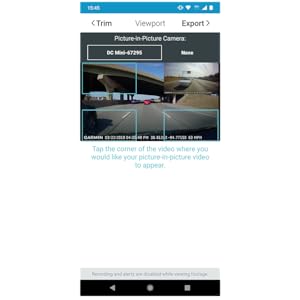
I chose this camera for a couple of reasons. I wanted something small (discreet), didn't need a ridiculous amount of features (GPS, lane departure warning, etc...), and I did NOT want one with a lithium-ion battery (those types of batteries don't really enjoy New York weather). This camera fit that criteria, and it uses a super-capacitor instead of a battery (so it stands up to cold and heat even better). This camera gets very warm to the touch during use, but that's considered normal by the manufacturer - so no big deal. When I first tried to connect it to the computer and update it via Garmin Express, the program couldn't detect the camera no matter what I did. I then decided to connect the camera to the phone app and update it that way. The firmware seemed to be very out of date. Once updated, my computer recognized it easily. Setup for the camera (via the app) is very easy. The "good" choices are already selected for you, and you can use the app to view and transfer videos as well as see what the camera "sees" (Live Preview) to make sure everything looks the way it should (since the camera doesn't come with a screen). You can also do things like enable/disable audio and format the SD care (purchased separately), but you can do that with the camera itself, too. I was very happy with the 1080p video quality of the camera. License plates look clear, and everything looks overall very good. I equipped my camera with the Garmin Mini Suction Cup Mount (Garmin's website and the Amazon listing don't show it as being compatible with this camera - but it is. I've posted a review and a photo of the two together on the page for the suction cup mount). I also equipped it with a Garmin Polarized Filter Lens to reduce windshield glare. The lens works perfectly in daylight and makes the night time videos just a little darker (and yet, you can see details better). So, I'll leave the lens on as default. I like that they included two different micro-USB cables in the box. One cable is positioned to point upward when plugged into the camera (for those who want to hide the wire in the trim of their vehicle) and the other is positioned downward (for those who just want it pointed straight down to where the vehicle's outlet is). Since I use the easily removable suction cup mount, I also use the cable that points downward. Everything can be installed/uninstalled in just a few seconds. Again, this camera is for people who just want a dash cam (to basically prove that you did nothing wrong in the event of an accident) and aren't looking for all of the bells and whistles as the more expensive models. This is also the only "new" Garmin dash cam that uses a super-capacitor instead of a battery, so that was worth it. I consider super-capacitors a premium feature. Yes, batteries "last longer" when the camera is not plugged in, but if my camera is ever not plugged in, then I'm not planning to use it. The super-capacitor lasts long enough to save the video it's shooting once the camera loses power - and that's all that really matters. Everything is working perfectly, so I'm extremely satisfied. If anything changes, I'll update the review!
A**R
Good small dash cam
I used this camera for the rear window in my wagon and it’s perfect as it’s very small and doesn’t block the view at all. I bought the Garmin magnetic mount and used that instead of the mount this came with as I wanted to be able to remove the camera much easier if needed. Picture quality is as good as is needed for a dash cam. Not good enough to read license plates unless the cars are very close but that’s not really needed. The Garmin app is also well set up and easy to use and find/download videos. Would recommend this camera to anyone looking for a reliable and compact dash cam.
A**7
Great Small Camera on Day One, but Has its Flaws
After doing a lot of research, I decided to purchase the Garmin Dash Cam Mini for a few reasons: (1) It's small size factor makes it less obvious there's a dash camera, therefore I can place my camera in an inconspicuous location. (2) It uses an adhesive to attach it to my windshield versus other products that only includes a suction cup. (3) It uses the Garmin smartphone app, but unlike some apps that runs all the time while you drive, this one you can access the video files only when you ask the app, meaning saving battery life. Inside the box contains: Camera 13 foot USB cable (for car) 4 foot USB cable (for your computer) Two adhesive window attachments for the camera Twin USB cigarette lighter adapter Quick start instructions Installation: It took longer than I thought. It took me about a good 15 minutes to look for a proper placement, which in the photo is right in front of my rearview mirror so it doesn't block my vision; also required by state law not to place camera in a way to obstruct my vision of the road. But I can still move my head to see if the device is on and easily reach the save button if I witness an incident. The window adhesive is strong enough if you need to attach it to the black dot area surrounding your mirror. Since I live in a major city, hiding the 13 feet of USB cabling is a must, and that took me at least an hour to work it out. I tucked the wires through the crevices to make it not easy to see the wire; only exposing it for a few inches leading up to the USB lighter port. I have to say, my wiring job was pretty impressive, just hoping if I ever buy a new camera, I can use the same USB cable so I don't have to rewire it again. Once set up, I turned on my car to accessories mode to get the lighter port to power up and check if the camera is working. Once done, I used the Garmin app to access live view to make adjustments to the camera to get the best view. Usage: Since I had to take care of some business on the first day of the camera, I did my normal driving, but since living in an urban area means that you have to drive extra defensive, I was able to press the save button on the camera to capture incidents of drivers swerving in my lane, and one nearly t-boning me. Since I pressed the save button, it was easy to use the app later and extract the videos to my phone's memory. Pros: It's small size makes it easy to hide, long enough cabling to hide the wires, 1080p 30fps camera with audio recording is decent, ability to press button on camera to mute the microphone, and save button will save a photograph and video for about 30-45 seconds before button press and after. Garmin app is good to use, and takes a little practice to use it the right way. Cons: The box did not include a crowbar to help you open the crevices of your vehicle to hide the cable, no Micro SD card is included with the camera (it's mandatory to have one to operate it), and no adhesive cable clips. Video footage is decent, but this is not 4K quality, you can mostly read license plates if you zoom in on the video, but it's what you pay for for a lower resolution recording. When downloading the video from camera to your phone's memory, it will do it in 1080p HD quality, but the download rate is roughly one second of video takes one second to download; so if you have five minutes of footage you need to download, you'll be waiting five minutes to get the complete file. The camera lens range is 140 degrees, which is good, but could be more to help cover more of the vehicle. There is no GPS on this, so you won't see the speed, nor location of where you are; the video will show on the lower left the time and date. If you use live camera view, there is about a two second lag if you move the camera or something passes by the view of the camera; it's annoying when you're trying to adjust the camera. Lastly, while this camera includes "parking mode," you need to purchase the cables to hardwire this to your vehicle; I don't have the skills to do install this without professional help. Recommended items you need with the camera: (1) Flat head screwdriver or something similar; this can act as your crowbar to help you access tight crevices in your vehicle to hide the cable. (2) Rubbing alcohol. For the best adhesion to your windshield, use rubbing alcohol to clean the spot, let it dry, then attach. (3) Adhesive cable clips. Use these in cases where you can't tuck the cable in somewhere, it will help keep it organized and tidy. Also use the rubbing alcohol to clean where you want to stick those clips. (4) Zip ties or twine. If you have excess cable, use something to bundle it up. (5) A high endurance Micro SD card (a must). I strongly recommend a higher capacity like 128GB so that you can dig back in your recording footage if you need to. As the card gets written over when full, if the card gets written over too many times, your card may get worn out and you could lose the data; this is why a bigger capacity card means less writing over. (6) Garmin's Polarized Lens. This is a must if you experience glare showing your dashboard; the filter will reduce that glare for a better view in daylight conditions. (7) A video/movie editor app. Once you download your videos to your personal device, you may want to do a compilation or share it with your friends, so get familiar with your editor app to trim, and cut audio (especially copyrighted stuff or private conversations). (8) A cloud storage service for your videos you want to keep. Those videos takes up a lot of space, so instead of eating up precious space on your smartphone, upload it to a cloud storage website to preserve them, and delete the files from your phone. (9) If you want to hardwire the camera to your car to record on "parking mode," you need to purchase the proper wiring from Garmin. The box does not include this, nor does the camera have an internal battery to recharge and record when engine is off.
S**Z
revised review - customer service was top notch.
I bought this as it is small and has good reviews. The product did work good for a few months, then never did again after trying a Firmware update. All I get now is flashing yellow lights indicating a sim card reading error. After re-booting and changing to a new card, same issue. I contacted Garmin, whose customer service was very good (minus the long wait times) and they sent me a replacement. I was very happy with their responsiveness and how quick they sent me a replacement. Unfortunately, the refurbished unit i received has the same exact issue right out of the box - new sim card used. Maybe they just sent my original unit back to me by mistake, or this is a fairly common issue. I wished it continued to work, as I like the size/functionality. Unfortunately, it is not reliable, and I spent way too much time trying to resolve the issue. I would highly recommend buying another dashcam unless Garmin addresses the error issue that seems to be extremely common. Good luck UPDATE - Customer service fixed my issue - basically you need to use a new unformatted memory card. One previously formatted on Windows will not work. Camera works flawlessly and kudos to the customer service in helping get this resolved. I would highly recommend this product because the company stands by its product. Great job Garmin
D**Z
BAD product do not purchase this thing.
WORST PRODUCT EVER. The dash cam has a nice attractive size but it gets hyper hot to the touch and stops working after 10 or so minutes of usage. Also the car adapter supplied with the camera just burned after the first day of usage. The app android app does not work properly on a Sony XA2 with Android 9. Beware and read more reviews before purchasing this product. UPDATING REVIEW AS OF APRIL 27th 2021 Once again folks, I have been giving this product constant reviews, and I believe it's helpful to have a review over a period of time. A summary: the product STILL GETS HOT, no matter what configuration you put in. The camera get so freaking hot it will shut down eventually. Unfortunately enough, I had to disassembly the camera *its out of warranty anyways* , and I was able to find that the MAIN CPU CHIP has a very Tinny heat sink that its attach to the casing of the camera. I had to purchase a separate heat conducting paste and apply it, also, I create something like a Frankenstein attachment that goes outside of the camera, that will allow the system to dissipate more heat. Juts to let you know, as the camera gets hotter, you will get blurry images... so, the resolution for getting licenses plate its gone. If you ask me better go for a very cheap camera, one that its worth 60 USD MAX, used it for a year and then replace it for a new one. Updating the product review 22-Oct-19 1. After using the product for several months now, I have come to several conclusion, the car adapter was not damaged as original stated, it was getting stuck, thus creating a bad mechanical and electrical connection with the car outlet, I had to give a big push and make a good solid connection, now is working perfectly fine. 2. The App was causing problems with the release of the Sony Xperia XA2 Android Version 9, fortunately enough, Sony launch a new software upgrade to correct minor defects on the OS, now the Garmin application run perfectly fine on the cellphone. 3. Camera getting hot: This problem is still an issue, the camera is still getting hot, when I got the camera and installed the application software for the PC, I was able to connect the camera and make a FIRMWARE upgrade on the camera itself, this upgrade, does NOT eliminate the over heat issue, however, looks like the camera runs more efficiently and does not shut down during a long trip, however, the camera does shut down after 1 hour and 45 minutes, seems to be that putting the air conditioning helps in getting the camera to run a little bit hotter. Don't get me wrong... the camera size and the picture quality are great, however, running the camera at such high temperatures (even if is within spec and according to automotive standards) could be risky. Cheers
N**H
Best dash cam on market for the money
Camera is small and discreet. Installation was a breeze with long micro USB cord and was hidden behind trim. Dash cam is simple to utilize and connects flawlessly to app every time you need to check camera placement. Do not utilize the app to download video as it will take forever through Bluetooth connection however if you utilize dash cam for purposes intended you should only have to remove SD card in the event of an incident and save video to your computer. As other reviews state the camera does get hot however not excessively hot. This is to be expected with the fast write rate onto the SD card. I have taken the camera on several long road trips and has recorded without shutting down due to overheating. and camera has been on constantly for over eight hours during these trips. I would not hesitate to recommend this camera.
A**.
Garmin delivers a great camera
I love that this camera is practically invisible you can’t even tell it’s on the windshield. The installation was super easy I mounted the mount I ran the cable underneath the headliner down the A- pillar and underneath the glove box to the cigarette lighter. The video quality on the app is grainy but when you use the memory card on the computer the image is much better. I ended up buying the polarized lens to help out with any glare. You have to download the Garmin Drive app to set up the camera which is super easy. I have had it for about a month and I haven’t had any issues. The camera is not to pricey so for me the price was right. It has all the features that I need. It’s simple just plug n play. I highly recommend it if you want a camera in your vehicle incase of an accident which hopefully never happens.
K**R
Horrible Software From Garmin
I bought the dash cam mini, and the parking mode cable which was all installed and worked correctly. It worked as expected but as a couple days went by I noticed it would over heat and stop recording on a regular basis, and I live in California where the temp didn't get above 100 degrees in the summer time. My car has all tinted windows too, just to show you how much heat reduction my vehicle has. Another complaint is that the paring with Bluetooth is extremely finicky and only works sometimes. Also, the park mode cable setting places the videos in the saves footage catalog which does not delete itself when it is full so it will stop recording when it is out of room and I will have to manually do it. I do love the size of the camera, hide it behind my mirror and neither the passenger or I can see the camera at all, even from the outside of the vehicle it is hard to see unless you are looking for it. Overall this product can be good, although the average Garmin Software is holding it behind, I would not buy this product again looking back on it.
Trustpilot
3 days ago
2 weeks ago