🔍 Secure Your Space, Anytime, Anywhere!
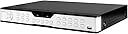
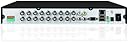
The Zmodo ZMD-DC-SBN6 is a 16-channel H.264 real-time security surveillance DVR that offers versatile recording modes, including manual, scheduled, and motion detection. With the ability to display and record at 480 fps, it ensures high-quality video capture. The system supports remote access via smartphone and features easy USB thumb drive backup for your convenience.
M**E
Must Buy!!! Great DVR! Easy to use! Super Clear Images and quiet!
Wow! What a great product! I installed a 1TB SATA HD into the DVR very easily. I turned on the DVR and it was surprisingly quiet. All video images came up very quickly. The controls and remote are all very easy to use. The Zmodo tech support staff were very friendly. If you want your surveillance system set up quickly and at a good cost, this is a must buy!
D**.
Works, but isn't quite plug and play.
It is operating as described, no complaints.The manual was just as hard to follow as other reviews suggested, but with the reviews here, and a little googling it can be set up quickly. I was able to recycle two old hard drives out of out-dated computers into this thing, and it is doing fine.Helpful thoughts and notes:1. When reviewing footage I would navigate to a day that should have been within the saved timeframe, and it would show no available recording. What you have to do is navigate to the day, then hit the search button at the bottom of the screen. Then it will show all the recordings.2. As far as I can tell there is no way to review archived footage from a web browser. You have to be using the actual machine. In my application that can be annoying because I have the monitor and the DVR in separate rooms. I finally ran the mouse cable through the wall with the monitor cord.
G**Y
Easy and inexpensive
Arrived quickly with my Prime membership. Wow, never dreamed this 16-ch Zmodo DVR would be so easy to install. It came with case top unattached along with the separate hard drive I had ordered so I did not have to remove the case. I installed the hard drive by hooking up two cables and inserting four small provided screws (60 seconds). I attached the case with the screws provided. I had been running a different brand of DVR and the Zmodo interfaced easily, old one out, new one in (five minutes). Turned the power on (don't forget the in/out switch on the back) and the unit powered up and instructed me to format the hard drive. You do that from the settings mode on screen with a few simple clicks. At the end of this process (5 min), everything froze and I had to restart the DVR (probably normal). I then inputted the settings, including those for each camera and everything just started working. (I inputted each camera setting, then found there is an ALL cameras setting.) Conveniently, a staff member had just entered the building so I searched for their entry video on camera 15 and guess what, there it was! Very easy to install, very inexpensive, and seems to actually provide a better quality picture than our old, more expensive, much heavier DVR. I strongly recommend the Zmodo DVRs.
D**R
Its like turning on a box with a pretty green light ...
The thing suddenly stopped working after about three weeks. It suffered a power outage but since it is on a battery back-up with over load protection I didn't worry. When it powered up, however, the memory was gone. Nada, the lights come on but there's nobody home. Its like turning on a box with a pretty green light inside 'cuz that's all it does. The software for the thing is wiped out is what I am guessing.Additionally the thing has two fans installed that are very noisy for as inefficient as they are and good luck figuring out how to get online to view your display. It requires the use of Windows Internet Explorer, the buggiest and most hacked browser on the planet...what the eff? Is Zmodo a branch of the NSA?
D**N
Zmodo SBN6 16 channel
The hardest system to set up. Hands down.
F**R
Great product but slightly misleading
Let me start by saying my intial experience was not so good. I ordered this item to monitor my business and upon arrival was quite shocked that the unit I received was not intact. The cover was loose and in fact was not even attached, nor were the screws even in the box. Despite this defect, I fixed it and proceeded to connect it because my other unit was old and had crashed. Despite the units battered arrival, installation was super easy and I had it online and running in no time. It was at that moment that I realized the unit was a stand alone unit, which means it does not include the hard drive. The description was a bit misleading in the details because it mentions all its wonderful ability to record videos etc. While this is true, it can only do this with the addition of a hard drive, which must be purchased seperately. I ended up buying one and installing it and the DVR malfunctioned and failed to record. I contacted the company and they agreed to replace the DVR after I shipped the defective one back. I requested through Amazon a return and the company keeps sending me emails with their return address. I explained it has to be initiated through Amazon but they keep sending me direct emails with their address and not a return through Amazon. Because I cannot have a lapse in monitoring at my business, I bought another unit from them until the defective return could be resolved however to date nothing has been handled through Amazon. Given my experience and the fact that I am a technical gal, I have decided to just keep the defective unit and repair it myself (although it looks refurbished already) and cut my losses. I am giving the item 3 stars because I do believe the product itself is a good one, but is more of a seller issue. They were very nice but the issue was never resolved. On a better note, they do ship quick and with the second shipment, the packaging was much better and that unti worked just fine after I installed the hard drive.
V**.
Low cost, reliable and easy to use!
I love being able to access my cameras remotely! This DVR has been very reliable and not to mention very easy to set up. I get a great picture when viewing my cameras locally, or via web browser, or through the app. Use the KMeye app for iPhone! Make sure you have either a static IP or a DYNDNS account in order to have access from anywhere. The only challenge can be getting the initial plugin for IE to work. I had to disable most security on the browser to do the initial download due to unsigned active x control. But after running the plugin and restoring security settings, access from my browser is great!
Trustpilot
3 weeks ago
2 weeks ago