


Desertcart purchases this item on your behalf and handles shipping, customs, and support to France.
๐ Unlock your vintage drives with modern ease โ donโt let your data fade away!
The Vital All-Terrain Converter Board Cable Adapter is a compact, USB-based solution designed to connect 1.8" micro-IDE hard drives (up to 250GB) to modern computers. Compatible with a wide range of Windows and Mac operating systems, it offers plug-and-play functionality without the need for additional drivers. Ideal for professionals needing quick access to legacy storage devices, this adapter ensures your old data remains accessible and relevant.
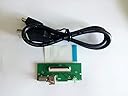
| ASIN | B07FW9WC1F |
| Best Sellers Rank | #259 in Laptop Computer Replacement Parts |
| Brand | Vital All-Terrain |
| Brand Name | Vital All-Terrain |
| Cable Type | USB |
| Color | Black |
| Compatible Devices | Music Player |
| Compatible Phone Models | Potentially compatible with smartphones, specific models unknown |
| Connectivity Technology | USB |
| Connector Gender | Male-to-Female |
| Connector Type | Usb |
| Customer Reviews | 3.7 out of 5 stars 77 Reviews |
| Indoor Outdoor Usage | Indoor, Outdoor |
| Item Shape | Round |
| Item Weight | 0.02 kg |
| Manufacturer | Vital All-Terrain |
| Model | 8541678459 |
| Number of Pins | 4 |
| Other Special Features of the Product | Data Transfer |
| Part Number | FGT-006_Z1 |
| Recommended Uses For Product | connecting and transferring data between 1. |
| Special Feature | Data Transfer |
| Specification Met | CE |
| UPC | 729787460455 |
| Unit Count | 1 Count |
G**R
Just what I needed
I'll be honest I wasn't sure if this was the device I needed to read and wipe several old "mini" hard drives I found laying around and I'm still unsure of the proper name for all the different connectors these small drives come with, but the ribbon cable in the picture looked like what I needed and it was. I have attached a picture that may help others determine if this is the device they need. I believe this is called a ZIF connection but don't hold me to that. In any case ... I pressed the cable into the drives connector, plugged the USB Type A into the computer, and Windows 10 recognized the drive immediately. There was no need to install any drivers. I have no reason to think this wouldn't be the case with OSX or Linux, but your mileage may vary. I'm very happy with this device and will certainly keep it around in case I need to access anymore of these small drives in the future.
W**Y
Poor quality
It ruined what I was looking to connect to it. Not good. Pin connector didnโt match. Damage was done at that point.
B**.
Does the Job
Working fine to read data from my Ipod HDD drive on my computer.
C**N
Handy to use if you don't have an enclosure.
I actually used this as a quick way to connect it to an iFlash quad to format the micro sd cards to use inside an iPod instead of a hard drive. Incredibly handy.
M**K
Glad I bought two!
Alright so these kids heat up. Its a board only, and connecting it is something to take great care in. Connect the harddrive to the board first. Then the computer. One of them did over heat somehow.
J**E
YOU DO NOT NEED TO DOWNLOAD DRIVERS
All right, so I bought this to use for an MK3008GAL Hard Drive I ripped out of an old camera my sister had as a Kid. I thought it was a bad purchase and that you needed drivers to get it to work but I was dead wrong. Use the ribbon that comes with the Kit, there's a blue end and a white end. Go watch YouTube for how to connect it properly. It worked like a charm, pretty much immediately. No drivers needed. The bad reviews probably didn't know what they were doing. Admittedly I didn't either at first.
R**3
The board didn't work for me
Ok, 1st of all, both my MacBook Pro 2012 and my Windows 11 computer recognized the board and the hard drives. It knew it was 80 gb drive but could not format it or read it. The drives came out of iPod. I found a website that had work around. They did not work.
D**W
Used for old Sony Handycam
It worked great for my intended purpose. I was repairing two old 2008 Sony Handycams. Put an ssd in one and replace the HDD in the other. Probably never have to use it again, but it served it's purpose.
E**A
FUnciona muy bien
BUena opcion para recuperar archivos del ipod
Trustpilot
3 weeks ago
1 month ago